

In this series of articles, we'll focus on a hands-on, practical implementation of JWT authentication with refresh tokens in .NET Core 6.0 using ADO.NET and SQL, emphasizing real-world scenarios and code examples. For a deeper understanding of the underlying concepts, feel free to explore the referenced documentation and resources provided in the conclusion section of the articles.
Introduction
Authentication is implemented with JWT tokens and refresh tokens. In this article, we will implement a login feature for a demo API in .NET core 6.0. On successful authentication, the API will return a JWT token with an expiry time set to 15 mins, along with a refresh token with an expiry time set to 15 days in the HTTP cookie. The JWT token is used to access secure endpoints of the API, and the refresh token is used for generating new JWT tokens upon or just before the JWT token expires.
Process Explanation
When users log in, they share their UserId and password. The API checks this info using ADO.NET against database records, ensuring the user is active and valid. If everything checks out, a refresh token is created and securely stored, and a JWT token is generated. Both tokens, user ID and appropriate authentication message, are sent back with a refresh token in a cookie as part of the API's response.
For inactive users or those with incorrect credentials and inactive user accounts, the API provides a clear Authentication Failure response, specifying either an Invalid User or Invalid Password or Account Expiry as the reason.
Note on cookie
- An HTTP-only cookie is used as we need to protect it from being read or modified by any JavaScript code that runs on the web page. This is a security feature that helps prevent cross-site scripting (XSS) attacks.
API End Points
- Login End Point (Accepts POST): https://localhost:7147/api/Auth/user-login
- Accepts user credentials via POST request, validates them, and returns JWT, RefreshToken, and UserId if valid
- Secure End Point (Weather forecast) (Accepts GET): https://localhost:7147/WeatherForecast
- Secured endpoint accessible only with a valid JWT token. Provides weather forecast data via a GET request.
Flow Chart

Prerequisites
-
Tools and Technologies Required: C#, .NET Core 6.0 REST Api, ADO.NET, T-SQL, Visual Studio, Postman, SSMS
Implementation Steps
Note. Complete Project Reference on GitHub
For a comprehensive reference, including the complete project with all implementation and configurations, you can access the project repository on GitHub.
-
Setting up the project
-
Backend setup
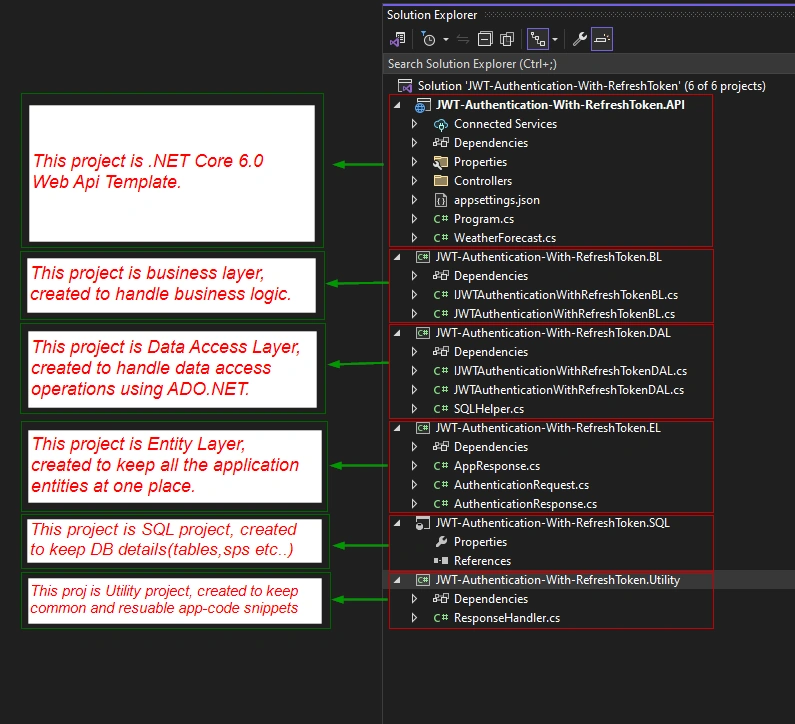
- We will need the following projects for implementing JWT Authentication with the refresh token.
- ASP.NET Core (6.0) Web API.
- SQL Server Database Project.
- Four projects of type Class Library (for BL, DAL, EL (entity), and Utility Layers).
- Here is the screenshot of the solution for reference.
- We will need the following projects for implementing JWT Authentication with the refresh token.
-
SQL Database Setup
- In SSMS, create a new database named JWT-Authentication-With-RefreshToken.
- In SSMS, navigate to the newly created database. Open the SQL script files (RefreshTokens.sql and UserDetails.sql) in the JWT-Authentication-With-RefreshToken.SQL project. Execute the scripts to create the necessary tables (UserDetails and RefreshTokens).
- Open the SQL script file UserDetailInsert.sql in the JWT-Authentication-With-RefreshToken.SQL project and execute the script to insert sample user data.
- UserDetails.sql
CREATE TABLE [dbo].[UserDetails] ( [UserId] INT IDENTITY (1, 1) NOT NULL, [FullName] VARCHAR (20) NOT NULL, [LoginId] VARCHAR (50) NOT NULL, [Address] VARCHAR (200) NOT NULL, [EmailAddress] VARCHAR (50) NULL, [IsActive] BIT NOT NULL, [PasswordChangeDate] DATETIME NULL, [CreatedUserId] INT NOT NULL, [CreatedDateTime] DATETIME NOT NULL, [ModifiedUserId] INT NULL, [ModifiedDate] DATETIME NULL, [Password] VARCHAR (20) MASKED WITH (FUNCTION = 'default()') NULL, [PhoneNumber] VARCHAR (10) NULL, CONSTRAINT [PK_UserDetails_UserId] PRIMARY KEY CLUSTERED ([UserId] ASC), UNIQUE NONCLUSTERED ([LoginId] ASC) ); - RefreshTokens.sql
CREATE TABLE [dbo].[RefreshTokens] ( [RefreshTokenId] INT IDENTITY (1, 1) NOT NULL, [UserId] INT CONSTRAINT [DF_RefreshTokens_RefreshTokenId] DEFAULT ((-1)) NOT NULL, [RefreshToken] VARCHAR (200) NOT NULL, [ExpireDateTime] DATETIME NOT NULL, [CreatedByIp] VARCHAR (50) NOT NULL, [RevokedDateTime] DATETIME NULL, [RevokedByIp] VARCHAR (50) NULL, [RevokedUserId] INT NULL, [ReplacedByToken] VARCHAR (200) NULL, [RevokeReason] VARCHAR (300) NULL, [IsExpired] CHAR (1) NULL, [IsActive] CHAR (1) CONSTRAINT [DF_RefreshTokens_IsActive] DEFAULT ('Y') NOT NULL, [IsRevoked] CHAR (1) NULL, [CreatedDateTime] DATETIME CONSTRAINT [DF_RefreshTokens_CreatedDateTime] DEFAULT (getdate()) NOT NULL, [CreatedUserId] INT NOT NULL, [ModifiedUserId] INT NULL, [Modifiedtime] DATETIME NULL, CONSTRAINT [Pk_RefreshTokens_RefreshTokenId] PRIMARY KEY CLUSTERED ([RefreshTokenId] ASC), CONSTRAINT [FK_RefreshTokens_UserId] FOREIGN KEY ([UserId]) REFERENCES [dbo].[UserDetails] ([UserId]) ON DELETE CASCADE, CONSTRAINT [UNQ_RefreshTokens_RefreshToken] UNIQUE NONCLUSTERED ([RefreshToken] ASC) ); - UserDetailsInsert.SQL
INSERT INTO UserDetails (FullName, LoginId, Address, EmailAddress, IsActive, PasswordChangeDate, CreatedUserId, CreatedDateTime, ModifiedUserId, ModifiedDate, Password, PhoneNumber)
	VALUES
('SysAdmin', 'SysAdmin', '123 Main St, Cityville', '[email protected]', 1, NULL, 1, GETDATE(), NULL, NULL,'SysAdmin', '555-1234'),
('John Doe', 'john_doe', '123 Main St, Cityville', '[email protected]', 1, NULL, 1, GETDATE(), NULL, NULL,'securepwd1', '555-1234')
- UserDetails.sql
-
-
Setting up Authentication Middleware and Dependency Injection Services in the Application
-
Registering Services in a Service Container for Dependency Injection
- Open the Program.cs file in the JWT-Authentication-With-RefreshToken.API project.
- Here, we register essential services for dependency injection.
- The code snippet below illustrates the registration of services for Business Logic (JWTAuthenticationWithRefreshTokenBL) and Data Access Layer (JWTAuthenticationWithRefreshTokenDAL).
builder.Services.AddSingleton<IJWTAuthenticationWithRefreshTokenBL,JWTAuthenticationWithRefreshTokenBL>(); builder.Services.AddSingleton<IJWTAuthenticationWithRefreshTokenDAL,JWTAuthenticationWithRefreshTokenDAL>(); - This step enhances the application's scalability and maintainability by facilitating a loosely coupled architecture.
-
Setup App Configuration For Authentication
- In the appsettings.json configuration file.
- JWT Configuration: SecretKey, Issuer, Audience, and JwtTokenExpiry settings for configuring JWT authentication
- Database Connection String: DBConnectionString specifies the connection details for the database.
- Stored Procedure Configuration: SP_AuthenticateUser and SP_SaveRefreshToken define the names of stored procedures used in the application for user authentication and refresh token management.
{
  "Logging": {
    "LogLevel": {
      "Default": "Information",
      "Microsoft.AspNetCore": "Warning"
    }
  },
  "AllowedHosts": "*",
  "JWT": {
    "SecretKey": "3ds87fjv$#dsf0p92h&0a1sjmvn3ak49d$SAdsf2cqw7kli5as9jfa6asd1^%r",
    "Issuer": "JWT-Authentication-With-RefreshToken.API",
    "Audience": "JWT-Authentication-With-RefreshToken.API",
    "JwtTokenExpiry": 15

  },
  "ConnectionStrings": {
    "DBConnectionString": "data source = .; database =  JWT-Authentication-With-RefreshToken; integrated security = SSPI"
  },
  "SPconfig": {
    "SP_AuthenticateUser": "Proc_AuthenticateUser_r",
    "SP_SaveRefreshToken": "Proc_SaveRefreshToken_iu"
  }
}
- In the appsettings.json configuration file.
-
Registering Authentication service in the Service container
- Ensure JwtBearer authentication is enabled in your API by adding Microsoft.AspNetCore.Authentication.JwtBearer NuGet package to the JWT-Authentication-With-RefreshToken.API project.
- Configure the authentication service in the Program.cs file. Add the following code snippet to the builder.
- Note: Self-Explanatory Comments for Clarity
In the provided code snippet, self-explanatory comments have been meticulously added to enhance readability and understanding. These comments serve as valuable explanations for each configuration parameter, making it easier for readers to comprehend the purpose and significance of each setting. Pay close attention to these comments to gain deeper insights into the JwtBearer authentication configuration.builder.Services.AddAuthentication(JwtBearerDefaults.AuthenticationScheme).AddJwtBearer((options) => { options.TokenValidationParameters = new TokenValidationParameters() { ValidateIssuer = true, //You can set this to true for production. //This setting determines whether to validate the "issuer" (iss) claim of the JWT. The "issuer" is the entity that issued the JWT. In this code, it's set to true, which means the issuer will be validated. In a production environment, you should typically set this to true to ensure that the token is issued by a trusted authority. ValidateAudience = true, //The "audience" (aud) claim in a JWT (JSON Web Token) represents the intended recipient of the token. //this setting determines whether to validate the "audience" (aud) claim of the JWT. The "audience" represents the intended recipient of the JWT. Again, it's set to true, but it's advisable to set it to true in production to verify that the token is meant for your application. ValidateLifetime = true, // This setting ensures that the token has not expired. It's set to true so that the token's expiration time is checked during validation. ValidateIssuerSigningKey = true, //This setting determines whether to validate the signing key used to sign the JWT. Setting it to true ensures that the token's signature is verified with the specified key. IssuerSigningKey = new SymmetricSecurityKey(Encoding.UTF8.GetBytes(builder.Configuration.GetSection("JWT")["SecretKey"])) //This line specifies the key used to verify the token's signature. It's set to a SymmetricSecurityKey created from a secret key. In a real application, you should replace "YourSecretKey" with a strong and secret key. The same key should be used for signing tokens in your authentication process. }; //As we specified to validate Issuer and Audience, we must also specify the details of Audience and Issuer to validate the incoming token's issuer and audience against these details. options.TokenValidationParameters.ValidAudience = builder.Configuration.GetSection("JWT")["Audience"]; options.TokenValidationParameters.ValidIssuer = builder.Configuration.GetSection("JWT")["Issuer"]; }); builder.Services.AddAuthorization();
- Note: Self-Explanatory Comments for Clarity
-
Integrating JwtBearer Authentication Middleware
- Integrate the JwtBearer Authentication Middleware into the HTTP pipeline by adding the following line in the Program.cs file.
app.UseAuthentication(); - This line ensures that the JwtBearer Authentication Middleware is included in the HTTP processing pipeline, enabling the API to authenticate and validate JWT tokens.
- Integrate the JwtBearer Authentication Middleware into the HTTP pipeline by adding the following line in the Program.cs file.
-
-
Implementing Controller, BusinessLayer, DataAccessLayer and StoredProc
- In the JWT-Authentication-With-RefreshToken.API project, create a new controller class named AuthController.cs.
- Inside the AuthController class, define an action method named UserAuthentication. This method is decorated with the [HttpPost] attribute and mapped to the route "user-login".
- The UserAuthentication method accepts user credentials in the form of an object as an HTTP POST request.
- Within the method, initiate a call to the BusinessLayer, which, in turn, communicates with the DataAccessLayer and invokes the stored procedure Proc_AuthenticateUser_r using ADO.NET.
- Proc_AuthenticateUser_r validates user credentials against the UserDetail table in the database and returns a response indicating whether the user is valid or not.
- If the user is valid, proceed to generate a JWT token using the appropriate logic. Additionally, create a new refresh token for the user and store it in the database using the stored procedure Proc_SaveRefreshToken_iu.
- Post the successful save of the refresh token in the database and copy the refresh token into the response cookie for the user.
- Return a successful response from the UserAuthentication method, including the user's ID, JWT token, and an authentication message.
- Account for various scenarios such as invalid user credentials, inactive users, and other potential authentication failure situations. Each scenario should be handled appropriately, providing the user with clear authentication messages and corresponding HTTP status codes.
- Now that we have outlined the high-level steps and considerations for the implementation. let's delve into the code snippets for each layer — Controller, BusinessLayer, DataAccessLayer, and Stored Procedures — to witness the practical implementation of JWT authentication with refresh tokens in action.
- Note: To enhance your understanding of the code, I've added detailed comments throughout the implementation, providing insights into the logic, decision-making processes, and key functionalities.
- JWT-Authentication-With-RefreshToken.EL
- AppResponse.cs
using System; using System.Collections.Generic; using System.Linq; using System.Text; using System.Threading.Tasks; namespace JWT_Authentication_With_RefreshToken.EL { public class AppResponse { public ResponseHeader Header { get; set; } public ResponseBody Body { get; set; } public Error Error { get; set; } } public class ResponseHeader { public string Status { get; set; } } public class ResponseBody { public string BusinessData { get; set; } public string OtherInformation { get; set; } } public class Error { public string ErrorNo { get; set; } public string ErrorMessage { get; set; } } } - AuthenticationRequest.cs
-
using System;
using System.Collections.Generic;
using System.Linq;
using System.Text;
using System.Threading.Tasks;

namespace JWT_Authentication_With_RefreshToken.EL
{
    public class AuthenticationRequest
    {
        public string UserId { get; set; }
        public string Password { get; set; }
        public string Operation { get; set; }
    }
}
-
- AuthenticationResponse.cs
-
using System;
using System.Collections.Generic;
using System.Linq;
using System.Text;
using System.Threading.Tasks;

namespace JWT_Authentication_With_RefreshToken.EL
{
    public class AuthenticationResponse
    {
        public string UserId { get; set; }
        public string Password { get; set; }
        public string JWTToken { get; set; }
        public string RefreshToken { get; set; }
        public bool IsValid { get; set; }
        public string AuthenticationMessage { get; set; }
    }
}
-
- DBConfig.cs
-
using System;
using System.Collections.Generic;
using System.Linq;
using System.Text;
using System.Threading.Tasks;
using System.Data.SqlClient;

namespace JWT_Authentication_With_RefreshToken.EL
{
    public class DBConfig
    {
        public string ConnectionString { get; set; }
        public string storedProc { get; set; }
    }
}
-
- AppResponse.cs
-
JWT-Authentication-With-RefreshToken.Utility
- ResponseHandler.cs
using JWT_Authentication_With_RefreshToken.EL;
using System;
using System.Collections.Generic;
using System.Linq;
using System.Text;
using System.Threading.Tasks;

namespace JWT_Authentication_With_RefreshToken.Utility
{
    public class ResponseHandler
    {
        private static string errMessage = "An error occured while processing your request. Please contact system admin";
        public static AppResponse CreateErrorResponse()
        {
            AppResponse response = new AppResponse();
            response.Header = new ResponseHeader() { Status = "Failed" };
            response.Body = new ResponseBody() { BusinessData = string.Empty, OtherInformation = string.Empty };
            response.Error = new Error() { ErrorNo = string.Empty, ErrorMessage = errMessage };

            return response;
        }

        public static AppResponse CreateErrorResponse(string message)
        {
            AppResponse response = new AppResponse();
            response.Header = new ResponseHeader() { Status = "Failed" };
            response.Body = new ResponseBody() { BusinessData = string.Empty, OtherInformation = string.Empty };
            response.Error = new Error() { ErrorNo = string.Empty, ErrorMessage = message };

            return response;
        }
    }
}
- ResponseHandler.cs
-
JWT-Authentication-With-RefreshToken.API
- AuthController.cs
using JWT_Authentication_With_RefreshToken.BL;
using JWT_Authentication_With_RefreshToken.EL;
using JWT_Authentication_With_RefreshToken.Utility;
using Microsoft.AspNetCore.Http;
using Microsoft.AspNetCore.Mvc;
using Microsoft.Extensions.Logging;
using Microsoft.IdentityModel.Tokens;
using System.IdentityModel.Tokens.Jwt;
using System.Security.Claims;
using System.Text;

namespace JWT_Authentication_With_RefreshToken.API.Controllers
{
    [Route("api/[controller]")]
    [ApiController]
    public class AuthController : ControllerBase
    {
        private IConfiguration configuration;
        private IJWTAuthenticationWithRefreshTokenBL jWTAuthenticationWithRefreshTokenBL;

        public AuthController(IConfiguration _configuration, IJWTAuthenticationWithRefreshTokenBL _jWTAuthenticationWithRefreshTokenBL) //Constructor Dependency Injection
        {
            configuration = _configuration;
            jWTAuthenticationWithRefreshTokenBL = _jWTAuthenticationWithRefreshTokenBL;
        }

        [HttpPost]
        [Route("user-login")]
        public async Task<ActionResult<AuthenticationResponse>> UserAuthentication([FromBody]AuthenticationRequest authenticationRequest)
        {
            #region LocalVariables
            ActionResult authResult = null;
            AuthenticationResponse authenticationResponse = null;
            string ipAddress = string.Empty;
            string refreshToken = string.Empty;
            #endregion
            try
            {
                ipAddress = Request.HttpContext.Connection.RemoteIpAddress.MapToIPv4().ToString(); //Read ip address of the system in which app is being used.

                if(string.IsNullOrEmpty(authenticationRequest.UserId) || string.IsNullOrEmpty(authenticationRequest.Password))
                {
                    authResult = BadRequest(ResponseHandler.CreateErrorResponse("User Id OR Password Cannot Be Empty"));
                }
                else
                {
                    authenticationResponse = await jWTAuthenticationWithRefreshTokenBL.AuthenticateUserBL(authenticationRequest.UserId, authenticationRequest.Password, configuration);

                    if (authenticationResponse != null)
                    {
                        //Write code for Generating JWT generation and refresh token generation
                        if (authenticationResponse.IsValid)
                        {
                            authenticationResponse.JWTToken = generateJWTToken(authenticationResponse.UserId);

                            refreshToken = await jWTAuthenticationWithRefreshTokenBL.GenerateRefreshToken(ipAddress, authenticationResponse.UserId, configuration);

                            setCookie(refreshToken);

                            authResult = Ok(authenticationResponse);
                        }
                        else if(!authenticationResponse.IsValid)
                        {
                            //If user is in-valid , return 401 Unauthorize response with Invalid User Id and Password message.
                            clearCookie("refreshToken");
                            authResult = StatusCode(401, ResponseHandler.CreateErrorResponse(authenticationResponse.AuthenticationMessage));
                        }
                    }
                    else
                    {
                        authResult = StatusCode(500, ResponseHandler.CreateErrorResponse());
                    }
                }
            }
            catch(Exception ex)
            {
                //You can log this exception for logs.
                //We are not sending exception detail to front-end as it may contain some sensitive info which is not supposed to be exposed.
                //Instead, we send custom 500 error response.
                authResult = StatusCode(500, ResponseHandler.CreateErrorResponse());
            }

            return authResult;
        }

        [NonAction]
        private string generateJWTToken(string userId)
        {
            #region Local Variables
            string JWTToken = string.Empty;
            #endregion

            var tokenHandler = new JwtSecurityTokenHandler();
            var key = Encoding.UTF8.GetBytes(configuration.GetSection("JWT")["SecretKey"]);
            var tokenDescriptor = new SecurityTokenDescriptor()
            {
                Audience = configuration.GetSection("JWT")["Audience"],
                Issuer = configuration.GetSection("JWT")["Issuer"],
                Subject = new ClaimsIdentity(new[] {
                    new Claim("sub",userId)
                }),
                SigningCredentials = new SigningCredentials(new SymmetricSecurityKey(key), SecurityAlgorithms.HmacSha256),
                Expires = DateTime.UtcNow.AddMinutes(Convert.ToInt16(configuration.GetSection("JWT")["JwtTokenExpiry"]))
            };

            var token = tokenHandler.CreateToken(tokenDescriptor);
            JWTToken = tokenHandler.WriteToken(token);

            return JWTToken;

            /*
                One more approach, Iam commenting it for documentation and future reference:

                var key = new SymmetricSecurityKey(Encoding.UTF8.GetBytes(configuration.GetSection("JWT")["SecretKey"]));
                var credentials = new SigningCredentials(key, SecurityAlgorithms.HmacSha256);

                var claims = new[]
                {
                    new Claim(JwtRegisteredClaimNames.Sub,user.UserId),
                    new Claim(JwtRegisteredClaimNames.Jti,Guid.NewGuid().ToString())
                };

                var token = new JwtSecurityToken(claims: claims, signingCredentials: credentials, expires: DateTime.UtcNow.AddMinutes(15));
                return new JwtSecurityTokenHandler().WriteToken(token);
             */
        }

        [NonAction]
        private void setCookie(string refreshToken)
        {
            var cookieOptions = new CookieOptions()
            {
                HttpOnly = true,//It means that the cookie that is set by the code is protected from being read or modified by any JavaScript code that runs on the web page. This is a security feature that helps prevent cross-site scripting (XSS) attacks, which are a type of web attack where malicious code is injected into a web page and executed by the browser. By setting the HttpOnly flag on the cookie, the server tells the browser that the cookie should only be sent back to the server in HTTP requests, and not exposed to any other APIs, such as document.cookie
                Expires = DateTime.Now.AddDays(7)
            };
            Response.Cookies.Append("refreshToken", refreshToken, cookieOptions);
        }

        [NonAction]
        private void clearCookie(string key)
        {
            Response.Cookies.Delete(key);
        }
    }
}
- AuthController.cs
-
JWT-Authentication-With-RefreshToken.BL
- JWTAuthenticationWithRefreshTokenBL.cs
using JWT_Authentication_With_RefreshToken.EL; using Microsoft.Extensions.Configuration; using System; using System.Collections.Generic; using System.Linq; using System.Text; using System.Threading.Tasks; namespace JWT_Authentication_With_RefreshToken.BL { public interface IJWTAuthenticationWithRefreshTokenBL { public Task<AuthenticationResponse> AuthenticateUserBL(string userId, string password, IConfiguration configuration); public Task<string> GenerateRefreshToken(string ipAddr, string userId, IConfiguration config); } } - JWTAuthenticationWithRefreshTokenBL.cs
using JWT_Authentication_With_RefreshToken.DAL;
using JWT_Authentication_With_RefreshToken.EL;
using Microsoft.Extensions.Configuration;
using Newtonsoft.Json;
using System;
using System.Collections.Generic;
using System.Linq;
using System.Security.Cryptography;
using System.Text;
using System.Threading.Tasks;

namespace JWT_Authentication_With_RefreshToken.BL
{
    public class JWTAuthenticationWithRefreshTokenBL : IJWTAuthenticationWithRefreshTokenBL
    {
        private readonly IJWTAuthenticationWithRefreshTokenDAL jWTAuthenticationWithRefreshTokenDAL;
        public JWTAuthenticationWithRefreshTokenBL(IJWTAuthenticationWithRefreshTokenDAL _jWTAuthenticationWithRefreshTokenDAL)
        {
            jWTAuthenticationWithRefreshTokenDAL = _jWTAuthenticationWithRefreshTokenDAL;
        }
        public async Task<AuthenticationResponse> AuthenticateUserBL(string userId, string password, IConfiguration configuration)
        {
            #region LocalVariables
            AuthenticationResponse response = null;
            string responseJson = string.Empty;
            DBConfig dBConfig = new DBConfig();
            var responseTemplate = new { userId = string.Empty, IsAuthenticated = false, authenticationMessage = string.Empty };
            #endregion
            try
            {
                dBConfig.ConnectionString = configuration.GetConnectionString("DBConnectionString");
                dBConfig.storedProc = configuration.GetSection("SPconfig")["SP_AuthenticateUser"];

                responseJson = await jWTAuthenticationWithRefreshTokenDAL.AuthenticateUserDAL(userId, password, dBConfig);

                if (!string.IsNullOrEmpty(responseJson))
                {
                    var businessData = JsonConvert.DeserializeAnonymousType(responseJson, responseTemplate);

                    response = new AuthenticationResponse()
                    {
                        UserId = businessData.userId,
                        Password = string.Empty,
                        IsValid = businessData.IsAuthenticated,
                        RefreshToken = string.Empty,
                        AuthenticationMessage = businessData.authenticationMessage

                    };
                }
                else
                {
                    response = null; //It means exception might have occured in down loayers or Stored proc, hence data has not come. We will using null validation in controller to generate 500 code.
                }

            }
            catch(Exception ex)
            {
                //log this exception and pass the flow to controller catch block to generate 500 error response.
                response = null;
                responseJson = string.Empty;
                throw;
            }
            return response;
        }
        public async Task<string> GenerateRefreshToken(string ipAddr, string userId, IConfiguration config)
        {
            #region Local Variables
            string refreshToken = string.Empty;
            string refreshTokenJson = string.Empty;
            DBConfig dBConfig = new DBConfig();
            string responseDAL = string.Empty;
            var spResponseTemplate = new { RFTokenSaved = true, Message = String.Empty };
            bool flag = false;
            #endregion

            try
            {
                refreshToken = GetRefreshToken();

                var refreshTokenObj = new
                {
                    UserId = userId,
                    RefreshToken = refreshToken,
                    ExpirationDate = DateTime.Now.AddDays(7).Date.ToString("yyyy-MM-dd HH:mm:ss", System.Globalization.CultureInfo.InvariantCulture), //to get date in this example format : 2023-11-18 00:00:00
                    CreatedByIp = ipAddr
                };

                refreshTokenJson = JsonConvert.SerializeObject(refreshTokenObj);

                dBConfig.storedProc = config.GetSection("SPconfig")["SP_SaveRefreshToken"];
                dBConfig.ConnectionString = config.GetConnectionString("DBConnectionString");

                responseDAL = await jWTAuthenticationWithRefreshTokenDAL.SaveRefreshTokenDAL(refreshTokenJson, dBConfig);
                if (responseDAL != string.Empty)
                {
                    //deserilize json data from proc.
                    var spResponseObj = JsonConvert.DeserializeAnonymousType(responseDAL, spResponseTemplate);
                    flag = spResponseObj.RFTokenSaved;

                    if (!flag) //It means refresh token did not get saved in DB table as per proc logic
                    {
                        refreshToken = string.Empty;
                    }
                }
                else
                {
                    refreshToken = string.Empty;
                }

            }
            catch(Exception ex)
            {
                //Log this exception
                refreshToken = string.Empty;
                throw;
            }

            return refreshToken;
        }
        private string GetRefreshToken()
        {
            /// <summary>
            /// generate token that is validity of 7 days
            ///The method takes a string parameter called ipAddress, which is the IP address of the client requesting the refresh token.
            ///The method creates an instance of the RNGCryptoServiceProvider class, which is a cryptographic random number generator.
            ///The method declares an array of 64 bytes called randomBytes and fills it with random data using the GetBytes method of the RNGCryptoServiceProvider instance.
            ///The method converts the randomBytes array to a base64 string using the Convert.ToBase64String method.This string is assigned to the Token property of a new RefreshToken object.
            /// </summary>

            /// <returns>
            /// string
            /// </returns>

            var rngCryptoServiceProvider = new RNGCryptoServiceProvider();
            var randomBytes = new byte[64];
            rngCryptoServiceProvider.GetBytes(randomBytes);
            return Convert.ToBase64String(randomBytes);
        }
    }
}
- JWTAuthenticationWithRefreshTokenBL.cs
-
JWT-Authentication-With-RefreshToken.DAL
- IJWTAuthenticationWithRefreshTokenDAL.cs
using JWT_Authentication_With_RefreshToken.EL; using System; using System.Collections.Generic; using System.Linq; using System.Text; using System.Threading.Tasks; namespace JWT_Authentication_With_RefreshToken.DAL { public interface IJWTAuthenticationWithRefreshTokenDAL { public Task<string> AuthenticateUserDAL(string userId, string password, DBConfig dBConfig); public Task<string> SaveRefreshTokenDAL(string refreshTokenJson, DBConfig dbConfig); } } - JWTAuthenticationWithRefreshTokenDAL.cs
using JWT_Authentication_With_RefreshToken.EL; using System; using System.Collections.Generic; using System.Linq; using System.Text; using System.Threading.Tasks; using System.Data.SqlClient; using System.Data; namespace JWT_Authentication_With_RefreshToken.DAL { public class JWTAuthenticationWithRefreshTokenDAL : IJWTAuthenticationWithRefreshTokenDAL { public async Task<string> AuthenticateUserDAL(string userId, string password, DBConfig dBConfig) { #region LocalVariables SQLHelper sqlHelper = null; int spExecutionStatusFlag = 0; string spExecutionMessage = string.Empty; string spResponse = string.Empty; #endregion try { SqlParameter[] Params = new SqlParameter[5]; Params[0] = new SqlParameter("@UserId", userId); Params[0].Direction = ParameterDirection.Input; Params[0].SqlDbType = SqlDbType.VarChar; Params[0].Size = 50; Params[1] = new SqlParameter("@Password", password); Params[1].Direction = ParameterDirection.Input; Params[1].SqlDbType = SqlDbType.VarChar; Params[1].Size = 20; Params[2] = new SqlParameter("@errorNo", System.Data.SqlDbType.Int); Params[2].Direction = ParameterDirection.Output; Params[3] = new SqlParameter("@errorMessage", System.Data.SqlDbType.VarChar); Params[3].Direction = ParameterDirection.Output; Params[3].Size = -1; Params[4] = new SqlParameter("@spResponse", System.Data.SqlDbType.VarChar); Params[4].Direction = ParameterDirection.Output; Params[4].Size = -1; sqlHelper = SQLHelper.GetSQLHelperInstance(dBConfig.ConnectionString); await sqlHelper.ExecuteNonQueryAsyncHelper(dBConfig.storedProc, Params); //as dBConfig.Params is a array which is ref type it will be holding memory address, so the address val is passed to variable accepting it's value in SQL helper class. so changes to the array in SQL helper class can be accessed here as well as both variables have same memory adress to the array. spExecutionStatusFlag = Convert.ToInt32(Params[2].Value); spExecutionMessage = Params[3].Value.ToString(); spResponse = Params[4].Value.ToString(); } catch (Exception ex) { spResponse = string.Empty; throw; } return spResponse; } public async Task<string> SaveRefreshTokenDAL(string refreshTokenJson, DBConfig dbConfig) { #region Local Variables string spResponse = string.Empty; int spExecutionStatusFlag = 0; string spExecutionMessage = string.Empty; SQLHelper helperInstance = null; #endregion try { SqlParameter[] Params = new SqlParameter[4]; Params[0] = new SqlParameter("@refreshTokenJson", refreshTokenJson); Params[0].Direction = System.Data.ParameterDirection.Input; Params[0].SqlDbType = System.Data.SqlDbType.NVarChar; Params[0].Size = 500; Params[1] = new SqlParameter("@errorNo", System.Data.SqlDbType.Int); Params[1].Direction = System.Data.ParameterDirection.Output; Params[2] = new SqlParameter("@errorMessage", System.Data.SqlDbType.VarChar, -1); Params[2].Direction = System.Data.ParameterDirection.Output; Params[3] = new SqlParameter("@spResponse", System.Data.SqlDbType.VarChar, 500); Params[3].Direction = System.Data.ParameterDirection.Output; helperInstance = SQLHelper.GetSQLHelperInstance(dbConfig.ConnectionString); await helperInstance.ExecuteNonQueryAsyncHelper(dbConfig.storedProc,Params); spExecutionStatusFlag = Convert.ToInt32(Params[1].Value); spExecutionMessage = Params[2].Value.ToString(); spResponse = Params[3].Value.ToString(); //this will be empty if SQL exception occurs at sp level. } catch (Exception ex) { //log the ex detail spResponse = string.Empty; throw; } return spResponse; } } } - SQLHelper.cs
-
using System;
using System.Collections.Generic;
using System.Data.SqlClient;
using System.Linq;
using System.Text;
using System.Threading.Tasks;
using System.Data;

namespace JWT_Authentication_With_RefreshToken.DAL
{
    internal class SQLHelper
    {
        private string _connectionString;
        private static SQLHelper sqlHelper;
        private SQLHelper(string connectionString)
        {
            _connectionString = connectionString;
        }

        public static SQLHelper GetSQLHelperInstance(string connectionString)
        {
            if(sqlHelper == null)
            {
                sqlHelper = new SQLHelper(connectionString);
            }
            return sqlHelper;
        }

        public async Task<int> ExecuteNonQueryAsyncHelper(string spName, SqlParameter[] spParams)
        {
            #region LocalVariables
            SqlConnection con = null;
            int flag = 0;
            #endregion
            try
            {
                using (con = new SqlConnection(this._connectionString))
                {
                    SqlCommand cmd = new SqlCommand(spName, con);
                    cmd.CommandType = CommandType.StoredProcedure;

                    foreach(SqlParameter param in spParams)
                    {
                        cmd.Parameters.Add(param);
                    }

                    con.Open();
                    flag = await cmd.ExecuteNonQueryAsync();
                    con.Close();
                }
            }
            catch(Exception ex)
            {
                //log the exception
                throw;
            }
            finally
            {
                if(con.State != ConnectionState.Closed)
                {
                    con.Close();
                }
            }
            return flag;
        }
    }
}
-
- IJWTAuthenticationWithRefreshTokenDAL.cs
-
SQL Stored Procedure
- Proc_AuthenticateUser_r: Handles user authentication logic.
-
USE [JWT-Authentication-With-RefreshToken]
GO
/****** Object:  StoredProcedure [dbo].[Proc_AuthenticateUser_r]    Script Date: 06-01-2024 18:47:53 ******/
SET ANSI_NULLS ON
GO
SET QUOTED_IDENTIFIER ON
GO
/********************************************************************************************
* Type				: Procedure
* Called by 		:
* Name				: Proc_AuthenticateUser_r
* Input Parameters  : @UserId,@Password,@errorNo_OUT,@errorMessage_OUT,@spResponse_OUT
* Output Parameters : @spResponse
* Purpose			: To check if user is available and valid(IsActive and correct password) in database with the given userid and password as input
* Created Date		: 03/01/2024
* Created By		:
						Kiran BS
						Email: [email protected]
						Bangalore
						LinkedIn : https://www.linkedin.com/in/kiran-b-s-50904b1b0/
* Return Value		:
	Success 		: 0
    Failure 		: -1
* Assumptions		: None
* Dependencies		: None

* ModifiedDate 	ModifiedBy 	RevisionNumber 	Modifications

PROC_EXECUTION_STATEMENT
DECLARE @UserId				VARCHAR(50) = 'sysadmin'
DECLARE @Password			VARCHAR(50) = 'sysadmin'
DECLARE @errorNo_OUT 		INT
DECLARE	@errorMessage_OUT 	VARCHAR(MAX)
DECLARE	@spResponse_OUT		VARCHAR(MAX)

EXEC Proc_AuthenticateUser_r
	@UserId	,
	@Password,
	@errorNo		= @errorNo_OUT		OUTPUT,
	@errorMessage	= @errorMessage_OUT OUTPUT,
	@spResponse		= @spResponse_OUT	OUTPUT

select @errorNo_OUT,@errorMessage_OUT,@spResponse_OUT

*********************************************************************************************************/
ALTER PROCEDURE [dbo].[Proc_AuthenticateUser_r]
	@UserId 		VARCHAR(50),
	@Password 		VARCHAR(20),
	@errorNo 		INT			 OUTPUT,
	@errorMessage 	VARCHAR(max) OUTPUT,
	@spResponse 	VARCHAR(max) OUTPUT
AS
BEGIN
	DECLARE @userIdPK			INT
	DECLARE @UserActive			BIT
	DECLARE @PasswordValidity	VARCHAR(20)
	DECLARE @ActiveFlag			BIT			= 1
	DECLARE @InActiveFlag		BIT			= 0

	BEGIN TRY

		SELECT
		@userIdPK			=	UserId,
		@UserActive			=	IsActive,
		@PasswordValidity	=
								(
									CASE
										WHEN Password =  @Password THEN 'CorrectPassword'
										WHEN Password <> @Password THEN 'InCorrectPassword'
										ELSE NULL
									END
								)
		FROM UserDetails(nolock)
		WHERE LoginId	= @UserId

		--01
		--Incorrect UserLoginId
		IF(@userIdPK IS NULL)
		BEGIN
			SET @spResponse =
			(
				SELECT
				@UserId			AS userId,
				@InActiveFlag	AS IsAuthenticated,
				'Invalid User' 	AS authenticationMessage
				FOR JSON Path, WITHOUT_ARRAY_WRAPPER
			)
			GOTO EXITPROC
		END

		--02
		--Correct UserLoginId, correct or incorrect Password but inactive user
		--In this case sys admin will activate the account from backend and reset the pass with default pass and ask user to reset with new pass.
		IF
		(
			@userIdPK IS NOT NULL
			AND
			(@PasswordValidity = 'CorrectPassword' OR @PasswordValidity = 'InCorrectPassword')
			AND
			@UserActive = @InActiveFlag
		)
		BEGIN
			SET @spResponse =
			(
				SELECT
				@UserId						AS userId,
				@InActiveFlag				AS IsAuthenticated,
				'User Account Is Expired. Please Contact System Admin' 	AS authenticationMessage
				FOR JSON Path, WITHOUT_ARRAY_WRAPPER
			)
			GOTO EXITPROC
		END

		--03
		--Correct UserLoginId, Incorrect Password and Active User
		IF
		(
			@userIdPK IS NOT NULL
			AND
			@PasswordValidity = 'InCorrectPassword'
			AND
			@UserActive = @ActiveFlag
		)
		BEGIN
			SET @spResponse =
			(
				SELECT
				@UserId						AS userId,
				@InActiveFlag				AS IsAuthenticated,
				'Incorrect Password. Please Re-Enter Password Again' 	AS authenticationMessage
				FOR JSON Path, WITHOUT_ARRAY_WRAPPER
			)
			GOTO EXITPROC
		END

		--04
		--Correct UserLoginId, Password and Active User
		IF
		(
			@userIdPK IS NOT NULL
			AND
			@PasswordValidity = 'CorrectPassword'
			AND
			@UserActive = @ActiveFlag
		)
		BEGIN
			SET @spResponse =
			(
				SELECT
				@UserId						AS userId,
				@UserActive					AS IsAuthenticated,
				'User Authenticated Successfully' 	AS authenticationMessage
				FOR JSON Path, WITHOUT_ARRAY_WRAPPER
			)
			GOTO EXITPROC
		END

		EXITPROC:
		SET @errorNo = 0
		SET @errorMessage = 'Proc_AuthenticateUser_r Executed Successfully'

	END TRY
	BEGIN CATCH
		SET @spResponse = ''
		SET @errorMessage = ERROR_MESSAGE()+ 'Line Num:' + CONVERT (VARCHAR(5), ERROR_LINE())+',ErrorNum:' + CONVERT (VARCHAR(5), ERROR_NUMBER()) +
							',Severity: '+ CONVERT (VARCHAR(5), ERROR_SEVERITY()) + ',State:' + CONVERT (VARCHAR(10), ERROR_STATE())+
							', Procedure: ' + CONVERT (VARCHAR(25), OBJECT_NAME (@@procid)) + ', Procedure:'
							+ CONVERT (VARCHAR(25), ERROR_PROCEDURE())

		SET @ErrorNo = -1
		RAISERROR (@errorMessage,16,1)
	END CATCH
END
-
- Proc_SaveRefreshToken_iu: Manages the insertion and update of refresh tokens.
-
USE [JWT-Authentication-With-RefreshToken]
GO
/****** Object:  StoredProcedure [dbo].[Proc_SaveRefreshToken_iu]    Script Date: 06-01-2024 18:51:05 ******/
SET ANSI_NULLS ON
GO
SET QUOTED_IDENTIFIER ON
GO

/********************************************************************************************
* Type				: Procedure
* Called by 		:
* Name				: Proc_SaveRefreshToken_iu
* Input Parameters  : @RefreshTokenData
* Output Parameters : @errorNo,@errorMessage,@spResponse
* Purpose			: It checks the refersh tokens in database and deletes them (refresh tokens) which are expired,inactive,revoked and two days older with respect to current date and then saves the data into RefreshTokens table in the Database.
* Created Date		: 01/03/2024
* Created By		: 	Kiran BS
						Email: [email protected]
						Bangalore
						LinkedIn : https://www.linkedin.com/in/kiran-b-s-50904b1b0/
* Return Value		:
	Success 		: 0
    Failure 		: -1
* Assumptions		: None
* Dependencies		: None

* ModifiedDate 	ModifiedBy 	RevisionNumber 	Modifications

PROC_EXECUTION_STATEMENT :

DECLARE @RefreshTokenData    NVARCHAR(1000)
DECLARE @errorNo_OUT 		 INT
DECLARE	@errorMessage_OUT 	 VARCHAR(MAX)
DECLARE	@spResponse_OUT		 VARCHAR(MAX)

SET @RefreshTokenData = N'{
    "UserId": "sysAdmin",
    "RefreshToken":"xiCZBf7Ae0bDUumhr0R+RVjPGPQAuD1N3RXXSKXNt59U1igjilKRn+kfNdo3OUXEWsY1KldgBk7cqOrlP7VRWQ==",
    "ExpirationDate":"2023-10-19",
    "CreatedByIp" : "127.0.0"
}'


EXEC Proc_SaveRefreshToken_iu
	@RefreshTokenData,
	@errorNo		= @errorNo_OUT		OUTPUT,
	@errorMessage	= @errorMessage_OUT OUTPUT,
	@spResponse		= @spResponse_OUT	OUTPUT

select @errorNo_OUT,@errorMessage_OUT,@spResponse_OUT

*********************************************************************************************************/
ALTER PROCEDURE [dbo].[Proc_SaveRefreshToken_iu]
@refreshTokenJson         NVARCHAR(1000),
@errorNo                  INT                OUTPUT,
@errorMessage             VARCHAR(255)       OUTPUT,
@spResponse               VARCHAR(1000)       OUTPUT
AS
BEGIN
DECLARE @LoginId                       VARCHAR(30),
		@RefreshToken                  VARCHAR(200),
		@ExpirationDate                DATE,
		@CreatedByIp                   VARCHAR(50),
		@ExistenceFlag                 BIT           =  0,
		@IdUsr                         INT,
		@CurrentDate                   DATETIME      =  GETDATE(),
		@ActiveFlag                    CHAR(1)       = 'Y',
		@InvalidUser	               BIT           =  0 ,
		@isUserActive                  BIT           =  1,
		@IsExpired                     CHAR(1)       = 'Y',
		@IsRevoked                     CHAR(1)       = 'Y',
		@InActiveFlag                  CHAR(1)       = 'N',
        @errorNo_OUT1		           INT,
	    @errorMessage_OUT1	           VARCHAR(MAX),
        @spResponse_OUT1	           BIT           = 0,
		@spDeleteOldRFTokenFlag        BIT           = 0,
		@YesFlag					   CHAR(1)		 = 'Y',
		@NoFlag                        CHAR(1)       = 'N'

	BEGIN TRY
		SELECT
			@LoginId             = UserId,
			@RefreshToken        = RefreshToken,
			@ExpirationDate		 = CAST(ExpirationDate AS DATE),
			@CreatedByIp         = CreatedByIp
		FROM OPENJSON(@refreshTokenJson)
		WITH
		(
		  UserId             VARCHAR(30)  '$.UserId',
		  RefreshToken       VARCHAR(200) '$.RefreshToken',
	      ExpirationDate     DATETIME     '$.ExpirationDate',
	      CreatedByIp        VARCHAR(50)  '$.CreatedByIp'
		)

		SELECT @IdUsr  = UserId
		FROM UserDetails (NOLOCK)
		WHERE LoginId  = @LoginId
		AND IsActive   = @isUserActive

		IF NOT EXISTS
		(
		  SELECT 1
		  FROM UserDetails (NOLOCK)
		  WHERE LoginId    = @LoginId
		  AND   IsActive   = @isUserActive
		)
		BEGIN
		     SET @InvalidUser = 1
			 GOTO ExitProc
		END

		IF EXISTS
		(
			  SElECT 1
			  FROM RefreshTokens(nolock)
			  WHERE UserId     = @IdUsr
			  AND RefreshToken = @RefreshToken
		)
		BEGIN
			SET @ExistenceFlag = 1
			GOTO ExitProc
		END

		BEGIN TRANSACTION INSERT_REFRESHTOKEN
            --Removing refresh tokens where are expired,inactive, revoked and two days older with respect to current date
			IF EXISTS
			(
			  SElECT top 1  1                                          ----to improve the performance
			  FROM RefreshTokens(nolock)
			  WHERE
			  IsExpired                          =   @IsExpired
			  AND IsActive                       =   @InActiveFlag
			  AND IsRevoked                      =   @IsRevoked
			  AND CAST(CreatedDateTime AS DATE)  <   CAST(DATEADD(d,-2,@CurrentDate)AS DATE)
			)
			BEGIN
				EXEC Proc_DeleteOlderRefreshToken
				NULL,
				@errorNo                    = @errorNo_OUT1       OUTPUT,
				@errorMessage               = @errorMessage_OUT1  OUTPUT


				IF @errorNo_OUT1 = -1
				BEGIN
					;THROW 51000, @errorMessage_OUT1, 1
				END
		  END

		    INSERT INTO RefreshTokens
		  (
				UserId,
				RefreshToken,
				ExpireDateTime,
				CreatedByIp,
				IsExpired,
				IsActive,
				IsRevoked,
				CreatedDateTime,
				CreatedUserId
			)
			SElECT
			@IdUsr,
			@RefreshToken,
			@ExpirationDate,
			@CreatedByIp,
			@NoFlag,
			@YesFlag,
			@NoFlag,
			@CurrentDate,
			@IdUsr

		COMMIT TRANSACTION INSERT_REFRESHTOKEN

		SET @errorNo      = 0
		SET @errorMessage = 'Proc_SaveRefreshToken_iu and Proc_DeleteOlderRefreshToken Executed Successfully'

		SET @spResponse   =
		(
			SELECT
			1                                    AS RFTokenSaved,
			'Refresh Token Inserted Successfully' AS Message
			FOR JSON Path, WITHOUT_ARRAY_WRAPPER
		)

		ExitProc:
		IF(@InvalidUser = 1)
		BEGIN
		 	SET @errorNo      = 0
			SET @errorMessage = 'Proc_SaveRefreshToken_iu Executed Successfully'
			SET @spResponse   =
			(
				SELECT
				0                     AS RFTokenSaved,
				'User Not Authorised' AS Message
				FOR JSON Path, WITHOUT_ARRAY_WRAPPER
			)
		END

		IF(@ExistenceFlag = 1)
		BEGIN
		 	SET @errorNo      = 0
			SET @errorMessage = 'Proc_SaveRefreshToken_iu Executed Successfully'
			SET @spResponse   =
			(
				SELECT
				0                                                     AS RFTokenSaved,
				'UserId And Refresh Token Combination Already Exists' AS Message
				FOR JSON Path, WITHOUT_ARRAY_WRAPPER
			)
		END
	END TRY
	BEGIN CATCH
		IF @@TRANCOUNT >0
		BEGIN
			ROLLBACK TRANSACTION INSERT_REFRESHTOKEN
		END
		SET @errorMessage   =    ERROR_MESSAGE()+
								'Line Num:' + CONVERT (VARCHAR(5), ERROR_LINE())+
								',ErrorNum:' + CONVERT (VARCHAR(5), ERROR_NUMBER()) +
								',Severity: '+ CONVERT (VARCHAR(5), ERROR_SEVERITY()) +
								',State:' + CONVERT (VARCHAR(10), ERROR_STATE())+
								', Procedure: ' + CONVERT (VARCHAR(25), OBJECT_NAME (@@procid)) +
								', Procedure:' + CONVERT (VARCHAR(25), ERROR_PROCEDURE())

		SET @errorNo        =   -1
		SET @spResponse     =   ''
		RAISERROR (@errorMessage,16,1)
	END CATCH
END
-
- Proc_DeleteOlderRefreshToken: Deletes older refresh tokens.
USE [JWT-Authentication-With-RefreshToken]
GO
/****** Object:  StoredProcedure [dbo].[Proc_DeleteOlderRefreshToken]    Script Date: 06-01-2024 18:53:09 ******/
SET ANSI_NULLS ON
GO
SET QUOTED_IDENTIFIER ON
GO

/********************************************************************************************
* Type				: Procedure
* Called by 		: Proc_SaveRefreshToken_iu
* Name				: Proc_DeleteOlderRefreshToken
* Input Parameters  : @userId
* Output Parameters : @errorNo,@errorMessage
* Purpose			: THIS SP ONLY DELETES THE RFTokens based on USERID NULL and NOT NULL Conditions in Database
* Created Date		: 01/03/2024
* Created By		:
						Kiran BS
						Email: [email protected]
						Bangalore
						LinkedIn : https://www.linkedin.com/in/kiran-b-s-50904b1b0/
* Return Value		:
	Success 		: 0
    Failure 		: -1
* Assumptions		: None
* Dependencies		: None
* ModifiedDate 	ModifiedBy 	RevisionNumber 	Modifications

PROC_EXECUTION_STATEMENT :

DECLARE @userId              INT = null
DECLARE @errorNo_OUT1		 INT
DECLARE	@errorMessage_OUT1	 VARCHAR(MAX)

EXEC Proc_DeleteOlderRefreshToken
	@userId,
	@errorNo						  = @errorNo_OUT1		   OUTPUT,
	@errorMessage					  = @errorMessage_OUT1     OUTPUT

SELECT @errorNo_OUT1,@errorMessage_OUT1,@spResponse_OUT1

DECLARE @userId              INT = 1
DECLARE @errorNo_OUT1		 INT
DECLARE	@errorMessage_OUT1	 VARCHAR(MAX)

EXEC Proc_DeleteOlderRefreshToken
	@userId,
	@errorNo						  = @errorNo_OUT1		   OUTPUT,
	@errorMessage					  = @errorMessage_OUT1     OUTPUT

SELECT @errorNo_OUT1,@errorMessage_OUT1

*********************************************************************************************************/
ALTER PROCEDURE [dbo].[Proc_DeleteOlderRefreshToken]
@idUsr                    INT,
@errorNo                  INT                OUTPUT,
@errorMessage             VARCHAR(255)       OUTPUT

AS
SET NoCount ON
BEGIN
	BEGIN TRY
	DECLARE @CurrentDate               DATETIME      =  GETDATE(),
	    @IsExpired                     CHAR(1)       = 'Y',
		@IsRevoked                     CHAR(1)       = 'Y',
		@InActiveFlag                  CHAR(1)       = 'N'

	BEGIN TRANSACTION DeleteOlderRefreshToken

		IF (@idUsr is NOT NULL)
		BEGIN
				DELETE
				FROM RefreshTokens
				WHERE
				IsExpired                           =   @IsExpired
			    AND IsActive                        =   @InActiveFlag
			    AND IsRevoked                       =   @IsRevoked
				AND CAST(CreatedDateTime AS DATE)   <   CAST(DATEADD(d,-2,@CurrentDate)AS DATE)
			    AND UserId                          =   @idUsr

		END
		ELSE
		BEGIN
			    DELETE
				FROM RefreshTokens
				WHERE
				IsExpired                           =   @IsExpired
			    AND IsActive                        =   @InActiveFlag
			    AND IsRevoked                       =   @IsRevoked
			    AND CAST(CreatedDateTime AS DATE)   <   CAST(DATEADD(d,-2,@CurrentDate)AS DATE)
		END

	COMMIT TRANSACTION DeleteOlderRefreshToken

	SET @errorNo                =  0
	SET @errorMessage           =  'Proc_DeleteOlderRefreshToken Executed Successfully'

 	END TRY
	BEGIN CATCH
	IF @@TRANCOUNT >0
		BEGIN
		   	ROLLBACK TRANSACTION DeleteOlderRefreshToken
		END
	    SET @errorMessage            =	    ERROR_MESSAGE()+
								            'Line Num:' + CONVERT (VARCHAR(5), ERROR_LINE())+
								            ',ErrorNum:' + CONVERT (VARCHAR(5), ERROR_NUMBER()) +
											',Severity: '+ CONVERT (VARCHAR(5), ERROR_SEVERITY()) +
											',State:' + CONVERT (VARCHAR(10), ERROR_STATE())+
											',Procedure: ' + CONVERT (VARCHAR(25), OBJECT_NAME (@@procid)) +
											',Procedure:' + CONVERT (VARCHAR(25), ERROR_PROCEDURE())

		SET @errorNo                  =      -1
		RAISERROR (@errorMessage,16,1)
	END CATCH
END
- Proc_AuthenticateUser_r: Handles user authentication logic.
Testing Results
-
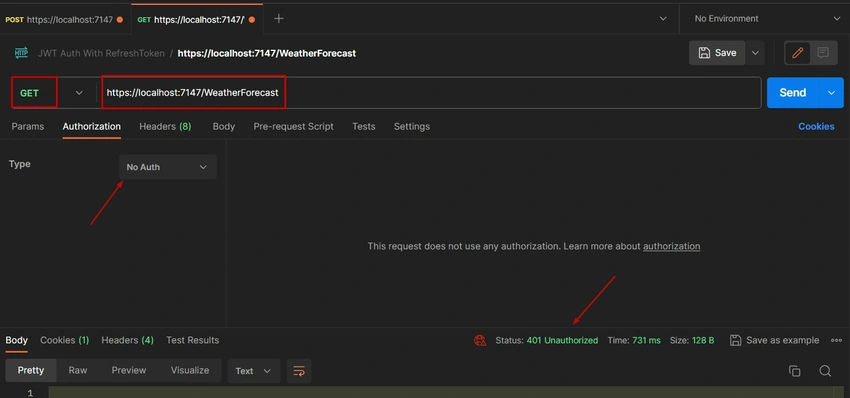
Unauthorized Access (Without JWT Token)
- Use Postman to send a request to the secure route (https://localhost:7147/WeatherForecast) without including a JWT token in the Authorization header.
Expected Result: Receive a 401 Unauthorized response.
- Use Postman to send a request to the secure route (https://localhost:7147/WeatherForecast) without including a JWT token in the Authorization header.
-
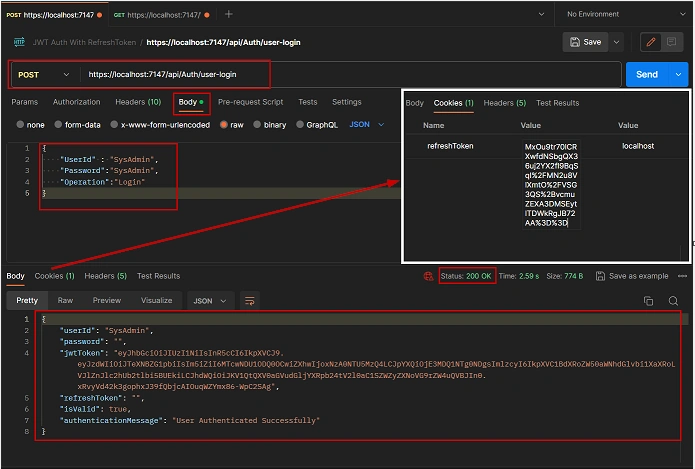
User Authentication (POST to /user-login)
In Postman, send a POST request to the user-login route (https://localhost:7147/api/Auth/user-login) with valid user credentials.Expected Result: Receive a successful response containing the JWT token and Refresh token in the response, and the Refresh token is set as a cookie.
-
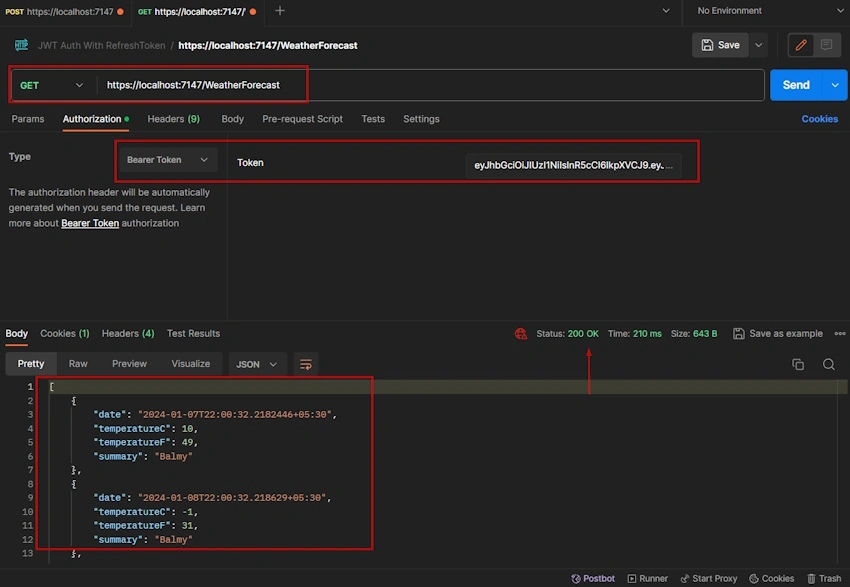
Access Secure Route with JWT Token
Using the obtained JWT token, send a GET request to the secure route (https://localhost:7147/WeatherForecast) with the JWT token included in the Authorization header.Expected Result: Receive the data from the secure route as a successful response.
Conclusion
This article has walked through the implementation of JWT authentication with refresh tokens in a .NET Core 6.0 Web API. We covered key aspects such as setting up the project, integrating JWT authentication, implementing controllers, business logic, data access, and testing the API using Postman. By following the provided steps, you now have a functional authentication mechanism for your .NET Core application.
Stay tuned for the upcoming Series 2 and Series 3 articles, where we will delve into extending login sessions and implementing a secure logout process. Your feedback is invaluable, and I encourage you to reach out with any questions or suggestions.
Explore the complete source code and project details on GitHub: GitHub Repository.
Thank you for joining in, and happy coding!
Best regards,
Kiran BS
Email: [email protected]
Follow Me On LinkedIn
Join the conversation! Your thoughts help the community grow.