

JWT in ASP.NET Core
JWT (JSON web token) has become more and more popular in web development. It is an open standard that allows transmitting data between parties as a JSON object in a secure and compact way. The data transmitted using JWT between parties are digitally signed so that it can be easily verified and trusted.
In this article, we will learn how to setup JWT with ASP.NET core web application. We can create an application using Visual Studio or using CLI (Command Line Interface).
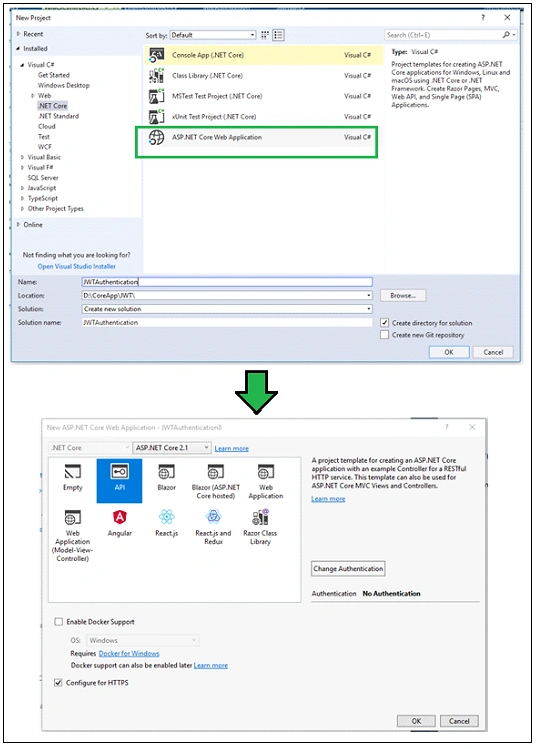
dotnet new webapi -n JWTAuthentication
Above command will create an ASP.NET Web API project with the name "JWTAuthentication" in the current folder.
The first step is to configure JWT based authentication in our project. To do this, we need to register a JWT authentication schema by using "AddAuthentication" method and specifying JwtBearerDefaults.AuthenticationScheme. Here, we configure the authentication schema with JWT bearer options.
public void ConfigureServices(IServiceCollection services)
{
    services.AddAuthentication(JwtBearerDefaults.AuthenticationScheme)
    .AddJwtBearer(options =>
    {
        options.TokenValidationParameters = new TokenValidationParameters
        {
            ValidateIssuer = true,
            ValidateAudience = true,
            ValidateLifetime = true,
            ValidateIssuerSigningKey = true,
            ValidIssuer = Configuration["Jwt:Issuer"],
            ValidAudience = Configuration["Jwt:Issuer"],
            IssuerSigningKey = new SymmetricSecurityKey(Encoding.UTF8.GetBytes(Configuration["Jwt:Key"]))
        };
    });
    services.AddMvc();
}
In this example, we have specified which parameters must be taken into account to consider JWT as valid. As per our code, the following items consider a token valid:
- Validate the server (ValidateIssuer = true) that generates the token.
- Validate the recipient of the token is authorized to receive (ValidateAudience = true)
- Check if the token is not expired and the signing key of the issuer is valid (ValidateLifetime = true)
- Validate signature of the token (ValidateIssuerSigningKey = true)
- Additionally, we specify the values for the issuer, audience, signing key. In this example, I have stored these values in appsettings.json file.
AppSetting.Json
{
  "Jwt": {
    "Key": "ThisismySecretKey",
    "Issuer": "Test.com"
  }
}
The above-mentioned steps are used to configure a JWT based authentication service. The next step is to make the authentication service is available to the application. To do this, we need to call app.UseAuthentication() method in the Configure method of startup class. The UseAuthentication method is called before UseMvc method.
public void Configure(IApplicationBuilder app, IHostingEnvironment env)
{
    app.UseAuthentication();
    app.UseMvc();
}
Generate JSON Web Token
I have created a LoginController and Login method within this controller, which is responsible to generate the JWT. I have marked this method with the AllowAnonymous attribute to bypass the authentication. This method expects the Usermodel object for Username and Password.
I have created the "AuthenticateUser" method, which is responsible to validate the user credential and returns to the UserModel. For demo purposes, I have returned the hardcode model if the username is "Jignesh". If the "AuthenticateUser" method returns the user model, API generates the new token by using the "GenerateJSONWebToken" method.
Here, I have created a JWT using the JwtSecurityToken class. I have created an object of this class by passing some parameters to the constructor such as issuer, audience, expiration, and signature.
Finally, JwtSecurityTokenHandler.WriteToken method is used to generate the JWT. This method expects an object of the JwtSecurityToken class.
using Microsoft.AspNetCore.Authorization;
using Microsoft.AspNetCore.Mvc;
using Microsoft.Extensions.Configuration;
using Microsoft.IdentityModel.Tokens;
using System;
using System.IdentityModel.Tokens.Jwt;
using System.Security.Claims;
using System.Text;

namespace JWTAuthentication.Controllers
{
    [Route("api/[controller]")]
    [ApiController]
    public class LoginController : Controller
    {
        private IConfiguration _config;

        public LoginController(IConfiguration config)
        {
            _config = config;
        }
        [AllowAnonymous]
        [HttpPost]
        public IActionResult Login([FromBody]UserModel login)
        {
            IActionResult response = Unauthorized();
            var user = AuthenticateUser(login);

            if (user != null)
            {
                var tokenString = GenerateJSONWebToken(user);
                response = Ok(new { token = tokenString });
            }

            return response;
        }

        private string GenerateJSONWebToken(UserModel userInfo)
        {
            var securityKey = new SymmetricSecurityKey(Encoding.UTF8.GetBytes(_config["Jwt:Key"]));
            var credentials = new SigningCredentials(securityKey, SecurityAlgorithms.HmacSha256);

            var token = new JwtSecurityToken(_config["Jwt:Issuer"],
              _config["Jwt:Issuer"],
              null,
              expires: DateTime.Now.AddMinutes(120),
              signingCredentials: credentials);

            return new JwtSecurityTokenHandler().WriteToken(token);
        }

        private UserModel AuthenticateUser(UserModel login)
        {
            UserModel user = null;

            //Validate the User Credentials
            //Demo Purpose, I have Passed HardCoded User Information
            if (login.Username == "Jignesh")
            {
                user = new UserModel { Username = "Jignesh Trivedi", EmailAddress = "[email protected]" };
            }
            return user;
        }
    }
}
Once, we have enabled the JWT based authentication, I have created a simple Web API method that returns a list of value strings when invoked with an HTTP GET request. Here, I have marked this method with the authorize attribute, so that this endpoint will trigger the validation check of the token passed with an HTTP request.
If we call this method without a token, we will get 401 (UnAuthorizedAccess) HTTP status code as a response. If we want to bypass the authentication for any method, we can mark that method with the AllowAnonymous attribute.
To test the created Web API, I am Using Fiddler. First, I have requested to "API/login" method to generate the token. I have passed the following JSON in the request body.
{"username": "Jignesh", "password": "password"}
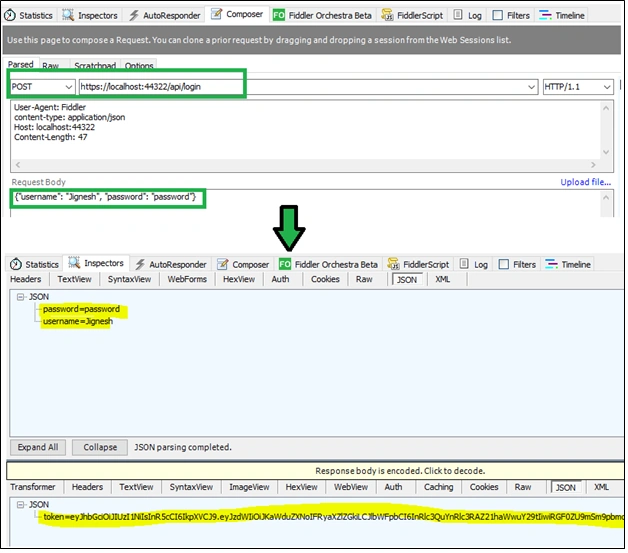
As a response, we will get the JSON like the following,
{
    "token" : "eyJhbGciOiJIUzI1NiIsInR5cCI6IkpXVCJ9.eyJzdWIiOiJKaWduZXNoIFRyaXZlZGkiLCJlbWFpbCI6InRlc3QuYnRlc3RAZ21haWwuY29tIiwiRGF0ZU9mSm9pbmciOiIwMDAxLTAxLTAxIiwianRpIjoiYzJkNTZjNzQtZTc3Yy00ZmUxLTgyYzAtMzlhYjhmNzFmYzUzIiwiZXhwIjoxNTMyMzU2NjY5LCJpc3MiOiJUZXN0LmNvbSIsImF1ZCI6IlRlc3QuY29tIn0.8hwQ3H9V8mdNYrFZSjbCpWSyR1CNyDYHcGf6GqqCGnY"
}
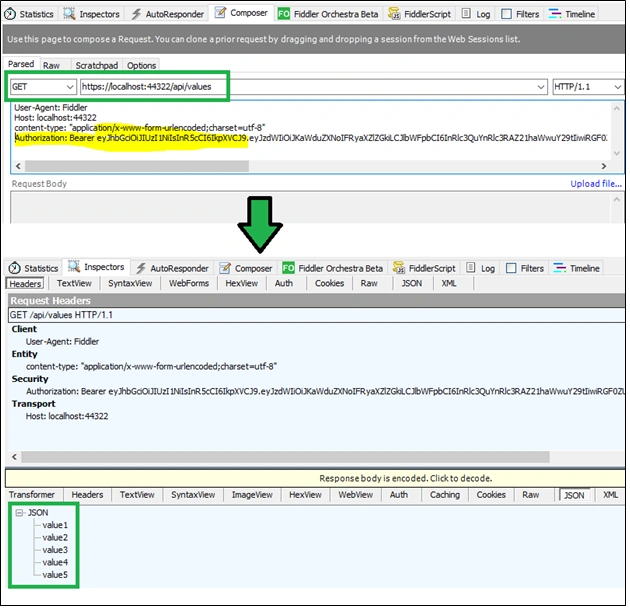
Now, we will try to get the list of values by passing this token into the authentication HTTP header. Following is my Action method definition.
[HttpGet]
[Authorize]
public ActionResult<IEnumerable<string>> Get()
{
    return new string[] { "value1", "value2", "value3", "value4", "value5" };
}
Authorization: Bearer eyJhbGciOiJIUzI1NiIsInR5cCI6IkpXVCJ9.eyJzdWIiOiJKaWduZXNoIFRyaXZlZGkiLCJlbWFpbCI6InRlc3QuYnRlc3RAZ21haWwuY29tIiwiRGF0ZU9mSm9pbmciOiIwMDAxLTAxLTAxIiwianRpIjoiYzJkNTZjNzQtZTc3Yy00ZmUxLTgyYzAtMzlhYjhmNzFmYzUzIiwiZXhwIjoxNTMyMzU2NjY5LCJpc3MiOiJUZXN0LmNvbSIsImF1ZCI6IlRlc3QuY29tIn0.8hwQ3H9V8mdNYrFZSjbCpWSyR1CNyDYHcGf6GqqCGnY
Handle Claims with JWT
Claims are data contained by the token. They are information about the user which helps us to authorize access to a resource. They could be Username, email address, role, or any other information. We can add claims information to the JWT so that they are available when checking for authorization.
In the above example, if we want to pass the claims to our token then the claim information needs to add GenerateJSONWebToken method of Login controller. In the following example, I have added a username, email address, and date of joining as claimed into the token.
private string GenerateJSONWebToken(UserModel userInfo)
{
    var securityKey = new SymmetricSecurityKey(Encoding.UTF8.GetBytes(_config["Jwt:Key"]));
    var credentials = new SigningCredentials(securityKey, SecurityAlgorithms.HmacSha256);

    var claims = new[] {
        new Claim(JwtRegisteredClaimNames.Sub, userInfo.Username),
        new Claim(JwtRegisteredClaimNames.Email, userInfo.EmailAddress),
        new Claim("DateOfJoing", userInfo.DateOfJoing.ToString("yyyy-MM-dd")),
        new Claim(JwtRegisteredClaimNames.Jti, Guid.NewGuid().ToString())
    };

    var token = new JwtSecurityToken(_config["Jwt:Issuer"],
        _config["Jwt:Issuer"],
        claims,
        expires: DateTime.Now.AddMinutes(120),
        signingCredentials: credentials);

    return new JwtSecurityTokenHandler().WriteToken(token);
}
The claims are an array of key-value pair. The keys may be values of a JwtRegisteredClaimNames structure (it provides names for public standardized claims) or custom name (such as DateOfJoining in above example).
This claims can be used to filter the data. In the following example, I have to change the list of values if the user spends more than 5 years with the company.
[HttpGet]
[Authorize]
public ActionResult<IEnumerable<string>> Get()
{
    var currentUser = HttpContext.User;
    int spendingTimeWithCompany = 0;

    if (currentUser.HasClaim(c => c.Type == "DateOfJoing"))
    {
        DateTime date = DateTime.Parse(currentUser.Claims.FirstOrDefault(c => c.Type == "DateOfJoing").Value);
        spendingTimeWithCompany = DateTime.Today.Year - date.Year;
    }

    if(spendingTimeWithCompany > 5)
    {
        return new string[] { "High Time1", "High Time2", "High Time3", "High Time4", "High Time5" };
    }
    else
    {
        return new string[] { "value1", "value2", "value3", "value4", "value5" };
    }
}
Summary
JWT is very famous in web development. It is an open standard that allows transmitting data between parties as a JSON object in a secure and compact way. In this article, we will learn how to generate and use JWT with ASP.NET core application.
You can view or download the source code from the GitHub link here.
Nikhil VairatPosted May 8, 2024, 9:45 AM
To run this code require .net core 2.1 Runtime and it is out of support now any suggestion sir ?
Niloy NiloyPosted Oct 6, 2023, 7:34 PM
Hi Jignesh Trivedi how did you implement jwt authentication without implementing Authorization filter.Microsoft should recruit you for inventing such a great way and wasting readers time and above all frustating them
Thomas SimonePosted Sep 20, 2023, 8:34 PM
Thomas SimoneJignesh: I was enjoying this when I came across a slight mispelling. In GenerateJSONWebToken, I got to DateOfJoing and had to stop. I didn't recognize the word. So I looked it up and was surprised when I only found an entry in UrbanDictionary. Granted, below the snippet is the correct word 'Joining'. DateOfJoing is not something I have seen, shall we say, documented before. :^0 Other than that, nice work, sir.
Sahil JaniPosted Sep 3, 2023, 6:47 PM
Hello Jignesh, Thank you for sharing this beautiful article on JWT Token Generation. This article is very useful and helped me in implementation of API model for my project. I was wondering; why the token expiration is not working however I found it in some other article to add "ClockSkew = TimeSpan.Zero" inside TokenValidationParameters under Program.cs file. Which should ensure to expire the token at the defined given time.
Arkadium ArksPosted Oct 22, 2021, 7:11 PM
Tanks! Nice bro
ishwar giriPosted Sep 8, 2021, 4:08 AM
Sir please make a blog on facebook n google authentication in same above application
Sunil ChawarePosted Aug 31, 2021, 3:34 PM
Hi, I want to use this in ASP.NET Core MVC. Is storing the token in session good idea?
Chandu SattiPosted Aug 27, 2021, 5:08 AM
I have a couple of questions . can you please clarify this? 1. I got a token from the server. I just passed it to someone to use this token. he could able to access the API with the token until it expires. How can we restrict this? 2.I got a token from the server with an expiry time of 15 min. before 15 min I hit token controller and got another token with an expiry time of 15 min. Now I have two tokens with valid time. will the two tokens work? or only the latest one? if so how can we validate?
Học TậpPosted Aug 8, 2021, 1:17 AM
Hi, when coding, I keep seeing this error with UserModel: The type or namespace of 'UserModel' could not be found. How can I fix this? Thank you.
Bhavin PandyaPosted May 19, 2021, 11:02 AM
Good one article Jignesh bhai. Keep writing this kind of blog and keep motivating us. Thanks.
manju muthamadhuPosted May 6, 2021, 7:39 AM
Hii Jigenesh, very good article, can you post a article on JWT Authentication with asymetric keys ??
Sandip G PatilPosted Apr 26, 2021, 12:41 PM
Nice article...
Nevin NPosted Apr 23, 2021, 6:42 AM
I use [authorize] in my project and shows 401 error after that what i do ?
Varun AtluriPosted Apr 21, 2021, 4:58 PM
How can we use JWT without registration or login credentials?
muruga boopathyPosted Mar 29, 2021, 5:13 AM
Yes, it works . thanks for the explanation and example code
Deepak KumarPosted Jan 15, 2021, 6:28 PM
Is JWT token to use in a different web api 2.0 or web application ?
Muhammad BilalPosted Oct 17, 2020, 10:55 AM
Hi Jignesh, fantastic explanation. I want to know where is middleware? I am new to this stuff and I thought that middleware should do authentication and authorization.
Ram kumar shuklaPosted Oct 13, 2020, 8:01 AM
Always returning same token, how to come out this
Eli EliPosted Sep 26, 2020, 7:48 AM
Great post, thanks.
Harsh SainiPosted Sep 4, 2020, 6:21 AM
Thanks for the solution Jignesh.. I want to quickly highlight 1 errors in the code which i downloaded from site. In LoginController.cs file -> AuthenticateUser method you should use the parameter object "login" to check if user name is valid of not like this if (login.Username == "Jignesh")
Hamid KhanPosted Aug 26, 2020, 2:23 PM
JWT enough elaborated Thanks Jignesh Trivedi
fay elmaPosted Jul 26, 2020, 9:37 PM
I got the token and passed it in WeatherForecast api but I received Bearer error="invalid_token", error_description="The audience 'empty' is invalid"
Anurag SinhaPosted Jul 10, 2020, 1:20 PM
401 Error in [Authorize]
Anurag SinhaPosted Jul 10, 2020, 11:24 AM
Download code not working
Anagha DeshpandePosted Jul 7, 2020, 7:32 AM
Hi, I had used your code to generate token but I am getting "Missing id, name, or email in the JWT token."
Mukund Narayan JhaPosted Jul 3, 2020, 12:11 PM
Can you explain JWT(with short lifespan e.g 15 seconds) with refresh token(an arbitrary string stored in database).Very good article.
Raju SoniPosted Jun 28, 2020, 1:25 PM
HI I want add custom authorize filter, because we have customer request and response for jwt, So can you please help to authorize by my method and return my message json
Emil SimonyanPosted Jun 8, 2020, 8:50 AM
Very good article, it really helps.
nirankar kaushikPosted May 23, 2020, 12:16 AM
Commendable explanation. Can you explain JWT(with short lifespan e.g 30 seconds) with refresh token(an arbitrary string stored in database) thanks a lot
shivaa vishnuPosted May 19, 2020, 4:52 AM
It throws error "Could not get any response", Any solution?
Harish PaudelPosted May 7, 2020, 5:01 AM
Great sir.
Yogesh KhurpePosted Apr 27, 2020, 2:43 AM
Nice Explanation, I have to implement a custom Authorization message when token expire over the [Authorize] attribute. Please suggest me how to override ?
Arbind TiwariPosted Apr 17, 2020, 4:05 AM
Token key validation always return 401
BrittoPosted Apr 15, 2020, 12:21 PM
Muito bom o artigo mais voc? poderia explica esse mesmo exemplo utilizando WINDOWS FORMS
ajay jangamPosted Apr 8, 2020, 8:06 AM
Good work. Helpful
Kevin EstradaPosted Apr 7, 2020, 7:50 AM
I am getting an error "ShowPII is hidden" - I am not sure if it is a missed configuration
Kevin EstradaPosted Apr 7, 2020, 7:27 AM
Hi Jignesh, Why did you not use the userInfo parameter on GenerateJSONWebToken() method?
Kedarnath DhagePosted Apr 2, 2020, 4:20 AM
Hi Jignesh, i have two separate project first is patient and second is api project and i call every api method form my patient project so i need authorization from patient project to api project so please help me my emaild: [email protected] contact:- 7507577769
RajibaLochan TaraiPosted Feb 3, 2020, 12:23 PM
You created jwt token in one project ,but how to validate same token in another project please tell me.
swaroop josephPosted Dec 3, 2019, 4:21 AM
Can we use this jwt authentication mechanism for mvc razor web applications? I have a scenario where I generate token through login action inside Login controller which returns a token. Now since I have token now I need to get redirected to home controller with action Index on the success event of Login ajax call. But since the home controller is authorized I am not able to get redirected. Am simply using window.location.href = "Home/Index" right now. Is there any way we can pass token also that is stored in my local storage?
lara arumaiPosted Sep 11, 2019, 7:27 AM
Private UserModel AuthenticateUser(UserModel login) { UserModel user = null; //Validate the User Credentials //Demo Purpose, I have Passed HardCoded User Information if (login.Username == "Jignesh") { user = new UserModel { Username = "Jignesh Trivedi", EmailAddress = "[email protected]", DateOfJoing = new DateTime(2010, 08, 02) }; } return user; }
suhail darPosted Aug 27, 2019, 1:22 AM
Shahbaz Hussain, cors is already configured services.AddCors(options => { options.AddPolicy("CorsPolicy", builder => builder.AllowAnyOrigin() .AllowAnyMethod() .AllowAnyHeader() .AllowCredentials() .Build()); }); and also changed authorize filter to [Authorize(AuthenticationSchemes = "Bearer")], still finding same issue.
suhail darPosted Aug 27, 2019, 12:49 AM
I am facing a issue, on decorating the api wth [authorize] . while hitting api with token on https coming up with "HttpRequestException: Response status code does not indicate success: 404 (Not Found).". removing authorize filter it comes with proper response. please your thought on this.
nishtha kapurPosted Aug 12, 2019, 4:21 AM
I am facing an issue. I have client side app made via reactjs and web api using asp.net core. Now i have written one api to generate pdf and i have used Authorize filter. When i remove this filter from api, my client side app is able to download pdf but if i use this filter, then pdf is downloaded but coming blank. Is there any issue with token generation?
Shahbaz HussainPosted Aug 3, 2019, 8:23 AM
Good work, I run it successfully
Anitha AtluriPosted Jul 19, 2019, 1:40 PM
Whats the best place to store the Key and Secret ?Right now im storing in web.config .Once we move to production it will be a issue if i store it in the Web.Config <add key="APiID" value="abcID"/> <add key="APIPWD" value="abcPW"/>
Ali AbbasPosted Jul 9, 2019, 1:42 PM
I have downloaded your sample code, make it run. Now I am trying this on Fiddler but I am unable to get the token.
desai balvantPosted Jun 28, 2019, 1:07 AM
Its working ok with header name - Authorization header Value - "Bearer xxxxxxxxxxx". Thanks for this article.
Dhruv PandyaPosted Jun 17, 2019, 11:30 PM
Hello Sir, I implemented your code but I am facing the error of 401.
Mubeen SarwarPosted May 17, 2019, 5:36 AM
How do you call the login action method? I am getting a 404 error on calling login
karthi puglenthiPosted May 6, 2019, 12:31 AM
I had set token expire 1minute. after 1 minute i had used same token itis working. how to check token expiry.
Prakash TripathiPosted May 1, 2019, 6:48 AM
Good article to explain the concept in easy language.
Paresh RathodPosted Mar 17, 2019, 9:45 PM
What are steps need to follow to work this example code with actual database
Md SalehPosted Jan 8, 2019, 8:34 AM
Please help am getting , error="invalid_token", error_description="The audience is invalid"
Baburao MannepalliPosted Dec 5, 2018, 10:41 PM
Can u send the any jwt document?
mukul kandpalPosted Nov 26, 2018, 3:21 AM
How to use JWT for security in .asmx file when I create web services ? Please Reply
ShantanuPosted Oct 21, 2018, 4:22 AM
Here is a package built by me which smoothly integrates Jwt Bearer Token Security in your Asp Net Core app in minutes. It is called AspNetCore.Security.Jwt. Also, provides Swagger UI integration too. GitHub: https://github.com/VeritasSoftware/AspNetCore.Security.Jwt
Michal KaczmarekPosted Oct 13, 2018, 4:40 PM
Thanks, very useful. One question - how to make logged in user accessible in the _Layout.cshtml file? I can access this.User but it's empty, doesn't contain claims. In normal views and controllers it works fine.
Pieter Van KampenPosted Oct 11, 2018, 10:43 AM
Thank you for this clear explanation. I have a web application that has both user identification (using asp.net core identity) and an API. I would like to create a new API release with JWT token identity. I am a bit confused whether it is an all or nothing approach, in other words, once I use JWT for the API, do I need to use it through out also on the web site? Or should I have separate Core applications? That would be a pity, adding complexity.
Rafael OsunaPosted Oct 2, 2018, 6:32 AM
Hi, LoginController at Line 65 . I think it should be 'login.Username' not 'user.Username', right?
Sylvain BouchardPosted Sep 10, 2018, 5:24 PM
Hi Jignesh, my GET doesn't work. The POST works well, I've got the token. I have created a function with httpget and allowAnonymous but still have 404. DO you have any idea? Thanks
Abhishek MishraPosted Jul 26, 2018, 8:10 AM
Nice one. Bookmarked
L APosted Jul 25, 2018, 7:07 PM
Hello Jignesh Trivedi sir, i have gone thru your articles on JWT(https://www.c-sharpcorner.com/article/introduction-to-jwt/ & https://www.c-sharpcorner.com/article/jwt-json-web-token-authentication-in-asp-net-core/) and i wish to implement it in ASP.Net Web-API. Thanks for your contribution on JWT with .Net Core.
Jeeva SubburajPosted Jul 25, 2018, 11:17 AM
Thanks for the article.