In the previous article, we integrated ASP.NET Core Identity Roles with JWT authentication. Our SecureShop API now generates JWTs containing user roles, enabling Role-Based Authorization with attributes like [Authorize(Roles = "Admin")].
Although our authentication system is now production-ready, there is still one usability problem.
JWT access tokens usually have a short expiration time (for example, 15–30 minutes).
When the token expires, the user is forced to log in again.
This creates a poor user experience.
The solution is Refresh Token Authentication.
In this article, you'll learn what refresh tokens are, why they are needed, and how they work alongside JWT access tokens.
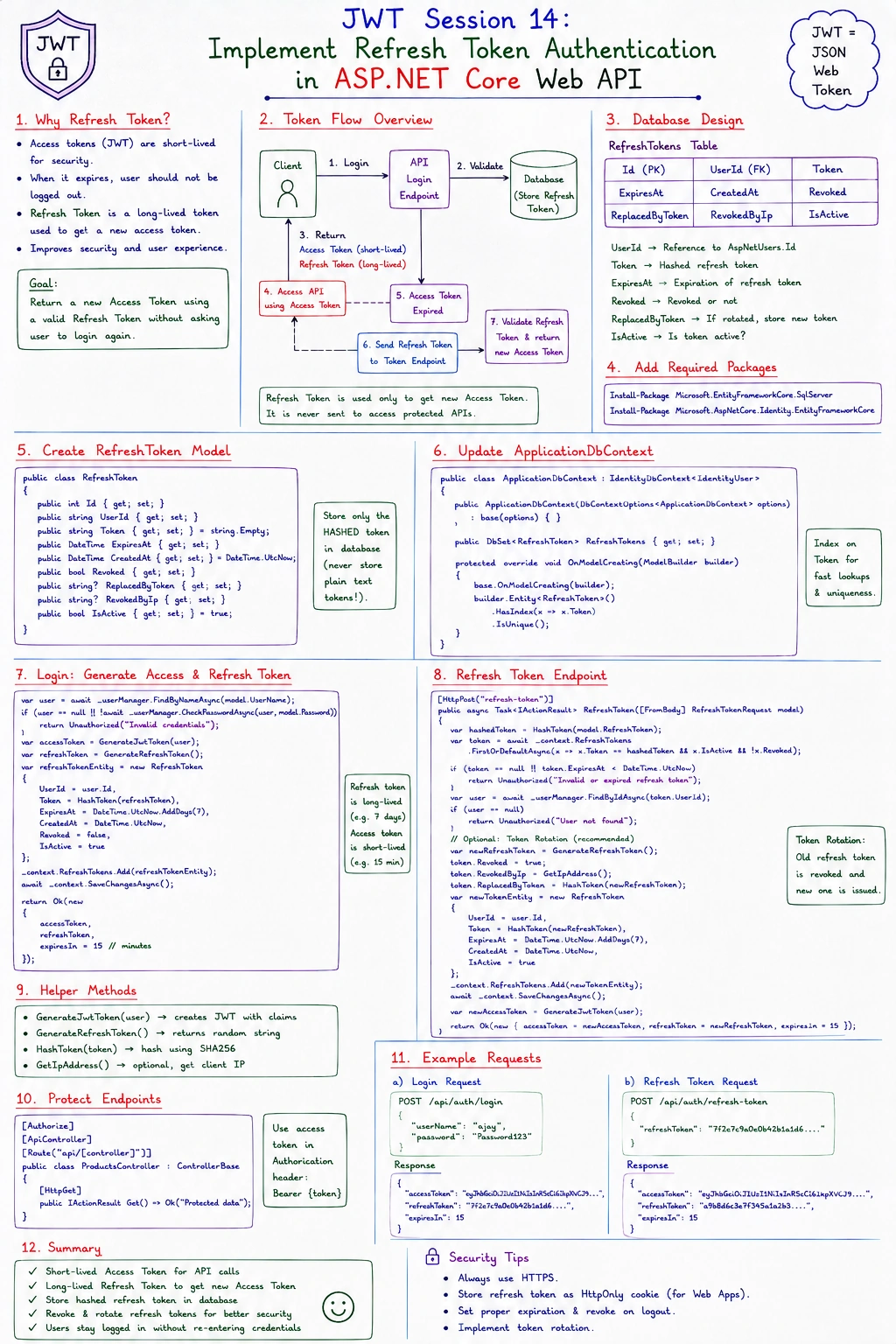
What Is a Refresh Token?
A Refresh Token is a long-lived token used to request a new JWT Access Token without asking the user to log in again.
Unlike an access token:
It is not sent with every API request.
It is used only when the access token expires.
It is stored securely by the client.
The access token continues to protect API endpoints, while the refresh token keeps the user signed in.
Why Do We Need Refresh Tokens?
Let's continue with our SecureShop API.
Suppose John logs in.
The API issues:
John continues shopping.
After 30 minutes:
The access token expires.
Instead of logging in again, the application sends the refresh token to request a new access token.
John continues using the application without interruption.
Access Token vs Refresh Token
| Access Token | Refresh Token |
|---|
| Short lifetime | Long lifetime |
| Sent with every API request | Used only to obtain a new access token |
| Contains user claims | Usually contains a random value |
| Protects API endpoints | Renews authentication |
Each token has a different purpose.
Authentication Flow with Refresh Tokens
The complete flow looks like this.
User Login
    │
    ▼
Validate Credentials
    │
    ▼
Generate Access Token
Generate Refresh Token
    │
    ▼
Client Stores Both Tokens
Later, when the access token expires:
Expired Access Token
        │
        ▼
Send Refresh Token
        │
        ▼
Validate Refresh Token
        │
        ▼
Generate New Access Token
        │
        ▼
Return New Tokens
The user does not need to enter their username and password again.
Step 1: Generate a Refresh Token
Unlike JWTs, refresh tokens are usually random strings.
Example:
public static string GenerateRefreshToken()
{
    return Convert.ToBase64String(
        RandomNumberGenerator.GetBytes(64));
}
Each login creates a unique refresh token.
Step 2: Store the Refresh Token
After generating it, save the refresh token in the database.
For example:
| User | Refresh Token | Expiry |
|---|
| John | Xy82...Ab9 | 7 Days |
Storing it allows the server to verify that the token is still valid.
Step 3: Return Both Tokens
After a successful login, return both tokens.
{
    "accessToken": "eyJhbGciOiJIUzI1NiIs...",
    "refreshToken": "Xy82GhL9..."
}
The client stores both values securely.
Step 4: Create a Refresh Endpoint
Create a new endpoint.
POST /api/auth/refresh
The client sends the refresh token.
{
    "refreshToken": "Xy82GhL9..."
}
The API validates the refresh token.
If valid, it generates a new access token.
Internal Refresh Flow
Client
   │
   │ Refresh Token
   ▼
Refresh Endpoint
   │
   ▼
Database
   │
   ▼
Refresh Token Valid?
      │
 Yes  │ No
      │
      ▼
Generate New JWT
      │
      ▼
Return New Tokens
If the refresh token has expired or is invalid, the API returns 401 Unauthorized, and the user must log in again.
Practical Example
Let's continue with the SecureShop API.
John logs in.
The API returns:
Access Token
 Expires : 30 Minutes

 Refresh Token
 Expires : 7 Days
Thirty minutes later:
John calls:
POST /api/auth/refresh
The API verifies the refresh token stored in the database.
↓
Token is valid.
↓
A new JWT access token is generated.
↓
John continues using the application without logging in again.
Security Best Practices
When implementing refresh tokens:
Store refresh tokens securely in the database.
Give refresh tokens an expiration date.
Generate a new refresh token whenever one is used (token rotation).
Delete refresh tokens when the user logs out.
Never include sensitive user information inside a refresh token.
These practices help reduce the impact of a stolen refresh token.
Common Mistakes
Mistake 1: Using Long-Lived JWTs Instead of Refresh Tokens
Making JWTs valid for several months increases security risks.
Keep access tokens short-lived and use refresh tokens for renewal.
Mistake 2: Not Storing Refresh Tokens
If the server doesn't store refresh tokens, it cannot revoke or validate them.
Always persist refresh tokens.
Mistake 3: Reusing the Same Refresh Token Forever
A refresh token should be replaced with a new one after successful use.
This is called Refresh Token Rotation and improves security.
Mistake 4: Forgetting to Remove Refresh Tokens on Logout
When a user logs out, invalidate or delete their refresh token so it cannot be used again.
Key Takeaways
Access tokens are short-lived and protect API endpoints.
Refresh tokens allow users to obtain new access tokens without logging in again.
Refresh tokens should be securely stored and validated on the server.
Create a dedicated refresh endpoint to issue new JWTs.
Rotate refresh tokens and remove them during logout for better security.
Our SecureShop API now provides a smoother and more secure authentication experience using Refresh Tokens. In the next article, we'll implement Logout and Refresh Token Revocation, ensuring that refresh tokens become invalid immediately after a user signs out or when an administrator revokes access.


Join the conversation! Your thoughts help the community grow.