

Introduction
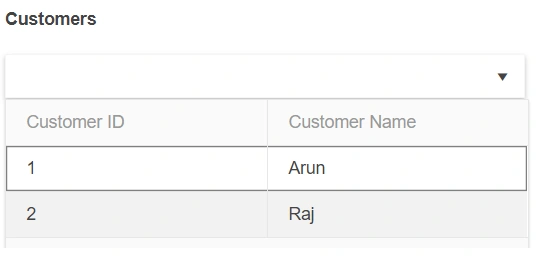
Kendo multi-column combo box control is used to display the data in multiple column Views within the combo box. In this article, we are going to see how to do a remote binding in Kendo multi-column combobox.
WEB API Service
I'm going to use the following Web API Service which is developed using ASP.NET Core to construct the data source for Kendo multi-column combobox.
Customer.cs
- public class Customer
- {
- public int CustomerID { get; set; }
- public string CustomerName { get; set; }
- public Customer(int customerID, string customerName)
- {
- CustomerID = customerID;
- CustomerName = customerName;
- }
- }
CustomerController.cs
- [Produces("application/json")]
- [Route("api/Customer")]
- public class CustomerController : Controller
- {
- [HttpGet]
- [Route("CustomerDetails")]
- public List<Customer> GetCustomers()
- {
- List<Customer> customers = new List<Customer>();
- customers.Add(new Customer(1, "Arun"));
- customers.Add(new Customer(2, "Raj"));
- return customers.ToList();
- }
- }
The GetCustomer action will return the customer list.
Testing the API in Postman
/api/Customer/CustomerDetails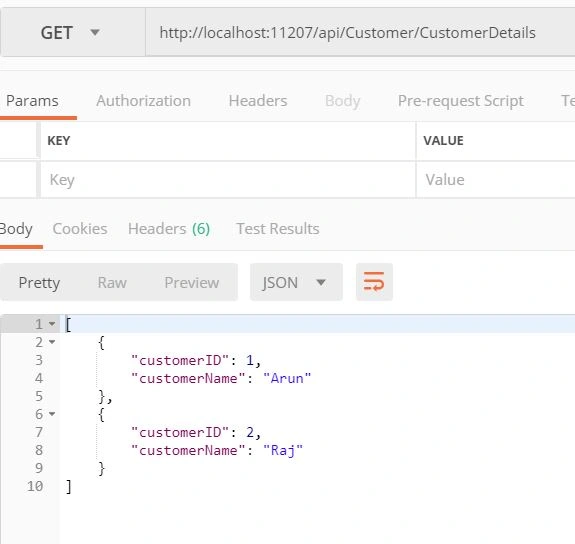
This API will return the Customer List.
KendoMultiColumnCombo.html
- <!DOCTYPE html>
- <html>
- <head>
- <style>
- html {
- font-size: 14px;
- font-family: Arial, Helvetica, sans-serif;
- }
- </style>
- <title></title>
- <link rel="stylesheet" href="https://kendo.cdn.telerik.com/2018.3.1017/styles/kendo.common-material.min.css" />
- <link rel="stylesheet" href="https://kendo.cdn.telerik.com/2018.3.1017/styles/kendo.material.min.css" />
- <link rel="stylesheet" href="https://kendo.cdn.telerik.com/2018.3.1017/styles/kendo.material.mobile.min.css" />
- <script src="https://kendo.cdn.telerik.com/2018.3.1017/js/jquery.min.js"></script>
- <script src="https://kendo.cdn.telerik.com/2018.3.1017/js/kendo.all.min.js"></script>
- </head>
- <body>
- <div id="example">
- <div class="demo-section k-content">
- <h4>Customers</h4>
- <input id="customers" style="width: 50%;" />
- </div>
- <script>
- $(document).ready(function () {
- $("#customers").kendoMultiColumnComboBox({
- dataTextField: "customerName",
- dataValueField: "customerID",
- height: 400,
- columns: [
- {
- field: "customerID", title: "Customer ID", width: 200
- },
- {
- field: "customerName", title: "Customer Name", width: 200
- },
- ],
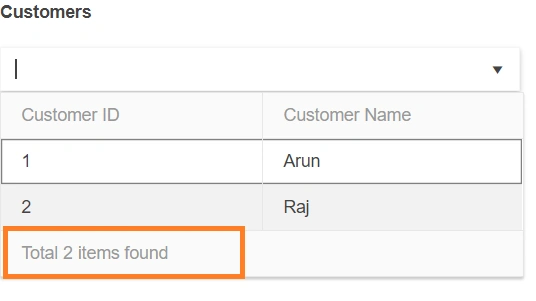
- footerTemplate: 'Total #: instance.dataSource.total() # items found',
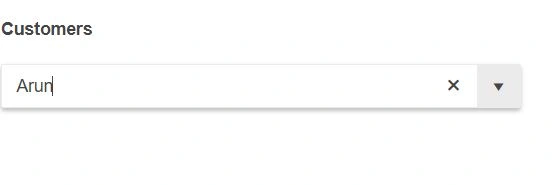
- filter: "contains",
- filterFields: ["customerID", "customerName"],
- dataSource: {
- type: "json",
- transport: {
- read: "http://localhost:11207/api/Customer/CustomerDetails"
- }
- }
- });
- });
- </script>
- <style type="text/css">
- </style>
- </div>
- </body>
- </html>
Join the conversation! Your thoughts help the community grow.