

What is IoT?
What is Raspberry Pi:
Raspberry Pi is an IoT device that can wrap up with various sensors, data, devices, cloud, etc., and can work with whatever instructions that have been given to it. This makes things much simpler to perform tasks with easy steps.
Image of Raspberry Pi 2 device:
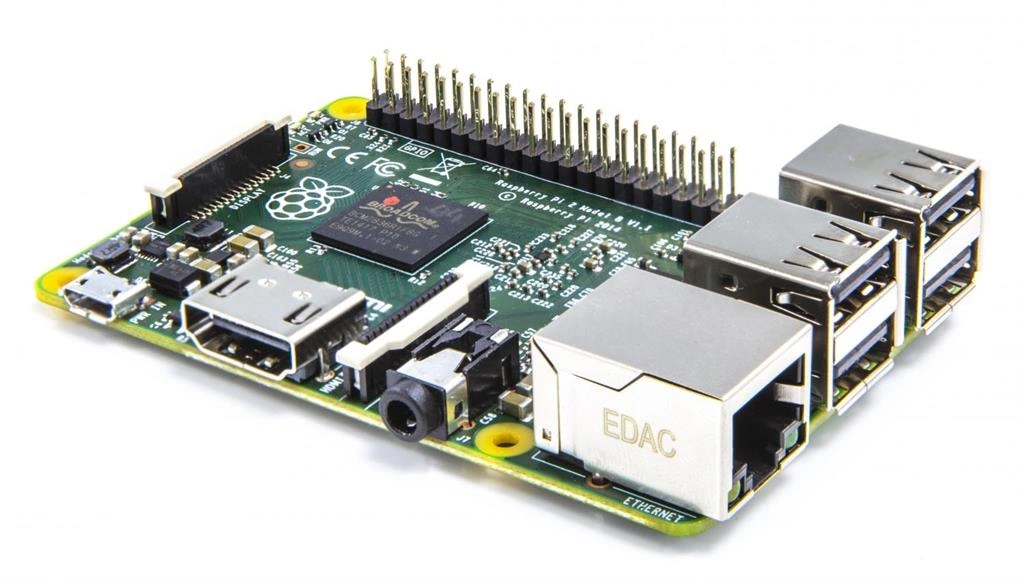
Raspberry Pi device could be described as a card size or palm-size based computer which comes with different models and different configurations, different Operating Systems, etc.,
Raspberry Pi comes with different models as:
- Raspberry Pi 1 – Compute Module
- Raspberry Pi 1 – Model A+
- Raspberry Pi 2 – Model B
- Raspberry Pi 3 – Model B
Components of Raspberry Pi kit:
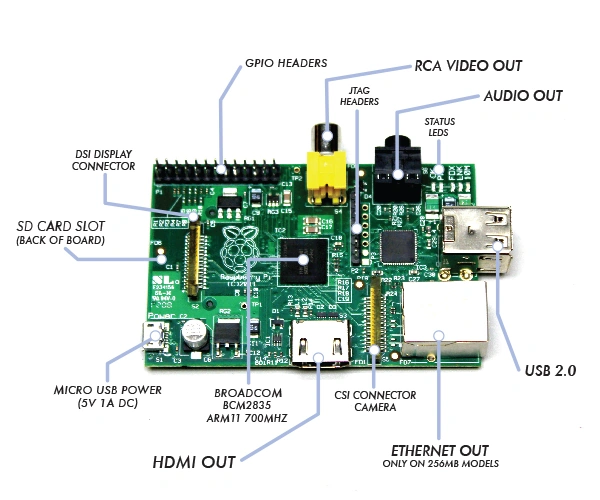
This Raspberry Pi kit holds different components as such the same as a laptop or PC:
- Processor (depends upon the configuration)
- 4 - USB Ports (to connect for any USB devices like mouse, keyboard, etc.,)
- 40 pin extended GPIO (general purpose input output pane)
- Full-Size HDMI
- 4 pole stereo output and composite video port
- CSI camera port and DSI display port.
- Micro USB power source.
Configurations: Configuration of Raspberry Pi 3 Model B.
| Processor | Broadcom BCM2837 64Bit Quad Core processor-powered Single Board Computer running at 1.2GHz |
| Processor Speed | Quad-Core @1.2 GHz |
| RAM | 1GB SDRAM @ 400 MHz |
| Storage | MicroSD |
| USB 2.0 | 4x USB Ports |
| Max Power Draw/Voltage | 2.5A @ 5V |
| GPIO | 40 pin |
| Ethernet Port | Yes |
| Wifi | Built-in |
| Bluetooth LE | Built-in |
Configuration of Raspberry Pi 2 Model B:
| Processor | Broadcom BCM2836 64Bit Quad Core processor-powered Single Board Computer running at 1.2GHz |
| Processor Speed | Quad-Core @900 GHz |
| RAM | 1GB SDRAM @ 400 MHz |
| Storage | MicroSD |
| USB 2.0 | 4x USB Ports |
| Max Power Draw/Voltage | 1.8A @ 5V |
| GPIO | 40 pin |
| Ethernet Port | Yes |
| Wifi | No |
| Bluetooth LE | No |
Things required to work with:
- SD Card: SD card of 8 GB with class 4 is recommended.
- Display & Connectivity cables: Use a monitor supported with HDMI port for output display and have HDMI cables to plugin with your monitor.
- Mouse and Keyboard: Use any USB wired or wireless mouse and keyboard to work with the Raspberry Pi device.
- Power Supply: Use a 5V micro USB power supply to power your Raspberry pi device. You can even use a standard data cable connected with your laptop or PC to power your Raspberry Pi device.
- Internet (Ethernet cable or Wifi): Provide internet supply for your Raspberry Pi device either with help of Ethernet cable connected towards your Ethernet port at Raspberry Pi device or go with Wifi connectivity.
- Wifi modem (in case of Raspberry Pi 2 – Model B): If you have Raspberry Pi2 – model B device than you should buy a USB Wifi Modem (Device name: COMFAST CF-WU810N). In Raspberry Pi 3 – Model B the device holds Wifi modem which is inbuilt so no need to go for an external device.
- Headphones: Not mandatory, if needed you can use earphones with a 3.5mm jack which can work with your Raspberry Pi device.
Operating Systems for Raspberry Pi:
Raspberry Pi device supports third party operating systems such as Windows 10 IoT Core, Ubuntu Mate, OpenElec, PINET, etc., the officially supported OS of Raspberry Pi device is NOOBS and RASPBIAN.
Microsoft supports the Raspberry Pi device with Windows 10 IoT core OS and this is the OS that is used by a large number of people for Raspberry Pi. This has a good GUI and makes things easily understood by a beginner. This Windows 10 IoT core OS supports devices only from Raspberry Pi 2 – Model B and Raspberry Pi 3 – Model B.
Read more articles on the Internet of Things (IoT):
SubashPosted Jul 14, 2016, 1:38 PM
Nice
kalu singh raoPosted Jul 2, 2016, 3:17 PM
Nice...
Santhakumar MunuswamyPosted May 21, 2016, 2:33 AM
Thank you for nice work
Pramod ThakurPosted Apr 27, 2016, 2:00 AM
Nice one.. Thanks for sharing..
Gowtham RajamanickamPosted Apr 26, 2016, 3:03 AM
good article
sreenivasa kPosted Apr 25, 2016, 2:04 PM
nice article. thx for sharing
Kuppurasu NagarajPosted Apr 22, 2016, 11:56 AM
Nice Sharing Feroz..
Mahendra SinghPosted Apr 21, 2016, 11:56 PM
This article is very useful for new ones
Syed ShanuPosted Apr 21, 2016, 8:19 PM
Thats nice link Abdul Rasheed Feroz Khan.It will be good to be in more detail from A to Z .Many persons not aware about how and where to get IOT and what are the initial steps to connect with PC and how to start and run first IOT Device application .It will be good all in one article with detail.
Vivek KumarPosted Apr 21, 2016, 1:18 PM
Good one
Gowtham KPosted Apr 21, 2016, 1:15 PM
Good one Abdul, looking forward for your next article with simple programming and testing on Raspberry Pi
Humayun Kabir MamunPosted Apr 21, 2016, 1:25 AM
Nice...
Sr KarthigaPosted Apr 20, 2016, 11:09 PM
good one
Sr KarthigaPosted Apr 20, 2016, 11:08 PM
very nice
Syed ShanuPosted Apr 20, 2016, 8:09 PM
Very nice article Abdul and I have one more request as can you post .how and from where to get IOT Device ,how to connect IOT device with your PC and how to write our simple program and test with IOT device in detail with Images.I didnt find any article with this much detail.
Vignesh ManiPosted Apr 20, 2016, 3:53 PM
Nice
Tamilan SPosted Apr 20, 2016, 3:05 PM
Nyc
Mohammed IbrahimPosted Apr 20, 2016, 2:49 PM
nice
Shakti Singh DulawatPosted Apr 20, 2016, 10:50 AM
This is first time I am reading in details about it and I am happy you posted about it thanks a lot