Describe the core architectural components of Azure
Azure Global Infrastructure – Advanced Technical Explanation
Azure is a hyperscale cloud platform that operates on a globally distributed infrastructure designed for high availability, regional fault tolerance, compliance segmentation, and low-latency service delivery. Understanding Azure’s physical and logical architecture is essential for designing enterprise-grade workloads that meet performance, business continuity, and regulatory requirements.
This explanation provides a deeper technical view of Azure regions, paired regions, sovereign clouds, availability zones, data centres, resources, resource groups, subscriptions, and management groups.
1. Azure Regions, Regional Pairs, and Sovereign Regions
Azure Regions
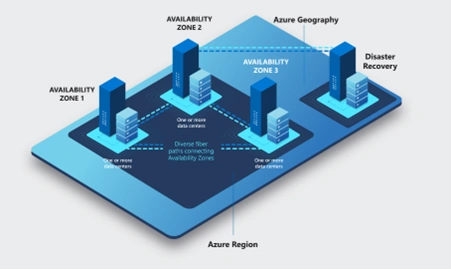
An Azure region is a discrete geographical area consisting of one or more data centres connected with region-local, high-bandwidth, low-latency network fabric. Regions operate as units of service deployment and feature boundaries for:
Data residency
Service availability
Latency-sensitive workloads
Regulatory compliance
Each region provides:
Independent capacity pools across compute, storage, and networking
Localized operational control
Regional fail-isolation zones (availability zones where supported)
Not all Azure services are available in every region due to capacity planning, hardware availability, and sovereign restrictions.
https://datacenters.microsoft.com/globe/explore
Azure Regional Pairs
Azure employs a paired-region architecture to enhance disaster recovery (DR), continuity of operations, and planned maintenance sequencing.
Key technical characteristics of paired regions include:
At least 300 miles of physical separation (where geography allows) to reduce correlated failure risks.
Shared geopolitical boundary, ensuring compliance with regional laws and data sovereignty requirements.
Platform-level replication, such as:
Azure Storage geo-redundant storage (GRS/GZRS) replication
Azure SQL Database geo-replication
Azure Site Recovery (ASR) replication targets
Staggered updates: Microsoft rolls out planned platform updates to one region first, then the paired region, minimizing simultaneous downtime risks.
Cross-region load balancing for disaster recovery architectures via Azure Traffic Manager and Azure Front Door.
Examples:
East US ↔ West US
Southeast Asia ↔ East Asia
North Europe ↔ West Europe
Paired regions form the backbone for designing multi-region high availability, active-active services, and geo-resilient storage architectures.
Azure Sovereign Regions
Sovereign clouds operate as logically and physically isolated Azure instances with unique compliance boundaries, network isolation, and administrative segregation.
US Government Cloud
Designed for:
Federal, state, and local agencies
DoD workloads
Government contractors
Technical characteristics:
Operated exclusively by screened U.S. personnel
Compliance with FedRAMP High, DoD IL5/IL6, ITAR, CJIS, etc.
Completely air-gapped from commercial Azure
Dedicated Azure AD tenant (Azure Government AAD)
Regions include:
US Gov Virginia
US Gov Arizona
DoD Central
DoD East
China Regions – Operated by 21Vianet
Due to Chinese regulatory requirements, Azure operates through a partnership with 21Vianet, not Microsoft directly.
Characteristics:
Network-isolated from global Azure
Services deployed separately
Localized operations and compliance
Some global Azure features and services may not be available
Regions include:
China North
China East
Sovereign regions are mandatory for workloads that must remain within strictly regulated national boundaries.
2. Availability Zones (AZs)
Availability Zones are physically separate fault domains within a region. Each zone consists of one or more datacentres engineered with:
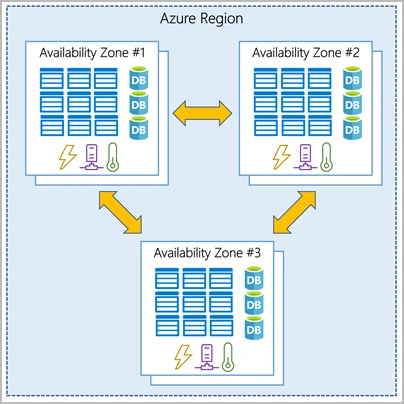
Independent power grids
Dedicated cooling systems
Distinct networking paths
Separate physical security controls
Azure guarantees a 99.99% VM uptime SLA for virtual machines deployed across availability zones.
Availability zones provide fault isolation for:
Compute (VMs using zone-aware or zone-redundant architecture)
Storage (ZRS/SZRS replication across zones)
Databases (Azure SQL zone-redundant mode)
Load balancing (Standard Load Balancer, zone redundant)
Connectivity between zones uses low-latency (<2ms), high-bandwidth fibre optic links to support synchronous replication for services requiring data consistency.

3. Azure Datacentres
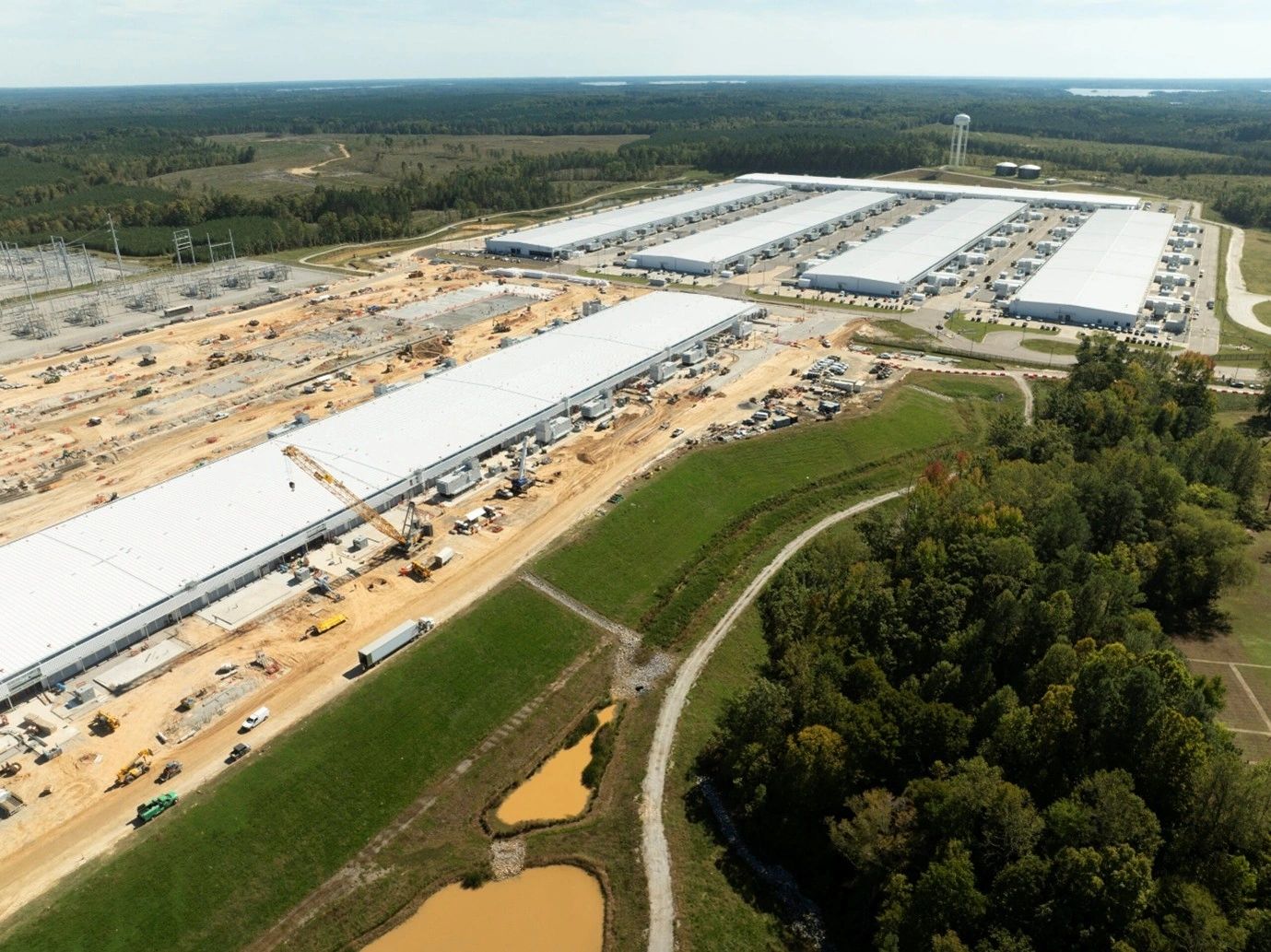
Azure datacentres form the physical foundation of the cloud. Each datacentre includes:
Large-scale server clusters with hyperconverged architectures
Redundant power via UPS and on-site generators
Multi-layer physical security (badging, biometrics, mantraps)
Precision cooling (free cooling, liquid cooling, hot/cold aisle containment)
Isolated network infrastructure for control plane and customer plane traffic
Microsoft categorizes datacentre infrastructure into:
Compute clusters
Storage stamps
Network fabrics with SDN
Azure customers do not interact with datacentres directly; instead, they deploy resources via region or zone abstractions.

4. Azure Resources and Resource Groups
Resources
A resource is any manageable component within Azure’s control plane. Examples:
Compute: VMs, VM Scale Sets, Kubernetes nodes
Storage: Storage accounts, disks, file shares
Networking: VNets, NICs, load balancers, NSGs
Databases: SQL Database, Cosmos DB, PostgreSQL Flexible Server
Identity: Managed identities, Key Vault
AI: Cognitive services
Resources are governed by:
Azure Resource Manager (ARM)
Role-based access control (RBAC)
Tags
Policies
Resource Groups (RGs)
Resource groups are logical containers for resources. They serve operational and organizational purposes.
Technical characteristics:
A resource belongs to exactly one resource group.
Resource groups cannot be nested.
Actions applied to an RG (e.g., delete) cascade to its resources.
RGs define the scope for RBAC delegation and Azure Policy assignments.
RG location determines metadata storage, not resource location.
Some resources can be moved across RGs and subscriptions, with restrictions.
Best practice: Group resources that share a common lifecycle (e.g., an application environment).
5. Azure Subscriptions
A subscription is the fundamental administrative, billing, and quota-boundary unit in Azure.
Key functions:
Represents a billing account for Azure consumption.
Provides a security boundary for RBAC authorization.
Defines service usage limits and quotas (e.g., VM cores, IP addresses).
Serves as a logical grouping for multiple resource groups.
Subscriptions are tied to an Azure AD tenant for identity management. One tenant can have many subscriptions.
Common design patterns:
Production vs. Non-production subscriptions
Workload-segmented subscriptions
Department- or cost-centre-based subscriptions
EA/MCA/Pay-as-you-go billing separation
6. Management Groups
Management groups are hierarchical containers used for governing and structuring multiple subscriptions. They provide the highest-level scope for:
Azure Policy
RBAC
Compliance enforcement
Standardized configuration baselines
Organizational governance
Characteristics:
Unlimited nesting depth (up to 6 levels supported).
All subscriptions inherit settings from their parent management groups.
Root management group provides top-level governance for the entire tenant.
Architectural governance examples:
Enforcing region restrictions (e.g., only allow deployments in approved regions)
Enforcing tagging standards
Applying security baselines
Restricting resource types
Centralizing global administrator access
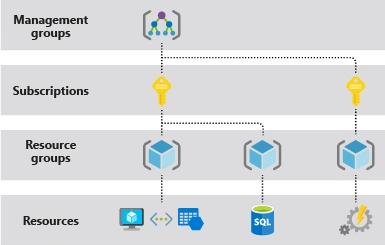
7. Azure Logical Hierarchy
Azure’s governance and resource structure is:

This layered model ensures:
Clear separation of responsibilities
Central governance
Policy-driven compliance
Scalable permissions management
Support for large enterprise architectures

Join the conversation! Your thoughts help the community grow.