

What is Kimi K2 Thinking
Kimi K2 Thinking is Moonshot AI’s latest and most powerful open‑source “thinking” model. It is designed as a smart agent that can think step by step and invoke different tools as it works.
This model is available in Microsoft Foundry as a Direct from Azure model, which means Microsoft hosts and manages it directly on Azure.
What does “Direct from Azure” mean
“Direct from Azure” models are a special set of models that Microsoft sells and manages itself.
They are secured and operated by Microsoft, so you get enterprise‑grade security, support, and reliability.
Billing, governance, and usage are all handled in one place inside Microsoft Foundry, which makes operations simpler.
You can easily try, deploy, or switch between models on the same platform as new models are added.
You can control costs with pay‑as‑you‑go or reserved capacity, depending on your needs.
Key capabilities of Kimi K2 Thinking
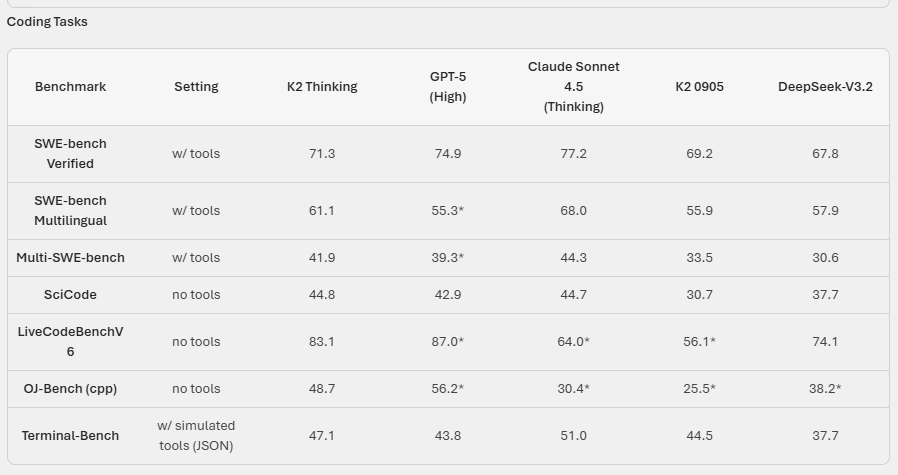
Kimi K2 Thinking focuses on deep reasoning and long, stable workflows.
Deep thinking and tool orchestration: It is trained to mix step‑by‑step reasoning (chain‑of‑thought) with function calls, so it can run long workflows for research, coding, or writing without losing track of the goal.
Native INT4 quantization: It uses a special low‑precision format (INT4) with Quantization‑Aware Training to speed up inference about 2x, without losing quality, and to save GPU memory.
Stable long-horizon agency: It can keep following the same objective across 200–300 tool calls in a row, while many older models start to break down after around 30–50 steps.
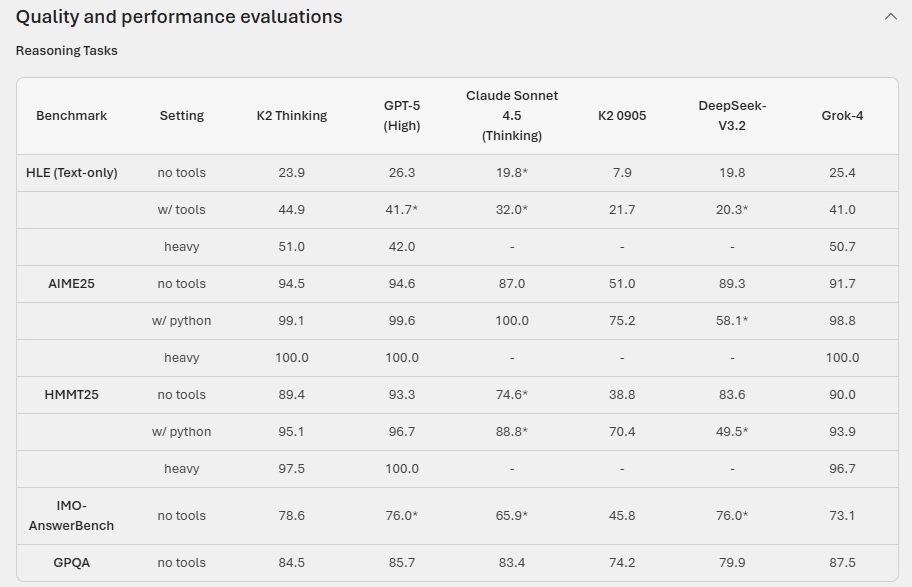
It also sets new state‑of‑the‑art results on benchmarks like Humanity’s Last Exam (HLE) and BrowseComp, which test difficult reasoning and multi‑step tool use.
Architecture and technical specs
Under the hood, Kimi K2 Thinking is a very large Mixture‑of‑Experts (MoE) model.
Total parameters: about 1 trillion, but only 32 billion are “active” for each token thanks to MoE routing.
It has 61 layers in total, with 1 dense layer and many expert layers.
It uses 64 attention heads, with hidden dimensions tuned for large‑scale reasoning.
There are 384 experts, and 8 experts are selected per token, plus 1 shared expert.
Context length is 256K tokens, so it can handle very long conversations or documents in one go.
Activation function is SwiGLU, and attention uses an MLA‑style mechanism.
Some details like training cut‑off date, training time, supported languages, and input/output formats are not provided in the catalog yet.
Kimi K2 Thinking API Compatibility
One of the key advantages of the Kimi K2 Thinking API is its seamless, drop-in compatibility with OpenAI’s API specifications, making migration effortless for existing applications. Developers can continue using the OpenAI Python or Node.js SDKs without modificationonly the base_url needs to be updated to Moonshot’s endpoint (https://api.moonshot.ai/v1) and the api_key replaced with a Kimi credential.
Because of this compatibility, services currently built on GPT endpoints can transition to Kimi K2 Thinking with minimal changes. There’s no need to refactor SDK calls or adapt to new request or response schemas. For example, a standard chat completion request works the same way, requiring only the endpoint and key swap.
from openai import OpenAI

client = OpenAI(
    api_key="your_kimi_api_key",
    base_url="https://api.moonshot.ai/v1"
)

response = client.chat.completions.create(
    model="kimi-k2-thinking",
    messages=[{"role": "user", "content": "Explain quantum entanglement."}]
)

Pricing and responsible AI
Pricing for Kimi K2 Thinking depends on things like deployment type and how many tokens you use, and Microsoft provides a separate pricing page for Moonshot AI models.
From a safety point of view, this model can sometimes produce content that triggers Microsoft’s Protected Material Detection filters.
In Microsoft Foundry, prompts and responses are automatically passed through default safety classifiers to reduce harmful content.
Microsoft recommends using the Protected Material Detection filter with this model and doing proper testing and monitoring before and after going live.
Customers must follow the Microsoft Enterprise AI Services Code of Conduct when using it.
Join the conversation! Your thoughts help the community grow.