

Introduction
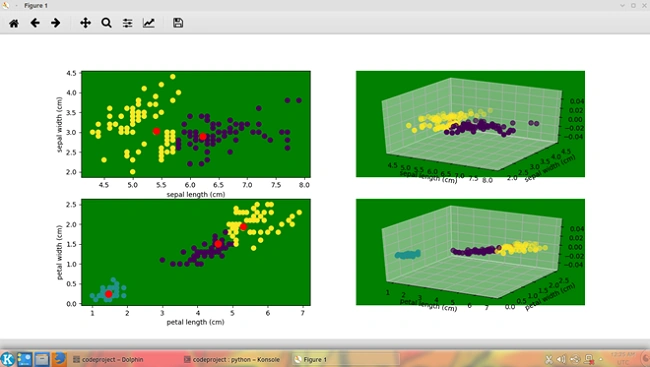
This article is about clustering using Python. In this article, we will look into two different methods of clustering. The first is KMeans clustering and the second is MeanShift clustering. KMeans clustering is a data mining application that partitions n observations into k clusters. Each observation belongs to the cluster with the nearest mean. In the KMeans clustering, you can specify the number of clusters to be generated, whereas in the MeanShift clustering, the number of clusters is automatically detected based on the number of density centers found in the data. The MeanShift algorithm shifts data points iteratively towards the mode, which is the highest density of data points. It is also called the mode-seeking algorithm.
Background
The KMeans clustering can be achieved using the KMeans class in sklearn.cluster. Some of the parameters of KMeans are as follows:
- n_clusters: The number of clusters as well as centroids to be generated. Default is 8.
- n_jobs: The number of jobs to be run in parallel. -1 means to use all processors. Default is None.
- n_init: The number of times the algorithm should run with different centroid seeds. Default is 10.
- verbose: Displays information about the estimation if set to 1.
The MeanShift clustering can be achieved using the MeanShift class in sklearn.cluster. Some of the parameters of MeanShift are as follows:
- n_jobs: The number of jobs to be run in parallel. -1 means to use all processors. Default is None.
- bandwidth: The bandwidth to be used. If not specified, it is estimated using sklearn.estimate_bandwidth.
- verbose: Displays information about the estimation if set to 1.
To demonstrate clustering, we can use the sample data provided by the iris dataset in sklearn.cluster package. The iris dataset consists of 150 samples (50 each) of 3 types of iris flowers (Setosa, Versicolor and Virginica) stored as a 150x4 numpy.ndarray. The rows represent the samples and the columns represent the Sepal Length, Sepal Width, Petal Length and Petal Width.
Using the Code
To implement clustering, we can use the sample data provided by the iris dataset.
First, we will see the implementation of the KMeans clustering.
We can load the iris dataset as follows:
- from sklearn import datasets
- iris=datasets.load_iris()
Then, we need to extract the sepal and petal data as follows:
- sepal_data=iris.data[:,:2]
- petal_data=iris.data[:,2:4]
Then, we create two KMeans objects and fit the sepal and petal data as follows:
- from sklearn.cluster import KMeans
- km1=KMeans(n_clusters=3,n_jobs=-1)
- km1.fit(sepal_data)
- km2=KMeans(n_clusters=3,n_jobs=-1)
- km2.fit(petal_data)
The next step is to determine the centroids and labels of the sepals and petals.
- centroids_sepals=km1.cluster_centers_
- labels_sepals=km1.labels_
- centroids_petals=km2.cluster_centers_
- labels_petals=km2.labels_
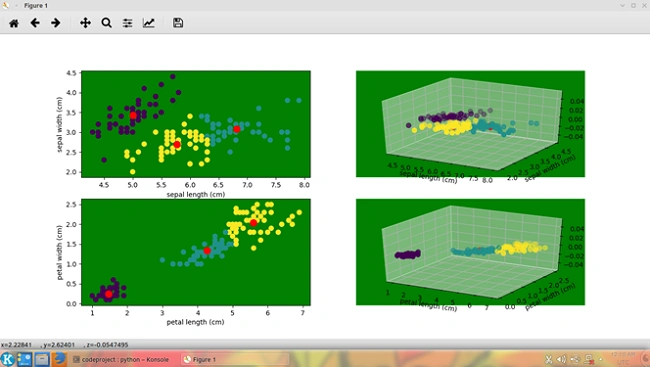
In order to visualize the clusters, we can create scatter plots representing the sepal and petal clusters.
For that, first we create a figure object as follows:
- import matplotlib.pyplot as plt
- from mpl_toolkits.mplot3d import Axes3D
- fig=plt.figure()
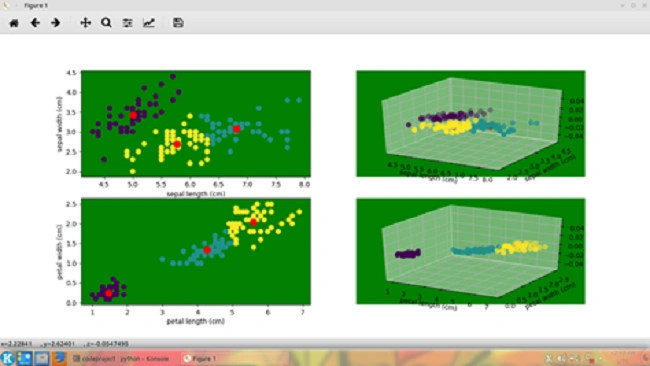
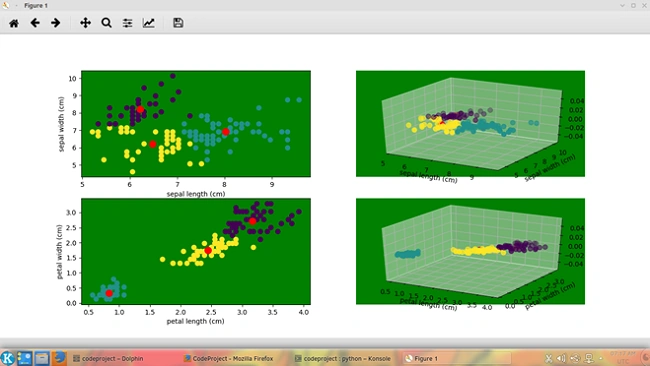
We can create four subplots to show the sepal data in two dimensions and three dimensions. The subplots are created as a 2 by 2 matrix with the first row representing the sepal information and the second row representing the petal information. The first column of each row shows a 2-dimensional scatter chart and the second column shows a 3-dimensional scatter chart. The first two digits of the first parameter of the add_subplot() function represent the number of rows and number of columns and the third digit represents the sequence number of the current subplot. The second (optional) parameter represents the projection mode.
- ax1=fig.add_subplot(221)
- ax2=fig.add_subplot(222,projection="3d")
- ax3=fig.add_subplot(223)
- ax4=fig.add_subplot(224,projection="3d")
To plot the scatter chart (data and centroids), we can use the following code:
- ax1.scatter(sepal_data[:,0],sepal_data[:,1],c=labels_sepals,s=50)
- ax1.scatter(centroids_sepals[:,0],centroids_sepals[:,1],c="red",s=100)
- ax2.scatter(sepal_data[:,0],sepal_data[:,1],c=labels_sepals,s=50)
- ax2.scatter(centroids_sepals[:,0],centroids_sepals[:,1],c="red",s=100)
- ax3.scatter(petal_data[:,0],petal_data[:,1],c=labels_petals,s=50)
- ax3.scatter(centroids_petals[:,0],centroids_petals[:,1],c="red",s=100)
- ax4.scatter(petal_data[:,0],petal_data[:,1],c=labels_petals,s=50)
- ax4.scatter(centroids_petals[:,0],centroids_petals[:,1],c="red",s=100)
Join the conversation! Your thoughts help the community grow.