

Introduction
In this article you will see how to detect the language using a NINTEX workflow in SharePoint 2013 Online.
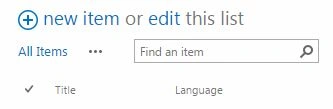
Bing language detection is a new action introduced in NINTEX workflow for SharePoint 2013 that can be added from the NINTEX store. Using this action the language can be detected. To explain this action I have created a custom list with the following columns.
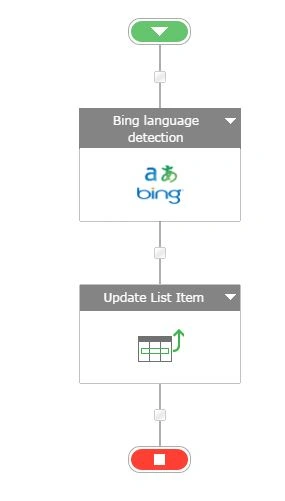
Workflow Design
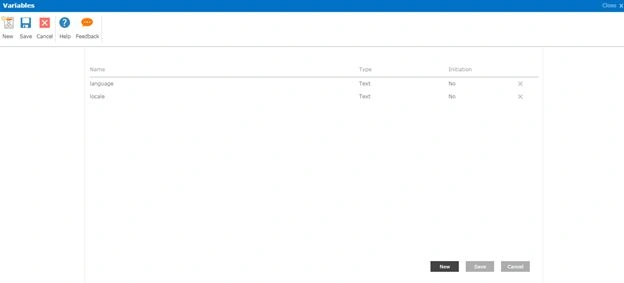
Workflow Variables
Use the following procedure to create a Language Detection Workflow:
- Navigate to the Office 365 site (https://c986.sharepoint.com/).
- Click on the custom list link in the quick launch bar. Click on the List tab and then click on the NINTEX Workflow button in the ribbon interface.

- Drag and drop a Bing language detection action from the Integration section.
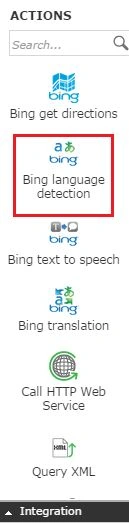
- Click on the down arrow and then click on Configure.
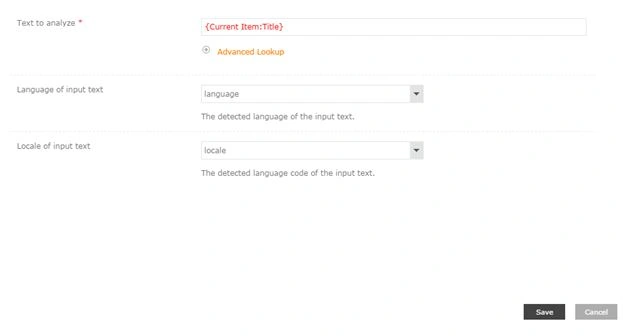
- Select the Text to analyze (select current item Title field) and the Language of input text. Store the value in a workflow variable “language” and the Locale of the input text. Store the value in a workflow variable “locale”. Click on the Save button.
- Drag and drop an Update list item action from the Libraries and Lists section.
- Click on the down arrow and then click on Configure.
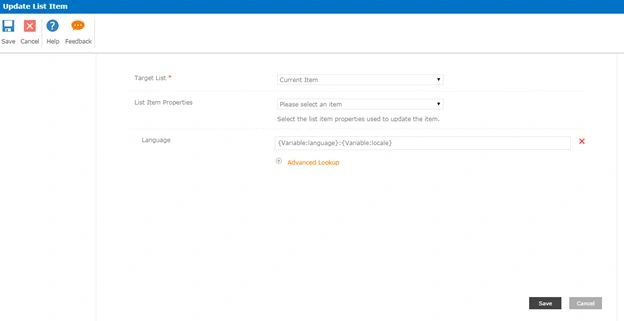
- Set the value for the current item “Language” field.
- Click on the Save button.
Publish the Workflow
- Click on the Publish button in the ribbon interface.
- Make sure the Title is set; optionally you can set the values for Description. Select the Task List, History List and Start options.
The following describes the Start Options in the Publish Window.
- Click on the Publish button. Workflow will be validated.

- The workflow is published successfully.

Test the Workflow
- Navigate to the custom list
- Select the item and then click on Workflows in the ribbon interface.

- Click on Language Detection Workflow and then click on the Start button.
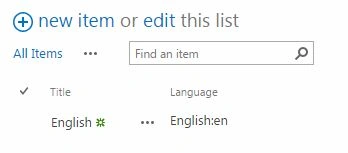
- After a few minutes the language will be detected for the value entered in the “Title” field and it will be updated in the “Language Detection” field as shown below:
Summary
Thus in this article you saw how to detect language using a NINTEX workflow in SharePoint 2013 Online.
SriramPosted Jul 2, 2015, 5:42 AM
Excellent