

Introduction
Today we will make a language translator. Language translators are very important, especially for people who travel abroad. This app allows users to speak any language the user wants without even knowing that language.
In this app, the user will enter the text that he/she wants to convert. The user will get the translated text on a button click. The user will not only be able to read but hear the translated text.
Step 1
We will be using Microsoft Translator for this. Prior to making this app, you will need to register yourself in the "Microsoft Marketplace". For registering, visit http://blogs.msdn.com/b/translation/p/gettingstarted1.aspx. We will be using the "Client ID" and "Client Secret" provided in this app.
Step 2
Download the "microsoft-translator-java-api-0.6.1-jar-with-dependenciesjar" file provided in "library.rar" above.
Include this jar as a library in the Eclipse project for your language translator.
Step 3
"string.xml" used in this app is:
- <?xml version="1.0" encoding="utf-8"?>
- <resources>
- <string name="app_name">LangTranslatoeFinal</string>
- <string name="action_settings">Settings</string>
- <string name="hello_world">Hello world!</string>
- <string name="choose_lang">Choose Language</string>
- <string-array name="lang">
- <item>ENGLISH</item>
- <item>FRENCH</item>
- <item>GERMAN</item>
- <item>ITALIAN</item>
- </string-array>
- </resources>
Step 4
Open "activity_main" and add the following code to it:
- <RelativeLayout xmlns:android="http://schemas.android.com/apk/res/android"
- xmlns:tools="http://schemas.android.com/tools"
- android:layout_width="match_parent"
- android:layout_height="match_parent"
- android:background="#ffd088">
- <EditText
- android:id="@+id/text"
- android:layout_width="wrap_content"
- android:layout_height="wrap_content"
- android:layout_alignParentTop="true"
- android:layout_centerHorizontal="true"
- android:layout_marginTop="31dp"
- android:ems="10" >
- <requestFocus />
- </EditText>
- <LinearLayout
- android:layout_height="wrap_content"
- android:layout_width="fill_parent"
- android:orientation="vertical" >
- <TextView
- android:id="@+id/translatedtext"
- android:layout_width="wrap_content"
- android:layout_height="wrap_content"
- android:layout_below="@+id/etUserText"
- android:layout_centerHorizontal="true"
- android:layout_marginTop="168dp"
- android:text=""
- android:layout_marginLeft="90dp"
- android:textAppearance="?android:attr/textAppearanceLarge" />
- <Spinner
- android:id="@+id/selectLanguage"
- android:layout_width="wrap_content"
- android:layout_height="wrap_content"
- android:layout_below="@+id/etUserText"
- android:layout_centerHorizontal="true"
- android:layout_marginTop="50dp"
- android:prompt="@string/choose_lang"
- android:entries="@array/lang"
- android:layout_marginLeft="90dp"/>
- <Button
- android:id="@+id/say"
- android:layout_width="wrap_content"
- android:layout_height="wrap_content"
- android:layout_below="@+id/tvTranslatedText"
- android:layout_centerHorizontal="true"
- android:layout_marginTop="46dp"
- android:text="Say"
- android:background="@drawable/button_lay"
- android:layout_marginLeft="100dp" />
- </LinearLayout>
- </RelativeLayout>
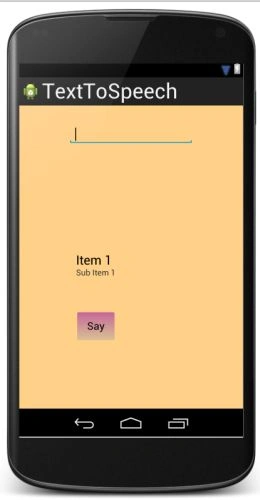
EditText will take the text from the user that needs to be converted.
TextView will display the translated text.
Spinner is for the user to choose the language in which he/she wants to translate the entered text.
Button click will display the translated text and voice.
The layout looks like:
Step 5
Open "MainActivity" and add the following code to it:
- package com.chhavi.langtranslatoefinal;
- import java.util.Locale;
- import android.app.Activity;
- import android.content.Intent;
- import android.os.AsyncTask;
- import android.os.Bundle;
- import android.speech.tts.TextToSpeech;
- import android.util.Log;
- import android.view.Menu;
- import android.view.View;
- import android.view.View.OnClickListener;
- import android.widget.Button;
- import android.widget.EditText;
- import android.widget.Spinner;
- import android.widget.TextView;
- import android.widget.Toast;
- import com.memetix.mst.language.Language;
- import com.memetix.mst.translate.Translate;
- public class MainActivity extends Activity implements TextToSpeech.OnInitListener {
- private int check_code = 0;
- Spinner lang;
- Button say;
- EditText text;
- TextView translatedText;
- String original=null;
- String translated=null;
- String langSelected;
- private TextToSpeech convert;
- @Override
- protected void onCreate(Bundle savedInstanceState) {
- super.onCreate(savedInstanceState);
- setContentView(R.layout.activity_main);
- lang=(Spinner)findViewById(R.id.selectLanguage);
- say=(Button)findViewById(R.id.say);
- text=(EditText)findViewById(R.id.text);
- translatedText=(TextView)findViewById(R.id.translatedtext);
- Intent check = new Intent();
- check.setAction(TextToSpeech.Engine.ACTION_CHECK_TTS_DATA);
- startActivityForResult(check, check_code);
- say.setOnClickListener(new OnClickListener() {
- @Override
- public void onClick(View v) {
- class bgStuff extends AsyncTask<Void, Void, Void>{
- @Override
- protected Void doInBackground(Void... params) {
- // TODO Auto-generated method stub
- Translate.setClientId("CLIENT ID"); //Change this
- Translate.setClientSecret("CLIENT SECRET"); //Change this
- Log.i("calling....................","speak");
- original=text.getText().toString();
- Log.i("Original Text is.............",original);
- langSelected=String.valueOf(lang.getSelectedItem());
- Log.i("Language selected.........",langSelected);
- if (text!=null && text.length()>0) {
- try
- {
- if(langSelected.equalsIgnoreCase("ENGLISH"))
- {
- convert.setLanguage(Locale.US);
- translated = Translate.execute(original, Language.ENGLISH);
- Log.i("translated text................", translated);
- }
- else if(langSelected.equalsIgnoreCase("GERMAN"))
- {
- convert.setLanguage(Locale.GERMAN);
- translated = Translate.execute(original, Language.GERMAN);
- Log.i("translated text................", translated);
- }
- else if(langSelected.equalsIgnoreCase("FRENCH"))
- {
- convert.setLanguage(Locale.FRENCH);
- translated = Translate.execute(original, Language.FRENCH);
- Log.i("translated text................", translated);
- }
- else if(langSelected.equalsIgnoreCase("ITALIAN"))
- {
- convert.setLanguage(Locale.ITALIAN);
- translated = Translate.execute(original, Language.ITALIAN);
- Log.i("translated text................", translated);
- }
- }
- catch(Exception e)
- {
- Log.i("Error in translation.........",e.toString());
- }
- }
- return null;
- }
- @Override
- protected void onPostExecute(Void result) {
- translatedText.setText(translated);
- Toast.makeText(MainActivity.this, "Saying: " + translated, Toast.LENGTH_LONG).show();
- convert.speak(translated, TextToSpeech.QUEUE_ADD, null);
- }
- }
- new bgStuff().execute();
- }
- });
- }
- @Override
- public boolean onCreateOptionsMenu(Menu menu) {
- // Inflate the menu; this adds items to the action bar if it is present.
- getMenuInflater().inflate(R.menu.main, menu);
- return true;
- }
- protected void onActivityResult(int requestCode, int resultCode, Intent data) {
- if (requestCode == check_code) {
- if (resultCode == TextToSpeech.Engine.CHECK_VOICE_DATA_PASS) {
- // success, create the TTS instance
- convert = new TextToSpeech(this, this);
- }
- else {
- // missing data, install it
- Intent installIntent = new Intent();
- installIntent.setAction(TextToSpeech.Engine.ACTION_INSTALL_TTS_DATA);
- startActivity(installIntent);
- }
- }
- }
- @Override
- public void onInit(int status) {
- if (status == TextToSpeech.SUCCESS) {
- Toast.makeText(MainActivity.this,"Engine is initialized", Toast.LENGTH_LONG).show();
- int result = convert.setLanguage(Locale.GERMAN);
- if (result == TextToSpeech.LANG_MISSING_DATA || result == TextToSpeech.LANG_NOT_SUPPORTED) {
- Log.i("TTS", "This Language is not supported");
- }
- else {
- //speakOut("Ich");
- Log.i("TTS", "This Language is supported");
- }
- }
- else if (status == TextToSpeech.ERROR) {
- Toast.makeText(MainActivity.this,"Error occurred while initializing engine", Toast.LENGTH_LONG).show();
- }
- }
- }
Text-To-Speech (TTS), also known as "speech synthesis", enables your Android device to "speak" text of various languages. The TextToSpeech engine supports many languages, like English, Spanish, German, Italian and so on.
In the code above, convert is an object of TextToSpeech.
The "convert.setLanguage" function will allow you to produce the voice in the accent of the specified country. Some languages are spoken with a different accent in different countries. You will clearly be able to see what difference it makes if you use this without the Translate.execute function.
The "Translate.execute" function performs language translation.
The "convert.speak" function will produce the voice.
Note that the code above will not work until and unless you give your "CLIENT ID" and "CLIENT SECRET" provided to you during registration, in "Translate.setClientId" and "Translate.setClientSecret" respectively.
Step 6
Add the internet permission in "AndroidManifest.xml" as in the following:
- <?xml version="1.0" encoding="utf-8"?>
- <manifest xmlns:android="http://schemas.android.com/apk/res/android"
- package="com.chhavi.langtranslatoefinal"
- android:versionCode="1"
- android:versionName="1.0" >
- <uses-permission android:name="android.permission.INTERNET"/>
- <uses-sdk
- android:minSdkVersion="8"
- android:targetSdkVersion="17" />
- <application
- android:allowBackup="true"
- android:icon="@drawable/ic_launcher"
- android:label="@string/app_name"
- android:theme="@style/AppTheme" >
- <activity
- android:name="com.chhavi.langtranslatoefinal.MainActivity"
- android:label="@string/app_name" >
- <intent-filter>
- <action android:name="android.intent.action.MAIN" />
- <category android:name="android.intent.category.LAUNCHER" />
- </intent-filter>
- </activity>
- </application>
- </manifest>
Output snapshots:
Run this application on an Android phone.
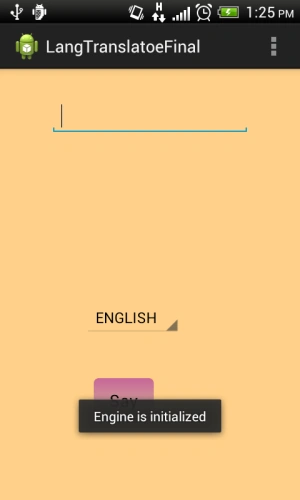
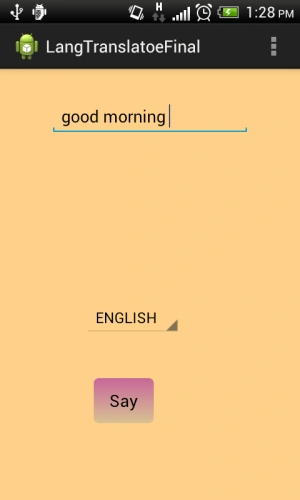
Enter the text.
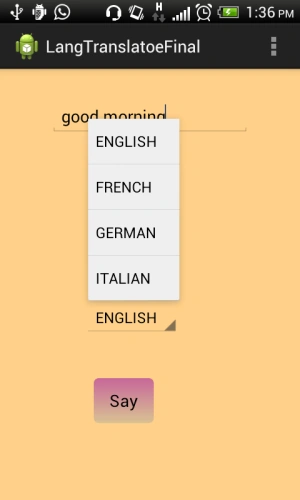
Clicking on the Spinner will give you the following language list:
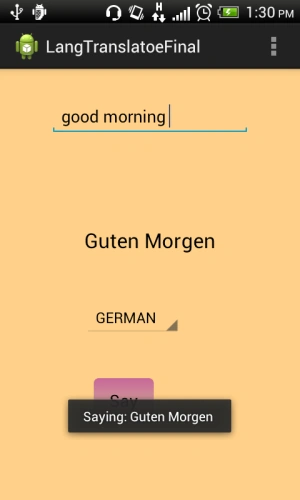
Choosing "German" from the spinner and clicking on the "Say" button will give you (note that you will hear the translated text at this time):
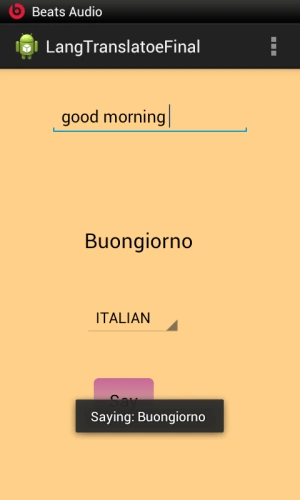
Translating into "Italian":
Translating into "French":
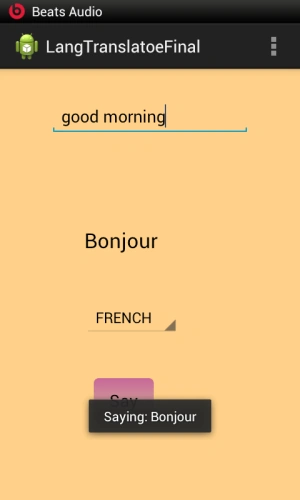
Similarly, you can type text in any of these languages and get the translated text in the required language.
Summary
In this article, you learned two things: how to convert text to speech (accent taken care of) and how to translate text into some other language.
Thank you....... Enjoy coding :)
Sufyan QadeerPosted Dec 18, 2017, 1:09 AM
Can you tell how we can convert the Urdu text into speech in android?
Arnab DasPosted Nov 11, 2015, 10:54 AM
import com.memetix.mst.language.Language;import com.memetix.mst.translate.Translate; THESE TWO LINES ARE SHOWING ERRORS
Bhaskar SaurabhPosted Apr 23, 2015, 4:06 PM
Language is not converting in any one of the list and TTS is also not working. What changes should i do??
محمود جمال الدينPosted Mar 29, 2015, 11:04 PM
is there is arabic ?