

Introduction
This article explains the Box and Group layout managers, in Java.
Layout Managers
Go through the following link for the layout managers, discussed in the past.
Now, let's discuss further layout managers.
Box layout manager
This layout manager is used to arrange the components, either vertically or horizontally, in a container. For this, it provides four constants that are found in the javax.swing package.
The four constants are as follows:
- public static final int X_AXIS
- public static final int Y_AXIS
- public static final int LINE_AXIS
- public static final int PAGE_AXIS
Example (X_AXIS)
- import javax.swing.*;
- import java.awt.*;
- import java.awt.event.*;
- public class BoxLayoutDemo extends JFrame {
- public BoxLayoutDemo() {
- super("Demostrating BoxLayout");
- final int SIZE = 3;
- Container c = getContentPane();
- c.setLayout(new BorderLayout(30, 30));
- Box boxes[] = new Box[4];
- boxes[0] = Box.createHorizontalBox();
- boxes[1] = Box.createVerticalBox();
- boxes[2] = Box.createHorizontalBox();
- boxes[3] = Box.createVerticalBox();
- for (int i = 0; i < SIZE; i++)
- boxes[0].add(new JButton("boxes[0]: " + i));
- for (int i = 0; i < SIZE; i++) {
- boxes[1].add(Box.createVerticalStrut(25));
- boxes[1].add(new JButton("boxes[1]: " + i));
- }
- for (int i = 0; i < SIZE; i++) {
- boxes[2].add(Box.createHorizontalGlue());
- boxes[2].add(new JButton("boxes[2]: " + i));
- }
- for (int i = 0; i < SIZE; i++) {
- boxes[3].add(Box.createRigidArea(new Dimension(12, 8)));
- boxes[3].add(new JButton("boxes[3]: " + i));
- }
- JPanel panel = new JPanel();
- panel.setLayout(new BoxLayout(panel, BoxLayout.Y_AXIS));
- for (int i = 0; i < SIZE; i++) {
- panel.add(Box.createGlue());
- panel.add(new JButton("panel: " + i));
- }
- c.add(boxes[0], BorderLayout.NORTH);
- c.add(boxes[1], BorderLayout.EAST);
- c.add(boxes[2], BorderLayout.SOUTH);
- c.add(boxes[3], BorderLayout.WEST);
- c.add(panel, BorderLayout.CENTER);
- setSize(400, 400);
- show();
- }
- public static void main(String args[]) {
- BoxLayoutDemo app = new BoxLayoutDemo();
- app.addWindowListener(new WindowAdapter() {
- public void windowClosing(WindowEvent e) {
- System.exit(0);
- }
- });
- }
- }
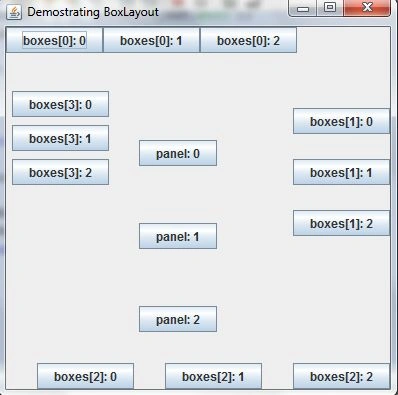
Output
Example (Y_AXIS)
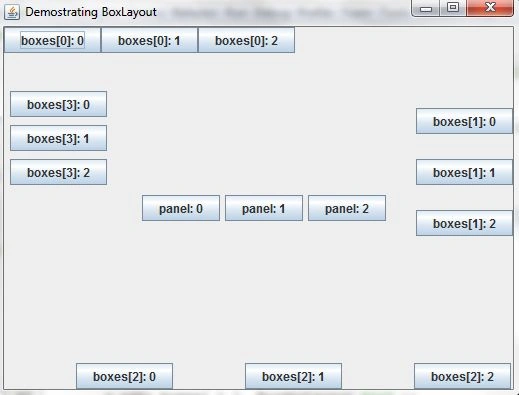
For the BoxLayout class with Y_AXIS, we need to edit the line of code, as in the following:
- new BoxLayout(panel, BoxLayout.Y_AXIS));
- arrow
- new BoxLayout(panel, BoxLayout.X_AXIS));
Output
Group Layout manager
This layout manager is used to arrange the group components hierarchically, to position them in a container. This is also found in the javax.swing package.
It contains the following two fields:
- static int DEFAULT_SIZE
- static int PREFERRED_SIZE
Example
- import java.awt.*;
- import java.awt.event.*;
- import javax.swing.*;
- public class GroupLayoutDemo {
- private JFrame mainFrame;
- private JLabel headerLabel;
- private JLabel statusLabel;
- private JPanel controlPanel;
- private JLabel msglabel;
- public GroupLayoutDemo() {
- prepareGUI();
- }
- public static void main(String[] args) {
- GroupLayoutDemo swingLayoutDemo = new GroupLayoutDemo();
- swingLayoutDemo.showGroupLayoutDemo();
- }
- private void prepareGUI() {
- mainFrame = new JFrame("GroupLayout Manager");
- mainFrame.setSize(400, 400);
- mainFrame.setLayout(new GridLayout(3, 1));
- headerLabel = new JLabel("", JLabel.CENTER);
- statusLabel = new JLabel("", JLabel.CENTER);
- statusLabel.setSize(350, 100);
- mainFrame.addWindowListener(new WindowAdapter() {
- public void windowClosing(WindowEvent windowEvent) {
- System.exit(0);
- }
- });
- controlPanel = new JPanel();
- controlPanel.setLayout(new FlowLayout());
- mainFrame.add(headerLabel);
- mainFrame.add(controlPanel);
- mainFrame.add(statusLabel);
- mainFrame.setVisible(true);
- }
- private void showGroupLayoutDemo() {
- headerLabel.setText("Demonstration: GroupLayout Manager");
- JPanel panel = new JPanel();
- panel.setSize(200, 200);
- GroupLayout layout = new GroupLayout(panel);
- layout.setAutoCreateGaps(true);
- layout.setAutoCreateContainerGaps(true);
- JButton btn1 = new JButton("Button 1");
- JButton btn2 = new JButton("Button 2");
- JButton btn3 = new JButton("Button 3");
- layout.setHorizontalGroup(layout.createSequentialGroup().addComponent(btn1).addGroup(layout.createSequentialGroup().addGroup(layout.createParallelGroup(GroupLayout.Alignment.CENTER).addComponent(btn2))).addGroup(layout.createSequentialGroup().addGroup(layout.createParallelGroup(GroupLayout.Alignment.CENTER).addComponent(btn3))));
- layout.setVerticalGroup(layout.createSequentialGroup().addComponent(btn1).addComponent(btn2).addComponent(btn3));
- panel.setLayout(layout);
- controlPanel.add(panel);
- mainFrame.setVisible(true);
- }
- }
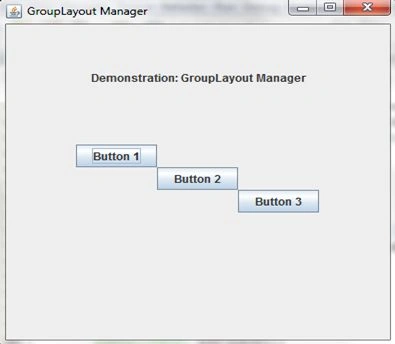
Output
Wait for further content…
Join the conversation! Your thoughts help the community grow.