

Introduction
Lazy loading is a technique which loads the data on demand or when it is required. It improves efficiency and the performance of the application. Let's take a scenario, where we have 1 lakh of records and want to display them to the user. However, when you load 1 lakh of records at a time, it takes more time to render the result. It may be off putting to the user, while loading the records. In order to avoid the problem, either we need to use paging concept or lazy loading. Lazy loading loads the data step-by-step, when the user scrolls down the page, which is required by it.
Requirement- We have 500 records in our DataSource (text file or the database). It displays 20 records, when the page loads the first time. It displays the next records, when the user scroll down the page.
Using Code
To describe technically the requirement stated above, we will use DataSource as a text file, which has 500 records. Subsequently, controller's action loads 20 records for the first time. When the user scrolls down, it sends an AJAX request to the Server to load the next records. JavaScript code snippet checks when the user scrolls down by checking Window height and scroll height. The snapshot is gif project structure and follows the steps given below.
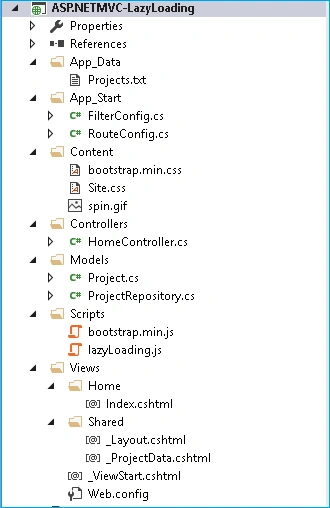
Figure 1: Project structure of Lazy Loading
Model
Let's design Project entity. It contains properties, which are ID, Name, ManagerName and Email.
- public class Project
- {
- public string ID { get; set; }
- public string Name { get; set; }
- public string ManagerName { get; set; }
- public string Email { get; set; }
- }
Now, it loads the data from the text file, which contains all the project related information. After getting the text file contents, it loops over line by line and creates new project object with the required properties.
- public List<Project> GetProjectList()
- {
- string projectFile = HostingEnvironment.MapPath("~/App_Data/Projects.txt");
- List<Project> tempList = new List<Project>();
- foreach (string line in File.ReadAllLines(projectFile))
- {
- var parts = line.Split('|');
- tempList.Add(new Project()
- {
- ID = parts[0],
- Name = parts[1],
- ManagerName= parts[2],
- Email = parts[3]
- });
- }
- return tempList;
- }
It contains the actions given below.
- Index()
It is the default action, when we browse home controller and it redirects to GetProject() action. - GetProjects()
This function checks whether it is simple AJAX request. If it is yes, it returns the data with Partial View, else it returns the data through ViewBag. - GetRecordsForPage()
It receives the page number as the parameter. It uses LINQ to get the required no of records data from DataSource.
- public const int RecordsPerPage = 20;
- public List<Project> ProjectData;
- public HomeController()
- {
- ViewBag.RecordsPerPage = RecordsPerPage;
- }
- public ActionResult Index()
- {
- return RedirectToAction("GetProjects");
- }
- public ActionResult GetProjects(int? pageNum)
- {
- pageNum = pageNum ?? 0;
- ViewBag.IsEndOfRecords = false;
- if (Request.IsAjaxRequest())
- {
- var projects = GetRecordsForPage(pageNum.Value);
- ViewBag.IsEndOfRecords = (projects.Any());
- return PartialView("_ProjectData", projects);
- }
- else
- {
- var projectRep = new ProjectRepository();
- ProjectData = projectRep.GetProjectList();
- ViewBag.TotalNumberProjects = ProjectData.Count;
- ViewBag.Projects = GetRecordsForPage(pageNum.Value);
- return View("Index");
- }
- }
- public List<Project> GetRecordsForPage(int pageNum)
- {
- var projectRep = new ProjectRepository();
- ProjectData = projectRep.GetProjectList();
- int from = (pageNum * RecordsPerPage);
- var tempList = (from rec in ProjectData
- select rec).Skip(from).Take(20).ToList<Project>();
- return tempList;
- }
To define Views module, we will discuss about _Layout.cshtml, Index.cshtml and _Projectdata.cshtml.
_Layout.cshtml
It acts as a master page, which maintains consistent layout. In header section, it injects all common js and css files. In body section, it has RenderBody(), where child page content will render. This page reference is added in _ViewStart.cshtml page (Layout = "~/Views/Shared/_Layout.cshtml").
- <!DOCTYPE html>
- <html>
- <head>
- <meta charset="utf-8" />
- <meta name="viewport" content="width=device-width, initial-scale=1.0">
- <title>@ViewBag.Title</title>
- <script src="~/Scripts/jquery-1.10.2.min.js"></script>
- <script src="https://ajax.googleapis.com/ajax/libs/jquery/3.1.1/jquery.min.js"></script>
- <script src="~/Scripts/bootstrap.min.js"></script>
- <link href="~/Content/bootstrap.min.css" rel="stylesheet" />
- <link href="~/Content/Site.css" rel="stylesheet" />
- </head>
- <body>
- <div class="container body-content">
- @RenderBody()
- <hr />
- <div id="loading">
- <img src='~/Content/spin.gif' /><p style="color: red;"><b>Loading Next...</b></p>
- </div>
- <footer>
- <p>Copyright© @DateTime.Now.Year </p>
- </footer>
- </div>
- @RenderSection("scripts", required: false)
- </body>
- </html>
Varun SetiaPosted Jul 26, 2020, 2:51 AM
This is very helpful :)
Manoj KumarPosted Feb 4, 2020, 6:52 AM
This artical not working properly
Casper LaustsenPosted Nov 25, 2019, 11:46 AM
I had a problem with scrollHandler not stopping. if (data != '') did not return false, but if ($.trim(data) != '') does.
Ismail PenekliPosted Jan 15, 2019, 3:23 AM
Hi guys, thats nice article Manas thanks. I suggest updating the code to run more efficiently like this;var scrollHandler = function () { if (isReachedScrollEnd == false && ($(document).height() - $(this).height() - 100 < $(this).scrollTop())) { loadProjectData(url); } } The above code tells when the user’s scroll bar is under 100 pixels from the bottom.
Muzafar HasanPosted Nov 30, 2018, 7:01 AM
You are loading all of the data from datasource if we have millions of record it can become non-reponsive, your soultion is simple and working
MrnamsPosted Oct 10, 2018, 12:33 AM
Hello experts,I want to implement load more button for my website ,https://mrnams.com Can any one please give idea how to implement load more button to load more videos without refreshing (I mean without loosing loaded videos) page. Similar to YouTube functionality. I am using .net core 2.1 version
Kirubakara GPosted Mar 1, 2018, 7:41 AM
For every scroll server hit is happening. It must happen at the end of paging right?
madhubabu chintaPosted Jan 31, 2018, 2:38 AM
Can we use the lazyloading.js file in our project ? is it a open source ?
test enginePosted Mar 17, 2017, 10:54 AM
Sorry, I have added a height to 1000px to see the scroll bar it's working. .
test enginePosted Mar 17, 2017, 10:46 AM
I have downloaded the project and I have executed the application, Why is the scroll bar missing from the page ?
Fabio Silva LimaPosted Dec 31, 2016, 11:56 AM
Great article. Just for everyonr knows that solution works no just only with mvc... congratulations :)