

Introduction
- Arduino Mega 2560
- LDR
- LED
- BreadBoard
- Resistor
- Hookup wires
LDR
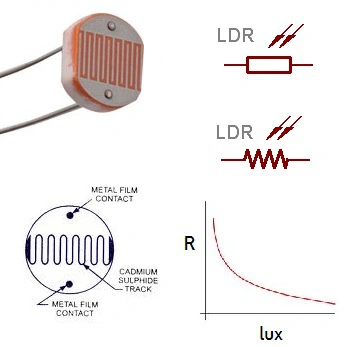
Figure 1: LRD
- Light Dependent Resistor (LDR): it will measure the light level.
- It will sense the light level.
Connection
Step 1: Connection From The LDR To Arduinomega2560.
- Take the positive pin connected to the Analog pin of A1 and also connect to the resistor with the positive pin connected with the Gnd.
- The negative pin can be connected to the 5v of the Arduino Mega 2560.
Step 2: Connection From The LED To Arduino Mega 2560
- Positive pin = 11
- Negative pin = Gnd.
Programming

- int LDR=A1;
- int led=11;
- int ldr reading=0;
- void setup()
- {
- pinMode(led,OUTPUT);
- Serial.begin(9600);
- }
- void loop()
- {
- ldr reading=analogRead(LDR);
- if(value < 800)
- {
- digitalWrite(led,HIGH);
- }
- else
- {
- digitalWrite(led,LOW);
- }
- Serial.println(ldr reading);
- delay(200);
- }
Explanation
In this article, I have explained about the light measuring level when the light has a low level, or at the high level, it will display in the serial monitor.
Output
Figure 2: Output
Read more articles on the Internet of Things:
Salman FarisPosted May 10, 2016, 8:07 AM
sir , when look to the code there is an declaration error in line-03 {int ldr reading=0;}. and also some syntax errors , i rebuild the code and its working but does not show the percentage of the light level. /////////////////////////////////////////////////////////////////////////////////////////////////////////////////////////////////////////////// int LDR=A1; int led=11; int ldr_reading=0; void setup() { pinMode(led,OUTPUT); Serial.begin(9600); } void loop() { ldr_reading = analogRead(LDR); if(ldr_reading < 800) { digitalWrite(led,HIGH); } else { digitalWrite(led,LOW); } Serial.println(ldr_reading); delay(200); } ////////////////////////////////////////////////////////////////////////////////////////////////////////////////////////////////////////////
Sr KarthigaPosted Apr 19, 2016, 7:15 AM
"thank you gowtham rajamanickam sir"
Gowtham RajamanickamPosted Apr 19, 2016, 6:39 AM
nice share
Sr KarthigaPosted Feb 29, 2016, 7:48 PM
thank you asfend sir
Asfend YarPosted Feb 29, 2016, 2:20 PM
good
Sr KarthigaPosted Feb 20, 2016, 7:55 PM
Thank you sibeesh sir
Sibeesh VenuPosted Feb 18, 2016, 12:10 AM
Nice Share
Sr KarthigaPosted Feb 16, 2016, 11:45 PM
Thank you raja sir
Raja TPosted Feb 16, 2016, 11:06 PM
Nice, Thanks for sharing
Sr KarthigaPosted Feb 16, 2016, 9:53 PM
Thank you santhakumar sir
Sr KarthigaPosted Feb 16, 2016, 9:53 PM
Thank you vignesh mani sir
Sr KarthigaPosted Feb 16, 2016, 9:52 PM
Thank you shubham sir
Sr KarthigaPosted Feb 16, 2016, 9:52 PM
Thank you jithil sir
Sr KarthigaPosted Feb 16, 2016, 9:52 PM
Thank you kumaresh sir
Santhakumar MunuswamyPosted Feb 16, 2016, 2:52 PM
Thanks for nice work
Vignesh ManiPosted Feb 16, 2016, 11:47 AM
Nice one
Shubham KumarPosted Feb 16, 2016, 12:16 AM
Nice share
Jithil JohnPosted Feb 15, 2016, 10:57 PM
Good one
Kumaresh RajalingamPosted Feb 15, 2016, 8:31 PM
Good one