

Introduction
LDR - Light Dependent Resistor
In this article, I'll show you how to work with LDR to sense the light levels, measure those levels with the Arduino Uno, and print the value to the serial port.
Required Components:
- Arduino Uno
- LDR
- Bread Board
- led
Connections:
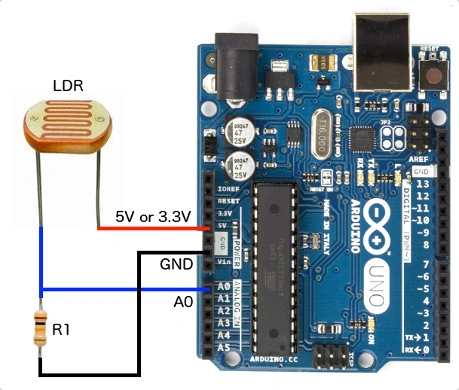
- Led Anode pin to Arduino digital pin.
- Led Cathode pin to Gnd.
Programming
- int LDR=A0;
- int led=13;
- int ldr reading=0;
- void setup()
- {
- pinMode(led,OUTPUT);
- Serial.begin(9600);
- }
- void loop()
- {
- ldr reading=analogRead(LDR);
- if(value < 800)
- {
- digitalWrite(led,HIGH);
- }
- else
- {
- digitalWrite(led,LOW);
- }
- Serial.println(ldr reading);
- delay(200);
- }
Explanation
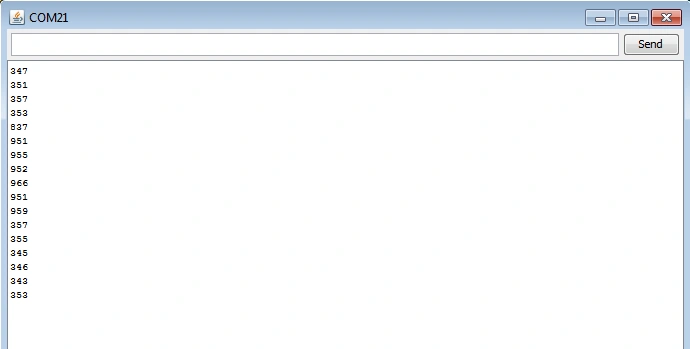
Initialize the value to the LDR to the Analog Pin and set value "0." In setup() function we want to set the Baud Rate as 9600 and in the loop() function we want to make the condition to the LDR; such as, first we want to read the Analog Pin value from the Arduino board. If the value is less than 800, the led will be ON, else the led will be in the OFF condition, and then print the value in the serial monitor.
Output:
Read more articles on Arduino:
Rodrigo SantosPosted Jul 11, 2020, 3:29 PM
Thank you so much!
Kumaresh RajalingamPosted Feb 16, 2016, 10:01 AM
Thank u Raja sir
Kumaresh RajalingamPosted Feb 16, 2016, 10:01 AM
Thanks u Raja sir
Kumaresh RajalingamPosted Feb 16, 2016, 10:01 AM
Thanks sibeesh sir
Kumaresh RajalingamPosted Feb 16, 2016, 10:01 AM
Thanks Mohammed sir
Raja TPosted Feb 15, 2016, 3:05 AM
Nice,Thanks for sharing
Sibeesh VenuPosted Feb 15, 2016, 12:36 AM
Nice Share
Mohammed IbrahimPosted Feb 14, 2016, 11:27 PM
nice
Kumaresh RajalingamPosted Feb 13, 2016, 3:50 AM
Thank you santha kumar sir
Kumaresh RajalingamPosted Feb 13, 2016, 3:50 AM
Thank u Shubham Kumar sir
Santhakumar MunuswamyPosted Feb 13, 2016, 2:58 AM
Thanks for nice share
Shubham KumarPosted Feb 13, 2016, 1:15 AM
nice
Kumaresh RajalingamPosted Feb 13, 2016, 12:32 AM
Thanks Pramod Sir
Pramod ThakurPosted Feb 13, 2016, 12:31 AM
Nice..
Sr KarthigaPosted Feb 12, 2016, 7:42 PM
Good one