


Introduction
MVC is an architectural design pattern which is used to develop the user interfaces which are maintainable, reusable, and testable. It is used for separation of concerns.
MVC stands for Model, View, and Controller. MVC separates the application into three component like Model, View, and Controller. We will learn in detail what Model, View, and Controller is.
What is the design pattern?
A design pattern is a solution to the problems that occur in software development. Design pattern helps us in applications development to resolve problems easily.
Example of design pattern
- MVC
- Proxy
- Singleton
- Iterator
- DAO
What is ASP.NET MVC
ASP.NET MVC is a web framework from Microsoft which is used to develop the web application. ASP.NET MVC use MVC architecture pattern. ASP.NET MVC are introduced in 2009 by Microsoft.
Advantages of using ASP.NET MVC
Separation of code
- This feature is specified for separating presentation logic from the database related logic. Easy to develop and modify using this feature.
- In MVC based applications the development process is split into three modules like Model - View - Controller.
Loosely coupling
- Loosely coupling represents less dependency.
- Views in mvc are less dependent on models.
- We can easily edit, expand and enhance the application.
Parallel Development
- This feature specifies developing models and views in parallel.
- It means multiple programmers work in parallel on views and models.
- This feature makes your application development is faster and easier.
Easy to perform unit testing
- Unit testing is the concept of testing only a certain portion of the application which is modified.
- In MVC based applications, we can easily perform unit testing.
TDD (Test Driven Development)
- In TDD testers will be guided by the development process.
- MVC applications are more comfortable for TDD because they will be easy to modify at any point of time and any module.
- TDD is one of the latest development processes used in real-time projects.
Model
- Model is a normal C# class.
- Model is responsible to handle data and business logic.
- Model represents the shape of the data.
- Model is responsible for handling database related changes.
Sample code of model as follows,
- namespace MVCDemo.Models
- {
- public class Employee
- {
- public int EmpId { get; set; }
- public string Name { get; set; }
- public string Email { get; set; }
- public double Salary { get; set; }
- }
- }
View
- The view is responsible for UI (user interface).
- View displays the data coming from the model.
- The view is an HTML template which will be binding and displaying HTML controls with data.
- The “.cshtml” file use the Razor view engine. And .cshtml views are use C# programming.
The view contains the following extension depends on languages.
- .aspx
- .asp
- .html
- .cshtml
- .vbhtml
Following are the types of view in ASP.NET MVC,
- Layout View
- Partial view
- Normal view
Controller
- A controller can contain action and non-action method. It is used to handle the user request coming from the browser. It will check the request from the browser and identify the action method and return the respective view.
- A controller is inherited from “ControllerBase” class which is inside the “System.Web.Mvc” namespace.
- While creating controller remember it always has the suffix “Controller” keyword. Default Controller is “HomeController” and “Index” view.
Sample code of Controller as follows,
- namespace MVCDemo.Controllers
- {
- public class HomeController : Controller
- {
- // GET: Home
- public ActionResult Index()
- {
- return View();
- }
- }
- }
Following are diagrams of ASP.NET MVC,
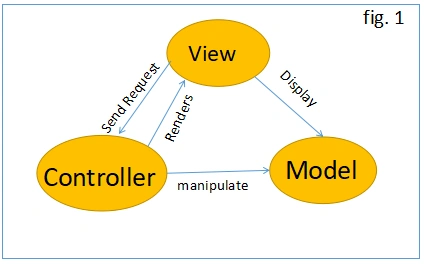
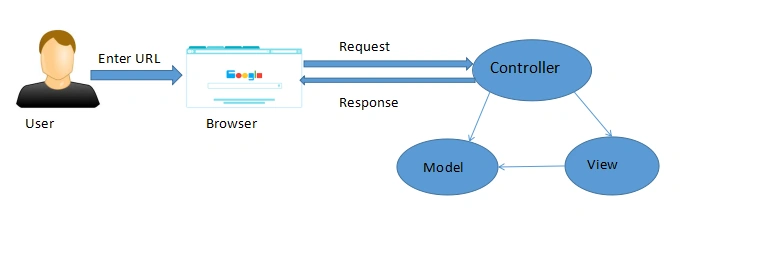
As per the above figure, user request enters the URL on the browser, the given request goes to the server and calls the routing which will execute the appropriate controller. And based on the request the controller executes the appropriate controller action method. It will pass the request to model if the controller action method has data from the database. After completing this process controller returns the response to the user.
I hope you understand the introduction of ASP.NET MVC and the advantages of using ASP.NET MVC.
Join the conversation! Your thoughts help the community grow.