


This service allows you to manage not only your keys but also those who have access to them. You can grant granular permissions to each key to only the users and applications who need access. It also allows for separation of duties as shown in the diagram below.
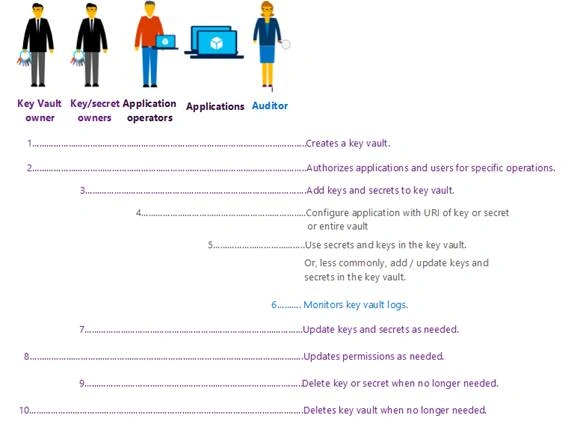
Monitoring for compliance and audit is another crucial component to key management. Azure Key Vault also provides logging into what and who accesses what is in your vault. By enabling logging for Key Vault, it saves data in an Azure storage account you create and stores all the information in needs for reporting within a retention range you set. My next blog in this series will show you step by step how to set up and configure logging using Azure Log Analytics.

As with any critical component of your infrastructure, your keys and secrets should be safe guarded against failures. Thankfully, Azure gives us the ability to store these keys with georedundancy in case of a disaster. You no longer have to worry about where those keys are stored and backing up those keys off site. However, one large caveat to storing your keys in the cloud is that you must always have internet access. Storing and using keys requires the application layer to retrieve those keys for use, redundant strong internet access is essential to any cloud operations.
Key Vault is also great for creating a secure login to SQL DB. My co-worker Joey D’Antoni (B|T) blogged about it recently here. In this recent blog he also dives in automation using this secured method and give you a great PowerShell script where he defines a variable called password, and gets from the Key Vault, and then passes it into the -SQLAdministratorCredentials in New-AzureRMSQLServer.
Lastly, part of key management is key rotation. Every company has a different rotation strategy, however, most of the time changing out these keys is a manual time-consuming process. Azure Automation can help you with this in conjunction with Azure Key Vault. This link gives you all the steps you need to set this up.
Azure Key Vault is definitely a service worth looking to it. It is a relatively low-cost alternative to managing and storing your companies passwords, tokens, connection strings, API keys as well as encryption keys and certificates. Plu it is a great way to get your company’s footprint into the cloud.
Join the conversation! Your thoughts help the community grow.