Introduction
This article explains how to switch among Activities and send data in Android. Android Studio is used to create the sample.
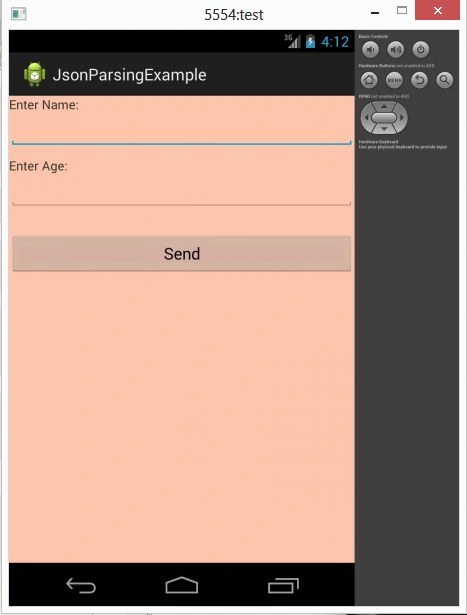
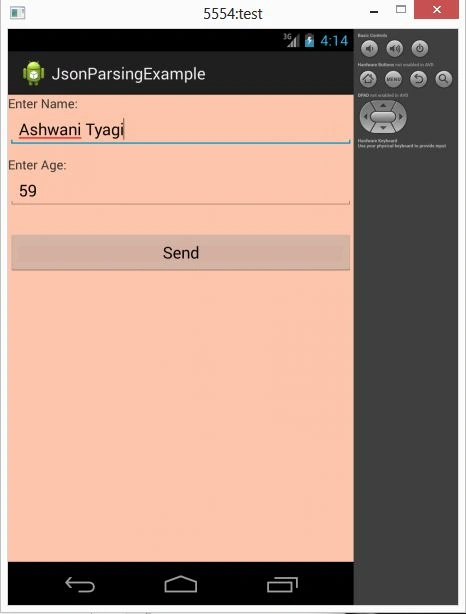
This application will send data to another activity when you enter the data in the previous activity on a button click. For this, you need to create a Java class named MainActivity where you will use two textviews, two edittexts, and a button. So you will enter the data that you want to in another activity on a button click.
So to data you need to use an Intent. Intents are used to data and perform switching among activities. So to use Intent methods you will create the object of the intent and the context and activity on which you want to switch as a parameter. Now to transfer data you will call the putExtra() method that contains both the parameters of the string type. the data as a parameter in the putExtra() method and the intent object as a parameter in the startActivity() method.
Now create another Java class named Second that holds the sent data by the activity. Create the object of the intent and call the getStringExtra() method that will return the data in string formated by the MainActivity. Now set the data in textview by calling the setText method provided by the TextView class.
Step 1
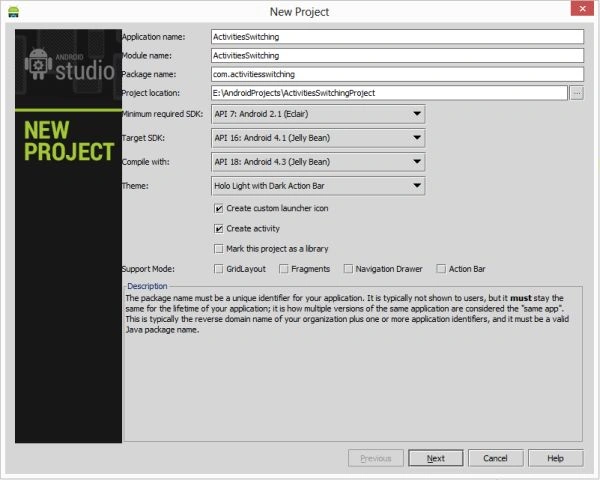
Create a project like this:
"File" -> "New Project" -> "Android Application"
Step 2
Create an XML file named actvitymain.xml as in the following:
- <?xml version="1.0" encoding="utf-8"?>
- <LinearLayout xmlns:android="http://schemas.android.com/apk/res/android"
- android:orientation="vertical"
- android:layout_width="fill_parent"
- android:layout_height="fill_parent"
- android:background="#FFC6A9"
- >
- <TextView android:layout_width="fill_parent"
- android:layout_height="wrap_content"
- android:text="Enter Name: "/>
- <EditText android:id="@+id/editText1"
- android:layout_width="fill_parent"
- android:layout_height="wrap_content"
- android:layout_marginBottom="10dip"/>
- <TextView
- android:layout_width="fill_parent"
- android:layout_height="wrap_content"
- android:text="Enter Age: "
- />
- <EditText android:id="@+id/editText2"
- android:layout_width="fill_parent"
- android:layout_height="wrap_content"
- android:layout_marginBottom="10dip"
- android:inputType="number"/>
-
- <Button android:id="@+id/sendButton"
- android:layout_width="fill_parent"
- android:layout_height="wrap_content"
- android:text="Send"
- android:layout_marginTop="15dip"/>
- </LinearLayout>
Step 3
Create another XML file with the following contents:
- <?xml version="1.0" encoding="utf-8"?>
- <LinearLayout
- xmlns:android="http://schemas.android.com/apk/res/android"
- android:orientation="vertical"
- android:layout_width="fill_parent"
- android:layout_height="fill_parent"
- android:background="#FFC6A9">
- <TextView android:id="@+id/textViewName"
- android:layout_width="fill_parent"
- android:layout_height="wrap_content"
- android:layout_margin="15dip"
- android:textSize="18dip"/>
- <TextView android:id="@+id/txtViewAge"
- android:layout_width="fill_parent"
- android:layout_height="wrap_content"
- android:layout_margin="15dip"
- android:textSize="18dip"/>
- <Button android:id="@+id/backButton"
- android:layout_width="fill_parent"
- android:layout_height="wrap_content"
- android:layout_marginTop="15dip"
- android:text="Back"/>
- </LinearLayout>
Step 4
Create a Java class file with the following contents:
- package com.jsonparsingexample;
- import android.app.Activity;
- import android.content.Intent;
- import android.os.Bundle;
- import android.util.Log;
- import android.view.View;
- import android.widget.Button;
- import android.widget.EditText;
- public class MainActivity extends Activity {
-
- EditText Name;
- EditText Age;
- @Override
- public void onCreate(Bundle savedInstanceState) {
- super.onCreate(savedInstanceState);
- setContentView(R.layout.activity_main);
- Name = (EditText) findViewById(R.id.editText1);
- Age = (EditText) findViewById(R.id.editText2);
- Button btnNextScreen = (Button) findViewById(R.id.sendButton);
-
- btnNextScreen.setOnClickListener(new View.OnClickListener() {
- public void onClick(View arg0) {
-
- Intent nextScreen = new Intent(getApplicationContext(), SecondActivity.class);
-
- nextScreen.putExtra("Name", Name.getText().toString());
- nextScreen.putExtra("Age", Age.getText().toString());
- startActivity(nextScreen);
- }
- });
- }
- }
Step 5
Create another Java class file with the following contents:
- package com.jsonparsingexample;
- import android.app.Activity;
- import android.content.Intent;
- import android.os.Bundle;
- import android.util.Log;
- import android.view.View;
- import android.widget.Button;
- import android.widget.TextView;
- public class SecondActivity extends Activity {
-
- @Override
- public void onCreate(Bundle savedInstanceState) {
- super.onCreate(savedInstanceState);
- setContentView(R.layout.second);
- TextView txtName = (TextView) findViewById(R.id.textViewName);
- TextView txtEmail = (TextView) findViewById(R.id.txtViewAge);
- Button btnBack = (Button) findViewById(R.id.backButton);
- Intent i = getIntent();
-
- String name = i.getStringExtra("Name");
- String age = i.getStringExtra("Age");
- Log.e("Second Screen", name + "." + age);
-
- txtName.setText(name);
- txtEmail.setText(age);
-
- btnBack.setOnClickListener(new View.OnClickListener() {
- public void onClick(View arg0) {
-
- finish();
- }
- });
- }
- }
Step 6
Add a Second Activity name in the Android manifest.xml file with the following contents:
- <?xml version="1.0" encoding="utf-8"?>
- <manifest xmlns:android="http://schemas.android.com/apk/res/android"
- package="com.jsonparsingexample"
- android:versionCode="1"
- android:versionName="1.0" >
-
- <uses-sdk
- android:minSdkVersion="7"
- android:targetSdkVersion="16" />
-
- <application
- android:allowBackup="true"
- android:icon="@drawable/ic_launcher"
- android:label="@string/app_name"
- android:theme="@style/AppTheme" >
- <activity
- android:name="com.jsonparsingexample.MainActivity"
- android:label="@string/app_name" >
- <intent-filter>
- <action android:name="android.intent.action.MAIN" />
-
- <category android:name="android.intent.category.LAUNCHER" />
- </intent-filter>
- </activity>
- <activity
- android:name=".SecondActivity"></activity>
- </application>
- <uses-permission android:name="android.permission.INTERNET"/>
- </manifest>

Join the conversation! Your thoughts help the community grow.