

Introductions
In this article, we are going to see Angular directives. Directives in Angular are a Typescript class which is declared with decorator @Directive. These are DOM instruction sets, which decide how logic implementation can be done.
The angular directives are classified into three types
- Attribute directives
- Structural directives
- Components directives
Attribute directives
The first one, the attribute directives, are used to change the styles and behavior of the DOM element. We use attribute directives to apply a conditional style to elements, show or hide elements or dynamically change the behavior of a component according to a changing property. It provides the ability to create our custom attribute directive. Please follow the below codes to create our custom attribute directive.
Here I have mentioned existing directives in Angular are fairly easy. The ngClass directive is a good example of an existing Angular attribute directive.
- <style>
- .red{color: red}
- .green{color: green}
- </style>
- <p[ngClass]="{'red'=true, 'green'=false}">
- Angular attribute directive
- </p>
Next, we are going to create a custom attribute directive, Here I have the app.mydirective.ts file. Please copy the below codes.
- import {Directive, ElementRef} from'@angular/core';
- @Directive({
- selector:'[my-directive]'
- })
- exportclassMyDirective{
- constructor(elr:ElementRef){
- elr.nativeElement.style.background='yellow';
- }
- }
After creating the directive from @angular/core we can then use it. First, we need a selector like my-directive.
Then we created a class, MyDirective, to access any element of our DOM, we need to use ElementRef. Since it also belongs to the @angular/core package.it simple to import and use in our application.
use this newly created directive to the app.module.ts file.
- import { NgModule } from'@angular/core';
- import { BrowserModule } from'@angular/platform-browser';
- import { MyDirective } from'./app.mydirective';
- import { AppComponent } from'./app.component';
- @NgModule({
- imports: [ BrowserModule ],
- declarations: [ AppComponent, MyDirective ],
- bootstrap: [ AppComponent ]
- })
- exportclassAppModule { }
Next, add the app.component.ts and app.component.html file codes.
- import { Component, Input } from'@angular/core';
- @Component({
- selector:'app-root',
- templateUrl:'./app.component.html'
- })
- exportclassAppComponent {
- name = 'Angular Directive ';
- }
- <h3my-directive>Test Sat {{name}}</h3>
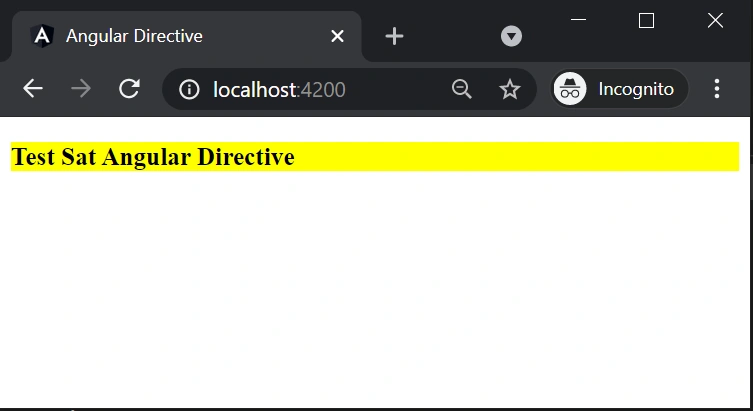
Next After adding the code please run the application using this commends npm start or ng-serve --open, the result will be like this.
Structural directives
The structure directives manipulate the DOM elements. Angular applications already have structure directives. For example, *ngIf and *ngFor. We will see how to use these directives in applications.
- import { Component, Input } from'@angular/core';
- @Component({
- selector:'app-root',
- templateUrl:'./app.component.html',
- })
- exportclassAppComponent {
- name = 'Angular Directive ';
- numberlists=['1', '2', '3','4', '5', '6', '7'];
- }
- <div*ngFor="let num of numberlists">
- <ng-container*ngIf = "(num == '1' || num == '3' || num == '5' || num == '7'); else elseTemplate">
- <h1>{{num}} is a odd number</h1>
- </ng-container>
- <ng-template#elseTemplate>
- <h1>{{num}} is even number</h1>
- </ng-template>
- </div>
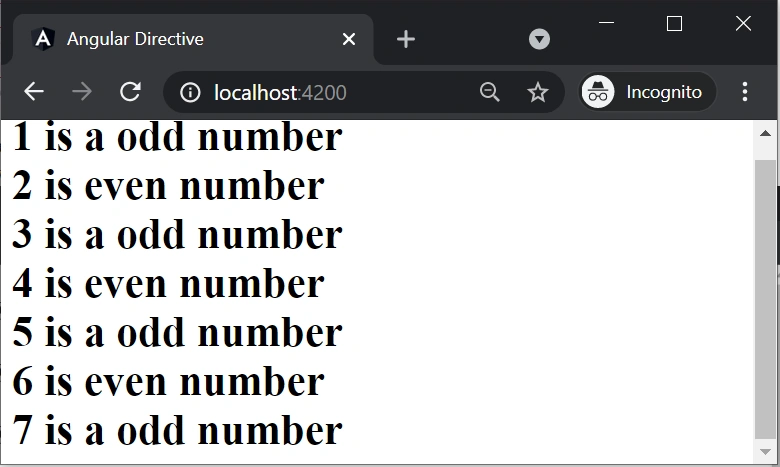
In the above code, we are used ngFor and ngIf directives and finally, the output will show like the below screens.
Components directives
The components are just directives with templates. Under they use the directive API and give us a cleaner way to define the applications. It contains the details on component processing, instantiation, and usage at run time. The other two directive types don’t have templates. Instead, they are specifically for DOM manipulation.
- @Component({
- selector:'app-root',
- templateUrl:'./app.component.html',
- styleUrls: ['./app.component.scss']
- })
selector - Here I mentioned the template tag which specifies the start and end of the component.
templateURL - Template used for the component.
styleUrls - It is all the style format files used for the template.
I hope this article is most helpful for you.
Join the conversation! Your thoughts help the community grow.