
What are Triggers?
Triggers are a medium by which we can trigger a behavior of the targeted control when it fulfills the specified conditions.
There are three types of Triggers.
- Property Trigger
- Data Trigger
- Event Trigger
Let us look at a scenario where we use all the triggers.
The View has three buttons, each of which uses all the above-mentioned types of Triggers.
- The first button triggers the property trigger, which changes the cursor to a hand when hovered upon.
- The second button when pressed triggers the data trigger which sets the text property of the TextBlock.
- The third button triggers the event trigger which does an animation to increase the width property of the Button.
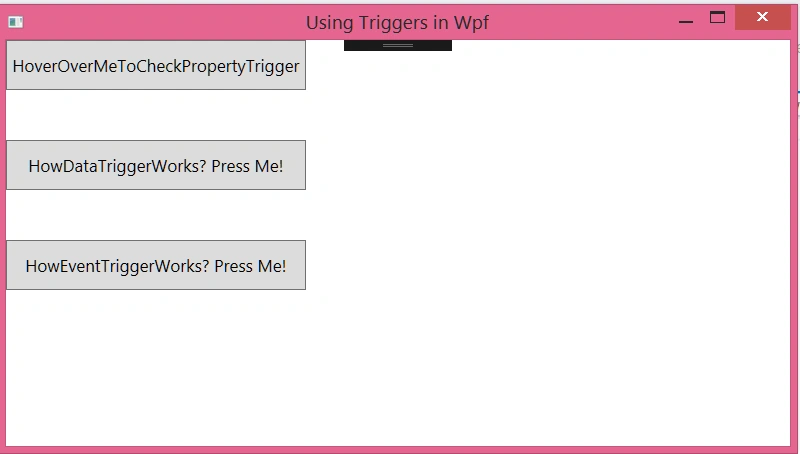
We define the triggers in the XAML code, which looks as below.
- <Window x:Class="TriggersInWpf.MainWindow"
- xmlns="http://schemas.microsoft.com/winfx/2006/xaml/presentation"
- xmlns:x="http://schemas.microsoft.com/winfx/2006/xaml"
- xmlns:d="http://schemas.microsoft.com/expression/blend/2008"
- xmlns:mc="http://schemas.openxmlformats.org/markup-compatibility/2006"
- mc:Ignorable="d"
- Title="Using Triggers in Wpf" Height="450" Width="800">
- <Window.Resources>
- <!--Define the property trigger-->
- <Style x:Key="PropertyTriggered" TargetType="Button">
- <Setter Property="Background" Value="Gainsboro"/>
- <Style.Triggers>
- <Trigger Property="IsMouseOver" Value="True">
- <Setter Property="Cursor" Value="Hand"/>
- </Trigger>
- </Style.Triggers>
- </Style>
- <!--Define the data trigger-->
- <Style x:Key="DataTriggered" TargetType="TextBlock">
- <Style.Triggers>
- <DataTrigger
- Binding="{Binding ElementName=BtnDataTrigger, Path=IsPressed}" Value="True">
- <Setter Property="Text" Value="DataTrigger has been triggered!"/>
- <Setter Property="FontWeight" Value="Bold"/>
- <Setter Property="VerticalAlignment" Value="Center"/>
- <Setter Property="HorizontalAlignment" Value="Center"/>
- <Setter Property="FontSize" Value="18"/>
- </DataTrigger>
- </Style.Triggers>
- </Style>
- </Window.Resources>
- <Grid>
- <Grid.RowDefinitions>
- <RowDefinition Height="50"/>
- <RowDefinition Height="50"/>
- <RowDefinition Height="50"/>
- <RowDefinition Height="50"/>
- <RowDefinition Height="50"/>
- <RowDefinition Height="Auto"/>
- </Grid.RowDefinitions>
- <Grid.ColumnDefinitions>
- <ColumnDefinition Width="300"/>
- <ColumnDefinition Width="100"/>
- <ColumnDefinition Width="Auto"/>
- </Grid.ColumnDefinitions>
- <Button x:Name="BtnKey"
- Content="HoverOverMeToCheckPropertyTrigger"
- Style="{StaticResource PropertyTriggered}"
- Grid.Row="0"
- Grid.Column="0" Width="300"/>
- <Button x:Name="BtnDataTrigger"
- Content="HowDataTriggerWorks? Press Me!"
- Style="{StaticResource PropertyTriggered}"
- Grid.Row="2"
- Grid.Column="0" Width="300"/>
- <TextBlock x:Name="TxtBlock"
- Style="{StaticResource DataTriggered}"
- Grid.Row="2"
- Grid.Column="2"/>
- <Button x:Name="BtnEventTrigger"
- Content="HowEventTriggerWorks? Press Me!"
- Style="{StaticResource PropertyTriggered}"
- Grid.Row="4"
- Grid.Column="0">
- <!--Define the event trigger-->
- <Button.Triggers>
- <EventTrigger RoutedEvent="Button.Click">
- <EventTrigger.Actions>
- <BeginStoryboard>
- <Storyboard>
- <DoubleAnimation
- Storyboard.TargetName="BtnEventTrigger"
- Storyboard.TargetProperty="Width"
- From="0" To="300"
- Duration="0:0:5">
- </DoubleAnimation>
- </Storyboard>
- </BeginStoryboard>
- </EventTrigger.Actions>
- </EventTrigger>
- </Button.Triggers>
- </Button>
- </Grid>
- </Window>
This is just a simple use of Triggers I have demonstrated. Triggers are very useful in our everyday coding but it must be STRESSED that the unnecessary/excessive use of triggers/converters in our code can lead to performance issues. So, just make sure that you really need it in your application.
Former memberPosted Sep 9, 2022, 9:54 PM
Why don't you just copy and paste next time lol