
Introduction
This article explains analog and digital clocks in Android. Android Studio is used to create the sample.
An analog clock and digital clock displays the time from the current device.To display an analog or digital clock you need to drag and drop the analog and digital clock from the pallet. The analog and digital clock cannot change the time of the device; to do so you will use TimePicker and DatePicker.
Step 1
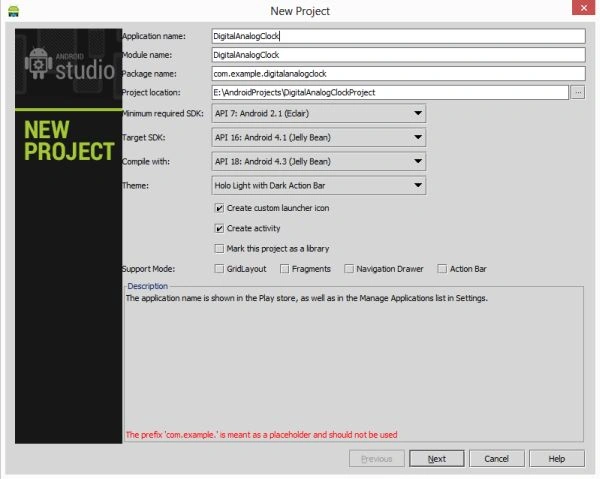
Create a project like this:
Step 2
Create an XML file and with this:
- <RelativeLayout xmlns:android="http://schemas.android.com/apk/res/android"
- xmlns:tools="http://schemas.android.com/tools"
- android:layout_width="match_parent"
- android:layout_height="match_parent"
- android:paddingLeft="@dimen/activity_horizontal_margin"
- android:paddingRight="@dimen/activity_horizontal_margin"
- android:paddingTop="@dimen/activity_vertical_margin"
- android:paddingBottom="@dimen/activity_vertical_margin"
- tools:context=".MainActivity"
- android:background="#b76e79">
- <TextView
- android:gravity="center"
- android:layout_width="wrap_content"
- android:layout_height="wrap_content"
- android:text="Clocks"
- android:textStyle="bold"
- android:textSize="30dp"
- android:id="@+id/textView" />
- <AnalogClock
- android:gravity="center"
- android:layout_width="wrap_content"
- android:layout_height="wrap_content"
- android:id="@+id/analogClock"
- android:layout_marginTop="50dp"
- />
- <DigitalClock
- android:layout_centerInParent="true"
- android:layout_width="wrap_content"
- android:layout_height="wrap_content"
- android:id="@+id/digitalClock"
- android:layout_marginTop="100dp" />
- </RelativeLayout>
Step 2
Create a Java class file with the following:
- package com.analogdigitalclock;
- import android.os.Bundle;
- import android.app.Activity;
- import android.view.Menu;
- public class MainActivity extends Activity {
- @Override
- protected void onCreate(Bundle savedInstanceState) {
- super.onCreate(savedInstanceState);
- setContentView(R.layout.activity_main);
- }
- @Override
- public boolean onCreateOptionsMenu(Menu menu) {
- // Inflate the menu; this adds items to the action bar if it is present.
- getMenuInflater().inflate(R.menu.main, menu);
- return true;
- }
- }
Step 3
Android manifest.xml file
- <?xml version="1.0" encoding="utf-8"?>
- <manifest xmlns:android="http://schemas.android.com/apk/res/android"
- package="com.analogdigitalclock"
- android:versionCode="1"
- android:versionName="1.0" >
- <uses-sdk
- android:minSdkVersion="7"
- android:targetSdkVersion="16" />
- <application
- android:allowBackup="true"
- android:icon="@drawable/ic_launcher"
- android:label="@string/app_name"
- android:theme="@style/AppTheme" >
- <activity
- android:name="com.analogdigitalclock.MainActivity"
- android:label="@string/app_name" >
- <intent-filter>
- <action android:name="android.intent.action.MAIN" />
- <category android:name="android.intent.category.LAUNCHER" />
- </intent-filter>
- </activity>
- </application>
- </manifest>
Step 4
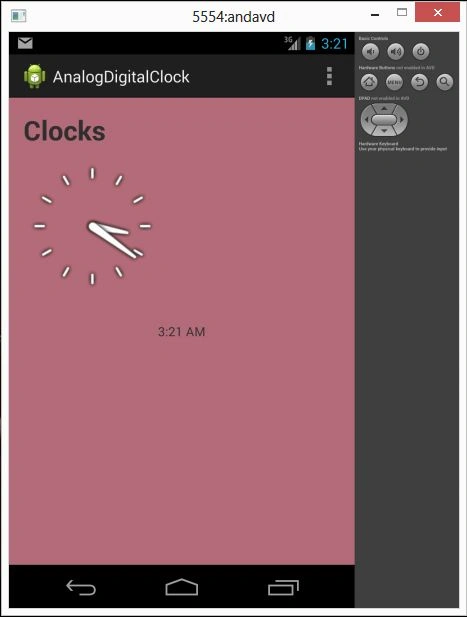
Analog and Digital Clock
Join the conversation! Your thoughts help the community grow.