

Introduction
This article shows the walk through of how to use MVC with Visual Studio LightSwitch In previous article we have seen how to get started by creating a LightSwitch Application..Now lets continue by creating the MVC structure.
- Step 1: Create the following folders in the Server project as shown
- App_Start
- Controllers
- Models
- Views
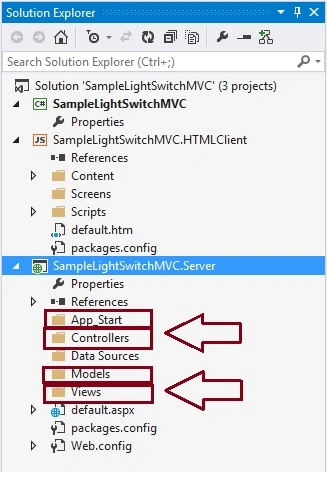
- Step 2 Add a class file named RouteConfig.cs to the App_Start folder and add the following implementation
- using System.Web.Mvc;
- using System.Web.Routing;
- namespace LightSwitchApplication
- {
- public class RouteConfig
- {
- public static void RegisterRoutes(RouteCollection routes)
- {
- routes.IgnoreRoute("{*allsvc}", new { allsvc = @".*\.svc(/.*)?" });
- routes.IgnoreRoute("{resource}.axd/{*pathInfo}");
- routes.MapRoute(
- name: "Default",
- url: "{controller}/{action}/{id}",
- defaults: new
- {
- controller = "Home",
- action = "Index",
- id = UrlParameter.Optional
- }
- );
- }
- }
- }
- Step 3 Right click on views folder and add Web.config file and use the following code
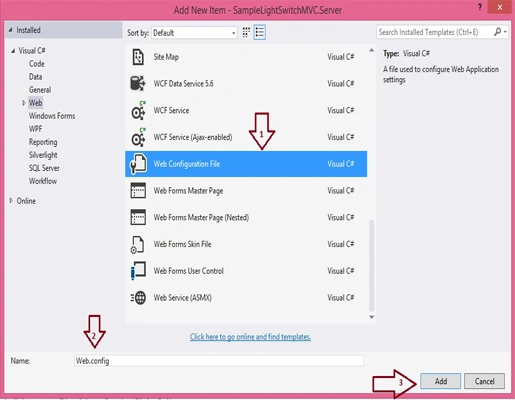
- <?xml version="1.0"?>
- <configuration>
- <configSections>
- <sectionGroup name="system.web.webPages.razor"
- type="System.Web.WebPages.Razor.Configuration.RazorWebSectionGroup,
- System.Web.WebPages.Razor, Version=3.0.0.0,
- Culture=neutral, PublicKeyToken=31BF3856AD364E35">
- <section name="host" type="System.Web.WebPages.Razor.Configuration.HostSection,
- System.Web.WebPages.Razor, Version=3.0.0.0,
- Culture=neutral, PublicKeyToken=31BF3856AD364E35"
- requirePermission="false" />
- <section name="pages" type="System.Web.WebPages.Razor.Configuration.RazorPagesSection,
- System.Web.WebPages.Razor, Version=3.0.0.0,
- Culture=neutral, PublicKeyToken=31BF3856AD364E35"
- requirePermission="false" />
- </sectionGroup>
- </configSections>
- <system.web.webPages.razor>
- <host factoryType="System.Web.Mvc.MvcWebRazorHostFactory,
- System.Web.Mvc, Version=5.0.0.0,
- Culture=neutral, PublicKeyToken=31BF3856AD364E35" />
- <pages pageBaseType="System.Web.Mvc.WebViewPage">
- <namespaces>
- <add namespace="System.Web.Mvc" />
- <add namespace="System.Web.Mvc.Ajax" />
- <add namespace="System.Web.Mvc.Html" />
- <add namespace="System.Web.Routing" />
- </namespaces>
- </pages>
- </system.web.webPages.razor>
- <appSettings>
- <add key="webpages:Enabled" value="false" />
- </appSettings>
- <system.web>
- <httpHandlers>
- <add path="*" verb="*" type="System.Web.HttpNotFoundHandler"/>
- </httpHandlers>
- <pages
- validateRequest="false"
- pageParserFilterType="System.Web.Mvc.ViewTypeParserFilter,
- System.Web.Mvc, Version=5.0.0.0, Culture=neutral, PublicKeyToken=31BF3856AD364E35"
- pageBaseType="System.Web.Mvc.ViewPage,
- System.Web.Mvc, Version=5.0.0.0, Culture=neutral, PublicKeyToken=31BF3856AD364E35"
- userControlBaseType="System.Web.Mvc.ViewUserControl,
- System.Web.Mvc, Version=5.0.0.0, Culture=neutral, PublicKeyToken=31BF3856AD364E35">
- <controls>
- <add assembly="System.Web.Mvc, Version=5.0.0.0,
- Culture=neutral, PublicKeyToken=31BF3856AD364E35"
- namespace="System.Web.Mvc" tagPrefix="mvc" />
- </controls>
- </pages>
- </system.web>
- <system.webServer>
- <validation validateIntegratedModeConfiguration="false" />
- <handlers>
- <remove name="BlockViewHandler"/>
- <add name="BlockViewHandler" path="*" verb="*"
- preCondition="integratedMode" type="System.Web.HttpNotFoundHandler" />
- </handlers>
- </system.webServer>
- </configuration>
Summary
In this small article, I explained how to prepare LightSwitch Application to use MVC, In next article we will see the complete configuration.
Join the conversation! Your thoughts help the community grow.