
Introduction
In this first, you will create two XML files inside the anim folder that defines the animation to be performed on the button click.
anim1
- <?xml version="1.0" encoding="utf-8"?>
- <translate xmlns:android="http://schemas.android.com/apk/res/android"
- android:fromXDelta="100%p"
- android:toXDelta="0"
- android:duration="500"/>
anim2
- <?xml version="1.0" encoding="utf-8"?>
- <translate xmlns:android="http://schemas.android.com/apk/res/android"
- android:fromXDelta="0"
- android:toXDelta="-50%p"
- android:duration="500"/>
- Activityoptions
a helper class to build an option bundle to be used with "context.startActivity(Intent,Bundle)" and related methods. - makeCustomAnimation
Create an "ActivityOptions" specifying a custom animation to run when the Activity is displayed. It returns an Activity Options type object that we to the "startActivity()" to perform the sliding operation.
- <RelativeLayout xmlns:android="http://schemas.android.com/apk/res/android"
- xmlns:tools="http://schemas.android.com/tools"
- android:layout_width="match_parent"
- android:layout_height="match_parent"
- android:paddingLeft="@dimen/activity_horizontal_margin"
- android:paddingRight="@dimen/activity_horizontal_margin"
- android:paddingTop="@dimen/activity_vertical_margin"
- android:paddingBottom="@dimen/activity_vertical_margin"
- tools:context=".MainActivity"
- >
- <Button
- android:id="@+id/button"
- android:layout_height="wrap_content"
- android:layout_width="300dp"
- android:text="Slide"
- android:textStyle="italic"
- android:textSize="40dp"
- android:layout_centerHorizontal="true"
- ></Button>
- </RelativeLayout>
Step 2
Create another XML file and write this:
- <?xml version="1.0" encoding="utf-8"?>
- <LinearLayout xmlns:android="http://schemas.android.com/apk/res/android"
- android:orientation="vertical"
- android:layout_width="match_parent"
- android:layout_height="match_parent"
- android:background="#234567">
- <ImageView
- android:layout_width="wrap_content"
- android:layout_height="wrap_content"
- android:src="@drawable/download"
- android:layout_gravity="center"
- android:layout_marginTop="100dp"
- ></ImageView>
- </LinearLayout>
Step 3
Create another XML file inside the res folder named "anim1":
Step 4
- <?xml version="1.0" encoding="utf-8"?>
- <translate xmlns:android="http://schemas.android.com/apk/res/android"
- android:fromXDelta="100%p"
- android:toXDelta="0"
- android:duration="500"/>
anim2
- <?xml version="1.0" encoding="utf-8"?>
- <translate xmlns:android="http://schemas.android.com/apk/res/android"
- android:fromXDelta="0"
- android:toXDelta="-50%p"
- android:duration="500"/>
- package com.slidingmenu;
- import android.os.Bundle;
- import android.app.Activity;
- import android.app.ActivityOptions;
- import android.content.Intent;
- import android.view.Menu;
- import android.view.View;
- import android.widget.Button;
- public class MainActivity extends Activity {
- @Override
- public void onCreate(Bundle savedInstanceState) {
- super.onCreate(savedInstanceState);
- setContentView(R.layout.activity_main);
- Button button = (Button)findViewById(R.id.button);
- button.setOnClickListener(new View.OnClickListener() {
- @Override
- public void onClick(View v) {
- Intent slide = new Intent(MainActivity.this, Second.class);
- Bundle bnaniamtion =ActivityOptions.makeCustomAnimation(getApplicationContext(), R.anim.anim1,R.anim.anim2).toBundle();
- startActivity(slide, bnaniamtion);
- }
- });
- }
- }
Step 5
- package com.slidingmenu;
- import android.app.Activity;
- import android.os.Bundle;
- /**
- * Created by vivek on 8/5/13.
- */
- public class Second extends Activity {
- public void onCreate(Bundle savedInstanceState) {
- super.onCreate(savedInstanceState);
- setContentView(R.layout.second);
- }
- }
Step 6
Perform changes in the Android Manifest XML file as in the following:
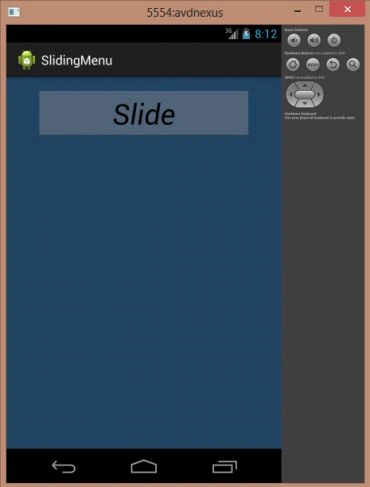 Step 8
When you click on the button:
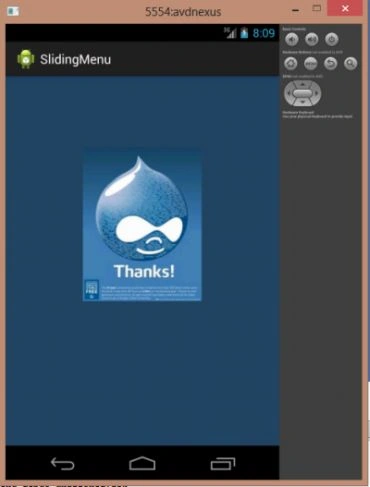
Step 8
When you click on the button:
- <?xml version="1.0" encoding="utf-8"?>
- <manifest xmlns:android="http://schemas.android.com/apk/res/android"
- package="com.slidingmenu"
- android:versionCode="1"
- android:versionName="1.0" >
- <uses-sdk
- android:minSdkVersion="7"
- android:targetSdkVersion="16" />
- <application
- android:allowBackup="true"
- android:icon="@drawable/ic_launcher"
- android:label="@string/app_name"
- android:theme="@style/AppTheme" >
- <activity
- android:name="com.slidingmenu.MainActivity"
- android:label="@string/app_name" >
- <intent-filter>
- <action android:name="android.intent.action.MAIN" />
- <category android:name="android.intent.category.LAUNCHER" />
- </intent-filter>
- </activity>
- <activity
- android:name=".Second">
- </activity>
- </application>
- </manifest>
Step 7
Join the conversation! Your thoughts help the community grow.