
Introduction
It is a very simple concept to support landscape mode or portrait mode in applications. For this, you will need to create a folder named "layout-land". In the layout-land folder, you will paste the same XML file present in your layout folder (activity_main.xml). So when we change the layout to landscape mode it will automatically take the XML file from the layout-land folder.
Step 1
Create an XML file inside the layout folder and write the following:
- <LinearLayout xmlns:android="http://schemas.android.com/apk/res/android"
- xmlns:tools="http://schemas.android.com/tools"
- android:layout_width="match_parent"
- android:layout_height="match_parent"
- tools:context=".MainActivity"
- android:orientation="horizontal">
- <LinearLayout
- android:layout_height="wrap_content"
- android:layout_width="wrap_content"
- android:orientation="vertical">
- <Button
- android:id="@+id/button1"
- android:layout_height="wrap_content"
- android:layout_width="wrap_content"
- android:text="@string/about"
- android:background="#ffffff">
- </Button>
- <Button
- android:id="@+id/button2"
- android:layout_height="wrap_content"
- android:layout_width="72dp"
- android:text="@string/help"
- android:background="#ffffff">
- </Button>
- </LinearLayout>
- <ImageView
- android:layout_height="352dp"
- android:layout_width="wrap_content"
- android:src="@drawable/socialnetwork"
- android:paddingLeft="20dp">
- </ImageView>
- </LinearLayout>
Step 2
Create the same XML file inside the layout-land folder and write the following:
- <LinearLayout xmlns:android="http://schemas.android.com/apk/res/android"
- xmlns:tools="http://schemas.android.com/tools"
- android:layout_width="match_parent"
- android:layout_height="match_parent"
- tools:context=".MainActivity"
- android:orientation="horizontal">
- <LinearLayout
- android:layout_height="wrap_content"
- android:layout_width="wrap_content"
- android:orientation="vertical">
- <Button
- android:layout_height="wrap_content"
- android:layout_width="wrap_content"
- android:text="@string/about"
- android:background="#ffffff">
- </Button>
- <Button
- android:layout_height="wrap_content"
- android:layout_width="72dp"
- android:text="@string/help"
- android:background="#ffffff">
- </Button>
- </LinearLayout>
- <ImageView
- android:layout_height="352dp"
- android:layout_width="wrap_content"
- android:src="@drawable/socialnetwork"
- android:paddingLeft="20dp">
- </ImageView>
- </LinearLayout>
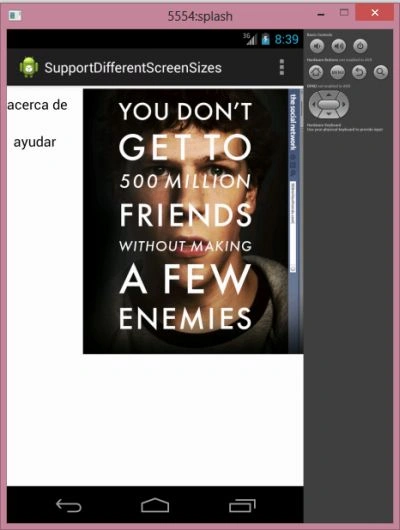
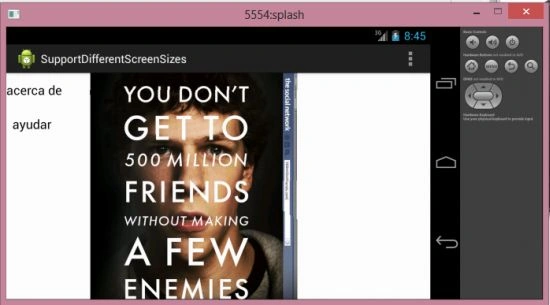
Join the conversation! Your thoughts help the community grow.