

This article is the first part of the "Learning SharePoint" series. The purpose of this series is to help the reader understand SharePoint and boost their knowledge from a beginner to that of a SharePoint developer.
Here are the basic points which I am going to cover in this article.
- What is SharePoint?
- History of SharePoint
- Evaluation of SharePoint
- Basic Comparison of SharePoint and Other Web Development Platforms
- How to decide whether to go with SharePoint
- The basic architecture of SharePoint
- Types of SharePoint
- Components of SharePoint
What is SharePoint?
Wikipedia defines SharePoint as "A web-based, collaborative platform that integrates with Microsoft Office. Launched in 2001, SharePoint is primarily sold as a document management and storage system, but the product is highly configurable and usage varies substantially between organizations".
Microsoft describes SharePoint like this: "Organizations use SharePoint to create websites. You can use it as a secure place to store, organize, share, and access information from any device. All you need is a web browser, such as Microsoft Edge, Internet Explorer, Chrome, or Firefox." (Definition source).
The definition of SharePoint may differ from person to person. If you ask me to define SharePoint, then I would define SharePoint as, "A web-based platform which allows a user to build a CMS-based website and manage their contents without having knowledge of HTML, JavaScript and CSS". Now managing the content includes creating content, searching the content, and many more operations.
History and Evaluation of SharePoint
The history of SharePoint is quite simple and straightforward. Microsoft has evolved SharePoint from time to time. The first product of SharePoint was launched in 2001. And then later in 2003, Microsoft came up with a new version. Let's have a look at the history of SharePoint and its feature enhancements.
- SharePoint 2001: Microsoft SharePoint 2001 was officially called SharePoint Portal Server 2001. It has the functionality of document management and enterprise search with SharePoint Team services to work in collaboration.
- SharePoint 2003: Microsoft SharePoint 2003 was officially called Microsoft SharePoint Portal Server 2003. This time Microsoft released Windows SharePoint Server as part of Windows Server 2003. It had an improved user interface, better personalization, and a collaboration store.
- SharePoint 2007: Microsoft SharePoint 2007 was officially called Microsoft Office SharePoint Server 2007(MOSS). Also, it came up with many fixes for Microsoft SharePoint portal 2003. A few more services were introduced such as Business Data Connectivity, Infopath Form Services site columns, content types, etc.
- SharePoint 2010: Microsoft SharePoint 2010 was officially called Microsoft SharePoint Server 2010. With this version, SharePoint Foundation was also released. New authentication functionality was also added.
- SharePoint 2013: Microsoft SharePoint 2013 was officially called Microsoft SharePoint Server 2013. This product came up with an entirely new design package. It had a new master page as compared to SharePoint's previous versions. The most significant changes that Microsoft has made to SharePoint 2013 have been done to adapt the SharePoint platform for hosted environments in the cloud, such as SharePoint Online in the Office 365 environment. This is a big change for developers because the SharePoint platform has been split in two. There is the older, familiar SharePoint platform in scenarios in which a company has deployed SharePoint on-premises.
- SharePoint 2016: Microsoft SharePoint 2016 was officially called Microsoft SharePoint Server 2016. Key improvements include hybrid mode, improved mobile navigation, large file support, and extended support for special characters in filenames, and SharePoint Server 2016 now provides the same data loss prevention capabilities as Office 365.
For more references on the history, you can read here.
Basic comparison of SharePoint and other web development platforms
There are many web-based platforms available that provide the functionality to develop a website just using web browsers. A few of them are WordPress, Joomla, and many other CMS websites. Some are premium and some are free. SharePoint is also one of them. SharePoint can be considered as a great CMS that allows the user to build and control the website and its content without having knowledge of HTML, CSS, and JavaScript. In other words, SharePoint allows the user to manage content on the website without having any technical knowledge.
As compared to other CMS websites, SharePoint provides much better control over the contents and security of the contents. Some of the functionalities that SharePoint provides is versioning to the contents, content approval, fast search, permission management, user management, and many more features.
How to decide whether to go with SharePoint?
When it comes to choosing between SharePoint and another web-based platform, it becomes a tough call to decide to choose SharePoint. Let me simplify the choice(*).
(*) Every organization has its own reason to choose SharePoint. Here I am describing if I have to make a choice then why I will choose SharePoint.
Due to following reasons, I will choose SharePoint:
- SharePoint has better Document Management facilities
- It has better user and rights management
- Opens a full scope to customize the application
- Provides the best way to collaborate with your team using team sites, task management, issue tracking, announcements, etc
- Fastest search service
- Versioning of the documents and content approvals
- Its default workflows
- Control over contents
And it has many more such facilities. You can refer to the following links to learn more:
- https://collab365.community/5-reasons-vs-challenges-to-choose-microsoft-sharepoint/
- https://en.share-gate.com/blog/why-use-sharepoint-its-benefits-between-two-farms
- https://www.allcovered.com/newsletter-article/choose-sharepoint-software-422
The basic architecture of SharePoint
SharePoint is built on the top of Microsoft .NET framework. Every web page in SharePoint will end up with the extension *.aspx. So the architecture of SharePoint is based on the .NET framework. Below is the architecture of SharePoint.
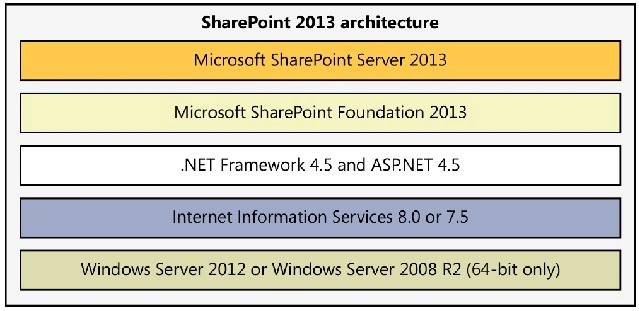
Image Source: http://www.enjoysharepoint.com/pic/SharePoint-2013-architecture.png
Architecture explained
As per the architecture, please follow the below-given instructions to set up SharePoint.
- Install Windows Server
- Install IIS Services
- Install .NET Framework
- Install SQL Server
- Set up Active Directory Services
- Install SharePoint Foundation
- Install SharePoint Server (Any SharePoint Version)
Types of SharePoint
There are basically 3 types of SharePoint.
- SharePoint Foundation: SharePoint Foundation is a free downloadable installation and represents the foundational parts of SharePoint. You will just need to have Windows Server OS. For features refer https://www.tutorialspoint.com/sharepoint/sharepoint_types.htm
- SharePoint Server: SharePoint Server offers a wealth of features that expand upon those offered in SharePoint Foundation. It provides a richer, more advanced collection of features that you can utilize in your organization’s solutions. For more details, you can refer here: https://www.tutorialspoint.com/sharepoint/sharepoint_types.htm
- SharePoint Online: It is SharePoint’s Cloud version. It provides cloud-based solutions. You just need to pay per the number of users. You do not have to worry about upgrading SharePoint, Microsoft handles that on its own. For more details refer here: https://www.tutorialspoint.com/sharepoint/sharepoint_types.htm
Components of SharePoint
Components of SharePoint include
- SharePoint Farm
- Web Application
- Site Collections
- Sites and Subsites
- WebParts
- List and Libraries
- Search
- Site Pages
- Users and Groups
- Permissions
- Workflows
- Branding
- And many more
So in this article, I tried to cover the basics of SharePoint. I hope this will be helpful to someone who is pretty new to SharePoint and wants to start learning SharePoint. If you are a SharePoint person, and you think that I have missed or provided some improper information then please let me know in the comments section.
The links to my next articles are
You can refer to it.
Adam LungaPosted Apr 24, 2020, 1:58 AM
Thank you. Very useful indeed
Priyanka JainPosted Jul 3, 2019, 11:22 AM
Nice article . Thanks for sharing
Tarique SultanPosted Mar 25, 2018, 11:38 AM
Very useful article