

Introduction
This article is the 22nd part of my SharePoint series. Here are my previous articles.
- Learn SharePoint In Series - Part One - Introduction
- Learn SharePoint In Series - Part Two - Web Application
- Learn SharePoint In Series - Part Three - Site Collections
- Learn SharePoint In Series - Part Four - Subsites
- Learn SharePoint In Series – Part Five – SharePoint Lists
- Learn SharePoint In Series - Part Six - Power Of Versioning
- Learn SharePoint In Series - Part Seven - Lists Advanced Settings
- Learn SharePoint In Series - Part Eight - Validation Settings in List Settings
- Learn SharePoint In Series - Part Nine - Audience Targeting
- Learn SharePoint In Series - Part Ten - Rating Settings
- Learn SharePoint In Series - Part Eleven - Form Settings in List Settings
- Learn SharePoint In Series - Part Twelve- Save list as a template in List Setting
- Learn SharePoint In Series - Part Thirteen- Permission Settings in List Settings
- Learn SharePoint In Series - Part Fourteen- Enterprise Metadata and Keywords
- Learn SharePoint In Series - Part Fifteen - Retention Policy Under Information Management
- Learn SharePoint In Series - Part Sixteen - RSS Settings in List Setting
- Learn SharePoint In Series - Part Seventeen - List Columns in SharePoint
- Learn SharePoint In Series - Part Eighteen - Multiple Lines Of Text Column Type in SharePoint
- Learn SharePoint In Series - Part Nineteen - Number and Choice Column Type in SharePoint
- Learn SharePoint In Series - Part Twenty - Currency and Yes No Column types in SharePoint
- Learn SharePoint In Series - Part Twenty One - Person or Group Column types in SharePoint
In the previous article, I have explained everything about Person or Group column type in SharePoint lists. We have seen the different behavior of the column in Lists. Now in this article, I will be explaining Date and Time Column type in detail. In this article, I am going to cover the following topics in detail.
- Background
- Introduction to Date and Time column type
- Creating Date and Time column type
- Properties and Options available in Date and Time column type
- Summary
Background
While managing the metadata of the document or any content, it is always very important to know and track when the document or content was created and when it was created and by whom it was created. For tracking the user who created and modified the contents, we have Person or Group columns. In the same way for tracking when the document was created and when the document was last modified there is a Date and Time column type available. Let's explore this column types in detail in this article.
Introduction to Date and Time column type
Date and Time column type is a very special column type in SharePoint. This column type is used to store the data in the format of date and time. This column type can be used to store the date of birth, date of joining, due date for any tasks, expiry date for any announcements and many such data which includes dates or time. This column type can be used to store only dates or date and time together. There is no such facility available by which we can store only time values.
Creating Date and Time column type
You can refer to this article to know how to create a column in many ways, you can select any way and while creating date and time column just select the Date and Time radio button as shown in figure.
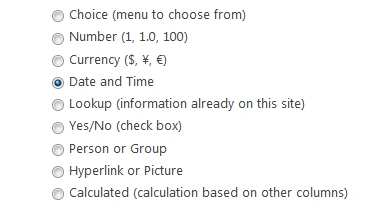
Once you select the Date and Time Option while creating a column, you will observe that many options are now available to configure this column.
Properties of Date and Time column type
There are several properties available using which we can configure the Date and Time columns. The properties are.
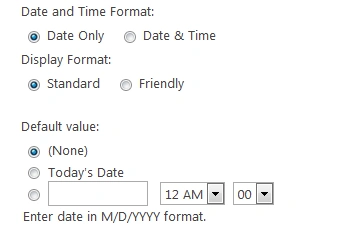
Date and time Format
Here there are 2 options.. Date Only and Date & Time. If you want that the column should contain only the date value then in that case you can select Date Only type. By default Date Only is selected. This type can be used when you are storing data like date of joining, date of birth, etc because here we do not require the time values. Sometimes we need to store the date and time value both, such as last modified date and time of contents, document uploaded date and time etc.Display Format
Here we have two values again. One is Standard and other is Friendly. Both the values are used to configure the look and feel of the displaying date and time values. There are several cases in this such as:If Date and Time Format is Date Only and Display Format is Standard then this will display the date in standard format like 7/10/2018 (MM/DD/YYYY)
If Date and Time Format is Date Only and Display Format is Friendly then this will display the date like Today, Yesterday,Tomorrow, then it will display the week days such as Monday, Tuesday if the date lies in current week, else it will display like July 22 etc.
If Date and Time Format is Date & Time and Display Format is Standard then this will display the date and time in the format 7/10/2018 12:00 AM (MM/DD/YYYY HH:MM AM/PM).
If Date and Time Format is Date & Time and Display Format is Friendly then this will display the date and time in the format like Today, Tomorrow, Yesterday, July 22 etc.
Default Value
Using this option we can configure the default values in the date and time columns, This contains options like None; if None is selected then no default values will be set. As for Today’s Date, if this value is selected then by default we will have today’s date auto populated in the control or else we can enter any custom date and time that should be default populated.
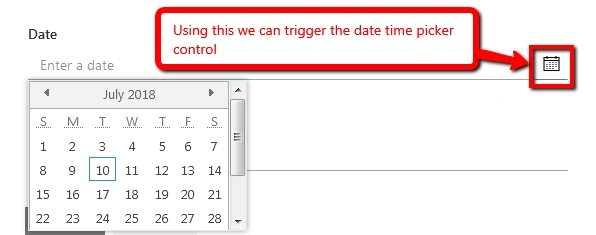
Also note that when we create a Date and Time column and try to input the values into it, it will provide a date and time picker control using which we can enter the date and time values to the columns. The default date and time picker looks like this:
Summary
So in this article we have explored the SharePoint Date and Time column types available in SharePoint list. If you have any query regarding these columns then please do let me know in the comment section and I will update my article to include your queries and solution to the questions.
In the next article I am going to cover Look Up column types in SharePoint lists.
Viknaraj ManogararajahPosted Jul 14, 2018, 10:51 PM
Nice Article, Thank you for sharing.........
Hadshana KamalanathanPosted Jul 14, 2018, 7:17 PM
Thanks for sharing