

This article continues a detailed description of the append() method used in the Java StringBuffer() class.
Before reading further, read the previous parts of the series.
Now let's move forward to the next append() methods to reach our purpose of learning. The next four append() methods are as in the following:
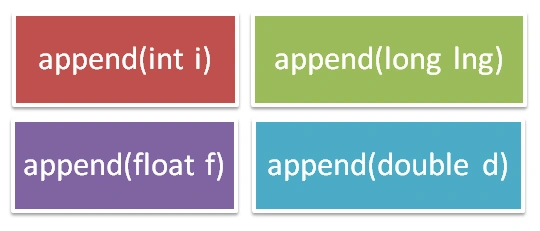
- StringBuffer append(int i) appends the string representation of the int argument to the given sequence. It returns the reference to the given object.
- StringBuffer append(long lng) appends the string representation of the long argument to the given sequence. It also returns the reference to the given object.
- StringBuffer append(float f) appends the string representation of the float argument to the given sequence. It returns the reference to the given object.
- StringBuffer append(double d) appends the string representation of the double argument to the given sequence. It also returns the reference to the given object.
Now to understand with code examples.
Example
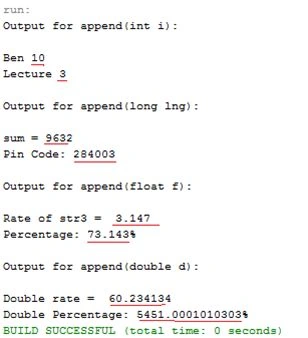
The following example contains all four append() methods stated above.
- public class AppendIntLongFloatDoubleMethods
- {
- public static void main(String args[])
- {
- StringBuffer str1 = new StringBuffer("Ben ");
- System.out.println("Output for append(int i):");
- System.out.println();
- str1.append(10);
- System.out.println(str1); //appends int argument as string to the string buffer
- str1 = new StringBuffer("Lecture ");
- str1.append(3);
- System.out.println(str1); //appends int argument as string to the string buffer
- System.out.println();
- System.out.println("Output for append(long lng):");
- System.out.println();
- StringBuffer str2 = new StringBuffer("sum = ");
- str2.append(9632);
- System.out.println(str2); //appends long argument as string to the string buffer
- str2 = new StringBuffer("Pin Code: ");
- str2.append(284003);
- System.out.println(str2); //appends long argument as string to the string buffer
- System.out.println();
- System.out.println("Output for append(float f):");
- System.out.println();
- StringBuffer str3 = new StringBuffer("Rate of str3 = ");
- str3.append(3.147);
- System.out.println(str3); //appends float argument as string to the string buffer
- str3 = new StringBuffer("Percentage: ");
- str3.append(73.143);
- System.out.println(str3 + "%"); //appends float argument as string to the string buffer
- System.out.println();
- System.out.println("Output for append(double d):");
- System.out.println();
- StringBuffer str4 = new StringBuffer("Double rate = ");
- str4.append(60.234134);
- System.out.println(str4); //appends double argument as string to the string buffer
- str4 = new StringBuffer("Double Percentage: ");
- str4.append(5451.0001010303);
- System.out.println(str4 + "%"); //appends double argument as string to the string buffer
- }
- }
Output
 Now the next and the last four append() methods are being discussed in this lecture.
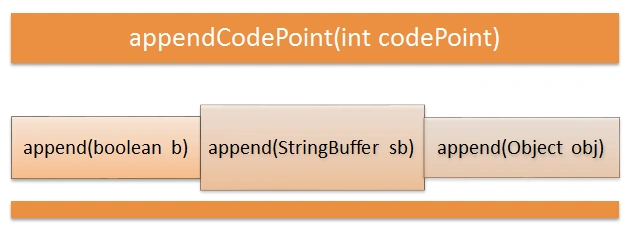
- StringBuffer append(Boolean b) appends the string representation of the Boolean argument to the given sequence.
- StringBuffer append(Object obj) appends the string representation of the object argument to the given sequence.
- StringBuffer append(StringBuffer sb) appends the specified StringBuffer argument to the given sequence. The characters of the StringBuffer arguments are appended in order (thread-safe) to the content of the StringBuffer and increase its (StringBuffer) length by the length of the StringBuffer argument. If the value of sb is “null” then the four characters of null will be appended.
- StringBuffer appendCodePoint(int codePoint) appends the string representation of the codePoint argument to the given sequence and the argument is appended to the content of the sequence.
Example
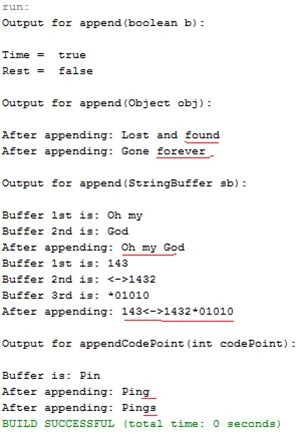
Here all four append() methods are illustrated in this example.
- public class AppendBooleanStrbuffObjCodePointMethods
- {
- public static void main(String args[])
- {
- StringBuffer str1 = new StringBuffer("Time = ");
- System.out.println("Output for append(boolean b):");
- System.out.println();
- str1.append(true);
- System.out.println(str1); //appends the boolean argument as string to the StringBuffer
- str1 = new StringBuffer("Rest = ");
- str1.append(false);
- System.out.println(str1); //appends the boolean argument as string to the StringBuffer
- System.out.println();
- System.out.println("Output for append(Object obj):");
- System.out.println();
- StringBuffer str2 = new StringBuffer("Lost and ");
- Object obj1 = "found";
- str2.append(obj1); //appends object value
- System.out.println("After appending: " + str2); //print string buffer after appending
- str2 = new StringBuffer("Gone ");
- Object obj2 = "forever";
- str2.append(obj2); //appends object value
- System.out.println("After appending: " + str2); //print string buffer after appending
- System.out.println();
- System.out.println("Output for append(StringBuffer sb):");
- System.out.println();
- StringBuffer str3 = new StringBuffer("Oh my ");
- StringBuffer str4 = new StringBuffer("God");
- System.out.println("Buffer 1st is: " + str3);
- System.out.println("Buffer 2nd is: " + str4);
- str3.append(str4); //appends strBuff4 to strBuff3
- System.out.println("After appending: " + str3); //prints StringBuffer after appending
- str3 = new StringBuffer("143");
- str4 = new StringBuffer("<->1432");
- StringBuffer str5 = new StringBuffer("*01010");
- System.out.println("Buffer 1st is: " + str3);
- System.out.println("Buffer 2nd is: " + str4);
- System.out.println("Buffer 3rd is: " + str5);
- str3.append(str4).append(str5); //appends strBuff5 & strBuff4 to strBuff3
- System.out.println("After appending: " + str3); //prints StringBuffer after appending
- System.out.println();
- System.out.println("Output for appendCodePoint(int codePoint):");
- System.out.println();
- StringBuffer str6 = new StringBuffer("Pin");
- System.out.println("Buffer is: " + str6);
- str6.appendCodePoint(103); //appends codePoint as string to the StringBuffer
- System.out.println("After appending: " + str6);
- /*prints the string buffer after appending 103
- as codePoint*/
- str6.appendCodePoint(115);
- System.out.println("After appending: " + str6);
- /*prints the string buffer after appending 103 & 115
- as codePoints*/
- }
- }
Gowtham RajamanickamPosted May 19, 2015, 12:45 AM
keep writing..
Gowtham RajamanickamPosted May 19, 2015, 12:45 AM
good one
NitinPosted May 17, 2015, 2:15 PM
nice
Manoj BhoirPosted May 16, 2015, 6:04 AM
Nice Article....
Gopi ChandPosted May 16, 2015, 4:21 AM
Thanks to everyone. :)
Santhakumar MunuswamyPosted May 16, 2015, 3:44 AM
Thanks for nice article
NitinPosted May 16, 2015, 2:58 AM
nice
Abhishek JaiswalPosted May 15, 2015, 4:33 PM
Nice Presentation!! Recommended article! :)