

This article continues with the other insert() methods discussed in a previous lecture.
Before reading further, here are the previous parts of this series.
- Learn StringBuffer() Class in Java: Lecture 1
- Learn StringBuffer() Class in Java: Lecture 2
- Learn StringBuffer() Class in Java: Lecture 3
- Learn StringBuffer() class in Java: Lecture 4
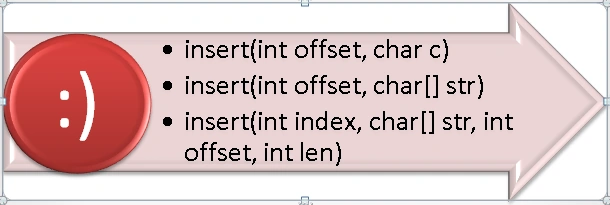
Java StringBuffer insert(int index, char[] str, int offset, int len) inserts a string representation of a subarray of the string str argument into the given sequence. The subarray lies between the specified offset value and length len of the characters. The characters of the subarray are inserted into the sequence at the position indicated by the index value and the length of the sequence increases by len chars.
It also throws StringIndexOutOfBoundsException(), if the index value is negative or greater than the length of the string or the offset or len value is negative or offset + len is greater than the string length.
Example
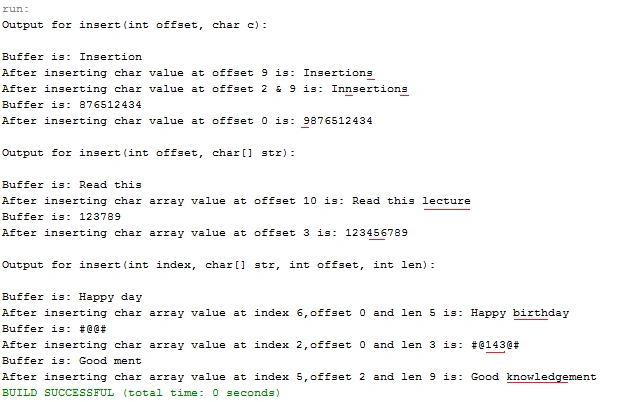
Here all three of those methods are described in the following example.
- public class InsertMethods {
- public static void main(String args[]) {
- StringBuffer str1 = new StringBuffer("Insertion");
- System.out.println("Output for insert(int offset, char c):");
- System.out.println();
- System.out.println("Buffer is: " + str1);
- str1.insert(9, 's'); //insert char value at offset 9
- System.out.println("After inserting char value at offset 9 is: " + str1.toString()); //prints StringBuffer after inserting
- str1.insert(2, 'n');
- System.out.println("After inserting char value at offset 2 & 9 is: " + str1.toString());
- str1 = new StringBuffer("876512434");
- System.out.println("Buffer is: " + str1);
- str1.insert(0, '9');
- System.out.println("After inserting char value at offset 0 is: " + str1.toString());
- System.out.println();
- System.out.println("Output for insert(int offset, char[] str):");
- System.out.println();
- StringBuffer str2 = new StringBuffer("Read this ");
- System.out.println("Buffer is: " + str2);
- char[] arr1 = {
- 'l', 'e', 'c', 't', 'u', 'r', 'e'
- }; //character array to be inserted
- str2.insert(10, arr1); //insert char array at offset 10
- System.out.println("After inserting char array value at offset 10 is: " + str2.toString()); //prints StringBuffer after inserting
- str2 = new StringBuffer("123789");
- char[] arr2 = {
- '4', '5', '6'
- };
- System.out.println("Buffer is: " + str2);
- str2.insert(3, arr2);
- System.out.println("After inserting char array value at offset 3 is: " + str2.toString());
- System.out.println();
- System.out.println("Output for insert(int index, char[] str, int offset, int len):");
- System.out.println();
- StringBuffer str3 = new StringBuffer("Happy day");
- System.out.println("Buffer is: " + str3);
- char[] arr3 = {
- 'b', 'i', 'r', 't', 'h'
- }; //character array to be inserted
- str3.insert(6, arr3, 0, 5); //insert char array at index 6,offset 0 and len 5
- System.out.println("After inserting char array value at index 6,offset 0 and len 5 is: " + str3.toString()); //prints StringBuffer after inserting
- str3 = new StringBuffer("#@@#");
- char[] arr4 = {
- '1', '4', '3'
- };
- System.out.println("Buffer is: " + str3);
- str3.insert(2, arr4, 0, 3);
- System.out.println("After inserting char array value at index 2,offset 0 and len 3 is: " + str3.toString());
- str3 = new StringBuffer("Good ment");
- char[] arr5 = {
- 'a', 'c', 'k', 'n', 'o', 'w', 'l', 'e', 'd', 'g', 'e'
- };
- System.out.println("Buffer is: " + str3);
- str3.insert(5, arr5, 2, 9); //insert char array at index 5,offset 2 and len 9
- System.out.println("After inserting char array value at index 5,offset 2 and len 9 is: " + str3.toString());
- /*offset 2 means it insert the
- char array leaving 'a' & 'c' i.e. knowledge*/
- }
- }
The following methods will be discussed now.
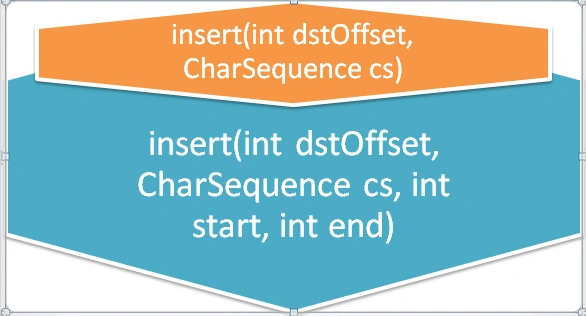
insert(int dstOffset, CharSequence cs) inserts the specified character sequence into the given sequence. The characters of the CharSequence are inserted in order (thread-safe) into the given sequence at the specified offset value, moving up until any the characters originally above that position and the length of the sequence is increased by the length of the argument s. It throws IndexOutOfBoundsException() if the offset value is invalid.
insert(int dstOffset, CharSequence cs, int start, int end) inserts a subsequence of the specified character sequence into the given sequence. The subsequence of the argument s is specified by start and end values that are inserted in the order (thread-safe) into the given sequence at the specified position indicated by the offset value, moving up until any character originally above that position and the length of sequence is increased by start end & value. It throws IndexOutOfBoundsException() if the dstOffset value is negative or greater than the length of the string or the start or end are negative or the start is greater than the end or the end is greater than the given string length.
Example
- public class InsertMethods {
- public static void main(String args[]) {
- StringBuffer str1 = new StringBuffer("Acknowledge");
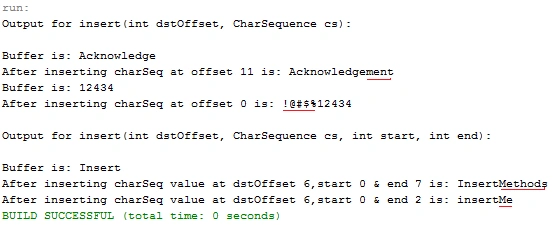
- System.out.println("Output for insert(int dstOffset, CharSequence cs):");
- System.out.println();
- System.out.println("Buffer is: " + str1);
- CharSequence CharSeq1 = ("ment");
- str1.insert(11, CharSeq1); //insert charSequence at offset 11
- System.out.println("After inserting charSeq at offset 11 is: " + str1.toString()); //prints StringBuffer after inserting
- str1 = new StringBuffer("12434");
- System.out.println("Buffer is: " + str1);
- CharSequence CharSeq2 = ("!@#$%");
- str1.insert(0, CharSeq2);
- System.out.println("After inserting charSeq at offset 0 is: " + str1.toString());
- System.out.println();
- System.out.println("Output for insert(int dstOffset, CharSequence cs, int start, int end):");
- System.out.println();
- StringBuffer str2 = new StringBuffer("Insert");
- System.out.println("Buffer is: " + str2);
- CharSequence CharSeq3 = ("Methods");
- str2.insert(6, CharSeq3, 0, 7); //insert charSequence at dstOffset 6,start 0 & end 7
- System.out.println("After inserting charSeq value at dstOffset 6,start 0 & end 7 is: " + str2.toString()); //prints StringBuffer after inserting
- str2 = new StringBuffer("insert");
- CharSequence CharSeq4 = ("Methods");
- str2.insert(6, CharSeq4, 0, 2);
- System.out.println("After inserting charSeq value at dstOffset 6,start 0 & end 2 is: " + str2.toString());
- }
- }
Other important methods of the StringBuffer class are discussed in the next article.
Santhakumar MunuswamyPosted May 18, 2015, 2:11 PM
Thanks for sharing
Gowtham RajamanickamPosted May 18, 2015, 12:40 PM
informative..