Before reading this article, I highly recommend reading my previous parts:
- Interface
- Abstract class
- Abstract classes vs Interface
In Day 3 we have kept few topics but these topics are important that need in depth knowledge in order to understand them, I hope that you will enjoy Day 3 of learning tiny bit of C#.
Interface
Interface is like a class that cannot contain the definition i.e. it contains empty events, methods and properties. We create Interface using interface keyword. Just like classes, interface contains properties, methods, members, delegates or event but only declaration and no implementation.
In one term we call Interface as a contract because they force the class to follow the contract between Class and Interface.
Syntax
- interface ICustomer
- {
- void Bonus();
-
- }
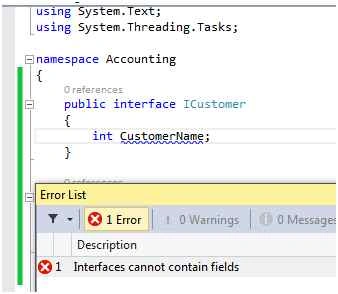
- Interface cannot contain Fields (variables)
E.g.
- public interface ICustomer
- {
- int CustomerName;
- }
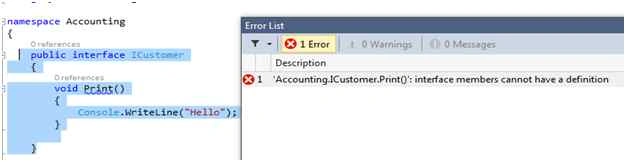
- Interface member cannot have a definition.
This means that a function of Interface cannot have its definition of its own.
E.g.
- public interface ICustomer
- {
- void Print()
- {
- Console.WriteLine("Hello");
- }
- }
How to implement Interface
As we inherit a class in C# using (:) same we have to do when we want to implement an Interface.
- We need to Implement the Interface members,
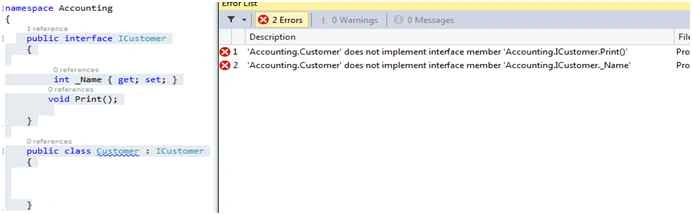
If we just implement the Interface and does not implement the properties or function it will threw a compile time error as shown below:
- public interface ICustomer
- {
- int _Name
- {
- get;
- set;
- }
- void Print();
- }
- public class Customer: ICustomer
- {}
- When we implement the Interface the members should be Public,
E.g.
- public interface ICustomer
- {
- int _Name
- {
- get;
- set;
- }
- void Print();
- }
- public class Customer: ICustomer
- {
- public int _Name
- {
- get
- {
- throw new NotImplementedException();
- }
- set
- {
- throw new NotImplementedException();
- }
- }
- void Print()
- {
- throw new NotImplementedException();
- }
- } * Implement the Interface members
- public interface ICustomer
- {
- int _Name
- {
- get;
- set;
- }
- void Print();
- }
- public class Customer: ICustomer
- {
- public int _Name
- {
- get
- {
- throw new NotImplementedException();
- }
- set
- {
- throw new NotImplementedException();
- }
- }
- public void Print()
- {
- throw new NotImplementedException();
- }
- }
- namespace Interface
- {
- interface ICustomer
- {
- void Bonus();
- }
- class Customer: ICustomer
- {
- public void Bonus()
- {
- Console.WriteLine("Bonus of this year");
- Console.ReadLine();
- }
- }
- }
Interface member are public by default, and they allow explicit modifiers if a class inherits from an interface it must provide implementation for all interface members. Otherwise, we get a compiler error, as shown below.
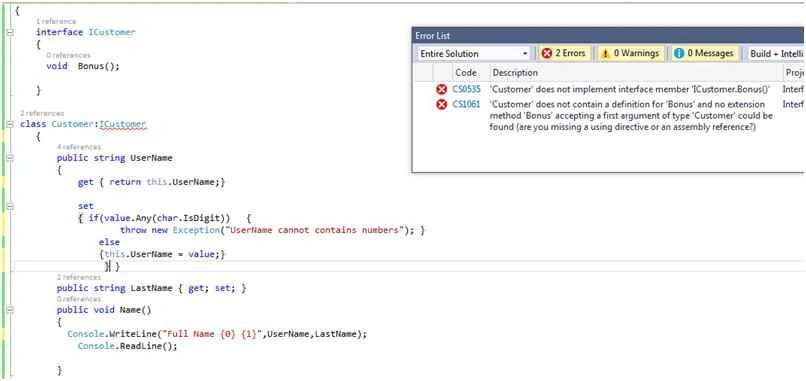
Now once we implement the interface the above mentioned error gets resolved.
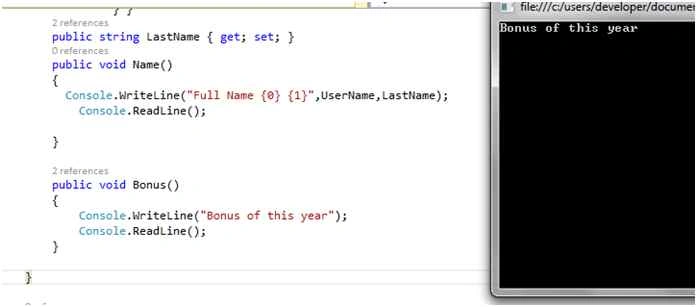
We can see the command prompt window with the output:
What if a Class implementing an Interface inherits another Interface
- using System;
- namespace Interface
- {
- interface ICustomer
- {
- void Print();
- }
- interface Icustomer2: ICustomer
- {
- void Print2();
- }
- public class Customer: Icustomer2
- {
- public void Print2()
- {
- Console.WriteLine("ICustomer2 Method");
- }
- }
- class Program
- {
- static void Main(string[] args)
- {
- Customer objCustomer = new Customer();
- objCustomer.Print2();
- }
- }
- }
Now once I try to build the same I face the following error:

When a class implements an Interface which inherits other Interface then the class has to provide the implementation for both the Interface methods.
- public class Customer: Icustomer2
- {
- public void Print2()
- {
- Console.WriteLine("ICustomer2 Method");
- }
- public void Print()
- {
- Console.WriteLine("ICustomer1 Method");
- }
- }
Now once I implement the other Interface method and try to build the application it gets successfully build.
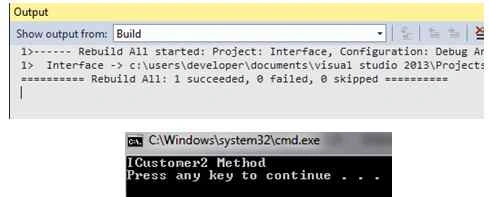
We cannot create an instance of Interface, but an Interface reference variable can be pointed towards a class object which is implementing the Interface.
Now the question comes why we should use Interface:
- ENFORCE the Standardization/ consistency(Contract)
- Decoupling
ENFORCE the Standardization/ consistency (Contract)
In law, a contract (or informally known as an agreement in some jurisdictions) is an agreement having a lawful object entered into voluntarily by two or more parties, each of whom intends to create one or more legal obligations between them. Source: Wikipedia.
Basically by the words contract we mean that class will implement all methods of Interface. Class that implements the Interface here signs the Contract that I will implement all the methods, etc. of the Interface. We will be showing the example for the same in the following example.
Decoupling
Decoupling as the word specifies dissociate (something) from something else, so here in programming world decoupling stand where we separate the dependency between our business layer concrete classes, UI layer and DAL Layer as shown below. As we have seen we cannot create an object of the Interface, but an Interface reference variable can point towards a derived class object.
So let’s get started we will create a Registration Page where we will be inserting the User Details into the database without directly calling BAL or DAL from the concrete classes rather we will call these classes via an Interface. This topic will be little bit difficult to understand. Please focus and try to go with a practical implementation.
So switch to Visual Studio:
- I have created a web application named TestInterface which is basically a Web Form based application.
- We create a UI as shown below:
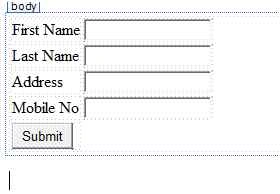
So when we create an Enterprise application we should make them in 3 layer architecture which means UI, BAL (Business Layer or Concrete classes) and DAL Data Access Layer.
So we have created our UI which generally talk to the concrete classes and then the concrete classes talk with DAL class to insert or update or delete information and vice versa. In this scenario we make a strong coupling between our Layers that means our Layers are not decoupled from each other in order to make them decoupled we make use of an Interface.
- Now we will create our Business Class called User.cs which will contain properties related to the user like FirstName, LastName, Address and MobileNo)
- We create an Interface called ICRUD (Create, Read, Update and Delete) where we will define our Methods that will be enforced to be implemented by the User Class.
- We create our IRegister Interface which will implement ICRUD and contains properties as in the following:
- public interface IRegister
- {
-
- string FirstName { get; set; }
- string LastName { get; set; }
- string Address { get; set; }
- string MobileNo { get; set; }
-
- }
- Now we will also create an Interface responsible for communicating between our BAL and DAL layer and will also decide which DB to be used. (SQL Server or oracle).
- public interface IDb
- {
-
-
-
-
-
-
-
-
-
- int Insert(string _FirstName, string _LastName, string _Address, string _MobileNo);
- }
Here I have only created one method while we can create all the operations that we need to perform as per our business requirements.
Now once we have created our Interface let us implement the Interface in our BAL class.
- using System;
- using System.Collections.Generic;
- using System.Linq;
- using System.Text;
- using System.Threading.Tasks;
- using Interface;
- namespace BAL
- {
- public class User: IRegister
- {
- public string FirstName
- {
- get
- {
- throw new NotImplementedException();
- }
- set
- {
- throw new NotImplementedException();
- }
- }
- public string LastName
- {
- get
- {
- throw new NotImplementedException();
- }
- set
- {
- throw new NotImplementedException();
- }
- }
- public string Address
- {
- get
- {
- throw new NotImplementedException();
- }
- set
- {
- throw new NotImplementedException();
- }
- }
- public string MobileNo
- {
- get
- {
- throw new NotImplementedException();
- }
- set
- {
- throw new NotImplementedException();
- }
- }
- public int InsertUser()
- {
- throw new NotImplementedException();
- }
- }
- }
Our IRegister Interface implements ICRUD interface so now class has to implement both the functionality of IRegister as well as ICRUD Interface as shown above.
We will write our implementation functionality for UserClass.
- using System;
- using System.Collections.Generic;
- using System.Linq;
- using System.Text;
- using System.Threading.Tasks;
- using Interface;
- namespace BAL
- {
- public class User: IRegister
- {
- private int _UserId;
- private string _FirstName;
- private string _Address;
- private string _LastName;
- private string _MobileNo;
- public string FirstName
- {
- get
- {
- return _FirstName;
- }
- set
- {
- _FirstName = value;
- }
- }
- public string LastName
- {
- get
- {
- return _LastName;
- }
- set
- {
- _LastName = value;
- }
- }
- public string Address
- {
- get
- {
- return _Address;
- }
- set
- {
- _Address = value;
- }
- }
- public string MobileNo
- {
- get
- {
- return _MobileNo;
- }
- set
- {
- _MobileNo = value;
- }
- }
- public int InsertUser(IDb obj)
- {
- _UserId = obj.Insert(_FirstName, _LastName, _Address, _MobileNo);
- return _UserId;
- }
- }
- }
Note: Here IDb Interface will communicate between BAL and DAL layer and will also decide which DB server will be used: SQL Server or Oracle.
Now we will create DAL layer. Here I am not using stored procedure to insert User Records to the Database but will request you to use stored procedure for the same.
- using System;
- using System.Collections.Generic;
- using System.Linq;
- using System.Text;
- using System.Threading.Tasks;
- using System.Data;
- using System.Data.SqlClient;
- using System.Data.OracleClient;
- using Interface;
- using System.Configuration;
- namespace DAL
- {
- public class SqlServer: IDb
- {
-
- static private string connectionString;
-
- static private SqlConnection con;
- static SqlServer()
- {
- connectionString = ConfigurationManager.ConnectionStrings["SqlDB"].ConnectionString;
- con = new SqlConnection(connectionString);
- }
- public int Insert(string firstName, string lastName, string mobileNo, string addreess)
- {
- try
- {
- string query = "insert into tblRegistration values ('" + firstName + "','" + lastName + "','" + mobileNo + "','" + addreess + "')";
-
- SqlCommand cmd = new SqlCommand(query, con);
- con.Open();
- cmd.ExecuteScalar();
- string query2 = "select IDENT_CURRENT('tblRegistration')";
- SqlCommand cmd2 = new SqlCommand(query2, con);
- decimal value = (decimal) cmd2.ExecuteScalar();
- return Convert.ToInt32(value);
- }
- catch (Exception ex)
- {
- throw new Exception(ex.Message.ToString());
- }
- finally
- {
- con.Close();
- }
- }
- }
- public class Oracle: IDb
- {
- static private string connectionString;
- static private OracleConnection con;
- static Oracle()
- {
- connectionString = ConfigurationManager.ConnectionStrings["OracleDB"].ConnectionString;
- con = new OracleConnection(connectionString);
- }
- public int Insert(string firstName, string lastName, string mobileNo, string addreess)
- {
- try
- {
- string query = "insert into tblRegistration values ('" + firstName + "','" + lastName + "','" + mobileNo + "','" + addreess + "')";
- OracleCommand cmd = new OracleCommand(query, con);
- con.Open();
- cmd.ExecuteScalar();
- string query2 = "select INCR_USERID.currval from dual";
- OracleCommand cmd2 = new OracleCommand(query2, con);
- decimal value = (decimal) cmd2.ExecuteScalar();
- return Convert.ToInt32(value);
- }
- catch (Exception ex)
- {
- throw new Exception(ex.Message.ToString());
- }
- finally
- {
- con.Close();
- }
- }
- }
- }
Now here we have created our DAL class which implements IDb Interface which works as a communication between BAL and DAL layer. It has only one method as shown above:
Now in the UI rather than creating an object of the Business class we give this job to a Factory Class which will be responsible for creating objects of the desired class which is needed. Factory class basically is a type of creational pattern. As we know that Interface cannot create object of its own but it can reference to the object of the implemented class. Here we have only one class but in real time project we will have lots of classes this may vary for the same and can be improvised with other design patterns.
- using Interface;
- using BAL;
- namespace Factory
- {
- public class Factory
- {
- public static IRegister getRegisterobject()
- {
- return new User();
- }
- }
- }
Now once we have implemented the Factory class let’s get the Information from UI and try to insert the same.
- using System;
- using Interface;
- using System.Configuration;
- using DAL;
- namespace TestInterface
- {
- public partial class Register: System.Web.UI.Page
- {
- IDb objIDB = null;
- string DBname = ConfigurationManager.AppSettings["DB"].ToString()
- .ToLower();
- protected void Page_Load(object sender, EventArgs e)
- {
- if (DBname == "oracle")
- {
- objIDB = new Oracle();
- }
- else
- {
- objIDB = new SqlServer();
- }
- }
- protected void Button1_Click(object sender, EventArgs e)
- {
- IRegister objRegister = Factory.Factory.getRegisterobject();
- setObjectFromUi(objRegister);
- int Id = objRegister.InsertUser(objIDB);
- Response.Write("User Registered successfully with UserId " + Id);
- }
- private void setObjectFromUi(IRegister userInformation)
- {
- userInformation.FirstName = txtFirstName.Text;
- userInformation.LastName = txtLastName.Text;
- userInformation.MobileNo = txtMobile.Text;
- userInformation.Address = txtAddress.Text;
- }
- }
- }
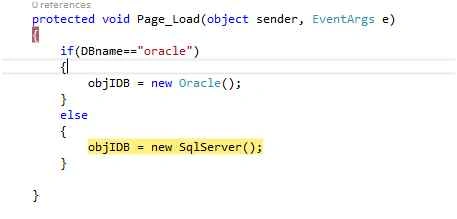
Here at the start of the application we check from the web.config file which DB to be used based upon the entry IDb Interface will reference towards the SQL Server or Oracle Server.
- IDb objIDB = null;
- string DBname = ConfigurationManager.AppSettings["DB"].ToString()
- .ToLower();
-
- protected void Page_Load(object sender, EventArgs e)
- {
- if (DBname == "oracle")
- {
-
- objIDB = new Oracle();
- }
- else
- {
- objIDB = new SqlServer();
- }
- }
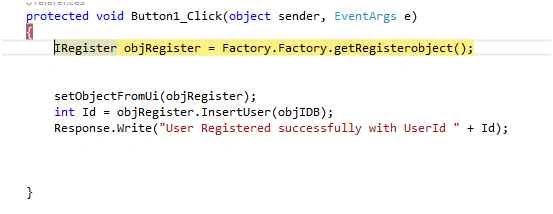
Now once the User enters the information IRegister will call Factory class to create object of User and IRegister will refer towards User Class.
- IRegister objRegister = Factory.Factory.getRegisterobject();
- Than setObjectFromUi(objRegister);
-
- private void setObjectFromUi(IRegister userInformation)
- {
- userInformation.FirstName = txtFirstName.Text;
- userInformation.LastName = txtLastName.Text;
- userInformation.MobileNo = txtMobile.Text;
- userInformation.Address = txtAddress.Text;
- }
- int Id = objRegister.InsertUser(objIDB);
IRegister reference object will call InsertUser method and pass IDb reference object and at the User class same will be received and then Idb will communicate with DAL layer.
- public int InsertUser(IDb obj)
- {
- _UserId = obj.Insert(_FirstName, _LastName, _Address, _MobileNo);
- return _UserId;
- }
We can see that there is no object creation of Concrete class and Db classes rather Interface has been used to reference to those classes making our project decoupled from each other. Let’s run our application and see how it works.
Phase 1 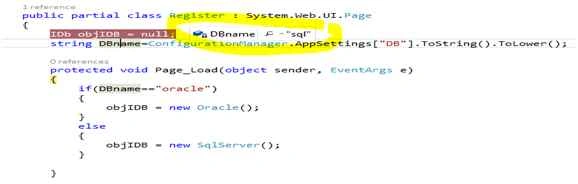 Phase 2:
 IDb referencing towards SqlServer Class,
 Phase 3:
 Loading connection string,
 Phase 4:
 Register Page Appear,
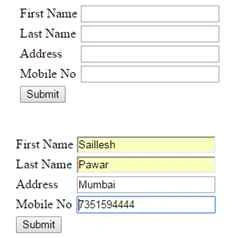 Phase 5:
 As soon as User Enters the information.
Factory class getRegisterObject function will be called and Iregister reference variable will point towards User class,
 Phase 6:
 Creation of User Object,
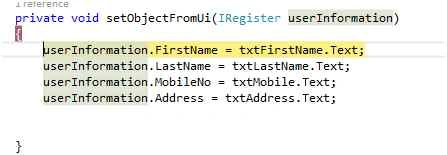
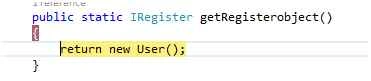 Phase 7:
 Setting User Information into properties of Class.
We can clearly see that all work is done by Interface we are not creating any object of class Interface communicating with all.
 Phase 8:
 Class method InsertUser will be called and Reference variable of IDb will be passed which point towards the DB which we want to use.
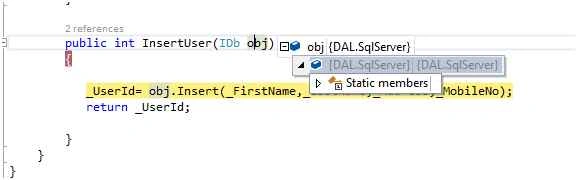
 Phase 9:
 Here we can see Idb ibj contains reference variable towards SQL Server, now all the fields value will be passed to the db Insert function. As shown below we have used _UsedId field to receive the generated UserId of the User.
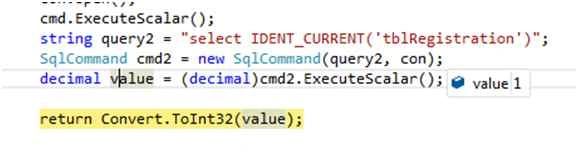
 Phase 10:
 Now SQl server class method will be called by IDb interface and the queries are executed and the generated UserId will be returned back to User UI screen.
 Phase 11:
 Showing UserId generated and same will be returned to User UI.
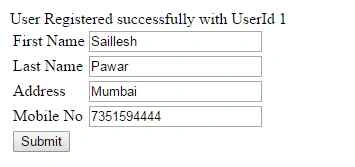
So here we learnt how Interface helps us to follow the standardization of Vocabulary and helps in Decoupling. I hope all phases would be helpful so that you can learn them phase by phase. I have attached the project and will request you to execute the same.
Explicit Interface
Think of a scenario where we have two Interfaces with same method name then how we will be able to tell the method which we implemented is of which Interface.
- public interface IPrintSony
- {
- void Print();
- }
- public interface IPrintHP
- {
- void Print();
- }
- public class Customer: IPrintHP, IPrintSony
- {
- public void Print()
- {
- Console.WriteLine("I am an Interface function");
- Console.ReadLine();
- }
- public static void Main()
- {
- Customer objCustomer = new Customer();
- objCustomer.Print();
- }
- }
Here as you can see there are two Interface IPrintSony and IPrintHP. Customer class is implementing both the Interface and implementing the methods, we run the program and found that it runs. So how do we figure out which interface method was called so in order to achieve that we make use of Explicit Interfaces as shown below.
- namespace ConsoleApplication1
- {
- public interface IPrintSony
- {
- void Print();
- }
- public interface IPrintHP
- {
- void Print();
- }
- public class Customer: IPrintHP, IPrintSony
- {
- void IPrintSony.Print()
- {
- Console.WriteLine("I am an IPrintSony Interface function");
- Console.ReadLine();
- }
- void IPrintHP.Print()
- {
- Console.WriteLine("I am an IPrintHP Interface function");
- Console.ReadLine();
- }
- public static void Main()
- {
- Customer objCustomer = new Customer();
- ((IPrintHP) objCustomer)
- .Print();
- ((IPrintSony) objCustomer)
- .Print();
- }
- }
- }
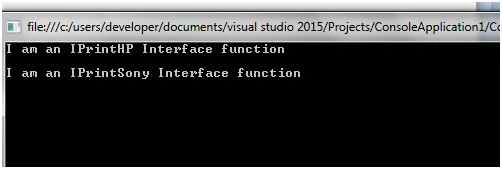
Hereby I conclude that once the class explicitly implements the Interface the Interface member can no longer be accessed through class reference variable, but only via Interface reference variable as shown above.
Abstract Class An Abstract class is a half defined Base class in C# and we cannot create the object of the Abstract class. You can create your own Abstract class by using the modifier called Abstract. An abstract class means we cannot create object of the same but we can inherit the Abstract class in our child classes.
- Abstract Class only comes in Inheritance hierarchy i.e. Is A relationship.
- Abstract is used in order to remove duplication in Inheritance model using Generalization and Specialization relationship.
Abstract keyword is used to create Abstract class e.g.:
- abstract class Customer
- {
-
- }
An Abstract Class can contain abstract methods i.e. that only contain definition they don’t have implementation of their own, abstract methods implementation is done in Child or Derived classes otherwise it will throw error note (all the child has to implement all abstract methods). Abstract method can also contain non abstract methods.
- namespace AbstractClass
- {
- abstract class Customer
- {
- public abstract void print();
- }
- }
But if I try to give implementation to the abstract class we will face an Error. We cannot define an Abstract class as static or sealed (it will not be inherited). We cannot define the access modifier for Abstract class it is by default Public.
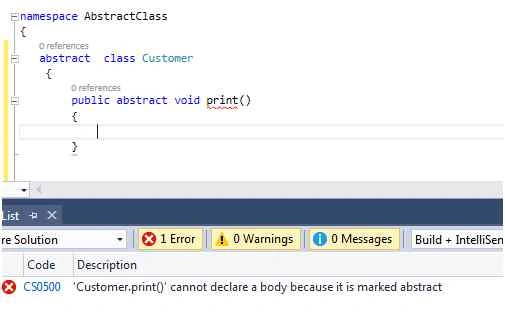
i.e. Abstract methods cannot contain implementation.
As discussed above we cannot create object of the Abstract class. Let us try the same, so as soon as we create an instance of the Abstract class. Abstract class can be used as a Base class for other classes.
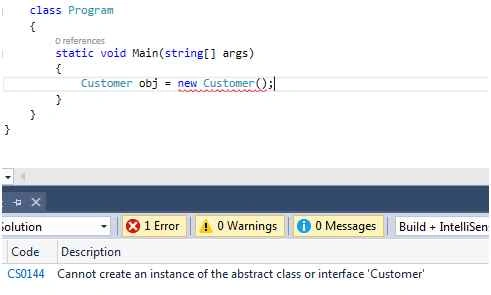
When we declare a method as Abstract and we inherit the Abstract class we have to implement the Abstract method otherwise it will throw an exception.
- namespace Abstract
- {
- abstract class PERSON
- {
- public abstract void Print();
- }
- class Program: PERSON
- {
- static void Main(string[] args)
- {}
- }
- }
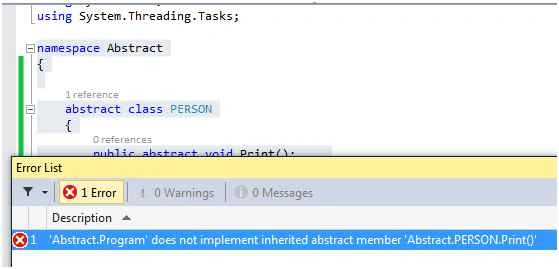
But if we don’t want to provide the implementation for the Abstract method we can put Abstract keyword in class Program, it will not throw an error and will mark it as an Abstract class i.e. that means this Abstract class has some Abstract members.
In order to implement abstract methods in Derived class we have to use
override in the abstract methods of Abstract class. Small example is shown below:
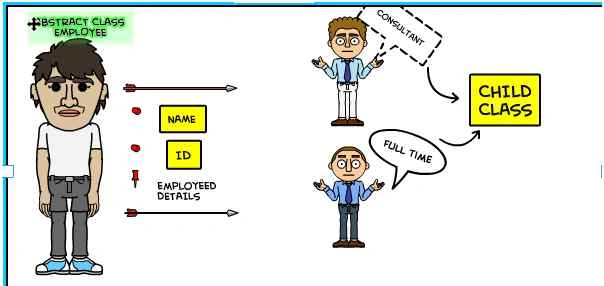
Here Employee is a generalized entity which has generalized properties which later inherited and override by the Child entity to define specialized relationship.
Like Consultant Employee, FullTime Employee.
- using System;
- namespace AbstractClass
- {
- abstract class Customer
- {
- public int ID
- {
- get;
- set;
- }
- public String UserName
- {
- get;
- set;
- }
- public abstract void Details();
- }
- class Consultant: Customer
- {
- public int HourlySalary
- {
- get;
- set;
- }
- public override void Details()
- {
- Console.WriteLine("The Consultant name {0} , id {1} and Hourly salary is {2}", this.ID, this.UserName, this.HourlySalary);
- }
- }
- class Fulltime: Customer
- {
- public int YearlySalary
- {
- get;
- set;
- }
- public override void Details()
- {
- Console.WriteLine("The Consultant name {0} , id is {1} and yearly salary is {2}", this.ID, this.UserName, this.YearlySalary);
- }
- }
- }
- using System;
- namespace AbstractClass
- {
- class Program
- {
- static void Main(string[] args)
- {
- Consultant objcons = new Consultant();
- objcons.HourlySalary = 4000;
- objcons.ID = 1;
- objcons.UserName = "Akansha Bakshi";
- objcons.Details();
- Console.ReadLine();
- }
- }
- }
In derived class the abstract method of Abstract class should be of same return type and definition otherwise it will show error.
- Non Abstract Methods:
If we declare method without Abstract keyword it is a Non Abstract method i.e. that means it’s not mandatory to have Abstract members in Abstract class.
- We cannot create an object of the Abstract class but we can point the Abstract class object to the child class object as in the following example:
- public class Program: PERSON
- {
- public override void Print()
- {
- Console.WriteLine("I am child class inheriting abstract class");
- }
- static void Main(string[] args)
- {
- PERSON objPerson = new Program();
- objPerson.Print();
- Console.ReadLine();
- }
- }
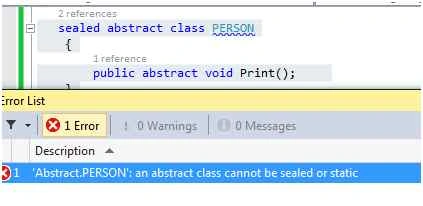
- Abstract class cannot be Sealed.
Why and when should we use Abstract class
Lets’ take an example if we implement the above example doing Inheritance method and creating a concrete class as base and child class Fulltime Employee and Parttime Employee inheriting the Base Class BaseEmployee.
We would be able to create the object of the BaseEmployeeClass, where in real time we only have two employees FullTime and PartTime so it would be wrong if we allow developers the object creation of BaseEmployeeClass. So we want to prevent them to create instance of the BaseEmployee. To solve this problem we use the concept of Abstract class. Once we mark the class as Abstract we cannot create object of the Abstract classes, preventing us from creating object of BaseEmployeeClass.
Hence I can conclude that we should use Abstract class when we want to move common functionality of two or more classes into a single base class and when we don’t want anyone to instantiate the base class.
Abstract classes vs Interface
| Abstract | Interface |
| Abstract classes can have implementation for some of its members. | Interface cannot have implementation for any of its members. |
| Abstract class members are by default Private | Interface members are by default Public (they cannot have access modifiers) |
| Abstract class can have fields. | Interface cannot contain fields. |
• A class can implement multiple interfaces at the same time.
• A class cannot inherit multiple classes at the same time. | |
| Abstract classes can be inherited from a class | Interface can only be inherited from an Interface. |
| Abstract classes are used when we want to share common functionality in parent child relationship, which cannot be initiated. | Interfaces are used to define the contract enforce the standardization, decoupling |
| Abstract classes are inherited | Interface are implemented |
| Abstract class member can have Access Modifiers. | Interface members are Public because purpose of an interface is to enable other types to access a class or struct. No access modifiers can be applied to interface members. |


Carlos KassabPosted Dec 17, 2021, 12:05 AM
This is a really great article, congratulations, thank you so much for all your effort on this.
Rashed Bin HaresPosted Dec 30, 2015, 3:21 AM
i am from Bangladesh.will you give me an alert when release other part of this series.kindly give me your fb link or email address.
Ranjit PowarPosted Dec 30, 2015, 12:07 AM
nice
Santhakumar MunuswamyPosted Dec 29, 2015, 10:42 AM
Thanks for good article. keep it up
Anu VPosted Dec 29, 2015, 6:57 AM
good
Sibeesh VenuPosted Dec 29, 2015, 6:41 AM
Nice Share
Akash VarshneyPosted Dec 29, 2015, 6:32 AM
Nice Article