

Before reading this article, I highly recommend reading the previous parts of the series.
- Learn Universal Windows Programming Via Modern C++
- Learn Universal Windows Programming Via Modern C++ (Button Control)
- Learn Universal Windows Programming Via Modern C++ (Stackpanel)
- Learn Universal Windows Programming Via Modern C++ (CheckBox)
- Learn Universal Windows Programming Via Modern C++ (RadioButton)
- Learn Universal Windows Programming Via Modern C++ (Combobox)
- Learn Universal Windows Programming Via Modern C++ (Border)
- Learn Universal Windows Programming Via Modern C++ (CommandBar)
In this article, we are going to learn about SplitView control in Modern C++.
SplitView
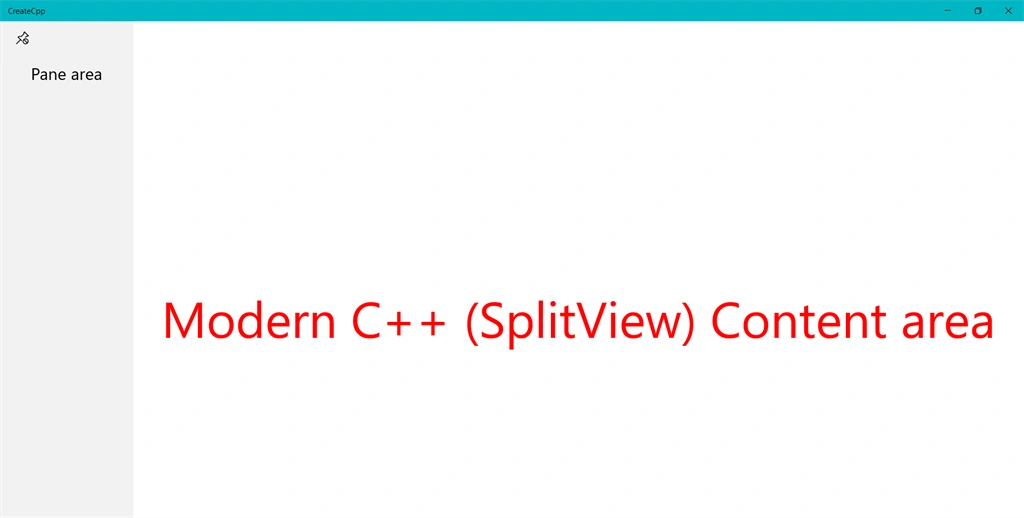
SplitView is used to create a top-level navigation. This control is divided into the following two main areas.
- Pane area.
- Content area.
Pane area - Pane area is representing the menu that users want to interact with.
Content area - the Content Area is used to display different pages or different controls based on the pane menu selected by the user.
- SplitView sView;
- auto txtPane = CreateTextBlock(L"Pane area");
- txtPane.HorizontalAlignment(HorizontalAlignment::Center);
- txtPane.VerticalAlignment(VerticalAlignment::Center);
- txtPane.Margin(CreateThickness(20, 0, 0, 0));
- txtPane.FontSize(25);
- txtStatus = CreateTextBlock(L"Modern C++ (SplitView) Content area");
- txtStatus.HorizontalAlignment(HorizontalAlignment::Center);
- txtStatus.VerticalAlignment(VerticalAlignment::Center);
- txtStatus.TextWrapping(TextWrapping::WrapWholeWords);
- txtStatus.FontSize(75);
- txtStatus.Foreground(SolidColorBrush(Colors::Red()));
- sView.Pane(txtPane );
- sView.Content(txtStatus);
Pane
The Pane area is generally used to display the menu items for Navigation to load various items into the content area.
The following are some of the important properties.
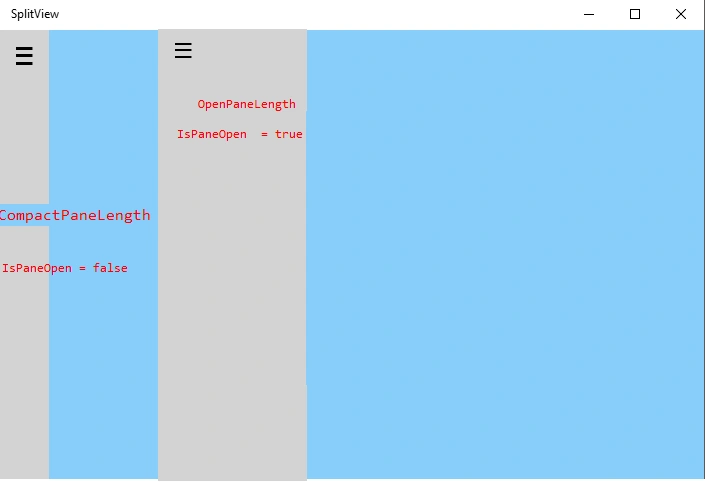
- CompactPaneLength: Normal display width of the pane area.
- OpenPaneLength: User interacts in the pane, changes the display of the width.
- IsPaneOpen: Find pane in CompactPaneLength or OpenPaneLength mode.
- SplitView sView;
- sView.IsPaneOpen(true);
- sView.OpenPaneLength(200);
- sView.CompactPaneLength(50);
Display modes of SplitView control.
- Overlay.
- CompactOverlay.
- Inline.
- Compact inline.
CompactOverlay mode
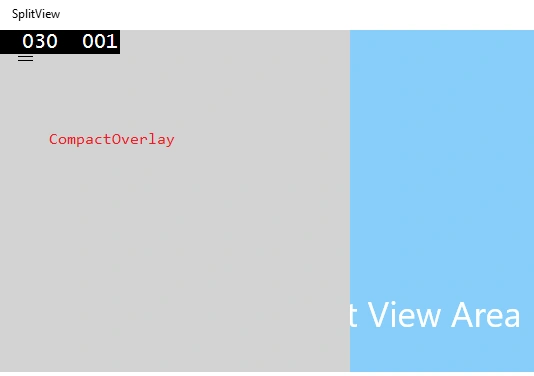
Overlay into the view area is good to use for Mobile version or small size window. For example, PC (Calculator app).
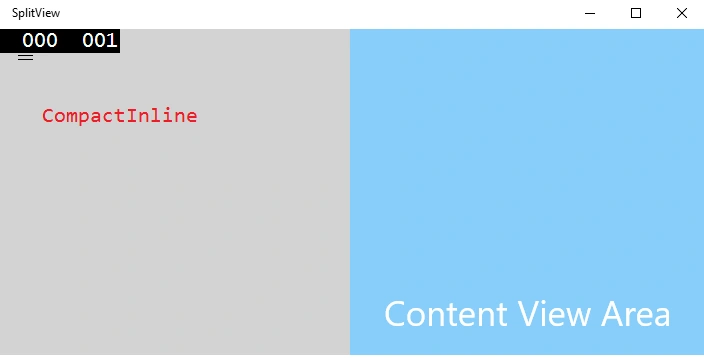
CompactInline mode is divided into a SplitView area and it's good to use for a PC version.
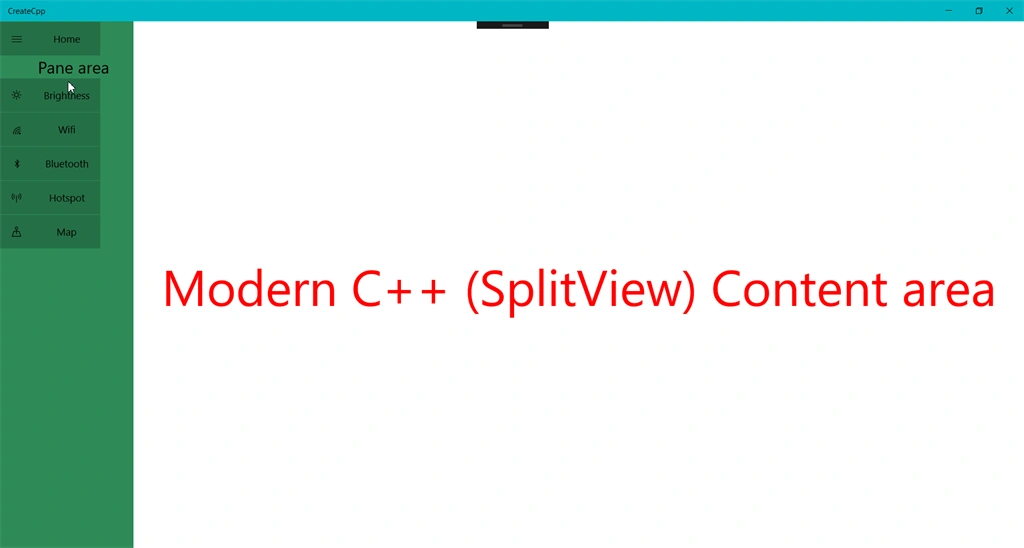
Inline and Overlay are used to hide the pane area. "Hide the pane area" properties are usually used in the mobile version or small size window. For example, in a Calculator app, the Pane area is hidden. When you click the Hamburger button (“?“), the CompactOverlay mode pane will open in the app.
- SplitView sView;
- sView.DisplayMode(SplitViewDisplayMode::CompactInline);
For a Hamburger menu button in the UAP, we can see this control in Groove music or calculator (in the preceding image, Pane area is a Hamburger menu button). This control is more popular in the SplitView Control. Let us see how to create Hamburger button.
- Open the "Character map" font (search in Windows OS).
- Select the font type "Segoe MDL2 Assets".
- Choose the Hamburger font ( Highlighted in the below image).
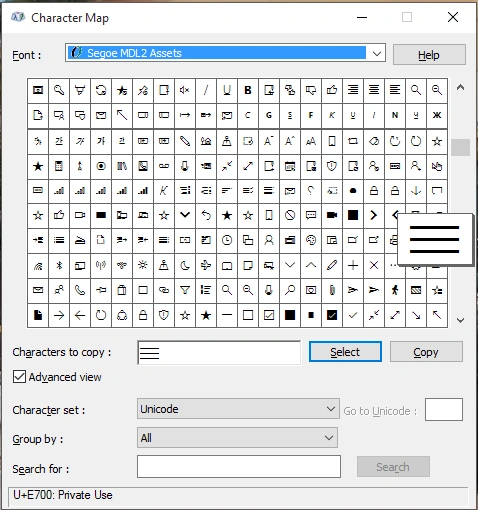
- Copy the Unicode character "E700" at the end of the image.
- Button BtnHamburger;
- IInspectable captionText = PropertyValue::CreateString(L"\uE700");
- BtnHamburger.Content(captionText);
- BtnHamburger.FontFamily(FontFamily(L"Segoe MDL2 Assets"));
- #include "pch.h"
- using namespace winrt;
- using namespace Windows::ApplicationModel;
- using namespace Windows::ApplicationModel::Activation;
- using namespace Windows::Foundation;
- using namespace Windows::UI;
- using namespace Windows::UI::Xaml;
- using namespace Windows::UI::Xaml::Controls;
- using namespace Windows::UI::Xaml::Controls::Primitives;
- using namespace Windows::UI::Xaml::Interop;
- using namespace Windows::UI::Xaml::Media;
- using namespace Windows::UI::Xaml::Navigation;
- using namespace Windows::UI::Popups;
- using namespace Windows::Storage;
- struct App :ApplicationT<App>
- {
- public:
- App()
- {
- }
- virtual ~App() = default;
- TextBlock txtStatus;
- SplitView sView;
- AppBarButton btnHome;
- TextBlock CreateTextBlock(hstring text)
- {
- TextBlock txtBlock;
- txtBlock.Text(text);
- txtBlock.FontSize(15);
- return txtBlock;
- }
- AppBarButton CreateAppBarButton(Symbol icon, hstring text, int Idx)
- {
- AppBarButton appBtn;
- appBtn.Label(text);
- appBtn.Click({ this,&App::OnBtnClick });
- appBtn.Tag(PropertyValue::CreateInt32(Idx));
- appBtn.VerticalAlignment(VerticalAlignment::Top);
- auto sIcon = CreateSymbolIcon(icon);
- appBtn.Icon(sIcon);
- return appBtn;
- }
- void OnBtnClick(IInspectable const &sender, RoutedEventArgs const args)
- {
- if (sView.IsPaneOpen())
- {
- sView.IsPaneOpen(false);
- btnHome.Icon(CreateSymbolIcon(Symbol::Pin));
- }
- else
- {
- sView.IsPaneOpen(true);
- btnHome.Icon(CreateSymbolIcon(Symbol::UnPin));
- }
- }
- SymbolIcon CreateSymbolIcon(Symbol icon)
- {
- SymbolIcon sIcon;
- sIcon.Symbol(icon);
- return sIcon;
- }
- Thickness CreateThickness(int left, int top, int right, int bottom)
- {
- Thickness thick;
- thick.Left = left;
- thick.Top = top;
- thick.Right = right;
- thick.Bottom = bottom;
- return thick;
- }
- StackPanel CreateStackPanel(hstring caption, hstring hamStytle,int Tag)
- {
- StackPanel sPanel;
- sPanel.Orientation(Orientation::Horizontal);
- //sPanel.Margin(CreateThickness(0, 0, 10, 0));
- auto HamButton = CreateBtnHamburger(caption, hamStytle, Tag);
- sPanel.Children().Append(HamButton);
- Button txtBox;
- IInspectable captionText = PropertyValue::CreateString(caption);
- txtBox.Content(captionText);
- txtBox.Tag(PropertyValue::CreateInt32(Tag));
- txtBox.Click({ this,&App::OnBtnClick });
- txtBox.VerticalAlignment(VerticalAlignment::Center);
- txtBox.Margin(CreateThickness(0, 1, 0, 0));
- txtBox.Width(100);
- txtBox.Height(50);
- sPanel.Children().Append(txtBox);
- return sPanel;
- }
- Button CreateBtnHamburger(hstring caption,hstring hamburgerStytle,int tag)
- {
- Button BtnHamburger;
- IInspectable captionText = PropertyValue::CreateString(hamburgerStytle);
- BtnHamburger.Content(captionText);
- BtnHamburger.FontFamily(FontFamily(L"Segoe MDL2 Assets"));
- BtnHamburger.Click({ this,&App::OnBtnClick });
- BtnHamburger.Width(50);
- BtnHamburger.Height(50);
- BtnHamburger.Margin(CreateThickness(0, 1, 0, 0));
- BtnHamburger.Tag(PropertyValue::CreateInt32(tag));
- return BtnHamburger;
- }
- void OnLaunched(LaunchActivatedEventArgs const&)
- {
- auto txtHeader = CreateTextBlock(L"SplitView Sample");
- txtHeader.HorizontalAlignment(HorizontalAlignment::Center);
- txtHeader.VerticalAlignment(VerticalAlignment::Center);
- txtHeader.FontSize(75);
- auto txtPane = CreateTextBlock(L"Pane area");
- txtPane.HorizontalAlignment(HorizontalAlignment::Center);
- txtPane.VerticalAlignment(VerticalAlignment::Center);
- txtPane.Margin(CreateThickness(20, 0, 0, 0));
- txtPane.FontSize(25);
- txtStatus = CreateTextBlock(L"Modern C++ (SplitView) Content area");
- txtStatus.HorizontalAlignment(HorizontalAlignment::Center);
- txtStatus.VerticalAlignment(VerticalAlignment::Center);
- txtStatus.TextWrapping(TextWrapping::WrapWholeWords);
- txtStatus.FontSize(75);
- txtStatus.Foreground(SolidColorBrush(Colors::Red()));
- auto BtnHamburger = CreateStackPanel(L"Home", L"\uE700", 1);
- auto btnBrigthness = CreateStackPanel(L"Brightness", L"\uE706",2);
- auto btnWifi = CreateStackPanel(L"Wifi", L"\uE701", 3);
- auto btnbluetooth = CreateStackPanel(L"Bluetooth", L"\uE702", 4);
- auto btnHotSpot = CreateStackPanel(L"Hotspot", L"\uE704", 5);
- auto btnMap = CreateStackPanel(L"Map", L"\uE707", 6);
- StackPanel sPanel;
- sPanel.Children().Append(BtnHamburger);
- sPanel.Children().Append(txtPane);
- sPanel.Children().Append(btnBrigthness);
- sPanel.Children().Append(btnWifi);
- sPanel.Children().Append(btnbluetooth);
- sPanel.Children().Append(btnHotSpot);
- sPanel.Children().Append(btnMap);
- sPanel.Background(SolidColorBrush(Colors::SeaGreen()));
- sView.Pane(sPanel);
- sView.DisplayMode(SplitViewDisplayMode::CompactInline);
- sView.IsPaneOpen(true);
- sView.OpenPaneLength(200);
- sView.CompactPaneLength(50);
- sView.Content(txtStatus);
- Window window = Window::Current();
- window.Content(sView);
- window.Activate();
- }
- };
- int __stdcall wWinMain(HINSTANCE, HINSTANCE, PWSTR, int)
- {
- Application::Start([](auto &&) {make<App>(); });
- return 0;
- }
Conclusion
I hope you understood how to use SplitView control.
Join the conversation! Your thoughts help the community grow.