

Introduction
This is not the first article on Angular v2 available on the web to learn, implement, and use Angular v2 in development of web applications. After thinking a lot about whether should I write this article or not, I realized I should go ahead and write something for beginners.
Why Angular 2
The most basic question that pops into my mind whenever I see anything new in technology is “Why?". I feel that the question is genuine as a lot of frameworks/languages are already there. So, why do we need another one?
Angular2 is not an upgraded version of Angular JS 1X, it is completely rewritten and gives more flexibility to develop modern browser web applications.
Below are a few reasons to choose Angular 2 for web development.
- Faster browsing experience with modern browsers
- Better performance
- Enhanced Dependency Injection
- Good mobile development support
- Improved Routing
Above are the certain reasons for choosing Angular 2 as a development platform. I will explain each feature in more details later in the labs by giving example.
Prerequisites for Angular 2 web applications
The basic software required to set up and run an Angular application for web development consist of -
- NodeJS and NPM
- Any editor like Visual Studio or Web storm
- TypeScript
Setting up Angular2 project with Visual Studio
Step #1 Installing NodeJS and npm (node package manager)
Go to the link below.
https://nodejs.org/en/download/
Download node from the link as per your machine configuration and install. npm will also be installed as part of Node. Check the version installed on machine using commands node -v and npm -v on command prompt.
Step #2 Install Visual Studio 2015 update 3 or above
For this demo, I am using VS 2017 Enterprise Edition.
Step #3 Install TypeScript for Visual Studio
Go to link below and download TypeScript for VS 2017 and install the same.
https://www.microsoft.com/en-us/download/details.aspx?id=55258
TypeScript
TypeScript lets you write JavaScript the way you really want to. TypeScript is a typed superset of JavaScript that compiles to plain JavaScript. TypeScript is pure object oriented with classes, interfaces, and statically typed like C# or Java.
You can learn more using the below link.
https://www.tutorialspoint.com/typescript/
Step #4 Create a new web project
Open an empty web project and name it anything you want.
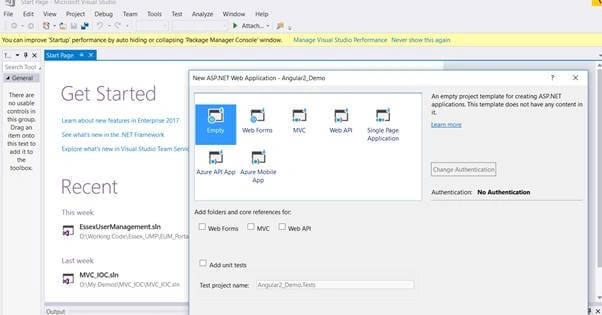
Step #5 Copying the Angular start-up files
Go to link https://github.com/angular/quickstart. Download the zip file from the web to your local machine. Unzip it and you will find some files as below.
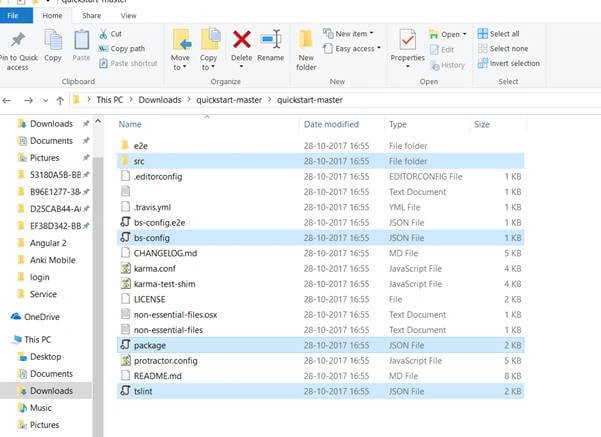
We need to copy these start up files to the root directory of the Angular web project and include the same in our project.
- Src folder
- bs-config
- package
- tslint
Step #6 Restore the required packages
Right-click on the package.json file copied as start-up files and do a restore package from there.
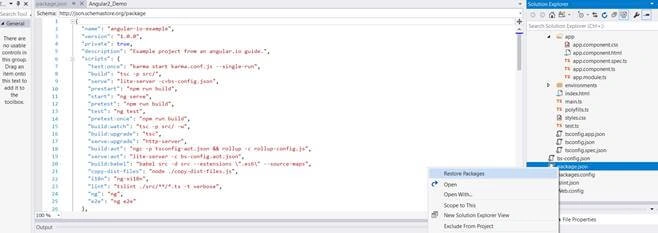
It will take some time restoring the package mentioned in the package.json file to project. It's worth waiting for some time.
Once all the required packages are restored, navigate to the project folder using the command prompt.
In my case, the folder is below.
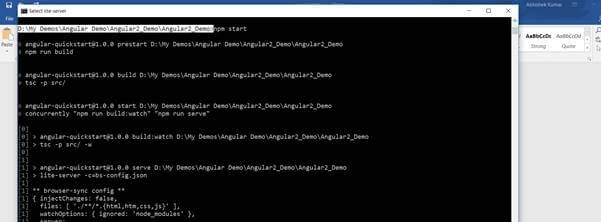
And, run a command: npm start
It will take some time and launch a lite server and host the application with URL local and external.
Local: http://localhost:3000/
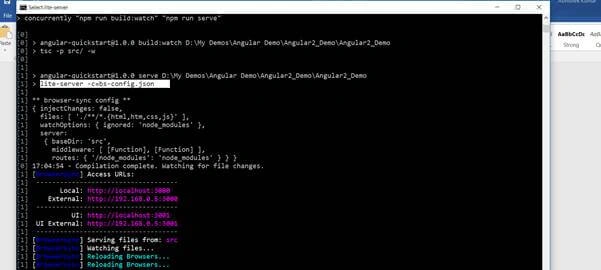
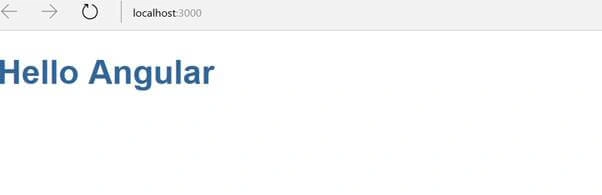
So, this has successfully launched the application on port 3000 and URL: http://localhost:3000/
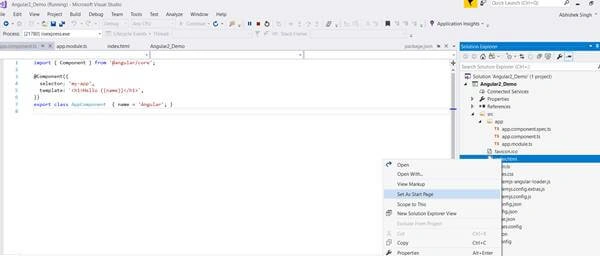
Code which has displayed the Hello Angular on web from is from app.componenet.ts.
William PowersPosted Jan 8, 2018, 5:33 PM
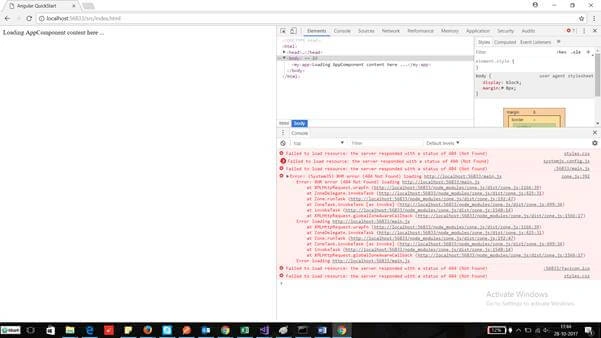
Following the instructions didn't work for running it in VS. Running it in NPM works; but running it in VS 017 gets these errors: Severity Code Description Project File Line Suppression StateError TS2307 (TS) Cannot find module 'protractor'. e2e (tsconfig project) C:\Users\MrBabakS\source\repos\AngularQuickStart\e2e\app.e2e-spec.ts 1 Active Error TS2415 (TS) Class 'Subject<T>' incorrectly extends base class 'Observable<T>'. Types of property 'lift' are incompatible. Type '<R>(operator: Operator<T, R>) => Observable<T>' is not assignable to type '<R>(operator: Operator<T, R>) => Observable<R>'. Type 'Observable<T>' is not assignable to type 'Observable<R>'. Type 'T' is not assignable to type 'R'. src (tsconfig project) C:\Users\MrBabakS\source\repos\AngularQuickStart\node_modules\rxjs\Subject.d.ts 16 Active
abhinay SPosted Nov 19, 2017, 4:56 PM
Well explained Abhishek
Nilesh PatilPosted Oct 31, 2017, 8:49 AM
Nice One Sir...........
Amit Kumar SinghPosted Oct 30, 2017, 2:36 PM
Thanks for sharing.......