

Introduction
This article is the next in the LINQ series to make the learning easy for beginners to get a clear understanding of the concepts. I have seen young developers and students that are very confused about LINQ and XML. This article will help them to understand and leverage their knowledge and to learn the advanced features later.
If you are new to LINQ then please have a look at the basic articles for LINQ.
Background
LINQ to XML provides an in-memory XML programming interface that leverages the .NET Language-Integrated Query (LINQ) Framework.
MSDN Says, LINQ to XML is a LINQ-enabled, in-memory XML programming interface that enables you to work with XML from within the .NET Framework programming languages.
It provides both DOM and XQuery/XPath like functionality in a consistent programming experience across the various LINQ-enabled data access technologies.
Functional construction
It is a way to create a XML tree using a single statement rather going for the traditional approach of DOM implementation.
There are certain classes that are used to create an XML tree with functional construction.
The following is LINQ to XML class hierarchy, I have copied this image from the MSDN to make the structure more clear.

The preceding diagram is from the MSDN.
There are many more classes that can be used in LINQ to XML. The following are a few of them to explain the functional construction of XML.
- XDocument
- XDeclaration
- XComment
- XElement
- XAttribute
CustomersDetail.xml
<?xml version="1.0" encoding="utf-8" standalone="yes"?> (XDeclaration)
   <!--LINQ to XML Demo--> (XComment)
   <Customers> (XElement)
      <Customer CustID="1001">(CustID = XAttribute)
      <Name>Abhishek</Name>
      <MobileNo>9820098200</MobileNo>
      <Location>Mumbai</Location>
      <Address>off link road Malad west Mumbai</Address>
   </Customer>
   <Customer CustID="1002">
      <Name>Rajesh</Name>
      <MobileNo>9820011234</MobileNo>
      <Location>New Delhi</Location>
      <Address>off link road laljatnagar New Delhi</Address>
   </Customer>
   <Customer CustID="1003">
      <Name>Rohan</Name>
      <MobileNo>9820022200</MobileNo>
      <Location>Mumbai</Location>
      <Address> link road Kandivali west Mumbai</Address>
   </Customer>
   <Customer CustID="1004">
      <Name>Sonali</Name>
      <MobileNo>9820098200</MobileNo>
      <Location>Mumbai</Location>
      <Address>khar west Mumbai</Address>
   </Customer>
</Customers>
Sample Code
This is sample code for the functional construction of XML using LINQ to XML with a statement. I have hard coded the values here just to explain the structure and classes used.
namespace LINQ_Learning
{
    class Program
    {
        static void Main(string[] args)
        {
            XDocument xmlDocument = new XDocument(
                new XDeclaration("1.0","utf-8","yes"),

                new XComment("LINQ To XML Demo"),

                new XElement("Customers",
                    new XElement("Customer",new XAttribute("CustID",1001),
                        new XElement("Name","Abhishek"),
                        new XElement("MobileNo","9820098200"),
                        new XElement("Location","Mumbai"),
                        new XElement("Address","off link road malad west Mumbai")),

                    new XElement("Customer",new XAttribute("CustID",1002),
                        new XElement("Name","Rajesh"),
                        new XElement("MobileNo","9820011234"),
                        new XElement("Location","New Delhi"),
                        new XElement("Address","off link road laljatnagar New delhi")),

                    new XElement("Customer",new XAttribute("CustID",1003),
                        new XElement("Name","Rohan"),
                        new XElement("MobileNo","9820022200"),
                        new XElement("Location","Mumbai"),
                        new XElement("Address"," link road Kandivali  west Mumbai")),

                    new XElement("Customer",new XAttribute("CustID",1004),
                        new XElement("Name","Sonali"),
                        new XElement("MobileNo","9820098200"),
                        new XElement("Location","Mumbai"),
                        new XElement("Address","khar west Mumbai"))
                        ));

         xmlDocument.Save(@"C:\Dev\LINQ_Learning\CustomersDetail.xml");

         Console.ReadLine();
        }
    }
}
The preceding example has hard-coded values just to explain how the functional construction works.
We can do that using in-memory objects or data from a database using ADO.Net or using the Entity Framework depending on your requirements.
Here I am explaining this using an in-memory object List.
Sample code
namespace LINQ_Learning
{
   public class Customers
    {
        public int CustID { get; set; }
        public string Name { get; set; }
        public long MobileNo { get; set; }
        public string Location { get; set; }
        public string Address { get; set; }

        public static List<Customers> GetCostomersDetail()
        {
            List<Customers> lstcustomer = new List<Customers>()
            {
                new Customers{CustID=10001,Name="Abhishek" , MobileNo=9820098200, Location="Mumbai",Address="off link road malad west Mumbai"},
                 new Customers{CustID=10001,Name="Rajesh" , MobileNo=9820011234, Location="New Delhi",Address="off link road laljatnagar New delhi"},
                  new Customers{CustID=10001,Name="Rohan" , MobileNo=9820011266, Location="Mumbai",Address="link road Kandivali  west Mumbai"},
                   new Customers{CustID=10001,Name="Abhishek" , MobileNo=890012452, Location="Mumbai",Address="khar west Mumbai"}
            };

            return lstcustomer;
        }
    }
}
Main Method
namespace LINQ_Learning
{
    class Program
    {
        static void Main(string[] args)
        {
            XDocument xmlDocument = new XDocument(
                new XDeclaration("1.0","utf-8","yes"),

                new XComment("LINQ To XML Demo"),

                new XElement("Customers",

from customers in Customers.GetCostomersDetail()
           select new XElement("Customer" , new XAttribute("ID" , customers.CustID),
                  new XElement("Name" , customers.Name),
                  new XElement("Mobile" , customers.MobileNo),
                  new XElement("Location" , customers.Location),
                  new XElement("Address" , customers.Address))

                 ));
            xmlDocument.Save(@"C:\Dev\LINQ_Learning\CustomersDetail.xml");

            Console.ReadLine();
        }
    }
}
Querying using XML document using LINQ to XML
IEnumerable<T> can be used to query the XML data and for this standard query the operators show up as extension methods on any object that implements IEnumerable<T> and can be invoked like any other method.
- Where
- Select
- SelectMany
- OrderBy
- GroupBy
namespace LINQ_Learning
{
    class Program
    {
        static void Main(string[] args)
        {

          xmlDocument.Save(@"C:\Dev\LINQ_Learning\CustomersDetail.xml");

 IEnumerable<string> names = from customers in
                         XDocument.Load(@"C:\Dev\LINQ_Learning\CustomersDetail.xml")
                                   .Descendants("Customer")
                        select customers.Element("Name").Value;

            foreach(string strName in names)
            {
                Console.WriteLine(strName);
            }

            Console.ReadLine();
        }
    }
}
Another way to do that
namespace LINQ_Learning
{
    class Program
    {
        static void Main(string[] args)
        {

          xmlDocument.Save(@"C:\Dev\LINQ_Learning\CustomersDetail.xml");

                IEnumerable<string> names = from customers in
                          XDocument.Load(@"C:\Dev\LINQ_Learning\CustomersDetail.xml")
                                            .Element("Customers").Elements("Customer")

                 select customers.Element("Name").Value;
            foreach(string strName in names)
            {
                Console.WriteLine(strName);
            }

            Console.ReadLine();
        }
    }
}
Manipulating XML
LINQ to XML provides a full set of methods for manipulating XML including insert, delete, copy and update XML content.
Inserting new Element
Using the Add() method new elements can be added to the existing XML Tree.
XDocument xdoc = XDocument.Load(@"C:\Dev\LINQ_Learning\CustomersDetail.xml");

xdoc.Element("Customers").Add(
   new XElement("Customer" , new XAttribute("CustID", 1005),
   new XElement("Name","Jonn"),
   new XElement("MobileNo","992282760"),
   new XElement("Location","London"),
   new XElement("Address","34th streat London")
));

xdoc.Save(@"C:\Dev\LINQ_Learning\CustomersDetail.xml");
If it is necessary to get the n elements added at the first element.
XDocument xdoc = XDocument.Load(@"C:\Dev\LINQ_Learning\CustomersDetail.xml");
xdoc.Element("Customers").AddFirst(
   new XElement("Customer" , new XAttribute("CustID", 1000),
   new XElement("Name","Bob"),
   new XElement("MobileNo","9922823460"),
   new XElement("Location","London"),
   new XElement("Address","27th streat London")
));

xdoc.Save(@"C:\Dev\LINQ_Learning\CustomersDetail.xml");
There are two methods available if you want to add at a specific location.
- AddAfterSelf
- AddBeforeSelf
XDocument xdoc = XDocument.Load(@"C:\Dev\LINQ_Learning\CustomersDetail.xml");
xdoc.Element("Customers").Elements("Customer")
.Where(X => X.Attribute("ID").Value == "10003").SingleOrDefault()
.AddBeforeSelf(
      new XElement("Customer", new XAttribute("CustID", 2000),
      new XElement("Name", "David"),
      new XElement("MobileNo", "9921123460"),
      new XElement("Location", "London"),
      new XElement("Address", "87th streat London")
));
Deleting XML
To delete XML, navigate to the content you want to delete and use the Remove() Method to perform the delete operation as in the following:
XDocument xdoc = XDocument.Load(@"C:\Dev\LINQ_Learning\CustomersDetail.xml");

xdoc.Root.Elements().Where(x => x.Attribute("ID").Value == "10002").FirstOrDefault().Remove();
Updating XML
XML Elements can be updated using the setElement Method.
XDocument xdoc = XDocument.Load(@"C:\Dev\LINQ_Learning\CustomersDetail.xml");
xdoc.Element("Customers").Elements("Customer")
.Where(X => X.Attribute("ID").Value == "10002").SingleOrDefault()
.SetElementValue("Mobile", 9090909090);
The ReplaceNodes() method can be used if nodes need to be replaced.
Validation of XML
XML can be validated using the XML Schema Definition (XSD) language.
XElement tree validation with an XML schema is done by importing the System.Xml.Schema namespace.
A XSD file will give you a schema file where user validations can be placed and that can be applied to XML data and the validation can be implemented.
On failure or success when validating there is a delegate provided that can use an error message and a customer error message can be printed.
Sample Code
XDocument xdoc = XDocument.Load(@"C:\Dev\LINQ_Learning\CustomersDetail.xml");
XmlSchemaSet xmlSchema = new XmlSchemaSet();
xmlSchema.Add("", @"C:\Dev\LINQ_Learning\LINQ_Learning\XMLTest.xsd");
bool _ErrorMessage=false;

xdoc.Validate(xmlSchema,(_sender,_args)=>
{
   Console.WriteLine(_args.Message);
   _ErrorMessage = true;
});

if (_ErrorMessage)
{
   Console.WriteLine("Error While validating!!!!");
}
else
{
   Console.WriteLine("Successfully validating!!!!");
}
A XSD file can be added from the Microsoft project templates.
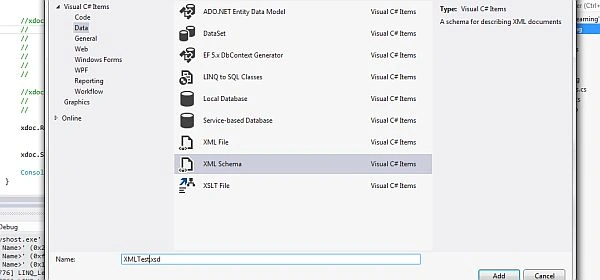
There is an overloaded Add method provided for adding the schema files URI and target namespace.

The Validate method will accept a schema object and an event handler for validating the XML file against the XSD.

Output

Advantages of LINQ to XML
- Load and Serialize XML from files or streams.
- XML to files or streams.
- Create XML trees from scratch using functional construction.
- Query XML trees using LINQ queries.
- Manipulate in-memory XML trees.
- Validate XML trees using XSD.
- Use a combination of these features to transform XML trees from one shape into another.
Conclusion
There are many advantages and disadvantages of using LINQ technology. It is very important to choose very intelligently the LINQ for your application so that beautiful features of LINQ to XML can be utilized and the application could be more efficient. It should not be a performance overhead and problem for your application.
More Tutorials on LINQ will be coming shortly.
Keep smiling and keep learning.
References: https://msdn.microsoft.com/en-us/library/bb308960.aspx
Muhammad Aqib ShehzadPosted Jan 6, 2016, 4:56 AM
nice approach and ifnormative
Gowtham RajamanickamPosted Apr 11, 2015, 1:19 PM
great
Tom MohanPosted Mar 16, 2015, 12:06 PM
Great work
NitinPosted Mar 16, 2015, 2:43 AM
nice
Rahul Kumar SaxenaPosted Mar 16, 2015, 2:10 AM
Good Work..