
In this article, I will explain how to find the length of the text of a field in a table. For this purpose we can use the LEN function in SQL Server 2012. The Length Function in SQL Server 2012 returns the number of characters in a string. The Length function does not count any blanks after the last character (trailing blanks).
The following examples clearly show the concept of the Length function:
| LEN Function Example | Output |
| SELECTLEN('Rahul') | 5 |
| SELECTLEN('Rahul ') | 5 |
| SELECTLEN(' Rahul') | 7 |
Len() function in SQL 2012
Syntax
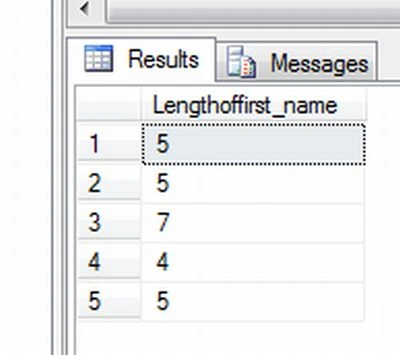
SELECT LEN(column_name) FROM table_name
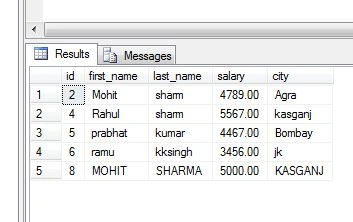
Let's have a look at a practical example. We create a table.
Creating table
CREATE TABLE SHARMA(
id INTEGER NOT NULL PRIMARY KEY,
first_name VARCHAR(10),
last_name VARCHAR(10),
salary DECIMAL(10,2),
city VARCHAR(20),
)
Now insert some values in the table.
Rahul SharmaPosted Feb 7, 2013, 4:44 AM
thanks to all......
Aman SinghalPosted Feb 6, 2013, 11:44 AM
Good Start Rahul.
Prabhakar MauryaPosted Feb 6, 2013, 11:43 AM
Nice Article Rahul..
Sharad GuptaeditedPosted Feb 6, 2013, 11:41 AMEdited Feb 6, 2013, 11:43 AM
Good start Rahul