Introduction

In this article, we will learn to implement modal popup for CRUD operations using MVC and Entity Framework. This is a single page for multiple operations using jQuery AJAX.
Prerequisites
  • Visual Studio 2017
  • SQL Server
Note
Before going through this session, please visit my previous articles related to Angular 7 applications.
Step 1
Create three tables with the script as mentioned below.
  1. USE [SatyaDB]
  2. GO
  3. /****** Object: Table [dbo].[Contacts] Script Date: 15-08-2019 21:35:17 ******/
  4. SET ANSI_NULLS ON
  5. GO
  6. SET QUOTED_IDENTIFIER ON
  7. GO
  8. CREATE TABLE [dbo].[Contacts](
  9. [ContactID] [int] IDENTITY(1,1) NOT NULL,
  10. [ContactPerson] [varchar](100) NOT NULL,
  11. [ContactNo] [varchar](20) NOT NULL,
  12. [CountryID] [int] NOT NULL,
  13. [StateID] [int] NOT NULL,
  14. PRIMARY KEY CLUSTERED
  15. (
  16. [ContactID] ASC
  17. )WITH (PAD_INDEX = OFF, STATISTICS_NORECOMPUTE = OFF, IGNORE_DUP_KEY = OFF, ALLOW_ROW_LOCKS = ON, ALLOW_PAGE_LOCKS = ON) ON [PRIMARY]
  18. ) ON [PRIMARY]
  19. GO
  20. /****** Object: Table [dbo].[Country] Script Date: 15-08-2019 21:35:19 ******/
  21. SET ANSI_NULLS ON
  22. GO
  23. SET QUOTED_IDENTIFIER ON
  24. GO
  25. CREATE TABLE [dbo].[Country](
  26. [CountryID] [int] IDENTITY(1,1) NOT NULL,
  27. [CountryName] [varchar](100) NOT NULL,
  28. PRIMARY KEY CLUSTERED
  29. (
  30. [CountryID] ASC
  31. )WITH (PAD_INDEX = OFF, STATISTICS_NORECOMPUTE = OFF, IGNORE_DUP_KEY = OFF, ALLOW_ROW_LOCKS = ON, ALLOW_PAGE_LOCKS = ON) ON [PRIMARY]
  32. ) ON [PRIMARY]
  33. GO
  34. /****** Object: Table [dbo].[State] Script Date: 15-08-2019 21:35:19 ******/
  35. SET ANSI_NULLS ON
  36. GO
  37. SET QUOTED_IDENTIFIER ON
  38. GO
  39. CREATE TABLE [dbo].[State](
  40. [StateID] [int] IDENTITY(1,1) NOT NULL,
  41. [CountryID] [int] NOT NULL,
  42. [StateName] [varchar](100) NOT NULL,
  43. PRIMARY KEY CLUSTERED
  44. (
  45. [StateID] ASC
  46. )WITH (PAD_INDEX = OFF, STATISTICS_NORECOMPUTE = OFF, IGNORE_DUP_KEY = OFF, ALLOW_ROW_LOCKS = ON, ALLOW_PAGE_LOCKS = ON) ON [PRIMARY]
  47. ) ON [PRIMARY]
  48. GO
Step 2
Enter some records to test it in the browser including the country and state table. I have implemented cascading dropdown method using country and state table in this application.
  1. USE [SatyaDB]
  2. GO
  3. SET IDENTITY_INSERT [dbo].[Contacts] ON
  4. GO
  5. INSERT [dbo].[Contacts] ([ContactID], [ContactPerson], [ContactNo], [CountryID], [StateID]) VALUES (2, N'Satya', N'8765858485', 4, 88)
  6. GO
  7. INSERT [dbo].[Contacts] ([ContactID], [ContactPerson], [ContactNo], [CountryID], [StateID]) VALUES (3, N'Kulu', N'6478389999', 4, 25)
  8. GO
  9. INSERT [dbo].[Contacts] ([ContactID], [ContactPerson], [ContactNo], [CountryID], [StateID]) VALUES (5, N'Satyaprakash Samantaray1', N'8764637375', 4, 137)
  10. GO
  11. SET IDENTITY_INSERT [dbo].[Contacts] OFF
  12. GO
  13. SET IDENTITY_INSERT [dbo].[Country] ON
  14. GO
  15. INSERT [dbo].[Country] ([CountryID], [CountryName]) VALUES (1, N'Brazil')
  16. GO
  17. INSERT [dbo].[Country] ([CountryID], [CountryName]) VALUES (2, N'China')
  18. GO
  19. INSERT [dbo].[Country] ([CountryID], [CountryName]) VALUES (3, N'France')
  20. GO
  21. INSERT [dbo].[Country] ([CountryID], [CountryName]) VALUES (4, N'India')
  22. GO
  23. INSERT [dbo].[Country] ([CountryID], [CountryName]) VALUES (5, N'USA')
  24. GO
  25. SET IDENTITY_INSERT [dbo].[Country] OFF
  26. GO
  27. SET IDENTITY_INSERT [dbo].[State] ON
  28. GO
  29. INSERT [dbo].[State] ([StateID], [CountryID], [StateName]) VALUES (1, 5, N'California')
  30. GO
  31. INSERT [dbo].[State] ([StateID], [CountryID], [StateName]) VALUES (2, 2, N'Beijing')
  32. GO
  33. INSERT [dbo].[State] ([StateID], [CountryID], [StateName]) VALUES (3, 5, N'Iowa')
  34. GO
  35. INSERT [dbo].[State] ([StateID], [CountryID], [StateName]) VALUES (4, 5, N'New York')
  36. GO
  37. INSERT [dbo].[State] ([StateID], [CountryID], [StateName]) VALUES (5, 2, N'Hebei')
  38. GO
  39. INSERT [dbo].[State] ([StateID], [CountryID], [StateName]) VALUES (6, 2, N'Jiangsu')
  40. GO
  41. INSERT [dbo].[State] ([StateID], [CountryID], [StateName]) VALUES (7, 5, N'New Jersey')
  42. GO
  43. INSERT [dbo].[State] ([StateID], [CountryID], [StateName]) VALUES (8, 5, N'Massachusetts')
  44. GO
  45. INSERT [dbo].[State] ([StateID], [CountryID], [StateName]) VALUES (9, 5, N'Connecticut')
  46. GO
  47. INSERT [dbo].[State] ([StateID], [CountryID], [StateName]) VALUES (10, 2, N'Guangdong')
  48. GO
  49. INSERT [dbo].[State] ([StateID], [CountryID], [StateName]) VALUES (11, 5, N'Florida')
  50. GO
  51. INSERT [dbo].[State] ([StateID], [CountryID], [StateName]) VALUES (12, 5, N'Texas')
  52. GO
  53. INSERT [dbo].[State] ([StateID], [CountryID], [StateName]) VALUES (13, 5, N'Armed Forces US')
  54. GO
  55. INSERT [dbo].[State] ([StateID], [CountryID], [StateName]) VALUES (14, 5, N'Tennessee')
  56. GO
  57. INSERT [dbo].[State] ([StateID], [CountryID], [StateName]) VALUES (15, 5, N'Kentucky')
  58. GO
  59. INSERT [dbo].[State] ([StateID], [CountryID], [StateName]) VALUES (16, 3, N'Ile-de-3nce')
  60. GO
  61. INSERT [dbo].[State] ([StateID], [CountryID], [StateName]) VALUES (17, 5, N'Georgia')
  62. GO
  63. INSERT [dbo].[State] ([StateID], [CountryID], [StateName]) VALUES (18, 1, N'Rio de Janeiro')
  64. GO
  65. INSERT [dbo].[State] ([StateID], [CountryID], [StateName]) VALUES (19, 5, N'Illinois')
  66. GO
  67. INSERT [dbo].[State] ([StateID], [CountryID], [StateName]) VALUES (20, 1, N'Ceara')
  68. GO
  69. INSERT [dbo].[State] ([StateID], [CountryID], [StateName]) VALUES (21, 5, N'Colorado')
  70. GO
  71. INSERT [dbo].[State] ([StateID], [CountryID], [StateName]) VALUES (22, 2, N'Zhejiang')
  72. GO
  73. INSERT [dbo].[State] ([StateID], [CountryID], [StateName]) VALUES (23, 5, N'Utah')
  74. GO
  75. INSERT [dbo].[State] ([StateID], [CountryID], [StateName]) VALUES (24, 2, N'Liaoning')
  76. GO
  77. INSERT [dbo].[State] ([StateID], [CountryID], [StateName]) VALUES (25, 4, N'Haryana')
  78. GO
  79. INSERT [dbo].[State] ([StateID], [CountryID], [StateName]) VALUES (26, 5, N'Maryland')
  80. GO
  81. INSERT [dbo].[State] ([StateID], [CountryID], [StateName]) VALUES (27, 2, N'Shanghai')
  82. GO
  83. INSERT [dbo].[State] ([StateID], [CountryID], [StateName]) VALUES (28, 2, N'Tianjin')
  84. GO
  85. INSERT [dbo].[State] ([StateID], [CountryID], [StateName]) VALUES (29, 5, N'South Carolina')
  86. GO
  87. INSERT [dbo].[State] ([StateID], [CountryID], [StateName]) VALUES (30, 5, N'Montana')
  88. GO
  89. INSERT [dbo].[State] ([StateID], [CountryID], [StateName]) VALUES (31, 5, N'Louisiana')
  90. GO
  91. INSERT [dbo].[State] ([StateID], [CountryID], [StateName]) VALUES (32, 2, N'Fujian')
  92. GO
  93. INSERT [dbo].[State] ([StateID], [CountryID], [StateName]) VALUES (33, 1, N'Santa Catarina')
  94. GO
  95. INSERT [dbo].[State] ([StateID], [CountryID], [StateName]) VALUES (34, 1, N'Espirito Santo')
  96. GO
  97. INSERT [dbo].[State] ([StateID], [CountryID], [StateName]) VALUES (35, 5, N'Washington')
  98. GO
  99. INSERT [dbo].[State] ([StateID], [CountryID], [StateName]) VALUES (36, 4, N'Andhra Pradesh')
  100. GO
  101. INSERT [dbo].[State] ([StateID], [CountryID], [StateName]) VALUES (37, 5, N'Pennsylvania')
  102. GO
  103. INSERT [dbo].[State] ([StateID], [CountryID], [StateName]) VALUES (38, 2, N'Guangxi')
  104. GO
  105. INSERT [dbo].[State] ([StateID], [CountryID], [StateName]) VALUES (39, 5, N'North Carolina')
  106. GO
  107. INSERT [dbo].[State] ([StateID], [CountryID], [StateName]) VALUES (40, 2, N'Shandong')
  108. GO
  109. INSERT [dbo].[State] ([StateID], [CountryID], [StateName]) VALUES (41, 2, N'Chongqing')
  110. GO
  111. INSERT [dbo].[State] ([StateID], [CountryID], [StateName]) VALUES (42, 5, N'Michigan')
  112. GO
  113. INSERT [dbo].[State] ([StateID], [CountryID], [StateName]) VALUES (43, 2, N'Hubei')
  114. GO
  115. INSERT [dbo].[State] ([StateID], [CountryID], [StateName]) VALUES (44, 4, N'Delhi')
  116. GO
  117. INSERT [dbo].[State] ([StateID], [CountryID], [StateName]) VALUES (45, 5, N'Arkansas')
  118. GO
  119. INSERT [dbo].[State] ([StateID], [CountryID], [StateName]) VALUES (46, 5, N'Wisconsin')
  120. GO
  121. INSERT [dbo].[State] ([StateID], [CountryID], [StateName]) VALUES (47, 3, N'Midi-Pyrenees')
  122. GO
  123. INSERT [dbo].[State] ([StateID], [CountryID], [StateName]) VALUES (48, 3, N'Picardie')
  124. GO
  125. INSERT [dbo].[State] ([StateID], [CountryID], [StateName]) VALUES (49, 1, N'Bahia')
  126. GO
  127. INSERT [dbo].[State] ([StateID], [CountryID], [StateName]) VALUES (50, 2, N'Heilongjiang')
  128. GO
  129. INSERT [dbo].[State] ([StateID], [CountryID], [StateName]) VALUES (51, 4, N'Tamil Nadu')
  130. GO
  131. INSERT [dbo].[State] ([StateID], [CountryID], [StateName]) VALUES (52, 5, N'Ohio')
  132. GO
  133. INSERT [dbo].[State] ([StateID], [CountryID], [StateName]) VALUES (53, 5, N'New Mexico')
  134. GO
  135. INSERT [dbo].[State] ([StateID], [CountryID], [StateName]) VALUES (54, 5, N'Kansas')
  136. GO
  137. INSERT [dbo].[State] ([StateID], [CountryID], [StateName]) VALUES (55, 5, N'Oregon')
  138. GO
  139. INSERT [dbo].[State] ([StateID], [CountryID], [StateName]) VALUES (56, 4, N'Uttar Pradesh')
  140. GO
  141. INSERT [dbo].[State] ([StateID], [CountryID], [StateName]) VALUES (57, 5, N'Ne1ska')
  142. GO
  143. INSERT [dbo].[State] ([StateID], [CountryID], [StateName]) VALUES (58, 5, N'West Virginia')
  144. GO
  145. INSERT [dbo].[State] ([StateID], [CountryID], [StateName]) VALUES (59, 5, N'Virginia')
  146. GO
  147. INSERT [dbo].[State] ([StateID], [CountryID], [StateName]) VALUES (60, 5, N'Missouri')
  148. GO
  149. INSERT [dbo].[State] ([StateID], [CountryID], [StateName]) VALUES (61, 5, N'Mississippi')
  150. GO
  151. INSERT [dbo].[State] ([StateID], [CountryID], [StateName]) VALUES (62, 5, N'Rhode Island')
  152. GO
  153. INSERT [dbo].[State] ([StateID], [CountryID], [StateName]) VALUES (63, 1, N'Sao Paulo')
  154. GO
  155. INSERT [dbo].[State] ([StateID], [CountryID], [StateName]) VALUES (64, 2, N'Shanxi')
  156. GO
  157. INSERT [dbo].[State] ([StateID], [CountryID], [StateName]) VALUES (65, 4, N'Karnataka')
  158. GO
  159. INSERT [dbo].[State] ([StateID], [CountryID], [StateName]) VALUES (66, 2, N'Hunan')
  160. GO
  161. INSERT [dbo].[State] ([StateID], [CountryID], [StateName]) VALUES (67, 5, N'4iana')
  162. GO
  163. INSERT [dbo].[State] ([StateID], [CountryID], [StateName]) VALUES (68, 5, N'Oklahoma')
  164. GO
  165. INSERT [dbo].[State] ([StateID], [CountryID], [StateName]) VALUES (69, 5, N'Minnesota')
  166. GO
  167. INSERT [dbo].[State] ([StateID], [CountryID], [StateName]) VALUES (70, 5, N'Alabama')
  168. GO
  169. INSERT [dbo].[State] ([StateID], [CountryID], [StateName]) VALUES (71, 2, N'Hainan')
  170. GO
  171. INSERT [dbo].[State] ([StateID], [CountryID], [StateName]) VALUES (72, 5, N'Arizona')
  172. GO
  173. INSERT [dbo].[State] ([StateID], [CountryID], [StateName]) VALUES (73, 2, N'Sichuan')
  174. GO
  175. INSERT [dbo].[State] ([StateID], [CountryID], [StateName]) VALUES (74, 5, N'South Dakota')
  176. GO
  177. INSERT [dbo].[State] ([StateID], [CountryID], [StateName]) VALUES (75, 4, N'Maharashtra')
  178. GO
  179. INSERT [dbo].[State] ([StateID], [CountryID], [StateName]) VALUES (76, 5, N'Nevada')
  180. GO
  181. INSERT [dbo].[State] ([StateID], [CountryID], [StateName]) VALUES (77, 2, N'Henan')
  182. GO
  183. INSERT [dbo].[State] ([StateID], [CountryID], [StateName]) VALUES (78, 4, N'Kerala')
  184. GO
  185. INSERT [dbo].[State] ([StateID], [CountryID], [StateName]) VALUES (79, 5, N'New Hampshire')
  186. GO
  187. INSERT [dbo].[State] ([StateID], [CountryID], [StateName]) VALUES (80, 5, N'Maine')
  188. GO
  189. INSERT [dbo].[State] ([StateID], [CountryID], [StateName]) VALUES (81, 5, N'Hawaii')
  190. GO
  191. INSERT [dbo].[State] ([StateID], [CountryID], [StateName]) VALUES (82, 4, N'Chhattisgarh')
  192. GO
  193. INSERT [dbo].[State] ([StateID], [CountryID], [StateName]) VALUES (83, 2, N'Anhui')
  194. GO
  195. INSERT [dbo].[State] ([StateID], [CountryID], [StateName]) VALUES (84, 5, N'District of Columbia')
  196. GO
  197. INSERT [dbo].[State] ([StateID], [CountryID], [StateName]) VALUES (85, 5, N'Delaware')
  198. GO
  199. INSERT [dbo].[State] ([StateID], [CountryID], [StateName]) VALUES (86, 4, N'West Bengal')
  200. GO
  201. INSERT [dbo].[State] ([StateID], [CountryID], [StateName]) VALUES (87, 2, N'Shaanxi')
  202. GO
  203. INSERT [dbo].[State] ([StateID], [CountryID], [StateName]) VALUES (88, 4, N'Madhya Pradesh')
  204. GO
  205. INSERT [dbo].[State] ([StateID], [CountryID], [StateName]) VALUES (89, 4, N'Gujarat')
  206. GO
  207. INSERT [dbo].[State] ([StateID], [CountryID], [StateName]) VALUES (90, 3, N'3nche-Comte')
  208. GO
  209. INSERT [dbo].[State] ([StateID], [CountryID], [StateName]) VALUES (91, 5, N'Idaho')
  210. GO
  211. INSERT [dbo].[State] ([StateID], [CountryID], [StateName]) VALUES (92, 4, N'Rajasthan')
  212. GO
  213. INSERT [dbo].[State] ([StateID], [CountryID], [StateName]) VALUES (93, 2, N'Nei Mongol')
  214. GO
  215. INSERT [dbo].[State] ([StateID], [CountryID], [StateName]) VALUES (94, 3, N'Alsace')
  216. GO
  217. INSERT [dbo].[State] ([StateID], [CountryID], [StateName]) VALUES (95, 4, N'Orissa')
  218. GO
  219. INSERT [dbo].[State] ([StateID], [CountryID], [StateName]) VALUES (96, 2, N'Jilin')
  220. GO
  221. INSERT [dbo].[State] ([StateID], [CountryID], [StateName]) VALUES (97, 4, N'Jharkhand')
  222. GO
  223. INSERT [dbo].[State] ([StateID], [CountryID], [StateName]) VALUES (98, 4, N'Chandigarh')
  224. GO
  225. INSERT [dbo].[State] ([StateID], [CountryID], [StateName]) VALUES (99, 4, N'Punjab')
  226. GO
  227. INSERT [dbo].[State] ([StateID], [CountryID], [StateName]) VALUES (100, 3, N'Languedoc-Roussillon')
  228. GO
  229. INSERT [dbo].[State] ([StateID], [CountryID], [StateName]) VALUES (101, 4, N'Assam')
  230. GO
  231. INSERT [dbo].[State] ([StateID], [CountryID], [StateName]) VALUES (102, 3, N'Centre')
  232. GO
  233. INSERT [dbo].[State] ([StateID], [CountryID], [StateName]) VALUES (103, 3, N'Champagne-Ardenne')
  234. GO
  235. INSERT [dbo].[State] ([StateID], [CountryID], [StateName]) VALUES (104, 3, N'Bretagne')
  236. GO
  237. INSERT [dbo].[State] ([StateID], [CountryID], [StateName]) VALUES (105, 3, N'Rhone-Alpes')
  238. GO
  239. INSERT [dbo].[State] ([StateID], [CountryID], [StateName]) VALUES (106, 3, N'Nord-Pas-de-Calais')
  240. GO
  241. INSERT [dbo].[State] ([StateID], [CountryID], [StateName]) VALUES (107, 3, N'Lorraine')
  242. GO
  243. INSERT [dbo].[State] ([StateID], [CountryID], [StateName]) VALUES (108, 1, N'Rio Grande do Sul')
  244. GO
  245. INSERT [dbo].[State] ([StateID], [CountryID], [StateName]) VALUES (109, 3, N'Provence-Alpes-Cote d''Azur')
  246. GO
  247. INSERT [dbo].[State] ([StateID], [CountryID], [StateName]) VALUES (110, 1, N'Minas Gerais')
  248. GO
  249. INSERT [dbo].[State] ([StateID], [CountryID], [StateName]) VALUES (111, 3, N'Limousin')
  250. GO
  251. INSERT [dbo].[State] ([StateID], [CountryID], [StateName]) VALUES (112, 2, N'Guizhou')
  252. GO
  253. INSERT [dbo].[State] ([StateID], [CountryID], [StateName]) VALUES (113, 3, N'Haute-Normandie')
  254. GO
  255. INSERT [dbo].[State] ([StateID], [CountryID], [StateName]) VALUES (114, 3, N'Poitou-Charentes')
  256. GO
  257. INSERT [dbo].[State] ([StateID], [CountryID], [StateName]) VALUES (115, 5, N'Wyoming')
  258. GO
  259. INSERT [dbo].[State] ([StateID], [CountryID], [StateName]) VALUES (116, 4, N'Daman and Diu')
  260. GO
  261. INSERT [dbo].[State] ([StateID], [CountryID], [StateName]) VALUES (117, 1, N'Para')
  262. GO
  263. INSERT [dbo].[State] ([StateID], [CountryID], [StateName]) VALUES (118, 3, N'Basse-Normandie')
  264. GO
  265. INSERT [dbo].[State] ([StateID], [CountryID], [StateName]) VALUES (119, 4, N'Bihar')
  266. GO
  267. INSERT [dbo].[State] ([StateID], [CountryID], [StateName]) VALUES (120, 3, N'Aquitaine')
  268. GO
  269. INSERT [dbo].[State] ([StateID], [CountryID], [StateName]) VALUES (121, 1, N'Parana')
  270. GO
  271. INSERT [dbo].[State] ([StateID], [CountryID], [StateName]) VALUES (122, 3, N'Auvergne')
  272. GO
  273. INSERT [dbo].[State] ([StateID], [CountryID], [StateName]) VALUES (123, 1, N'Pernambuco')
  274. GO
  275. INSERT [dbo].[State] ([StateID], [CountryID], [StateName]) VALUES (124, 3, N'Pays de la Loire')
  276. GO
  277. INSERT [dbo].[State] ([StateID], [CountryID], [StateName]) VALUES (125, 1, N'Amazonas')
  278. GO
  279. INSERT [dbo].[State] ([StateID], [CountryID], [StateName]) VALUES (126, 1, N'Distrito Federal')
  280. GO
  281. INSERT [dbo].[State] ([StateID], [CountryID], [StateName]) VALUES (127, 5, N'North Dakota')
  282. GO
  283. INSERT [dbo].[State] ([StateID], [CountryID], [StateName]) VALUES (128, 3, N'Bourgogne')
  284. GO
  285. INSERT [dbo].[State] ([StateID], [CountryID], [StateName]) VALUES (129, 5, N'Vermont')
  286. GO
  287. INSERT [dbo].[State] ([StateID], [CountryID], [StateName]) VALUES (130, 1, N'Goias')
  288. GO
  289. INSERT [dbo].[State] ([StateID], [CountryID], [StateName]) VALUES (131, 4, N'Himachal Pradesh')
  290. GO
  291. INSERT [dbo].[State] ([StateID], [CountryID], [StateName]) VALUES (132, 1, N'Sergipe')
  292. GO
  293. INSERT [dbo].[State] ([StateID], [CountryID], [StateName]) VALUES (133, 5, N'Alaska')
  294. GO
  295. INSERT [dbo].[State] ([StateID], [CountryID], [StateName]) VALUES (134, 1, N'Mato Grosso do Sul')
  296. GO
  297. INSERT [dbo].[State] ([StateID], [CountryID], [StateName]) VALUES (135, 2, N'Yunnan')
  298. GO
  299. INSERT [dbo].[State] ([StateID], [CountryID], [StateName]) VALUES (136, 4, N'Uttarakhand')
  300. GO
  301. INSERT [dbo].[State] ([StateID], [CountryID], [StateName]) VALUES (137, 4, N'Meghalaya')
  302. GO
  303. INSERT [dbo].[State] ([StateID], [CountryID], [StateName]) VALUES (138, 2, N'Jiangxi')
  304. GO
  305. INSERT [dbo].[State] ([StateID], [CountryID], [StateName]) VALUES (139, 1, N'Rio Grande do Norte')
  306. GO
  307. INSERT [dbo].[State] ([StateID], [CountryID], [StateName]) VALUES (140, 1, N'Paraiba')
  308. GO
  309. INSERT [dbo].[State] ([StateID], [CountryID], [StateName]) VALUES (141, 1, N'Piaui')
  310. GO
  311. INSERT [dbo].[State] ([StateID], [CountryID], [StateName]) VALUES (142, 2, N'Gansu')
  312. GO
  313. INSERT [dbo].[State] ([StateID], [CountryID], [StateName]) VALUES (143, 4, N'Jammu and Kashmir')
  314. GO
  315. INSERT [dbo].[State] ([StateID], [CountryID], [StateName]) VALUES (144, 4, N'Goa')
  316. GO
  317. INSERT [dbo].[State] ([StateID], [CountryID], [StateName]) VALUES (145, 1, N'Maranhao')
  318. GO
  319. INSERT [dbo].[State] ([StateID], [CountryID], [StateName]) VALUES (146, 1, N'Mato Grosso')
  320. GO
  321. INSERT [dbo].[State] ([StateID], [CountryID], [StateName]) VALUES (147, 3, N'Corse')
  322. GO
  323. INSERT [dbo].[State] ([StateID], [CountryID], [StateName]) VALUES (148, 1, N'Alagoas')
  324. GO
  325. INSERT [dbo].[State] ([StateID], [CountryID], [StateName]) VALUES (149, 4, N'Puducherry')
  326. GO
  327. INSERT [dbo].[State] ([StateID], [CountryID], [StateName]) VALUES (150, 4, N'Manipur')
  328. GO
  329. INSERT [dbo].[State] ([StateID], [CountryID], [StateName]) VALUES (151, 1, N'Tocantins')
  330. GO
  331. INSERT [dbo].[State] ([StateID], [CountryID], [StateName]) VALUES (152, 1, N'Roraima')
  332. GO
  333. INSERT [dbo].[State] ([StateID], [CountryID], [StateName]) VALUES (153, 1, N'Rondonia')
  334. GO
  335. INSERT [dbo].[State] ([StateID], [CountryID], [StateName]) VALUES (154, 2, N'Xizang')
  336. GO
  337. INSERT [dbo].[State] ([StateID], [CountryID], [StateName]) VALUES (155, 2, N'Ningxia')
  338. GO
  339. INSERT [dbo].[State] ([StateID], [CountryID], [StateName]) VALUES (156, 2, N'Xinjiang')
  340. GO
  341. INSERT [dbo].[State] ([StateID], [CountryID], [StateName]) VALUES (157, 2, N'Qinghai')
  342. GO
  343. INSERT [dbo].[State] ([StateID], [CountryID], [StateName]) VALUES (158, 4, N'Mizoram')
  344. GO
  345. INSERT [dbo].[State] ([StateID], [CountryID], [StateName]) VALUES (159, 4, N'Dadra and Nagar Haveli')
  346. GO
  347. INSERT [dbo].[State] ([StateID], [CountryID], [StateName]) VALUES (160, 4, N'Arunachal Pradesh')
  348. GO
  349. INSERT [dbo].[State] ([StateID], [CountryID], [StateName]) VALUES (161, 4, N'Tripura')
  350. GO
  351. INSERT [dbo].[State] ([StateID], [CountryID], [StateName]) VALUES (162, 1, N'Amapa')
  352. GO
  353. INSERT [dbo].[State] ([StateID], [CountryID], [StateName]) VALUES (163, 1, N'Acre')
  354. GO
  355. INSERT [dbo].[State] ([StateID], [CountryID], [StateName]) VALUES (164, 4, N'Sikkim')
  356. GO
  357. INSERT [dbo].[State] ([StateID], [CountryID], [StateName]) VALUES (165, 4, N'Nagaland')
  358. GO
  359. SET IDENTITY_INSERT [dbo].[State] OFF
  360. GO
Step 3
In this step, I have added an entity data model named "SatyaModalEntity.edmx". Follow the steps,
Go to Solution Explorer > right-click on the project name from Solution Explorer.
Go to Add > New item > select ADO.NET Entity Data Model under data.
Enter the model name > Add.
A popup window will appear (Entity Data Model Wizard).
Select "Generate from database" > Next.
Chose your data connection > select your database > Next.
Select tables > enter Model Namespace > Finish.
Step 4
In this step, I have created a partial class for implementing two fields - CountryName and StateName. Here, I have also added a Metadata class for applying validation on the Contact model.
Code
  1. using System;
  2. using System.Collections.Generic;
  3. using System.ComponentModel.DataAnnotations;
  4. using System.Linq;
  5. using System.Web;
  6. namespace MVCModalApp
  7. {
  8. [MetadataType(typeof(ContactMetaData))]
  9. public partial class Contact
  10. {
  11. public string CountryName { get; set; }
  12. public string StateName { get; set; }
  13. }
  14. public class ContactMetaData
  15. {
  16. [Required(ErrorMessage = "Contact Name required", AllowEmptyStrings = false)]
  17. [Display(Name = "Contact Person")]
  18. public string ContactPerson { get; set; }
  19. [Required(ErrorMessage = "Contact No required", AllowEmptyStrings = false)]
  20. [Display(Name = "Contact No")]
  21. public string ContactNo { get; set; }
  22. [Required(ErrorMessage = "Country required")]
  23. [Display(Name = "Country")]
  24. public int CountryID { get; set; }
  25. [Required(ErrorMessage = "State required")]
  26. [Display(Name = "State")]
  27. public int StateID { get; set; }
  28. }
  29. }
Step 5
In this step, I have added a JavaScript file named "Satya.CRUDContacts.js" under scripts folder for opening the popup to create a new contact and to read, update, and delete existing records.
Code Ref
  1. var $dialog;
  2. $(document).ready(function () {
  3. //Populate Contact
  4. LoadContacts();
  5. //Open popup
  6. $('body').on("click", "a.popup", function (e) {
  7. e.preventDefault();
  8. var page = $(this).attr('href');
  9. OpenPopup(page);
  10. });
  11. $('body').on('change', '#CountryID', function () {
  12. var countryID = $(this).val();
  13. LoadStates(countryID);
  14. });
  15. //Save Contacts
  16. $("body").on('submit', '#saveForm', function (e) {
  17. e.preventDefault();
  18. SaveContacts();
  19. });
  20. //Update Contacts
  21. $("body").on('submit', '#updateForm', function (e) {
  22. e.preventDefault();
  23. UpdateContacts();
  24. });
  25. //Delete Contact
  26. $('body').on('submit', '#deleteForm', function (e) {
  27. e.preventDefault();
  28. DeleteContact();
  29. });
  30. });
  31. function LoadContacts() {
  32. $('#update_panel').html('Loading Data...');
  33. $.ajax({
  34. url: '/home/GetContacts',
  35. type: 'GET',
  36. dataType: 'json',
  37. success: function (d) {
  38. if (d.length > 0) {
  39. var $data = $('<table></table>').addClass('table table-responsive table-striped');
  40. var header = "<thead><tr><th style='background-color: Yellow; color: blue'>Contact Person</th><th style='background-color: Yellow; color: blue'>Contact No</th><th style='background-color: Yellow; color: blue'>Country</th><th style='background-color: Yellow; color: blue'>State</th><th style='background-color: Yellow; color: blue'>Action</th></tr></thead>";
  41. $data.append(header);
  42. $.each(d, function (i, row) {
  43. var $row = $('<tr/>');
  44. $row.append($('<td/>').html(row.ContactPerson));
  45. $row.append($('<td/>').html(row.ContactNo));
  46. $row.append($('<td/>').html(row.CountryName));
  47. $row.append($('<td/>').html(row.StateName));
  48. $row.append($('<td/>').html("<a href='/home/Update/" + row.ContactID + "' class='popup'>Edit</a> | <a href='/home/Delete/" + row.ContactID + "' class='popup'>Delete</a>"));
  49. $data.append($row);
  50. });
  51. $('#update_panel').html($data);
  52. }
  53. else {
  54. var $noData = $('<div/>').html('No Data Found!');
  55. $('#update_panel').html($noData);
  56. }
  57. },
  58. error: function () {
  59. alert('Error! Please try again.');
  60. }
  61. });
  62. }
  63. //open popup
  64. function OpenPopup(Page) {
  65. var $pageContent = $('<div/>');
  66. $pageContent.load(Page);
  67. $dialog = $('<div class="popupWindow" style="overflow:hidden"></div>')
  68. .html($pageContent)
  69. .dialog({
  70. draggable: true,
  71. autoOpen: false,
  72. resizable: true,
  73. model: true,
  74. height: 600,
  75. width: 600,
  76. close: function () {
  77. $dialog.dialog('destroy').remove();
  78. }
  79. })
  80. $dialog.dialog('open');
  81. }
  82. //Casecade dropdown - Populate states of selected country
  83. function LoadStates(countryID) {
  84. var $state = $('#StateID');
  85. $state.empty();
  86. $state.append($('<option></option>').val('').html('Please Wait...'));
  87. if (countryID == null || countryID == "") {
  88. $state.empty();
  89. $state.append($('<option></option>').val('').html('Select State'));
  90. return;
  91. }
  92. $.ajax({
  93. url: '/home/GetStateList',
  94. type: 'GET',
  95. data: { 'countryID': countryID },
  96. dataType: 'json',
  97. success: function (d) {
  98. $state.empty();
  99. $state.append($('<option></option>').val('').html('Select State'));
  100. $.each(d, function (i, val) {
  101. $state.append($('<option></option>').val(val.StateID).html(val.StateName));
  102. });
  103. },
  104. error: function () {
  105. }
  106. });
  107. }
  108. //Save Contact
  109. function SaveContacts() {
  110. //Validation
  111. if ($('#ContactPerson').val().trim() == '' ||
  112. $('#ContactNo').val().trim() == '' ||
  113. $('#CountryID').val().trim() == '' ||
  114. $('#StateID').val().trim() == '') {
  115. $('#msg').html('<div class="failed">All fields are required.</div>');
  116. return false;
  117. }
  118. var contact = {
  119. ContactID: $('#ContactID').val() == '' ? '0' : $('#ContactID').val(),
  120. ContactPerson: $('#ContactPerson').val().trim(),
  121. ContactNo: $('#ContactNo').val().trim(),
  122. CountryID: $('#CountryID').val().trim(),
  123. StateID: $('#StateID').val().trim()
  124. };
  125. //Add validation token
  126. contact.__RequestVerificationToken = $('input[name=__RequestVerificationToken]').val();
  127. //Save Contact
  128. $.ajax({
  129. url: '/home/Save',
  130. type: 'POST',
  131. data: contact,
  132. dataType: 'json',
  133. success: function (data) {
  134. alert(data.message);
  135. if (data.status) {
  136. $('#ContactID').val('');
  137. $('#ContactPerson').val('');
  138. $('#ContactNo').val('');
  139. $('#CountryID').val('');
  140. $('#StateID').val('');
  141. LoadContacts();
  142. $dialog.dialog('close');
  143. }
  144. },
  145. error: function () {
  146. $('#msg').html('<div class="failed">Error! Please try again.</div>');
  147. }
  148. });
  149. }
  150. //Update Contact
  151. function UpdateContacts() {
  152. //Validation
  153. if ($('#ContactPerson').val().trim() == '' ||
  154. $('#ContactNo').val().trim() == '' ||
  155. $('#CountryID').val().trim() == '' ||
  156. $('#StateID').val().trim() == '') {
  157. $('#msg').html('<div class="failed">All fields are required.</div>');
  158. return false;
  159. }
  160. var contact = {
  161. ContactID: $('#ContactID').val() == '' ? '0' : $('#ContactID').val(),
  162. ContactPerson: $('#ContactPerson').val().trim(),
  163. ContactNo: $('#ContactNo').val().trim(),
  164. CountryID: $('#CountryID').val().trim(),
  165. StateID: $('#StateID').val().trim()
  166. };
  167. //Add validation token
  168. contact.__RequestVerificationToken = $('input[name=__RequestVerificationToken]').val();
  169. //Update Contact
  170. $.ajax({
  171. url: '/home/Update',
  172. type: 'POST',
  173. data: contact,
  174. dataType: 'json',
  175. success: function (data) {
  176. alert(data.message);
  177. if (data.status) {
  178. $('#ContactID').val('');
  179. $('#ContactPerson').val('');
  180. $('#ContactNo').val('');
  181. $('#CountryID').val('');
  182. $('#StateID').val('');
  183. LoadContacts();
  184. $dialog.dialog('close');
  185. }
  186. },
  187. error: function () {
  188. $('#msg').html('<div class="failed">Error! Please try again.</div>');
  189. }
  190. });
  191. }
  192. //Delete Contact
  193. function DeleteContact() {
  194. $.ajax({
  195. url: '/home/delete',
  196. type: 'POST',
  197. dataType: 'json',
  198. data: {
  199. 'id': $('#ContactID').val(),
  200. '__RequestVerificationToken': $('input[name=__RequestVerificationToken]').val()
  201. },
  202. success: function (data) {
  203. alert(data.message);
  204. if (data.status) {
  205. $dialog.dialog('close');
  206. LoadContacts();
  207. }
  208. },
  209. error: function () {
  210. $('#msg').html('<div class="failed">Error ! Please try again.</div>');
  211. }
  212. });
  213. }
Code Decsription
The section of code is described using a green mark comment for better understanding.
Step 6
In this step, I have added three different controller action methods in the Home controller for performing CRUD operation.
Code
  1. using System;
  2. using System.Collections.Generic;
  3. using System.Linq;
  4. using System.Web;
  5. using System.Web.Mvc;
  6. namespace MVCModalApp.Controllers
  7. {
  8. public class HomeController : Controller
  9. {
  10. public ActionResult Index() //"Index" Action for show data
  11. {
  12. return View();
  13. }
  14. public JsonResult GetContacts() //I have used "GetContacts" Action for fetch data as Json Data
  15. {
  16. List<Contact> all = null;
  17. using (SatyaDBEntities dc = new SatyaDBEntities())
  18. {
  19. var contacts = (from a in dc.Contacts
  20. join b in dc.Countries on a.CountryID equals b.CountryID
  21. join c in dc.States on a.StateID equals c.StateID
  22. select new
  23. {
  24. a,
  25. b.CountryName,
  26. c.StateName
  27. });
  28. if (contacts != null)
  29. {
  30. all = new List<Contact>();
  31. foreach (var i in contacts)
  32. {
  33. Contact con = i.a;
  34. con.CountryName = i.CountryName;
  35. con.StateName = i.StateName;
  36. all.Add(con);
  37. }
  38. }
  39. }
  40. return new JsonResult { Data = all, JsonRequestBehavior = JsonRequestBehavior.AllowGet };
  41. }
  42. //Fetch Country from database
  43. private List<Country> GetCountry()
  44. {
  45. using (SatyaDBEntities dc = new SatyaDBEntities())
  46. {
  47. return dc.Countries.OrderBy(a => a.CountryName).ToList();
  48. }
  49. }
  50. //Fetch State from database
  51. private List<State> GetState(int countryID)
  52. {
  53. using (SatyaDBEntities dc = new SatyaDBEntities())
  54. {
  55. return dc.States.Where(a => a.CountryID.Equals(countryID)).OrderBy(a => a.StateName).ToList();
  56. }
  57. }
  58. //return states as json data
  59. public JsonResult GetStateList(int countryID)
  60. {
  61. using (SatyaDBEntities dc = new SatyaDBEntities())
  62. {
  63. return new JsonResult { Data = GetState(countryID), JsonRequestBehavior = JsonRequestBehavior.AllowGet };
  64. }
  65. }
  66. //Get contact by ID
  67. public Contact GetContact(int contactID)
  68. {
  69. Contact contact = null;
  70. using (SatyaDBEntities dc = new SatyaDBEntities())
  71. {
  72. var v = (from a in dc.Contacts
  73. join b in dc.Countries on a.CountryID equals b.CountryID
  74. join c in dc.States on a.StateID equals c.StateID
  75. where a.ContactID.Equals(contactID)
  76. select new
  77. {
  78. a,
  79. b.CountryName,
  80. c.StateName
  81. }).FirstOrDefault();
  82. if (v != null)
  83. {
  84. contact = v.a;
  85. contact.CountryName = v.CountryName;
  86. contact.StateName = v.StateName;
  87. }
  88. return contact;
  89. }
  90. }
  91. //for get view for Save new employee data.
  92. public ActionResult Save(int id = 0)
  93. {
  94. List<Country> Country = GetCountry();
  95. List<State> States = new List<State>();
  96. if (id > 0)
  97. {
  98. var c = GetContact(id);
  99. if (c != null)
  100. {
  101. ViewBag.Countries = new SelectList(Country, "CountryID", "CountryName", c.CountryID);
  102. ViewBag.States = new SelectList(GetState(c.CountryID), "StateID", "StateName", c.StateID);
  103. }
  104. else
  105. {
  106. return HttpNotFound();
  107. }
  108. return PartialView("Save", c);
  109. }
  110. else
  111. {
  112. ViewBag.Countries = new SelectList(Country, "CountryID", "CountryName");
  113. ViewBag.States = new SelectList(States, "StateID", "StateName");
  114. return PartialView("Save");
  115. }
  116. }
  117. //for POST method for Save records to the database.
  118. [HttpPost]
  119. [ValidateAntiForgeryToken]
  120. public ActionResult Save(Contact c)
  121. {
  122. string message = "";
  123. bool status = false;
  124. if (ModelState.IsValid)
  125. {
  126. using (SatyaDBEntities dc = new SatyaDBEntities())
  127. {
  128. if (c.ContactID > 0)
  129. {
  130. var v = dc.Contacts.Where(a => a.ContactID.Equals(c.ContactID)).FirstOrDefault();
  131. if (v != null)
  132. {
  133. v.ContactPerson = c.ContactPerson;
  134. v.ContactNo = c.ContactNo;
  135. v.CountryID = c.CountryID;
  136. v.StateID = c.StateID;
  137. }
  138. else
  139. {
  140. return HttpNotFound();
  141. }
  142. }
  143. else
  144. {
  145. dc.Contacts.Add(c);
  146. }
  147. dc.SaveChanges();
  148. status = true;
  149. message = "Data Is Successfully Saved.";
  150. }
  151. }
  152. else
  153. {
  154. message = "Error! Please try again.";
  155. }
  156. return new JsonResult { Data = new { status = status, message = message } };
  157. }
  158. //for get view for update new employee data
  159. public ActionResult Update(int id = 0)
  160. {
  161. List<Country> Country = GetCountry();
  162. List<State> States = new List<State>();
  163. if (id > 0)
  164. {
  165. var c = GetContact(id);
  166. if (c != null)
  167. {
  168. ViewBag.Countries = new SelectList(Country, "CountryID", "CountryName", c.CountryID);
  169. ViewBag.States = new SelectList(GetState(c.CountryID), "StateID", "StateName", c.StateID);
  170. }
  171. else
  172. {
  173. return HttpNotFound();
  174. }
  175. return PartialView("Update", c);
  176. }
  177. else
  178. {
  179. ViewBag.Countries = new SelectList(Country, "CountryID", "CountryName");
  180. ViewBag.States = new SelectList(States, "StateID", "StateName");
  181. return PartialView("Update");
  182. }
  183. }
  184. //for POST method for update records to the database.
  185. [HttpPost]
  186. [ValidateAntiForgeryToken]
  187. public ActionResult Update(Contact c)
  188. {
  189. string message = "";
  190. bool status = false;
  191. if (ModelState.IsValid)
  192. {
  193. using (SatyaDBEntities dc = new SatyaDBEntities())
  194. {
  195. if (c.ContactID > 0)
  196. {
  197. var v = dc.Contacts.Where(a => a.ContactID.Equals(c.ContactID)).FirstOrDefault();
  198. if (v != null)
  199. {
  200. v.ContactPerson = c.ContactPerson;
  201. v.ContactNo = c.ContactNo;
  202. v.CountryID = c.CountryID;
  203. v.StateID = c.StateID;
  204. }
  205. else
  206. {
  207. return HttpNotFound();
  208. }
  209. }
  210. else
  211. {
  212. dc.Contacts.Add(c);
  213. }
  214. dc.SaveChanges();
  215. status = true;
  216. message = "Data Is Successfully Updated.";
  217. }
  218. }
  219. else
  220. {
  221. message = "Error! Please try again.";
  222. }
  223. return new JsonResult { Data = new { status = status, message = message } };
  224. }
  225. //For delete records view
  226. public ActionResult Delete(int id)
  227. {
  228. var c = GetContact(id);
  229. if (c == null)
  230. {
  231. return HttpNotFound();
  232. }
  233. return PartialView(c);
  234. }
  235. //for POST method for delete records from the database.
  236. [HttpPost]
  237. [ValidateAntiForgeryToken]
  238. [ActionName("Delete")]
  239. public ActionResult DeleteContact(int id)
  240. {
  241. bool status = false;
  242. string message = "";
  243. using (SatyaDBEntities dc = new SatyaDBEntities())
  244. {
  245. var v = dc.Contacts.Where(a => a.ContactID.Equals(id)).FirstOrDefault();
  246. if (v != null)
  247. {
  248. dc.Contacts.Remove(v);
  249. dc.SaveChanges();
  250. status = true;
  251. message = "Data Is Successfully Deleted!";
  252. }
  253. else
  254. {
  255. return HttpNotFound();
  256. }
  257. }
  258. return new JsonResult { Data = new { status = status, message = message } };
  259. }
  260. public ActionResult About()
  261. {
  262. ViewBag.Message = "Your application description page.";
  263. return View();
  264. }
  265. public ActionResult Contact()
  266. {
  267. ViewBag.Message = "Your contact page.";
  268. return View();
  269. }
  270. }
  271. }
Code Decsription
The section of code is described using a green mark comment for better understanding.
Step 7
Here, I have added the code inside index.cshtml for showing employee details.
Code
  1. @{
  2. ViewBag.Title = "List Of Employees";
  3. }
  4. <h2 style="background-color: darkorange;color: white; text-align: center; font-style: oblique">List Of Employees</h2>
  5. @Html.ActionLink("Enter New Employee", "Save", "Home", null, new { @style = "font-size:22px;", @class = "popup" })
  6. <div id="update_panel">
  7. </div>
  8. @* Add Jquery UI Css *@
  9. <link rel="stylesheet" href="//code.jquery.com/ui/1.11.4/themes/smoothness/jquery-ui.css" />
  10. <style>
  11. /*This is optional, I have added this for make looks good*/
  12. table {
  13. font-family: arial, sans-serif;
  14. border-collapse: collapse;
  15. width: 100%;
  16. }
  17. td, th {
  18. border: 1px solid #dddddd;
  19. text-align: left;
  20. padding: 8px;
  21. }
  22. tr:nth-child(even) {
  23. background-color: #dddddd;
  24. }
  25. html, body, footer, #body {
  26. background-color: #fff;
  27. }
  28. .ui-widget-header {
  29. border: none !important;
  30. background: none !important;
  31. color: #222222;
  32. font-weight: bold;
  33. }
  34. .ui-state-default, .ui-state-hover {
  35. border: none !important;
  36. background: none !important;
  37. }
  38. .ui-dialog {
  39. webkit-box-shadow: 0 5px 15px rgba(0,0,0,.5);
  40. box-shadow: 0 5px 15px rgba(0,0,0,.5);
  41. }
  42. h2 {
  43. margin-top: 0px;
  44. font-size: 30px;
  45. }
  46. .success {
  47. color: green;
  48. }
  49. .failed {
  50. color: red;
  51. }
  52. </style>
  53. @section Scripts{
  54. @*//Add Jquery UI JS*@
  55. <script src="//code.jquery.com/ui/1.11.4/jquery-ui.js"></script>
  56. <script src="~/Scripts/Satya.CRUDContacts.js"></script>
  57. }
Code Decsription
The section of code is described using a green mark comment for better understanding.
Step 8
In this step, I added a partial view named "Save.cshtml" for the "Save" Action & design.
Right-click on Shared folder (under Views) > Add > View... > Enter View Name > Select Template as Edit > Select your model class "Contact (MVCModalApp)" > Check "Create as a Partial View" > Add.
Code
  1. @model MVCModalApp.Contact
  2. <h2>Save Employee Details</h2>
  3. @using (Html.BeginForm("Save", "Home", FormMethod.Post, new { role = "form", id = "saveForm" }))
  4. {
  5. @*here role = "form" for bootstrap design (optional) *@
  6. @Html.ValidationSummary(true)
  7. @Html.AntiForgeryToken()
  8. @*here the field for person name *@
  9. <div class="form-group">
  10. @Html.HiddenFor(model => model.ContactID)
  11. @Html.LabelFor(model => model.ContactPerson)
  12. @Html.TextBoxFor(model => model.ContactPerson, new { @class = "form-control" })
  13. </div>
  14. @*here the field for person number *@
  15. <div class="form-group">
  16. @Html.LabelFor(model => model.ContactNo)
  17. @Html.TextBoxFor(model => model.ContactNo, new { @class = "form-control" })
  18. </div>
  19. @*here the field for person country *@
  20. <div class="form-group">
  21. @Html.LabelFor(model => model.CountryID)
  22. @Html.DropDownListFor(model => model.CountryID, ViewBag.Countries as SelectList, "Select Country", new { @class = "form-control" })
  23. </div>
  24. @*here the field for person state *@
  25. <div class="form-group">
  26. @Html.LabelFor(model => model.StateID)
  27. @Html.DropDownListFor(model => model.StateID, ViewBag.States as SelectList, "Select State", new { @class = "form-control" })
  28. </div>
  29. <button type="submit" class="btn btn-default">Save</button>
  30. @Html.ActionLink("Back To List", "Index", null, new { @style = "margin-left:50px; font-weight:bold;" })
  31. <div id="msg"></div>
  32. }
Code Decsription
The section of code is described using a green mark comment for better understanding.
Step 9
In this step, I added a partial view named "Update.cshtml" for the "Update" Action & design.
Right Click on Shared folder (under Views) > Add > View... > Enter View Name > Select Template as Edit > Select your model class "Contact (MVCModalApp)" > Check "Create as a Partial View" > Add.
Code
  1. @model MVCModalApp.Contact
  2. <h2>Update Employee Details</h2>
  3. @using (Html.BeginForm("Update", "Home", FormMethod.Post, new { role = "form", id = "updateForm" }))
  4. {
  5. @*here role = "form" for bootstrap design (optional) *@
  6. @Html.ValidationSummary(true)
  7. @Html.AntiForgeryToken()
  8. @*here the field for person name *@
  9. <div class="form-group">
  10. @Html.HiddenFor(model => model.ContactID)
  11. @Html.LabelFor(model => model.ContactPerson)
  12. @Html.TextBoxFor(model => model.ContactPerson, new { @class = "form-control" })
  13. </div>
  14. @*here the field for person number *@
  15. <div class="form-group">
  16. @Html.LabelFor(model => model.ContactNo)
  17. @Html.TextBoxFor(model => model.ContactNo, new { @class = "form-control" })
  18. </div>
  19. @*here the field for person country *@
  20. <div class="form-group">
  21. @Html.LabelFor(model => model.CountryID)
  22. @Html.DropDownListFor(model => model.CountryID, ViewBag.Countries as SelectList, "Select Country", new { @class = "form-control" })
  23. </div>
  24. @*here the field for person state *@
  25. <div class="form-group">
  26. @Html.LabelFor(model => model.StateID)
  27. @Html.DropDownListFor(model => model.StateID, ViewBag.States as SelectList, "Select State", new { @class = "form-control" })
  28. </div>
  29. <button type="submit" class="btn btn-default">Update</button>
  30. @Html.ActionLink("Back To List", "Index", null, new { @style = "margin-left:50px; font-weight:bold;" })
  31. <div id="msg"></div>
  32. }
Code Decsription
The section of code is described using a green mark comment for better understanding.
Step 10
In this step, I added a partial view named "Delete.cshtml" for the "Delete" Action & design.
Right-click on Shared folder (under Views) > Add > View... > Enter View Name > Select Template as Edit > Select your model class "Contact (MVCModalApp)" > Check "Create as a Partial View" > Add.
Code Ref
  1. @model MVCModalApp.Contact
  2. <h2> Delete Employee Details </h2>
  3. <h3>Are you sure you want to delete this?</h3>
  4. <div>
  5. <table class="table table-responsive">
  6. <tr>
  7. <td>@Html.DisplayNameFor(a => a.ContactPerson)</td> @*for name field*@
  8. <td>@Html.DisplayFor(a => a.ContactPerson)</td>
  9. </tr>
  10. <tr>
  11. <td>@Html.DisplayNameFor(a => a.ContactNo)</td> @*for number field*@
  12. <td>@Html.DisplayFor(a => a.ContactNo)</td>
  13. </tr>
  14. <tr>
  15. <td>@Html.DisplayNameFor(a => a.CountryID)</td> @*for country field*@
  16. <td>@Html.DisplayFor(a => a.CountryName)</td>
  17. </tr>
  18. <tr>
  19. <td>@Html.DisplayNameFor(a => a.StateID)</td> @*for state field*@
  20. <td>@Html.DisplayFor(a => a.StateName)</td>
  21. </tr>
  22. </table>
  23. </div>
  24. @using (Html.BeginForm("delete", "home", FormMethod.Post, new { id = "deleteForm" })) //This id used in JS file for delete contact.
  25. {
  26. <p>
  27. @Html.AntiForgeryToken()
  28. @Html.HiddenFor(a => a.ContactID)
  29. <input type="submit" value="Delete" />
  30. </p>
  31. }
Code Decsription
The section of code is described using a green mark comment for better understanding.

OUTPUT

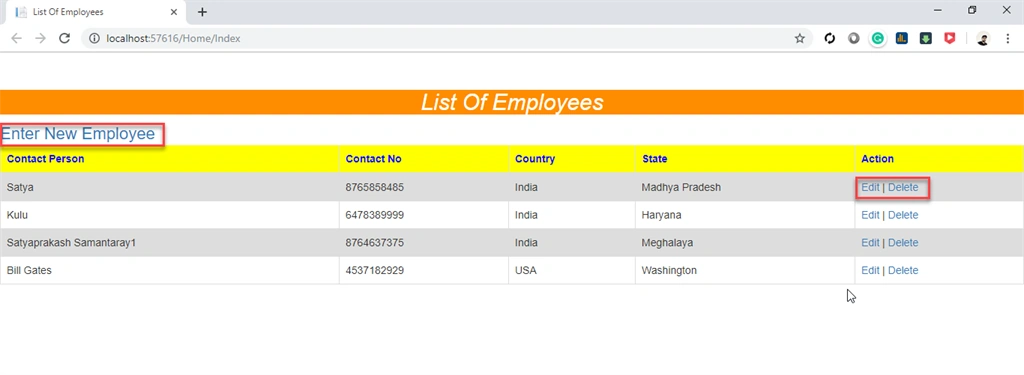
For Index View, here, I have used modal popup in the red marked area for CRUD operation.
Modal Popup Using MVC And Entity Framework In Depth
For Validation fields,
Modal Popup Using MVC And Entity Framework In Depth
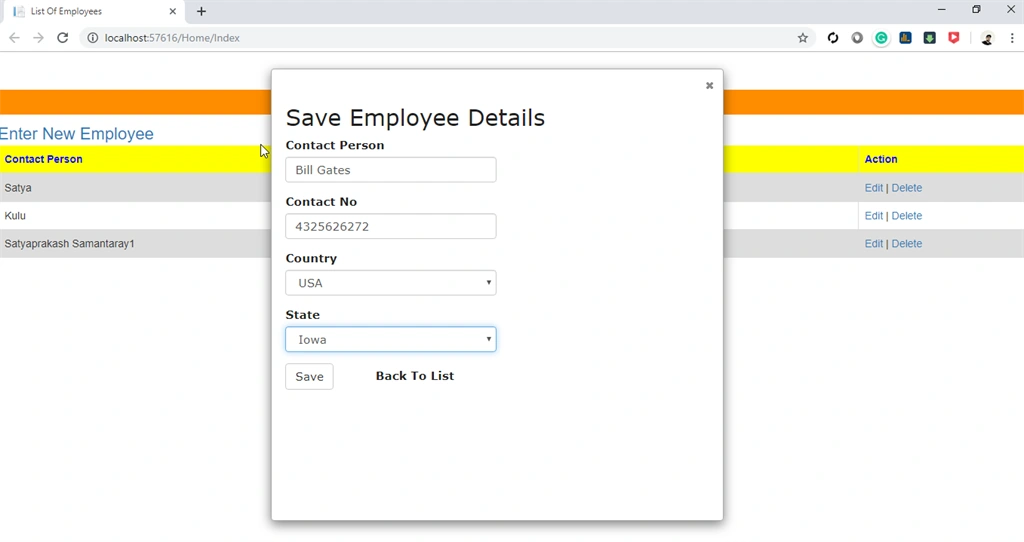
Modal Popup for saving records,
Modal Popup Using MVC And Entity Framework In Depth
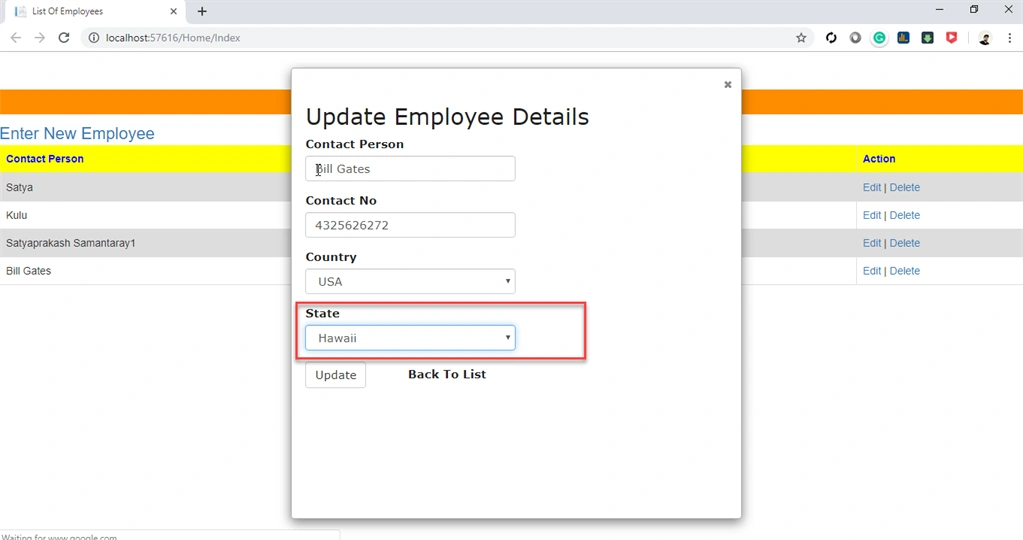
Modal Popup for updating records,
Modal Popup Using MVC And Entity Framework In Depth
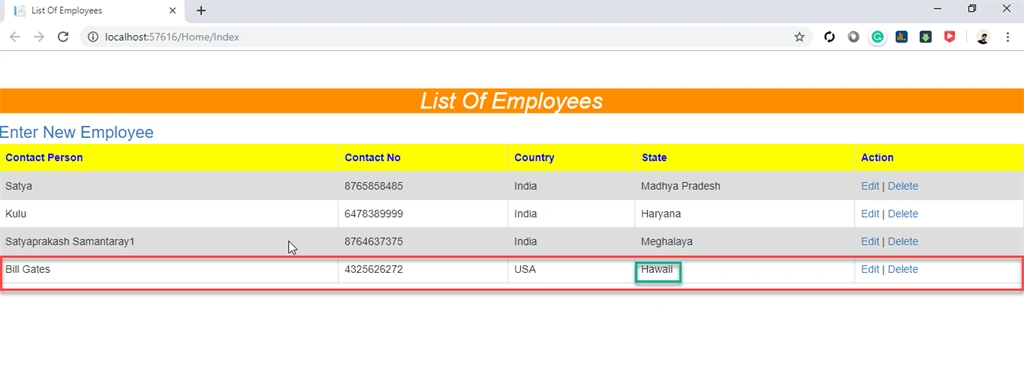
Show Update Field named "State" In record list as marked in green color,
Modal Popup Using MVC And Entity Framework In Depth
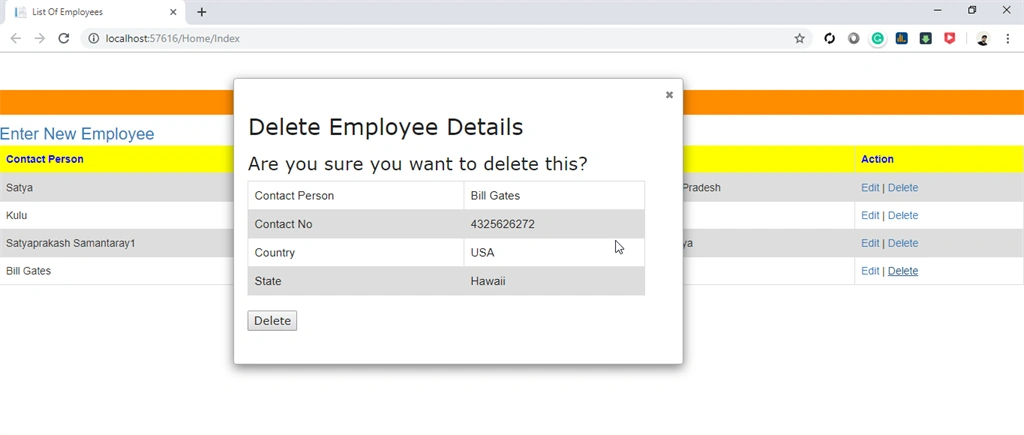
Modal Popup for deleting records,
Modal Popup Using MVC And Entity Framework In Depth
Record is deleted from the list as well as from database as marked in red color,
Modal Popup Using MVC And Entity Framework In Depth
Link To Source Code

Summary


In this article, we have learned how to perform -
  • Multiple operations on a single page using jQuery Ajax
  • CRUD operation using Modal popup
  • Field validation in Modal popup
  • Modal popup using Bootstrap