

Microsoft Purview Data Loss Prevention (DLP) is a powerful solution to monitor and protect sensitive information across devices, services, and applications. However, like any security tool, Endpoint DLP (EDLP) has limitations that organizations should be aware of when designing their data protection strategies. This article outlines key limitations in Endpoint DLP and suggests possible workarounds or complementary solutions.
1. Policy Scoping for Specific Destinations
Limitation
Currently, Microsoft Purview DLP does not support destination-specific policy configurations (e.g., blocking data uploads to a specific website or cloud service).
Workaround
- Utilize group-based controls to scope DLP behavior.
- For example, you can define allowed and unallowed user/device groups and configure the policy to permit or restrict actions for each group accordingly.
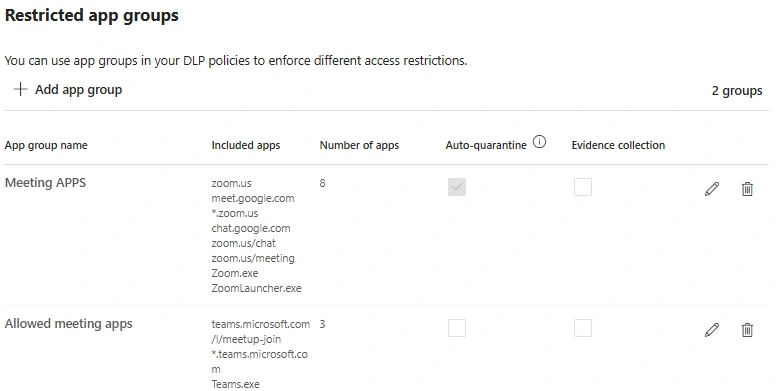
- Created the apps under the restricted app group, and mention that group in DLP polices.
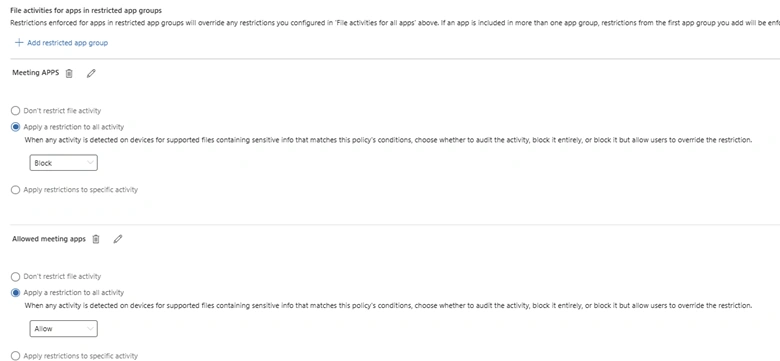
- Combine this with app restrictions to limit access to unapproved destinations.

Another solution is to leverage Microsoft Defender for Cloud Apps (MDA). For more granular control, use Microsoft Defender for Cloud Apps to detect and block unsanctioned apps and URLs. This includes real-time session control and app governance.
2. Screenshot Prevention
Limitation
Endpoint DLP cannot block screenshots or screen clipping tools on endpoints natively.
Workaround
- You can apply Microsoft Information Protection (MIP) sensitivity labels to documents to control screen capture behavior.
- When sensitivity labels are configured to restrict screen capture and are integrated with Microsoft Defender for Endpoint, screenshot blocking is enforced — but only within Microsoft 365 desktop apps (e.g., Word, Excel, Outlook).
Important. This protection does not work in web-based apps, including Outlook on the web (OWA). Users can still take screenshots of sensitive data when viewed in a browser.
3. Manual Entry of Sensitive Data
Limitation
Endpoint DLP does not monitor or block sensitive data that users manually type into web forms or applications.
Clarification
Preview Feature (as of June 20, 2025)
Microsoft has introduced "Collection policies", a preview capability designed to detect manually entered sensitive data. Key points.
- It aims to address this gap by capturing clipboard and keyboard input patterns.
- Requires Microsoft Defender for Endpoint integration.
- Also requires an additional Azure subscription.
- Still in preview and not production-confirmed as of June 20, 2025.
4. Raw Packet Inspection and Encrypted Traffic Analysis
Limitation
Endpoint DLP does not support deep packet inspection or encrypted traffic analysis.
Clarification
By design, Microsoft Purview Endpoint DLP does not work at the network layer. It does not perform raw packet inspection or analyze encrypted traffic. Instead, it operates at the application and file level, focusing on user interactions with sensitive data on supported endpoints. This means it relies on file classification and user activity monitoring, based on conditions defined in the Purview portal. Actions like allow or block are triggered when the data matches the configured DLP policies
5. Handling Password-Protected Files
Limitation
DLP cannot scan the contents of encrypted or password-protected files.
Workaround
- Use the DLP condition: "Attachment is password protected" to detect and restrict such files.
- Encourage the use of sensitivity labels prior to encryption, allowing better visibility and control.

- Use a DLP condition where the document or attachment is password protected. and use exceptions to be made for approved content while maintaining control. Reference the policy rule that you can evaluate.
6. Blocking File Transfers to Mobile Devices (MTP/PTP)
Support
Limitation: Microsoft Endpoint DLP supports blocking file transfers to mobile phones and cameras that connect via MTP/PTP protocols.
Recommendations
To strengthen your Endpoint DLP deployment.
- Combine MIP and DLP for enhanced control.
- Educate users on secure data handling practices.
- Pilot preview features cautiously and validate their stability before production rollout.
- Monitor for Microsoft announcements regarding Collection policies and web app screenshot protections in future updates.
Join the conversation! Your thoughts help the community grow.