

LINQ – Language Integrated Query
LINQ was introduced in Visual Studio 2008 and is available with .NET languages, it's very fast and short to write and to manipulate objects, contents, and values. Visual Studio includes LINQ provider assemblies that enable the use of LINQ.
We can use LINQ in the following ways:
- LINQ to SQL
- LINQ to Object
- LINQ to XML
My previous article on LINQ
In this article we will learn about LINQ Partitioning Operator: Skip, SkipWhile and Take, TakeWhile keywords.
Partition operator is splitting, breaking and returning result sets.
Partition operator is splitting, breaking and returning result sets.
- Skip: Return result set after jumping /skipping elements from start point as per given value.
- SkipWhile: Return result set after jumping with conditional from start point as per given value.
- Take: Return result set from start point as per given value.
- TakeWhile: Return result set from start point with conditional as per given value.
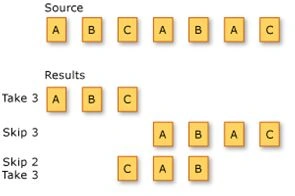
Picture taken from MSDN
We will do practical on the Subject array as given below:
- string[] Subjects = { "Hindi", "Marathi", "Maths", "Science", "English", "Computer" };
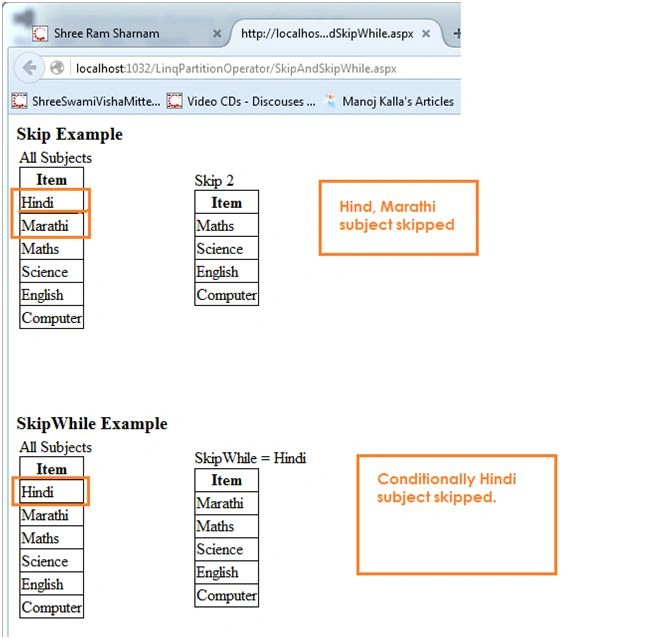
Return result set after jumping /skipping elements as given value.
Syntax: Subjects.Skip(?)
? = Numbers of item you want to skip.
Example: Subjects.Skip(2)
SkipWhile sample code
Return result set after jumping with conditional from start point as per given value.
Syntax: Subjects.Skip(?)
? = Numbers of items you want to skip.
Example: Subjects.Skip(2)
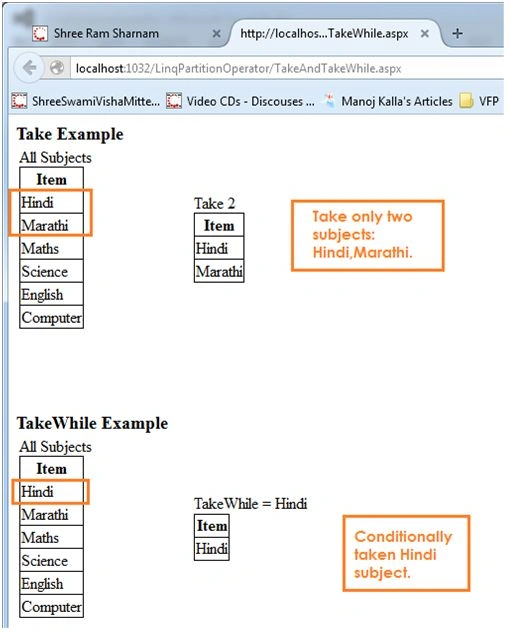
Take sample code
Return result set from start point as per given value.
Syntax: Subjects.Take(?);
? = Numbers of items you want to take from starting.
Example: Subjects.Skip(2)
TakeWhile sample code
Return result set from start point with conditional as per given value.
Syntax: Subjects.TakeWhile(?)
? = Numbers of item you want to take conditionally.
Example: Subjects.TakeWhile(x => x == "Hindi")
SkipAndSkipWhile.aspx code
- <%@ Page Language="C#" AutoEventWireup="true" CodeFile="SkipAndSkipWhile.aspx.cs" Inherits="SkipAndSkipWhile" %>
- <!DOCTYPE html>
- <html xmlns="http://www.w3.org/1999/xhtml">
- <head runat="server">
- <title></title>
- </head>
- <body>
- <form id="form1" runat="server">
- <div>
- <asp:Label ID="lblSkipTitle" runat="server" Text="Skip Example" Font-Bold="true" Font-Size="Larger"></asp:Label>
- <table title="Skip Example">
- <tr>
- <td>
- All Subjects
- <asp:GridView ID="GridView1" runat="server"></asp:GridView>
- </td>
- <td style="padding-left:100px">
- Skip 2
- <asp:GridView ID="GridView2" runat="server"></asp:GridView>
- </td>
- </tr>
- </table>
- </div>
- <br />
- <br />
- <br />
- <br />
- <div>
- <asp:Label ID="lblSkipWhile" runat="server" Text="SkipWhile Example" Font-Bold="true" Font-Size="Larger"></asp:Label>
- <table title="Skip While Example">
- <tr>
- <td>
- All Subjects
- <asp:GridView ID="GridView3" runat="server"></asp:GridView>
- </td>
- <td style="padding-left:100px">
- SkipWhile = Hindi
- <asp:GridView ID="GridView4" runat="server"></asp:GridView>
- </td>
- </tr>
- </table>
- </div>
- </form>
- </body>
- </html>
Shobana JPosted Jul 7, 2016, 6:53 AM
Good One
Sonu ChaudharyPosted May 26, 2016, 10:24 AM
nice
Sadasiva VPosted May 18, 2016, 8:04 AM
Thank you, Manoj...It is very useful article
Avikshith AradhyaPosted May 18, 2016, 3:03 AM
If i want to skip second item from array using skipwhile() it is not working. Does it only take first item of the array?
Bhuvanesh MohankumarPosted May 6, 2016, 3:51 PM
Good one...
Gowtham RajamanickamPosted Apr 7, 2016, 4:29 AM
Good Show.
Mohammed IbrahimPosted Apr 5, 2016, 12:19 PM
nice
Vignesh ManiPosted Apr 5, 2016, 8:22 AM
Nice
Karthikeyan KPosted Apr 5, 2016, 4:53 AM
Good one sir...
Humayun Kabir MamunPosted Apr 4, 2016, 11:43 PM
Nice...
Ammar ShaukatPosted Apr 4, 2016, 5:32 PM
I've also heard about "LINQ to Amazon".
Roshan MulePosted Apr 4, 2016, 2:52 PM
Thank you sir. Good Article.
Shaili DashoraPosted Apr 4, 2016, 2:48 PM
Nice one..
Debasis SahaPosted Apr 4, 2016, 1:41 PM
Good One..
Gowtham KPosted Apr 4, 2016, 12:35 PM
Good One, Thanks for sharing:)
ShehzadPosted Apr 4, 2016, 11:07 AM
Tks for sharing Sir....However SKIP & FILTER command already there in FoxPro since early 80's
Gopi ChandPosted Apr 4, 2016, 11:06 AM
Great one
Ankur MistryPosted Apr 4, 2016, 11:04 AM
Nice share
Hari ShankerPosted Apr 4, 2016, 9:46 AM
Thanks For Sharing..Nice
Rahul Kumar SaxenaPosted Apr 4, 2016, 8:58 AM
Very Clear Explanation