
Introduction
This article helps us to learn about “LINQ to SQL” and takes you through the step by step process to explain how to create the LINQ to SQL using Visual Studio and also how toachieve the basic Insert, Select, Update and delete operations using the concept of LINQ to SQL.
LINQ to SQL
We have seen the option of “LINQ to SQL” in visual studio 2010 onwards, many may not use it and some may get the chance to use it. “L2S” – [LINQ to SQL] is an Object Relational Mapping [ORM - like other frameworks], which is used to create the strongly typed models automatically with the .net classes based on SQL data tables of the refereed or strongly typed databases. That's simply to say if you provide the Database and map it using LINQ to SQL, then this framework will provide you the classes with properties similar to the data tables.
We can use this LINQ to SQL and can achieve the CRUD operation like Select, Insert, Update, Delete using C# language.
Sample LINQ to SQL
Please follow the steps and try the basic operation with your database tables,
Step 1 - Do right click on your project and choose new item option,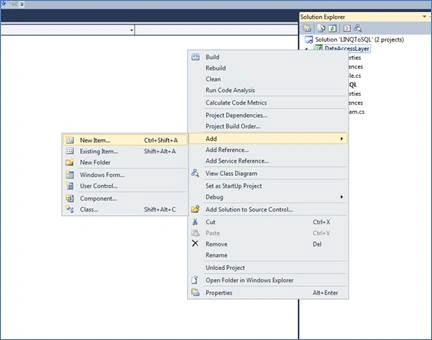
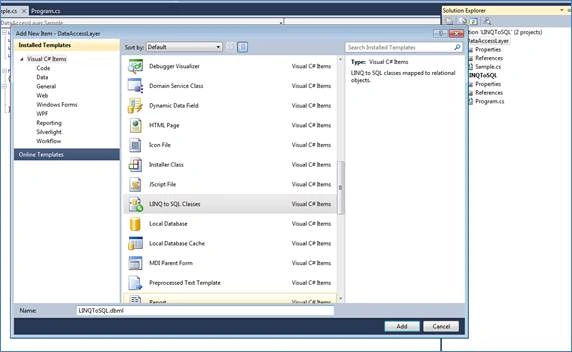
Step 2 - In the template wizard choose “LINQ to SQL Classes” template and name it as you wish
Step 3 - Open server explorer from view,

Step 4 - Connect your database and expand it,

Step 5 - Select all your database tables and place inside your dbml file. Just drag all the tables and place into your dbml file,
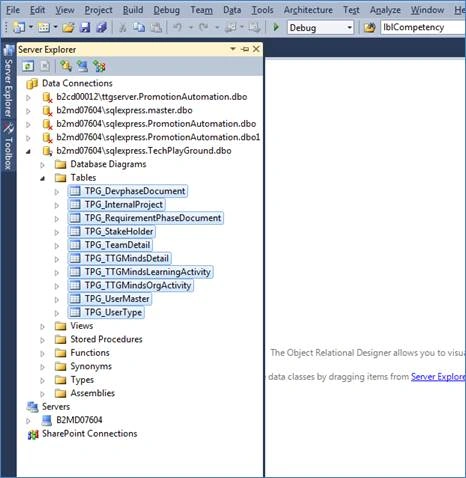
Step 6 - Now you can see all the tables in dbml file with relationships,

Sample Code

LINQ to SQL Using Visual Studio
Join the conversation! Your thoughts help the community grow.
Sign in to leave a comment
It is the same account you read, post and publish with — and you will come straight back to this page.
Ramzanali MominPosted Sep 8, 2018, 7:57 AM
Nice article
Manav PandyaPosted Sep 6, 2016, 2:46 AM
You have give sample code but u have not explained what is that ???
Bhuvanesh MohankumarPosted May 23, 2016, 3:44 AM
Thanks Sonu Chaudhary
Bhuvanesh MohankumarPosted May 23, 2016, 3:43 AM
Thanks Sonu Chaudhary
Sonu ChaudharyPosted May 19, 2016, 11:34 AM
good one
Bhuvanesh MohankumarPosted May 19, 2016, 6:45 AM
Thanks Debasis Saha
Bhuvanesh MohankumarPosted May 19, 2016, 6:45 AM
Thanks Hari Shanker
Bhuvanesh MohankumarPosted May 19, 2016, 6:45 AM
Thanks Kuppurasu Nagaraj
Debasis SahaPosted May 19, 2016, 6:31 AM
Good One..
Hari ShankerPosted May 19, 2016, 2:09 AM
Nice Share
Kuppurasu NagarajPosted May 18, 2016, 1:45 PM
Nice Sharing..
Bhuvanesh MohankumarPosted May 18, 2016, 1:16 PM
Thanks Neeraj Kumar
Bhuvanesh MohankumarPosted May 18, 2016, 1:16 PM
Thanks Debasis Saha
Bhuvanesh MohankumarPosted May 18, 2016, 1:15 PM
Thanks Thiruppathi R
Bhuvanesh MohankumarPosted May 18, 2016, 1:15 PM
Nataraj Gandhi Arunachalam Thanks
Bhuvanesh MohankumarPosted May 18, 2016, 1:15 PM
Thanks @Natara
Bhuvanesh MohankumarPosted May 18, 2016, 1:12 PM
Thanks Pankaj Kumar Choudhary, Yes I agree
Neeraj KumarPosted May 18, 2016, 12:59 PM
Nice sharing...
Debasis SahaPosted May 18, 2016, 10:20 AM
Good One..
Thiruppathi RPosted May 18, 2016, 10:15 AM
Good One .But any advantage compare to Entity Framework?
Nataraj Gandhi ArunachalamPosted May 18, 2016, 10:02 AM
good one!
Pankaj Kumar ChoudharyPosted May 18, 2016, 8:23 AM
Nice Article Sir .... As you maintained in the article that Many may not use LINQ to sql .. The reason may behind this "Linq TO SQL only support One to one mapping and It is not limited to SQL Server... Now a days Entity Framework take the place of LINQ TO SQL..........
Bhuvanesh MohankumarPosted May 18, 2016, 8:20 AM
Thanks @Ketak Bhalsing
Bhuvanesh MohankumarPosted May 18, 2016, 8:19 AM
Thanks @Aqib Shehzad
Ketak BhalsingPosted May 18, 2016, 8:19 AM
Very Well Written.....
Muhammad Aqib ShehzadPosted May 18, 2016, 7:30 AM
nice one