

Introduction & Demonstration
In Part
- 5 article of this series, we
have discussed how to use Automatic PostBack with DropDownList control. In this
article we will discuss how to work with items collection.
Items Collection
All the list items rendered by a List control are contained in the List
control's list item collection. This collection is exposed by the Items
property. We can work directly with the list items in this collection. For
example, we can add or remove particular list items or we can change the order
of the list items.
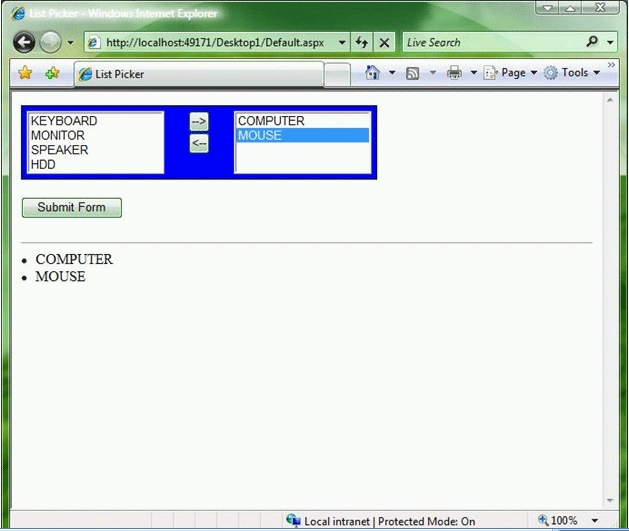
The page given below contains two ListBox controls and two button controls. When
we click the Add button, a list item is moved from the first ListBox to the
second ListBox control. When we click Remove, the list item is moved back to the
original List control. Let's take a look.
<%@ Page Language="VB" AutoEventWireup="false" CodeFile="Default.aspx.vb" Inherits="_Default"%>
<!DOCTYPE html PUBLIC "-//W3C//DTD XHTML 1.0 Transitional//EN""http://www.w3.org/TR/xhtml1/DTD/xhtml1-transitional.dtd">
<script runat="server">
Protected Sub btnAdd_Click(ByVal sender As Object, ByVal e As EventArgs)
Dim item As ListItem
= lstAllProducts.SelectedItem
If Not IsNothing
(item) Then
lstAllProducts.Items.Remove(item)
lstFavoriteProducts.ClearSelection()
lstFavoriteProducts.Items.Add(item)
End If
End Sub
Protected Sub btnRemove_Click(ByVal sender As Object, ByVal e As EventArgs)
Dim item As ListItem
= lstFavoriteProducts.SelectedItem
If Not IsNothing
(item) Then
lstFavoriteProducts.Items.Remove(item)
lstAllProducts.ClearSelection()
lstAllProducts.Items.Add(item)
End If
End Sub
Protected Sub btnSubmit_Click(ByVal sender As Object, ByVal e As EventArgs)
For Each item As ListItem In lstFavoriteProducts.Items
lblResults.Text &= "<li>" &
item.Text
Next
End Sub
</script>
<html xmlns="http://www.w3.org/1999/xhtml" >
<head id="Head1" runat="server">
<style type="text/css">
.listPicker
{
border:solid 1px black;
padding:5px;
width:380px;
background-color:blue;
}
.listPicker select
{
width:100%;
}
</style>
<title>List
Picker</title>
</head>
<body>
<form id="form1" runat="server">
Join the conversation! Your thoughts help the community grow.