Introduction

In this article, I will demonstrate new input types in HTML 5. HTML 5 introduces several input types like Date, DateTime, DateTime-local, time, week, month, email, tel, URL, search, range, color, and number to improve the user experience and to make the forms more interactive. However, if a browser fails to recognize these new input types, it will treat them like a normal text box.
date It allows the user to select a date from a drop-down calendar.
DateTime It allows the user to select a date and time along with time zone
time It allows the user to enter time.
DateTime-local It allows the user to select a local date and time
week It allows the user to select a week and year from a drop-down calendar.
month It allows the user to select a month and year from a drop-down calendar.
email It allows the user to enter an e-mail address.
tel It allows the user to enter the phone number with a specific pattern.
URL It allows the user to enter a website URL
search It's a text field for entering a search string
range It allows the user to range the value with the slider.
number It allows the user to enter a numeric value with the increase and decrease arrow.
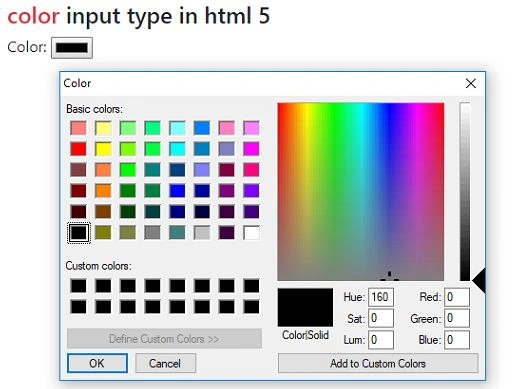
color It allows the user to select a color from the color picker
Date input type
The date input type in HTML 5 allows the user to select a date from the datepicker calendar. It has got a next button and a pre-button with a closing round button in the center of next and pre. Below is the example of the date input type in HTML 5.
Example of date input type
  1. <!DOCTYPE html>
  2. <html>
  3. <head>
  4. <title></title>
  5. <meta charset="utf-8" />
  6. <link rel="stylesheet" href="https://maxcdn.bootstrapcdn.com/bootstrap/4.1.3/css/bootstrap.min.css">
  7. <script src="https://ajax.googleapis.com/ajax/libs/jquery/3.3.1/jquery.min.js"></script>
  8. <script src="https://maxcdn.bootstrapcdn.com/bootstrap/4.1.3/js/bootstrap.min.js"></script>
  9. </head>
  10. <body>
  11. <div class="container py-5">
  12. <h4><span class="text-danger">date</span> input type in html 5</h4>
  13. <form>
  14. <div class="form-group">
  15. <label>Date:</label>
  16. <input type="date" id="date" class="form-control col-md-3" />
  17. </div>
  18. </form>
  19. </div>
  20. </body>
  21. </html>
Output
New Input Types in HTML 5
Datetime
Datetime input type allows the user to select date and time along with time zone but it does not support Internet Explorer, Firefox, Chrome or Opera browsers. It supports only Apple Safari. Below is an example of datetime input type in HTML 5.
Example of datetime input type
  1. <!DOCTYPE html>
  2. <html>
  3. <head>
  4. <title></title>
  5. <meta charset="utf-8" />
  6. <link rel="stylesheet" href="https://maxcdn.bootstrapcdn.com/bootstrap/4.1.3/css/bootstrap.min.css">
  7. <script src="https://ajax.googleapis.com/ajax/libs/jquery/3.3.1/jquery.min.js"></script>
  8. <script src="https://maxcdn.bootstrapcdn.com/bootstrap/4.1.3/js/bootstrap.min.js"></script>
  9. </head>
  10. <body>
  11. <div class="container py-5">
  12. <h4><span class="text-danger">datetime</span> input type in html 5</h4>
  13. <form>
  14. <div class="form-group">
  15. <label>Datetime:</label>
  16. <input type="datetime" id="datetime" class="form-control col-md-3" />
  17. </div>
  18. </form>
  19. </div>
  20. </body>
  21. </html>
Output
New Input Types in HTML 5
Datetime-local
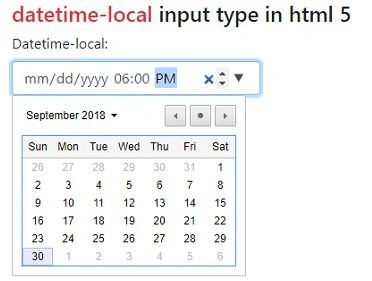
Datetime-local input type in HTML 5 allows the user to select date and time. Similar to the datepicker, it has got a next and a pre-button with a closing round button in the center of next and pre, along with AM and PM options. Below is an example of datetime-local input type in HTML 5.
Example of datetime-local input type
  1. <!DOCTYPE html>
  2. <html>
  3. <head>
  4. <title></title>
  5. <meta charset="utf-8" />
  6. <link rel="stylesheet" href="https://maxcdn.bootstrapcdn.com/bootstrap/4.1.3/css/bootstrap.min.css">
  7. <script src="https://ajax.googleapis.com/ajax/libs/jquery/3.3.1/jquery.min.js"></script>
  8. <script src="https://maxcdn.bootstrapcdn.com/bootstrap/4.1.3/js/bootstrap.min.js"></script>
  9. </head>
  10. <body>
  11. <div class="container py-5">
  12. <h4><span class="text-danger">datetime-local</span> input type in html 5</h4>
  13. <form>
  14. <div class="form-group">
  15. <label>Datetime-local:</label>
  16. <input type="datetime-local" id="datetime" class="form-control col-md-3" />
  17. </div>
  18. </form>
  19. </div>
  20. </body>
  21. </html>
Output
New Input Types in HTML 5
Time
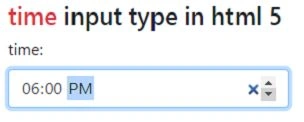
The time input type in HTML 5 allows the user to enter the time. Below is an example of a time input type.
Example of time input type
  1. <!DOCTYPE html>
  2. <html>
  3. <head>
  4. <title></title>
  5. <meta charset="utf-8" />
  6. <link rel="stylesheet" href="https://maxcdn.bootstrapcdn.com/bootstrap/4.1.3/css/bootstrap.min.css">
  7. <script src="https://ajax.googleapis.com/ajax/libs/jquery/3.3.1/jquery.min.js"></script>
  8. <script src="https://maxcdn.bootstrapcdn.com/bootstrap/4.1.3/js/bootstrap.min.js"></script>
  9. </head>
  10. <body>
  11. <div class="container py-5">
  12. <h4><span class="text-danger">time</span> input type in html 5</h4>
  13. <form>
  14. <div class="form-group">
  15. <label>Time:</label>
  16. <input type="time" id="time" class="form-control col-md-3" />
  17. </div>
  18. </form>
  19. </div>
  20. </body>
  21. </html>
Output
New Input Types in HTML 5
Week
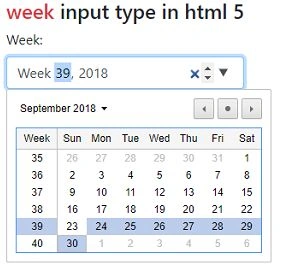
Week input type in HTML 5 allows the user to select week and year from the datepicker drop-down. Below is an example of a week's input type.
Example of week input type/span>
  1. <!DOCTYPE html>
  2. <html>
  3. <head>
  4. <title></title>
  5. <meta charset="utf-8" />
  6. <link rel="stylesheet" href="https://maxcdn.bootstrapcdn.com/bootstrap/4.1.3/css/bootstrap.min.css">
  7. <script src="https://ajax.googleapis.com/ajax/libs/jquery/3.3.1/jquery.min.js"></script>
  8. <script src="https://maxcdn.bootstrapcdn.com/bootstrap/4.1.3/js/bootstrap.min.js"></script>
  9. </head>
  10. <body>
  11. <div class="container py-5">
  12. <h4><span class="text-danger">week</span> input type in html 5</h4>
  13. <form>
  14. <div class="form-group">
  15. <label>Week:</label>
  16. <input type="week" id="week" class="form-control col-md-3" />
  17. </div>
  18. </form>
  19. </div>
  20. </body>
  21. </html>
Output
New Input Types in HTML 5
Month
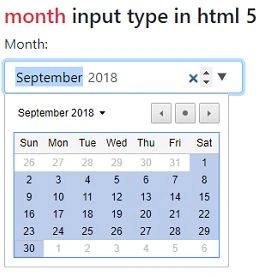
Month input type in HTML 5 allows the user to select month and year from the datepicker drop-down. Below is an example of the month input type.
Example of month input type
  1. <!DOCTYPE html>
  2. <html>
  3. <head>
  4. <title></title>
  5. <meta charset="utf-8" />
  6. <link rel="stylesheet" href="https://maxcdn.bootstrapcdn.com/bootstrap/4.1.3/css/bootstrap.min.css">
  7. <script src="https://ajax.googleapis.com/ajax/libs/jquery/3.3.1/jquery.min.js"></script>
  8. <script src="https://maxcdn.bootstrapcdn.com/bootstrap/4.1.3/js/bootstrap.min.js"></script>
  9. </head>
  10. <body>
  11. <div class="container py-5">
  12. <h4><span class="text-danger">month</span> input type in html 5</h4>
  13. <form>
  14. <div class="form-group">
  15. <label>Month:</label>
  16. <input type="month" id="month" class="form-control col-md-3" />
  17. </div>
  18. </form>
  19. </div>
  20. </body>
  21. </html>
Output
New Input Types in HTML 5
Email
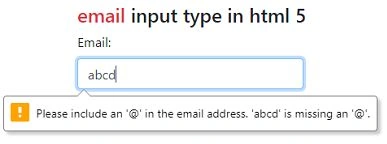
The email input type in HTML 5 allows the user to enter the email address. It behaves like a textbox if required and pattern attribute is not used along with it. Below is an example of the email input type.
Example of email input type
  1. <!DOCTYPE html>
  2. <html>
  3. <head>
  4. <title></title>
  5. <meta charset="utf-8" />
  6. <link rel="stylesheet" href="https://maxcdn.bootstrapcdn.com/bootstrap/4.1.3/css/bootstrap.min.css">
  7. <script src="https://ajax.googleapis.com/ajax/libs/jquery/3.3.1/jquery.min.js"></script>
  8. <script src="https://maxcdn.bootstrapcdn.com/bootstrap/4.1.3/js/bootstrap.min.js"></script>
  9. </head>
  10. <body>
  11. <div class="container py-5">
  12. <h4><span class="text-danger">email</span> input type in html 5</h4>
  13. <form>
  14. <div class="form-group">
  15. <label>Email:</label>
  16. <input type="email" id="email" placeholder="email address" pattern="[a-z0-9._%+-]+@[a-z0-9.-]+\.[a-z]{2,3}$" class="form-control col-md-3" required/>
  17. </div>
  18. <button class="btn-primary rounded-0">Submitt</button>
  19. </form>
  20. </div>
  21. </body>
  22. </html>
Output
New Input Types in HTML 5
Tel
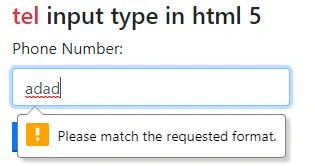
Tel input type in HTML 5 allows the user to enter a phone number. It behaves like a textbox if required and the pattern attribute does not get used along with it. Below is an example of a tel input type.
Example of tel input type
  1. <!DOCTYPE html>
  2. <html>
  3. <head>
  4. <title></title>
  5. <meta charset="utf-8" />
  6. <link rel="stylesheet" href="https://maxcdn.bootstrapcdn.com/bootstrap/4.1.3/css/bootstrap.min.css">
  7. <script src="https://ajax.googleapis.com/ajax/libs/jquery/3.3.1/jquery.min.js"></script>
  8. <script src="https://maxcdn.bootstrapcdn.com/bootstrap/4.1.3/js/bootstrap.min.js"></script>
  9. </head>
  10. <body>
  11. <div class="container py-5">
  12. <h4><span class="text-danger">tel</span> input type in html 5</h4>
  13. <form>
  14. <div class="form-group">
  15. <label>Phone Number:</label>
  16. <input type="tel" id="phone" placeholder="Phone Number" pattern="\d{10}$" class="form-control col-md-3" required/>
  17. </div>
  18. <button class="btn-primary rounded-0">Submitt</button>
  19. </form>
  20. </div>
  21. </body>
  22. </html>
Output
New Input Types in HTML 5
Number
The number input type in HTML 5 allows the user to enter an only numeric value. It has increment and decrement arrows to increase and decrease number values. Below is an example of the number input type.
Example of number input type
  1. <!DOCTYPE html>
  2. <html>
  3. <head>
  4. <title></title>
  5. <meta charset="utf-8" />
  6. <link rel="stylesheet" href="https://maxcdn.bootstrapcdn.com/bootstrap/4.1.3/css/bootstrap.min.css">
  7. <script src="https://ajax.googleapis.com/ajax/libs/jquery/3.3.1/jquery.min.js"></script>
  8. <script src="https://maxcdn.bootstrapcdn.com/bootstrap/4.1.3/js/bootstrap.min.js"></script>
  9. </head>
  10. <body>
  11. <div class="container py-5">
  12. <h4><span class="text-danger">number</span> input type in html 5</h4>
  13. <form>
  14. <div class="form-group">
  15. <label>Number:</label>
  16. <input type="number" id="number" class="form-control col-md-3"/>
  17. </div>
  18. </form>
  19. </div>
  20. </body>
  21. </html>
Output
New Input Types in HTML 5
URL
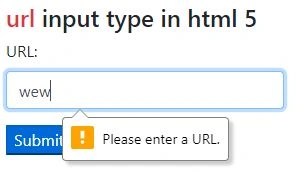
URL input type in HTML 5 is used to enter a valid website address or URL. It has an attribute pattern to specify the URL. It has multiple attributes that allow the user to enter multiple URLs. Below is an example of a URL input type.
Example of url input type
  1. <!DOCTYPE html>
  2. <html>
  3. <head>
  4. <title></title>
  5. <meta charset="utf-8" />
  6. <link rel="stylesheet" href="https://maxcdn.bootstrapcdn.com/bootstrap/4.1.3/css/bootstrap.min.css">
  7. <script src="https://ajax.googleapis.com/ajax/libs/jquery/3.3.1/jquery.min.js"></script>
  8. <script src="https://maxcdn.bootstrapcdn.com/bootstrap/4.1.3/js/bootstrap.min.js"></script>
  9. </head>
  10. <body>
  11. <div class="container py-5">
  12. <h4><span class="text-danger">url</span> input type in html 5</h4>
  13. <form>
  14. <div class="form-group">
  15. <label>URL:</label>
  16. <input type="url" id="url" pattern="https?://.+" class="form-control col-md-3" required/>
  17. </div>
  18. <button class="btn-primary rounded-0">Submitt</button>
  19. </form>
  20. </div>
  21. </body>
  22. </html>
Output
New Input Types in HTML 5
Search
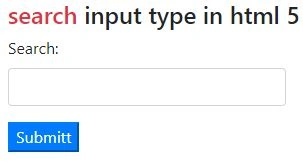
The search input type can be used for creating search fields. A search field behaves like a regular textbox, but in some browsers, like Google Chrome and Apple Safari, as soon as you start typing in a search box a small cross appears on the right side of the text box that lets you quickly clear the search textbox.
Example search input type
  1. <!DOCTYPE html>
  2. <html>
  3. <head>
  4. <title></title>
  5. <meta charset="utf-8" />
  6. <link rel="stylesheet" href="https://maxcdn.bootstrapcdn.com/bootstrap/4.1.3/css/bootstrap.min.css">
  7. <script src="https://ajax.googleapis.com/ajax/libs/jquery/3.3.1/jquery.min.js"></script>
  8. <script src="https://maxcdn.bootstrapcdn.com/bootstrap/4.1.3/js/bootstrap.min.js"></script>
  9. </head>
  10. <body>
  11. <div class="container py-5">
  12. <h4><span class="text-danger">search</span> input type in html 5</h4>
  13. <form>
  14. <div class="form-group">
  15. <label>Search:</label>
  16. <input type="search" id="search" class="form-control col-md-3" />
  17. </div>
  18. </form>
  19. </div>
  20. </body>
  21. </html>
Output
New Input Types in HTML 5
Range
The range input type can be used for entering a numerical value within a specified range. It is similar to the number input, but it offers a simpler control for entering a number. It has got a slider to increase and decrease the range value.
Example of range input type
  1. <!DOCTYPE html>
  2. <html>
  3. <head>
  4. <title></title>
  5. <meta charset="utf-8" />
  6. <link rel="stylesheet" href="https://maxcdn.bootstrapcdn.com/bootstrap/4.1.3/css/bootstrap.min.css">
  7. <script src="https://ajax.googleapis.com/ajax/libs/jquery/3.3.1/jquery.min.js"></script>
  8. <script src="https://maxcdn.bootstrapcdn.com/bootstrap/4.1.3/js/bootstrap.min.js"></script>
  9. </head>
  10. <body>
  11. <div class="container py-5">
  12. <h4><span class="text-danger">range</span> input type in html 5</h4>
  13. <form>
  14. <div class="form-group">
  15. <label>Range:</label>
  16. <input type="range" id="range" class="custom-range"/>
  17. </div>
  18. </form>
  19. </div>
  20. </body>
  21. </html>
Output
New Input Types in HTML 5
Color
The color input type allows the user to select a color from a color picker and returns the hex value for that color.
Example of color input type
  1. <!DOCTYPE html>
  2. <html>
  3. <head>
  4. <title></title>
  5. <meta charset="utf-8" />
  6. <link rel="stylesheet" href="https://maxcdn.bootstrapcdn.com/bootstrap/4.1.3/css/bootstrap.min.css">
  7. <script src="https://ajax.googleapis.com/ajax/libs/jquery/3.3.1/jquery.min.js"></script>
  8. <script src="https://maxcdn.bootstrapcdn.com/bootstrap/4.1.3/js/bootstrap.min.js"></script>
  9. </head>
  10. <body>
  11. <div class="container py-5">
  12. <h4><span class="text-danger">color</span> input type in html 5</h4>
  13. <form>
  14. <div class="form-group">
  15. <label>Color:</label>
  16. <input type="color" id="color"/>
  17. </div>
  18. </form>
  19. </div>
  20. </body>
  21. </html>
Output
New Input Types in HTML 5

Conclusion

In this article, we studied List Of New Input Types In HTML 5.