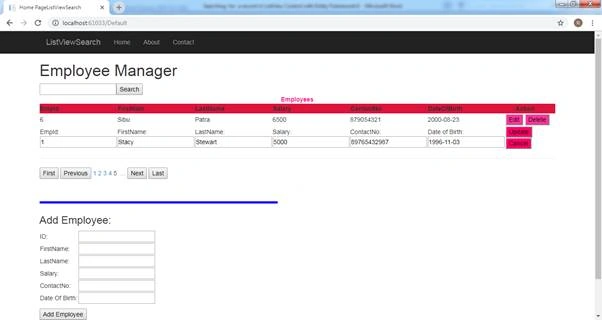
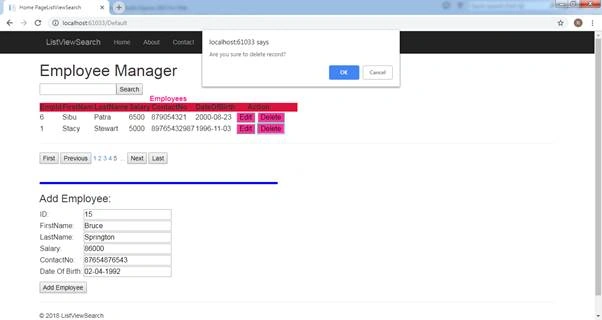
ASP.NET Web Form is still used by a large number of developers for rapid application development. This tutorial is a CRUD (Create, Retrieve, Update, and Delete) Web Application with the "search for a record" functionality. The records are displayed in a ListView Control which involves model binding. Data Pager is used for pagination of the records.
The data-bound controls (such as the ListView, the Repeater, the GridView, the DetailsView, and the FormView) are Strongly-Typed Data-Bound Controls.
Software required for this tutorial is -
- Microsoft .NET Framework 4.5.1or any higher version.
- Microsoft Visual Studio 2013 or Visual Studio Express 2013 for Web or any higher version of Microsoft Visual Studio above 2012
- Entity Framework 6.0
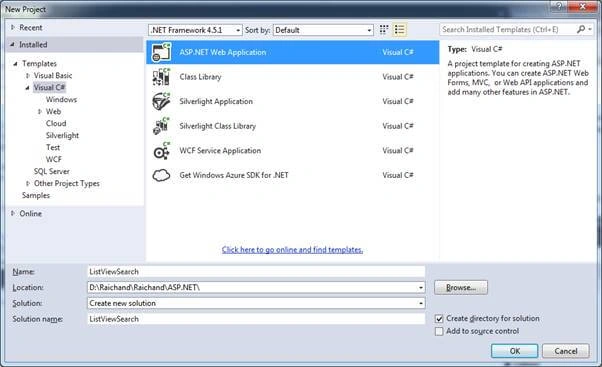
Lunch Visual Studio and create a new ASP.NET project. Name it as List View Search.
Go to File >> New Project.
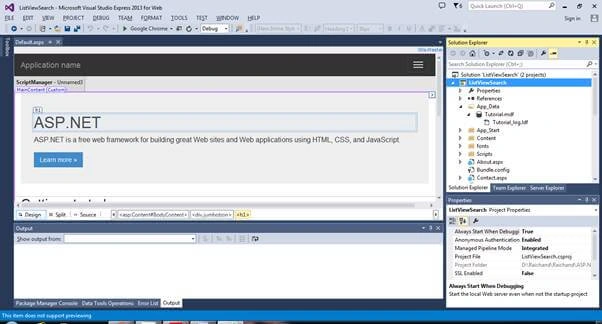
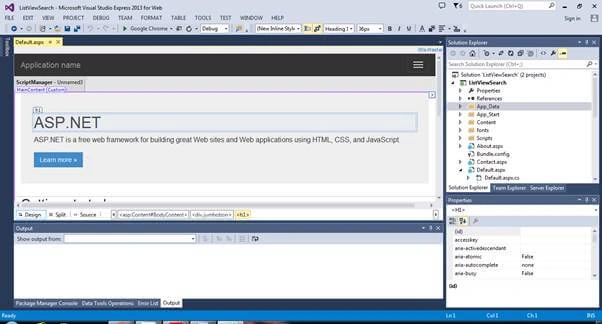
The project looks like below.
Default.aspx Page
- <%@ Page Title="Home Page" Language="C#" MasterPageFile="~/Site.Master" AutoEventWireup="true" CodeBehind="Default.aspx.cs" Inherits="ListViewSearch._Default" %>
- <asp:Content ID="Content2" ContentPlaceHolderID="MainContent" runat="server">
- <h1> Employee Manager</h1>
- <div>
- <asp:TextBox ID="txtSearch" AutoPostBack="true" runat="server" ToolTip="Search by part of EmployeeName"></asp:TextBox>
- <asp:Button ID="btnSearch" Text="Search" runat="server" CausesValidation="false" OnClick="btnSearch_Click" />
- </div>
- <div>
- <asp:ListView ID="EmployeeList" ItemType="ListViewSearch.Models.Employee" SelectMethod="GetSearchedItems" DataKeyNames="Id" UpdateMethod="UpdateEmployee" DeleteMethod="DeleteEmployee" OnSelectedIndexChanged="EmployeeList_SelectedIndexChanged" runat="server">
- <EmptyDataTemplate>
- <table>
- <tr>
- <td>Sorry,No Record Found.Try Again!</td>
- </tr>
- </table>
- </EmptyDataTemplate>
- <EmptyItemTemplate>
- <td />
- </EmptyItemTemplate>
- <LayoutTemplate>
- <div class="outerContainer">
- <table id="EmployeeTable">
- <caption style="color:deeppink"><b>Employees</b></caption>
- <tr style="background-color:crimson">
- <th>EmpId</th>
- <th>FirstNam</th>
- <th>LastName</th>
- <th>Salary</th>
- <th>ContactNo</th>
- <th>DateOfBirth</th>
- <th style="width:140px;"> Action</th>
- </tr>
- <tr runat="server" id="itemPlaceholder"></tr>
- </table>
- </div>
- </LayoutTemplate>
- <ItemTemplate>
- <tr>
- <td>
- <%# Item.Id %>
- </td>
- <td>
- <%# Item.FirstName %>
- </td>
- <td>
- <%# Item.LastName %>
- </td>
- <td>
- <%# Item.Salary %>
- </td>
- <td>
- <%# Item.ContactNo %>
- </td>
- <td>
- <%# Item.Date_Of_Birth %>
- </td>
- <td>
- <asp:Button BackColor="#ff3399" CommandName="Edit" Text="Edit" tooltip="Edit a record" CausesValidation="false" runat="server" />
- <asp:Button BackColor="#ff3399" CommandName="Delete" tooltip="Delete a record" CausesValidation="false" onclientclick="javascript:return confirm('Are you sure to delete record?')" Text="Delete" runat="server" />
- </td>
- </tr>
- </ItemTemplate>
- <EditItemTemplate>
- <tr>
- <input type="hidden" name="EmpId" value="<%# Item.Id %>" />
- <td>EmpId:
- <asp:TextBox ID="txtEmpId" runat="server" TextMode="SingleLine" Text='<%# BindItem.Id%>' />
- </td>
- <td>FirstName:
- <asp:TextBox ID="txtFName" runat="server" TextMode="SingleLine" Text='<%# BindItem.FirstName %>' />
- </td>
- <td>LastName:
- <asp:TextBox ID="txtLName" runat="server" TextMode="SingleLine" Text='<%# BindItem.LastName %>' />
- </td>
- <td>Salary:
- <asp:TextBox ID="txtSalary" runat="server" TextMode="SingleLine" Text='<%# BindItem.Salary %>' />
- </td>
- <td>ContactNo:
- <asp:TextBox ID="txtContactNo" runat="server" TextMode="SingleLine" Text='<%# BindItem.ContactNo %>' />
- </td>
- <td>Date of Birth:
- <asp:TextBox ID="txtDOB" runat="server" TextMode="SingleLine" Text='<%# BindItem.Date_Of_Birth %>' />
- </td>
- <td>
- <asp:Button BackColor="#ff0066" CommandName="Update" Text="Update" CausesValidation="false" runat="server" />
- <asp:Button BackColor="#ff0066" CommandName="Cancel" Text="Cancel" CausesValidation="false" runat="server" />
- </td>
- </tr>
- </EditItemTemplate>
- </asp:ListView>
- <hr style="color:darkblue" />
- <div style="clear: both;">
- <asp:DataPager ID="DataPager1" PagedControlID="EmployeeList" PageSize="2" runat="server">
- <Fields>
- <asp:NextPreviousPagerField ButtonType="Button" ShowFirstPageButton="true" ShowPreviousPageButton="true" ShowNextPageButton="false" ShowLastPageButton="false" />
- <asp:NumericPagerField ButtonType="Link" />
- <asp:NextPreviousPagerField ButtonType="Button" ShowLastPageButton="true" ShowNextPageButton="true" ShowFirstPageButton="false" ShowPreviousPageButton="false" />
- </Fields>
- </asp:DataPager>
- </div>
- </div>
- <hr style="width:5px;color:darkblue;" />
- <asp:Label ID="LabelStatus" BackColor="Blue" Width="540px" Height="5px" runat="server" Text=""></asp:Label>
- <h3>Add Employee:</h3>
- <table>
- <tr>
- <td>
- <asp:Label ID="LabelAddId" runat="server">ID:</asp:Label>
- </td>
- <td>
- <asp:TextBox ID="AddId" runat="server"></asp:TextBox>
- <asp:RequiredFieldValidator ID="RequiredFieldValidator6" runat="server" Text="* Id required." ControlToValidate="AddId" SetFocusOnError="true" Display="Dynamic"></asp:RequiredFieldValidator>
- </td>
- </tr>
- <tr>
- <td>
- <asp:Label ID="LabelAddFName" runat="server">FirstName:</asp:Label>
- </td>
- <td>
- <asp:TextBox ID="AddFirstName" runat="server"></asp:TextBox>
- <asp:RequiredFieldValidator ID="RequiredFieldValidator1" runat="server" Text="* First name required." ControlToValidate="AddFirstName" SetFocusOnError="true" Display="Dynamic"></asp:RequiredFieldValidator>
- </td>
- </tr>
- <tr>
- <td>
- <asp:Label ID="LabelAddLName" runat="server">LastName:</asp:Label>
- </td>
- <td>
- <asp:TextBox ID="AddLastName" runat="server"></asp:TextBox>
- <asp:RequiredFieldValidator ID="RequiredFieldValidator5" runat="server" Text="* Last name required." ControlToValidate="AddLastName" SetFocusOnError="true" Display="Dynamic"></asp:RequiredFieldValidator>
- </td>
- </tr>
- <tr>
- <td>
- <asp:Label ID="LabelAddSalary" runat="server">Salary:</asp:Label>
- </td>
- <td>
- <asp:TextBox ID="AddSalary" runat="server"></asp:TextBox>
- <asp:RequiredFieldValidator ID="RequiredFieldValidator2" runat="server" Text="* Salary required." ControlToValidate="AddSalary" SetFocusOnError="true" Display="Dynamic"></asp:RequiredFieldValidator>
- </td>
- </tr>
- <tr>
- <td>
- <asp:Label ID="LabelAddContactNo" runat="server">ContactNo:</asp:Label>
- </td>
- <td>
- <asp:TextBox ID="AddContactNo" runat="server"></asp:TextBox>
- <asp:RequiredFieldValidator ID="RequiredFieldValidator3" runat="server" Text="* ContactNo required." ControlToValidate="AddContactNo" SetFocusOnError="true" Display="Dynamic"></asp:RequiredFieldValidator>
- </td>
- </tr>
- <tr>
- <td>
- <asp:Label ID="LabelAddDOB" runat="server">Date Of Birth:</asp:Label>
- </td>
- <td>
- <asp:TextBox ID="AddDOB" runat="server"></asp:TextBox>
- <asp:RequiredFieldValidator ID="RequiredFieldValidator4" runat="server" Text="* Date of Birth required." ControlToValidate="AddDOB" SetFocusOnError="true" Display="Dynamic"></asp:RequiredFieldValidator>
- </td>
- </tr>
- </table>
- <p></p>
- <p></p>
- <asp:Button ID="AddEmployeeButton" runat="server" Text="Add Employee" OnClick="AddEmployeeButton_Click" CausesValidation="true" />
- <p></p>
- </asp:Content>
Default.aspx.cs Page
- using System;
- using System.Collections.Generic;
- using System.Linq;
- using System.Web;
- using System.Web.UI;
- using System.Web.UI.WebControls;
- using ListViewSearch.Models;
- using System.Web.ModelBinding;
- namespace ListViewSearch
- {
- public partial class _Default : Page
- {
- protected void Page_Load(object sender, EventArgs e)
- {
- }
- TutorialEntities DBContext = new ListViewSearch.Models.TutorialEntities();
- /*public IQueryable GetEmployees()//This piece of code is used to populate the list view but not used here.
- {
- var _db = new ListViewSearch.Models.TutorialEntities();
- IQueryable query = _db.Employees.OrderBy(emp => emp.Id);
- return query;
- }*/
- protected void btnSearch_Click(object sender, EventArgs e)
- {
- Response.Write("<script>Window.location.reload()</script>");
- }
- public IQueryable<Employee> GetSearchedItems([Control("txtSearch")]string Search)
- {
- //As there is no search word is given so listview is populated with all records sorted by First Name
- IQueryable<Employee> query = DBContext.Employees.OrderBy(emp => emp.FirstName);
- if (!string.IsNullOrEmpty(Search))
- {
- query = query.Where(emp => (emp.FirstName.Contains(Search) || emp.LastName.Contains(Search)));
- }
- return query;
- }
- public void DeleteEmployee(int id)
- {
- Employee oEmployee = DBContext.Employees.Find(id);
- DBContext.Employees.Remove(oEmployee);
- DBContext.SaveChanges();
- Response.Write("<script>javascript:alert('Employee Information Deleted successfully');</script>");
- }
- protected void EmployeeList_SelectedIndexChanged(object sender, EventArgs e)
- {
- EmployeeList.DataBind();
- Response.Write("<script>Window.location.reload()</script>");
- }
- protected void AddEmployeeButton_Click(object sender, EventArgs e)
- {
- // Add product data to DB.
- Employee newEmployee = new Employee();
- newEmployee.Id = int.Parse(AddId.Text);
- newEmployee.FirstName = AddFirstName.Text;
- newEmployee.LastName = AddLastName.Text;
- newEmployee.Salary = int.Parse(AddSalary.Text);
- newEmployee.ContactNo = AddContactNo.Text;
- newEmployee.Date_Of_Birth = AddDOB.Text;
- DBContext.Employees.Add(newEmployee);
- DBContext.SaveChanges();
- Response.Write("<script>javascript:alert('Employee Information Added successfully');</script>");
- }
- public void UpdateEmployee(Employee modifiedEmployee)
- {
- Employee oEmployee = DBContext.Employees.FirstOrDefault(i => i.Id == modifiedEmployee.Id);
- oEmployee.Id = modifiedEmployee.Id;
- oEmployee.FirstName = modifiedEmployee.FirstName;
- oEmployee.LastName = modifiedEmployee.LastName;
- oEmployee.Salary = modifiedEmployee.Salary;
- oEmployee.ContactNo = modifiedEmployee.ContactNo;
- oEmployee.Date_Of_Birth = modifiedEmployee.Date_Of_Birth;
- DBContext.SaveChanges();
- Response.Write("<script>javascript:alert('Employee Information Updated successfully');</script>");
- }
- }
- }
Web.Config File
- <?xml version="1.0" encoding="utf-8"?>
- <!--
- For more information on how to configure your ASP.NET application, please visit
- http://go.microsoft.com/fwlink/?LinkId=169433
- -->
- <configuration>
- <configSections>
- <section name="entityFramework" type="System.Data.Entity.Internal.ConfigFile.EntityFrameworkSection, EntityFramework, Version=6.0.0.0, Culture=neutral, PublicKeyToken=b77a5c561934e089" requirePermission="false" />
- <!-- For more information on Entity Framework configuration, visit http://go.microsoft.com/fwlink/?LinkID=237468 -->
- </configSections>
- <system.web>
- <compilation debug="true" targetFramework="4.5" />
- <httpRuntime targetFramework="4.5" />
- <pages>
- <namespaces>
- <add namespace="System.Web.Optimization" />
- </namespaces>
- <controls>
- <add assembly="Microsoft.AspNet.Web.Optimization.WebForms" namespace="Microsoft.AspNet.Web.Optimization.WebForms" tagPrefix="webopt" />
- </controls>
- </pages>
- </system.web>
- <runtime>
- <assemblyBinding xmlns="urn:schemas-microsoft-com:asm.v1">
- <dependentAssembly>
- <assemblyIdentity name="WebGrease" culture="neutral" publicKeyToken="31bf3856ad364e35" />
- <bindingRedirect oldVersion="0.0.0.0-1.5.2.14234" newVersion="1.5.2.14234" />
- </dependentAssembly>
- </assemblyBinding>
- </runtime>
- <connectionStrings>
- <add name="TutorialEntities" connectionString="metadata=res://*/Models.EmployeeModel.csdl|res://*/Models.EmployeeModel.ssdl|res://*/Models.EmployeeModel.msl;provider=System.Data.SqlClient;provider connection string="data source=(LocalDB)\v11.0;attachdbfilename=|DataDirectory|\Tutorial.mdf;integrated security=True;connect timeout=30;MultipleActiveResultSets=True;App=EntityFramework"" providerName="System.Data.EntityClient" />
- </connectionStrings>
- <entityFramework>
- <defaultConnectionFactory type="System.Data.Entity.Infrastructure.LocalDbConnectionFactory, EntityFramework">
- <parameters>
- <parameter value="v11.0" />
- </parameters>
- </defaultConnectionFactory>
- <providers>
- <provider invariantName="System.Data.SqlClient" type="System.Data.Entity.SqlServer.SqlProviderServices, EntityFramework.SqlServer" />
- </providers>
- </entityFramework>
- </configuration>
Creating Database File Tutorial.mdf
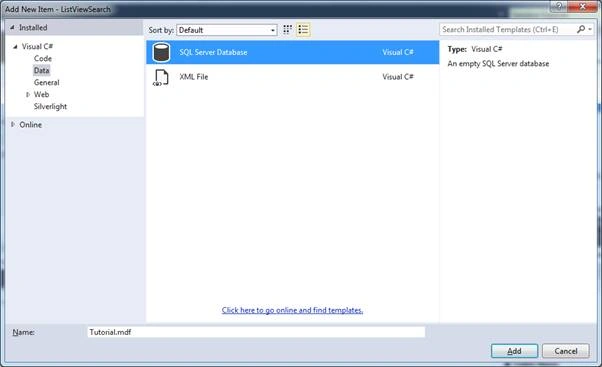
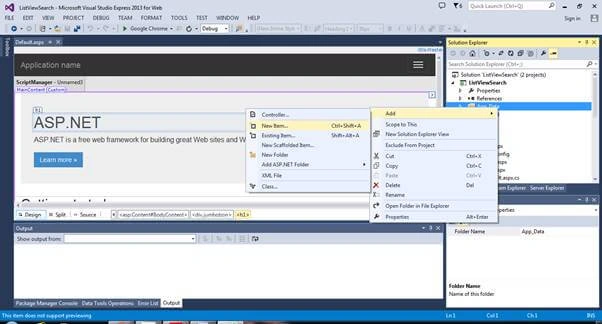
Right-click on the App_Data folder and choose Add >> New Item >> New SQL Server Database.
Name it as Tutorial.mdf.
Now, we will be creating a table in the Microsoft database file, Tutorial.mdf, and manually inserting a few dummy records.
The newly created database file Tutorial.mdf is displayed inside the App_Data folder.
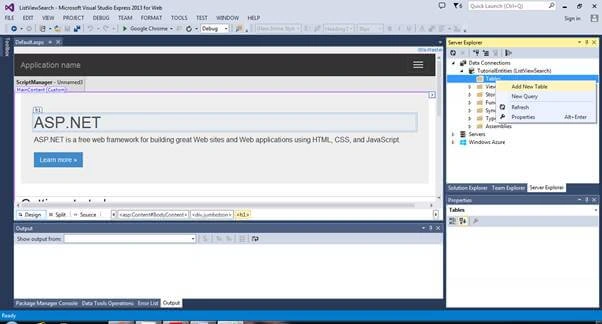
Right-click on Tutorial.mdf file and click "Open".
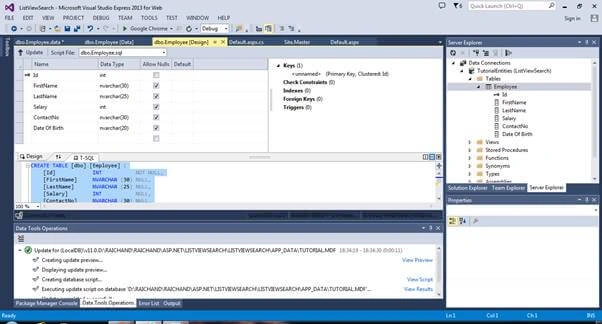
Right-click on Tables >> Add New Table.
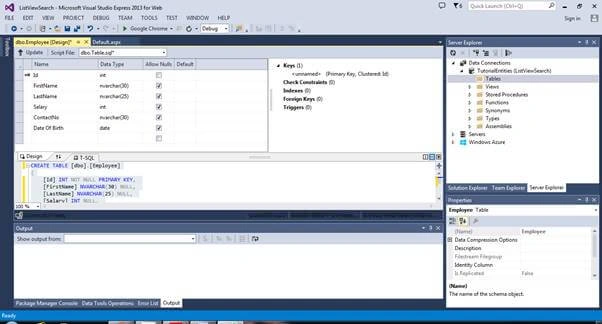
Name the table as Employee and add six columns.
SQL of the table is mentioned below.
- CREATE TABLE [dbo].[Employee] (
- [Id] INT NOT NULL,
- [FirstName] NVARCHAR (30) NULL,
- [LastName] NVARCHAR (25) NULL,
- [Salary] INT NULL,
- [ContactNo] NVARCHAR (30) NULL,
- [Date Of Birth] NVARCHAR(20) NULL,
- PRIMARY KEY CLUSTERED ([Id] ASC)
- );
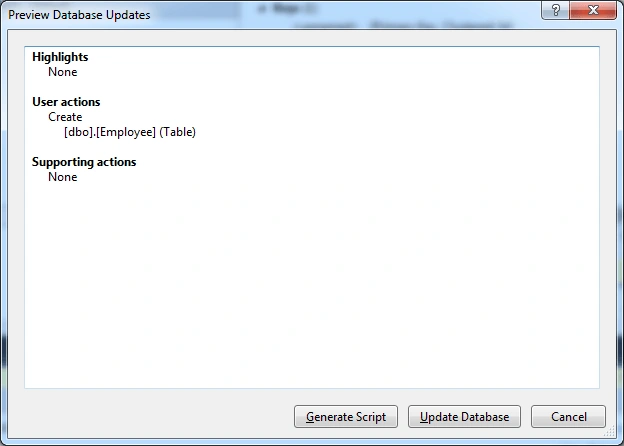
Click the "Update" button in the left corner and update the database in newly opened window.
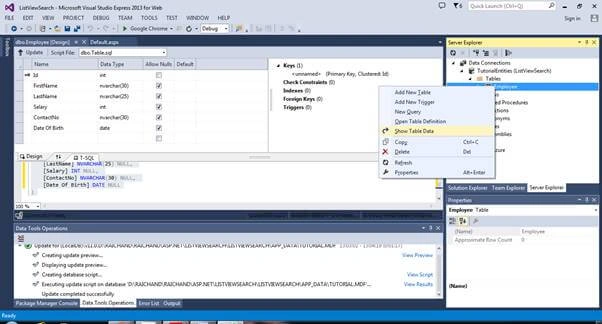
A new table, Employee, is created. Refresh the Table folder in the Server Explorer window. The Employee table is there.
To add a record to the Employee table, right-click on it and select "Show Table Data".
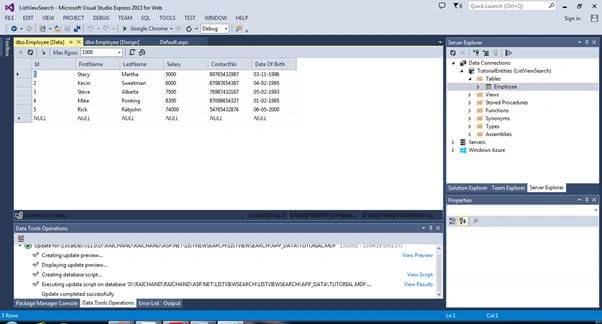
There is no record. So, let us add dummy records.


- INSERT INTO [dbo].[Employee] ([Id], [FirstName], [LastName], [Salary], [ContactNo], [Date Of Birth]) VALUES (1, N'Stacy', N'Stewart', 5000, N'89765432987', N'1996-11-03')
- INSERT INTO [dbo].[Employee] ([Id], [FirstName], [LastName], [Salary], [ContactNo], [Date Of Birth]) VALUES (2, N'Kevin', N'Sweetman', 6000, N'67987654387', N'1995-02-04')
- INSERT INTO [dbo].[Employee] ([Id], [FirstName], [LastName], [Salary], [ContactNo], [Date Of Birth]) VALUES (3, N'Steve', N'Perry', 7500, N'76987432167', N'1993-02-05')
- INSERT INTO [dbo].[Employee] ([Id], [FirstName], [LastName], [Salary], [ContactNo], [Date Of Birth]) VALUES (4, N'Mike', N'Ponting', 8300, N'87098654327', N'1995-02-01')
- INSERT INTO [dbo].[Employee] ([Id], [FirstName], [LastName], [Salary], [ContactNo], [Date Of Birth]) VALUES (5, N'Rick', N'Rabjohn', 74000, N'54765432876', N'2000-05-06')
- INSERT INTO [dbo].[Employee] ([Id], [FirstName], [LastName], [Salary], [ContactNo], [Date Of Birth]) VALUES (6, N'Sibu', N'Patra', 6500, N'879054321', N'2000-08-23')
- INSERT INTO [dbo].[Employee] ([Id], [FirstName], [LastName], [Salary], [ContactNo], [Date Of Birth]) VALUES (7, N'Sibu', N'Patra', 6500, N'879054321', N'2000-08-23')
Creating a Model to insert into Employee Database (Entity Framework Database First)
Create a new folder by right-clicking the project node >> Add >> NewFolde. Name it as "Models".
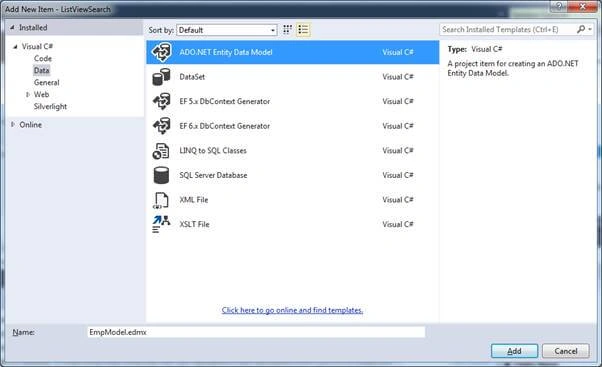
Right-click on the "Models" folder and from the opened menu list, click Add >> New Item >> ADO.NET Entity Data Model. Now, name it as EmpModel.edmex.

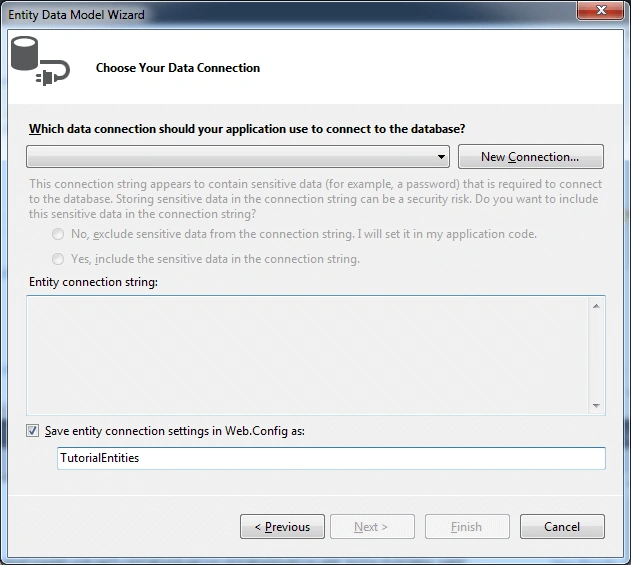
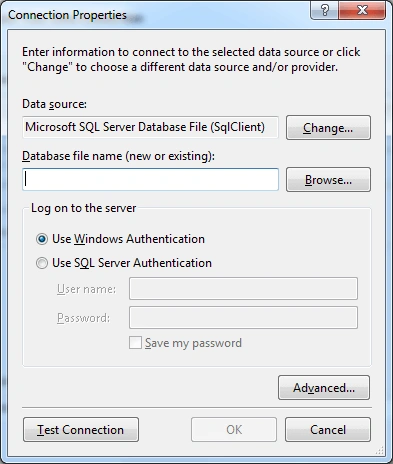
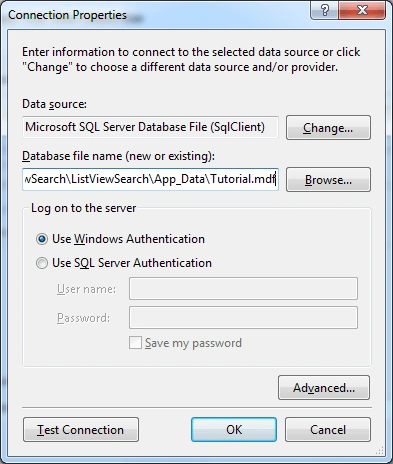
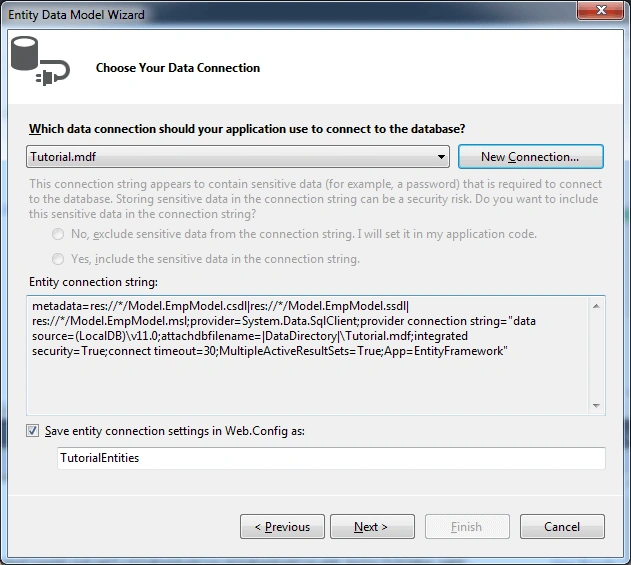
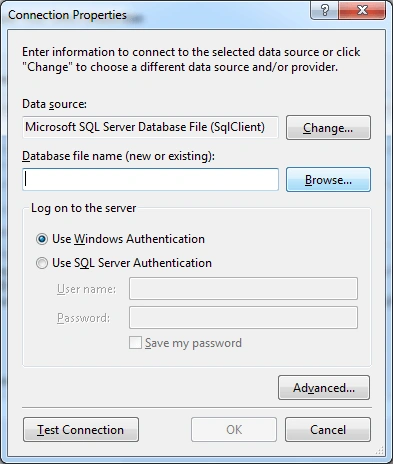
Click on "New Connection" >> browse, and select database file Tutorial.mdf.

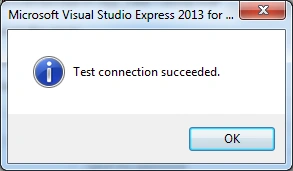
Click "Test Connection".
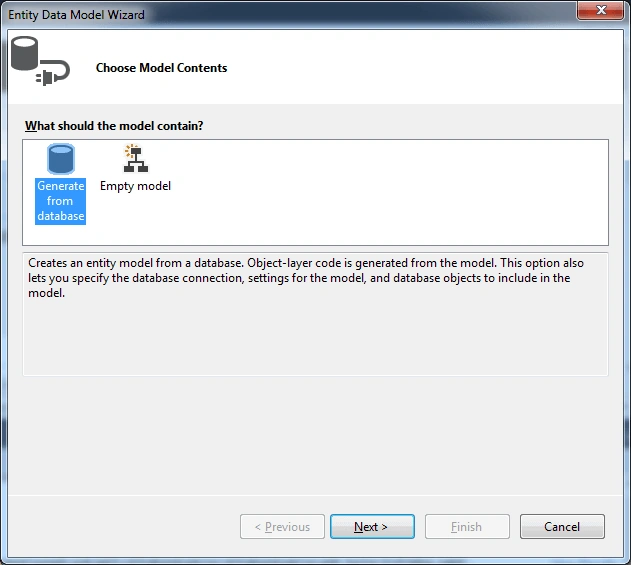
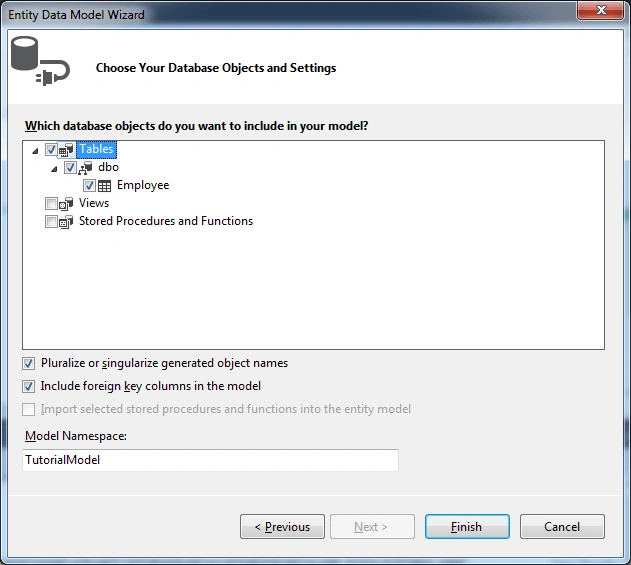
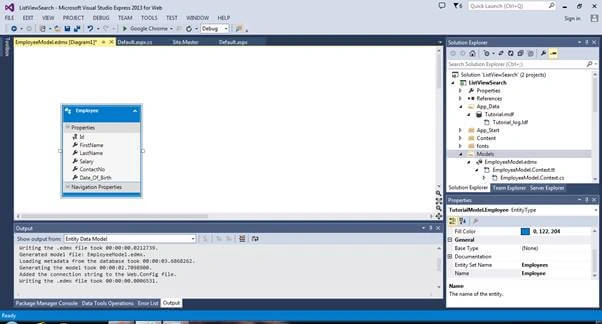
Click Next >> Employee Table, as displayed below. Then, click "Finish".

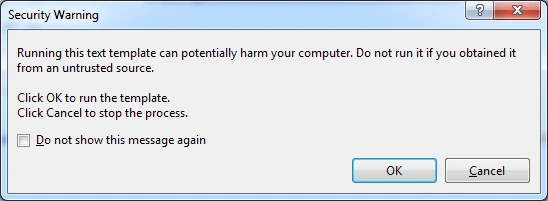
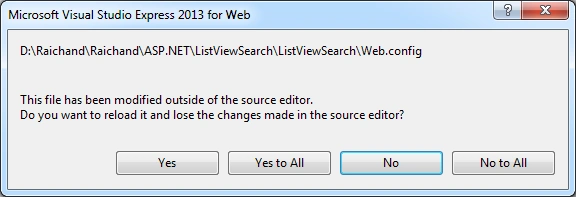
Click OK. Again, click OK and then, select the "Yes To All" button.


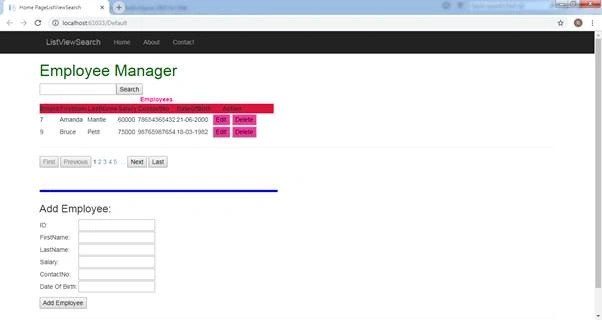
The web application ‘Employee Manager’ is shown below.
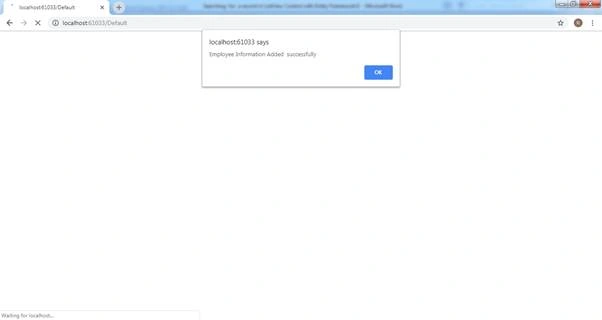
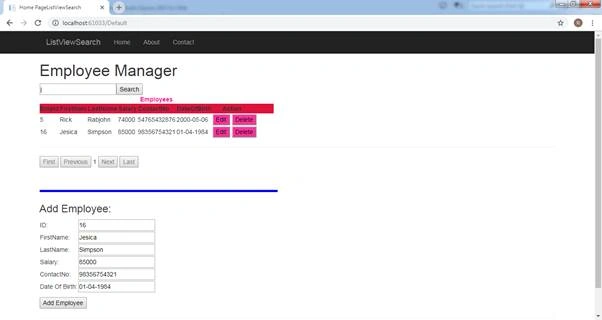
Add a record to it.
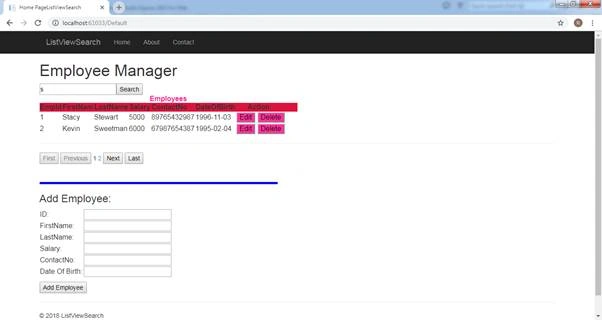
Here is how it will be searching for the FirstName or LastName containing the letter ‘S’.
Edit the records like below.
Delete the Records like below.
That's It. We have successfully built the CRUD Application in ASP.NET. Suggestions for modification are welcome.
First LastPosted Jan 24, 2019, 8:30 AM
When the edit button is clicked, how is that associated with the Edit template to make it appear?