

Aim: To add ListBox items with values from multiple tables or views.
Problem:
During my Academic Project (The Event Management System) there is a situation where I needed to display the Supplier's Names from multiple Tables (such as Caterer, Manpower, and Advertisement etc.). Right now I have completed my Academic year, but after extensive efforts and guidance from many people I succeed to achieve the intended goal in a simple manner.
Some weeks ago I placed this question in the Mind Cracker Network. Here I tried to present the sample for the same portion of the code.
This article contains the simplest way to do it.
Solution:
Requirements:
- One ListBox Control to display data.
- One Command Button to Perform associated actions
- Here I take Northwind Database as Sample Database
Justification:
- First we have to make some declarations as follows.
SqlConnection Conn =new SqlConnection("Data Source=.\\SqlExpress; "
+ "Initial Catalog=Northwind; Integrated security=True");
SqlDataReader rdr;
SqlCommand cmd;//The target is very simple, we just have to
//execute simple SELECT statements with Data Reader using Command Object -
After the declarations, execute the SELECT statement; then add each item from the Data Reader to the ListBox. To identify data from each table you can add a TABLE name as ListBox item at the beginning of the data being displayed.
private void button1_Click(object sender, EventArgs e)
{
Conn.Open();
//Supplier
listBox1.Items.Add("-----Suppliers----");
cmd = new SqlCommand("Select TOP(5) ContactName As PersonName from Suppliers", Conn);
rdr = cmd.ExecuteReader();while (rdr.Read())
{
listBox1.Items.Add(rdr.GetValue(0).ToString());
}
rdr.Close();//Customers
listBox1.Items.Add("-----Customers----");
cmd = new SqlCommand("Select TOP(5) ContactName As PersonName from Customers", Conn);
rdr = cmd.ExecuteReader();
while (rdr.Read())
{
listBox1.Items.Add(rdr.GetValue(0).ToString());
}
rdr.Close();
.
.
.
.
.
}
-
Figure 1 shows the intended result:
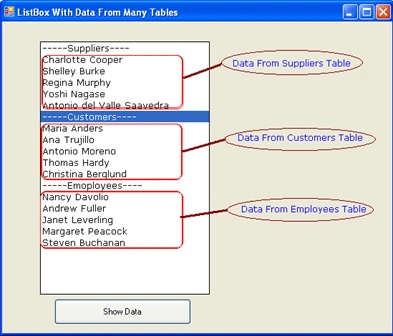
Figure 1
Summary:
In this article, we have seen the ListBox operation with multiple data sources in C# Programming.
Join the conversation! Your thoughts help the community grow.