

Microsoft Fabric is rapidly changing how data professionals interact with analytics assets, and Semantic Link is one of its most powerful (yet still underused) capabilities. If you’ve ever wanted to programmatically discover datasets (semantic models) across multiple workspaces , Fabric Notebooks combined with Semantic Link make this not only possible—but elegant.
In this article, we’ll walk through:
What Semantic Link is and why it matters
Why Fabric Notebooks are ideal for metadata exploration
How to list all datasets across workspaces using Semantic Link
Practical use cases for governance and automation
What Is Semantic Link in Microsoft Fabric?
Semantic Link is a Python-based capability in Microsoft Fabric that allows you to interact directly with Power BI semantic models (datasets) using code. Instead of relying solely on the UI, you can now:
Query semantic models using Python
Extract metadata programmatically
Integrate datasets into data science and engineering workflows
Under the hood, Semantic Link bridges Power BI, Fabric Lakehouses, and Notebooks , giving data engineers and analysts a single, unified experience.
Why Use Fabric Notebooks for This?
Fabric Notebooks are tightly integrated with the Fabric platform, which means:
Authentication is handled automatically
You don’t need to manage service principals or tokens manually
You can explore metadata across the tenant (subject to permissions)
This makes notebooks the perfect place for workspace and dataset discovery .
Listing All Datasets Across Workspaces
Using Semantic Link, we can query Fabric metadata to return all semantic models (datasets) that we have access to across workspaces.
Step 1: Import Semantic Link
import sempy.fabric as fabricStep 2: List All Datasets
The list_datasets() function retrieves datasets across all accessible workspaces.
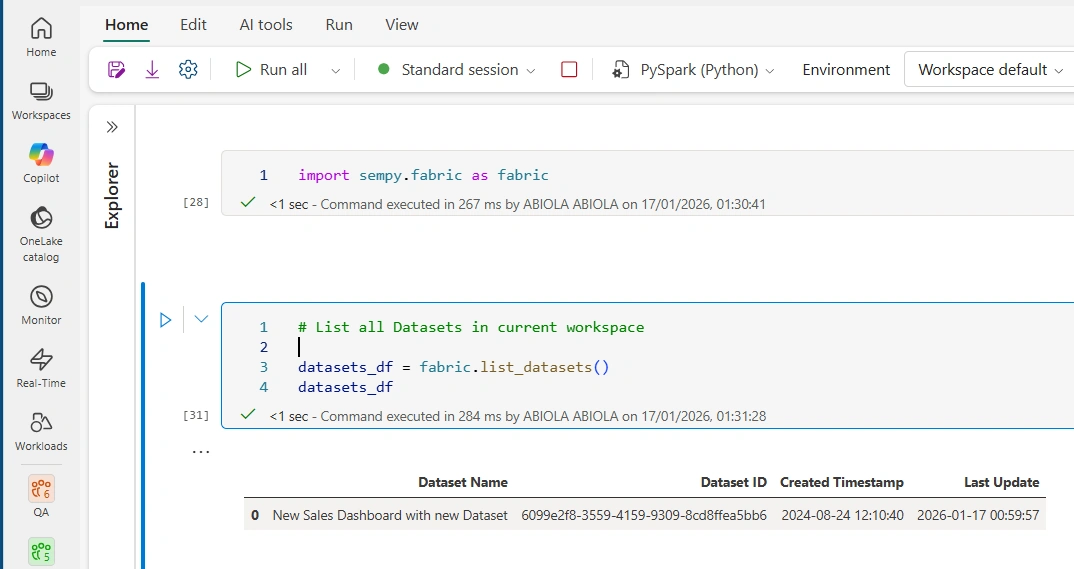
This returns a Pandas DataFrame containing details such as:
Dataset ID
Dataset Name
Workspace ID
Workspace Name
Dataset Type (Semantic Model)
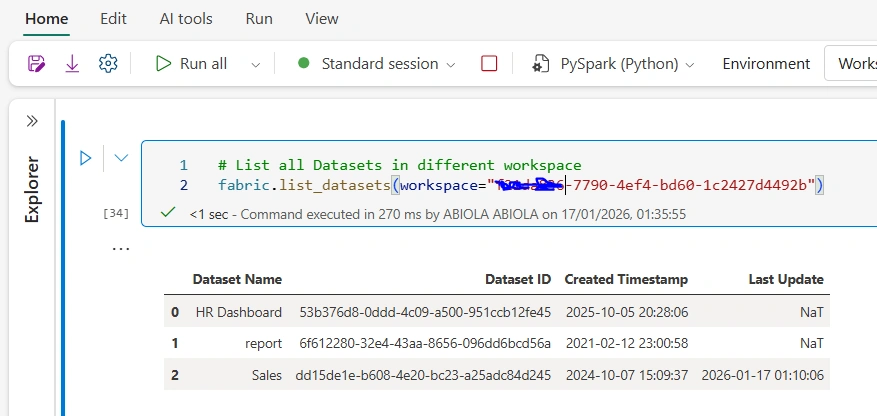
Step 2: List All Datasets in Different Workspace
To retrieve all the datasets in different workspace, execute:
# List all Datasets in different workspace
fabric.list_datasets(workspace="<workspace_id>")
Workspace ID can be found in your URL and it is after the group/
Final Thoughts
Semantic Link turns Microsoft Fabric into more than just an analytics platform—it becomes a programmable data ecosystem. By combining Fabric Notebooks with Semantic Link, you can unlock deep visibility into your semantic layer and build automation that was previously impossible without complex APIs.
If you’re serious about data governance, automation, or platform observability in Fabric, this is a capability you should start using today.
Join the conversation! Your thoughts help the community grow.