

The ListView is an extremely flexible data-bound control that renders its content based on the templates you define. Unlike the Repeater, the ListView adds higher level features such as selection and editing, which work in the same way as those in the GridView. But unlike the GridView, the ListView does’t support a field based model for creating quick and easy grids with a minimum of markup.
ListView is a new addition in ASP.NET 3.5. ListView can literally replace all other data binding controls in ASP.NET. ListView control makes data binding easier than previous controls. It has included styling with CSS, flexible pagination, and sorting, inserting, deleting, and updating features.
The most common reason for using the ListView is to create an unusual layout. For Example , to create a table that places more than one item in the same row, or to break free from table based rendering altogether. When building a page to display large amounts of data, ASP.NET developers usually turn to the GridView first and use the ListView in most specialized scenarios.
ListView Templates:
Templates control certain aspects of the ListView control's generated HTML. Templates are required with ListView; they are optional with other data controls. These templates provide complete control over the output; that is, all aspects of the ListView's generated markup are controlled via templates.
The following list offers details about the numerous templates available with ListView.
1. AlternatingItemTemplate: Defines how alternating items are displayed.
2. EditItemTemplate: Defines the presentation for an item when it is edited.
3. EmptyDataTemplate: Specifies the content to display for empty individual items.
4. EmptyItemTemplate: Specifies the content to display for empty group items.
5. GroupSeparatorTemplate: Specifies the content to display between groups.
6. GroupTemplate: Defines the content for groups. This template is a placeholder for the data displayed for individual group items (when data is grouped).
7. InsertItemTemplate: Defines the presentation for a new item being inserted into the data set.
8. ItemSeparatorTemplate: Defines the content to display between individual data items.
9. ItemTemplate: Defines the data to display for single items.
10. LayoutTemplate: Defines the main presentation features for the control. This root template contains placeholders that are replaced by what is defined by ItemTemplate and GroupTemplate.
11. SelectedItemTemplate: Specifies the content to display when users select items.
In this article we will discuss features in ListView step by step.
· Data Binding
· Data Pager
· Add, Edit and Delete
In Data Binding we will bind ListView from database. To show data use ItemTemplate and AlternateItemTemplate show alternative row with different styles.
1. Data Binding
AlternateItemTemplate & ItemTemplate :
<asp:ListView ID="VendorListView" runat="server" DataKeyNames="VendorId"
DataSourceID="SqlDataSource1" onitemcommand="VendorListView_ItemCommand"
onsorting="VendorListView_Sorting" InsertItemPosition="LastItem">
<AlternatingItemTemplate>
<tr style="background-color: #FFFFFF; color: #284775;">
<td><asp:Label ID="VendorIdLabel" runat="server" Text='<%# Eval("VendorId") %>' /></td>
<td><asp:Label ID="VendorFNameLabel" runat="server" Text='<%# Eval("VendorFName") %>' /></td>
<td><asp:Label ID="VendorLNameLabel" runat="server" Text='<%# Eval("VendorLName") %>' /></td>
<td><asp:Label ID="VendorCityLabel" runat="server" Text='<%# Eval("VendorCity") %>' /></td>
<td><asp:Label ID="VendorStateLabel" runat="server" Text='<%# Eval("VendorState") %>' /></td>
<td><asp:Label ID="VendorCountryLabel" runat="server" Text='<%# Eval("VendorCountry") %>' /></td>
<td><asp:Label ID="PostedDateLabel" runat="server" Text='<%# Eval("PostedDate") %>' /></td>
<td><asp:Label ID="VendorDescriptionLabel" runat="server" Text='<%# Eval("VendorDescription") %>' /></td>
<td><asp:LinkButton ID="LinkButtonEdit" runat="server" CommandName="Edit">Edit</asp:LinkButton></td>
</tr>
</AlternatingItemTemplate>
<ItemTemplate>
<tr style="background-color: #E0FFFF; color: #333333;">
<td><asp:Label ID="VendorIdLabel" runat="server" Text='<%# Eval("VendorId") %>' /></td>
<td><asp:Label ID="VendorFNameLabel" runat="server" Text='<%# Eval("VendorFName") %>' /></td>
<td><asp:Label ID="VendorLNameLabel" runat="server" Text='<%# Eval("VendorLName") %>' /></td>
<td><asp:Label ID="VendorCityLabel" runat="server" Text='<%# Eval("VendorCity") %>' /></td>
<td><asp:Label ID="VendorStateLabel" runat="server" Text='<%# Eval("VendorState") %>' /></td>
<td><asp:Label ID="VendorCountryLabel" runat="server" Text='<%# Eval("VendorCountry") %>' /></td>
<td><asp:Label ID="PostedDateLabel" runat="server" Text='<%# Eval("PostedDate") %>' /></td>
<td><asp:Label ID="VendorDescriptionLabel" runat="server" Text='<%# Eval("VendorDescription") %>' /></td>
<td><asp:LinkButton ID="LinkButtonEdit" runat="server" CommandName="Edit">Edit</asp:LinkButton></td>
</tr>
</ItemTemplate>
</asp:ListView>
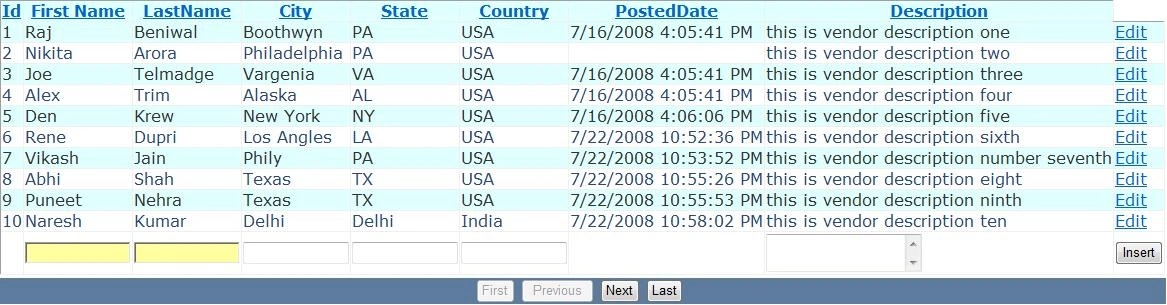
Figure1.
2. Data Paging
If you want to add Paging you have to use the new DataPager control. This control is a free standing control and what's nice about it is that you can put it anywhere on the page - it doesn't have to be directly visually associated with the control it's actually doing the paging.
<tr runat="server">
<td runat="server" style="text-align: center; background-color: #5D7B9D; font-family: Verdana, Arial, Helvetica, sans-serif;
color: #FFFFFF">
<asp:DataPager ID="DataPager1" runat="server">
<Fields>
<asp:NextPreviousPagerField ButtonType="Button" ShowFirstPageButton="True" ShowLastPageButton="True" />
</Fields>
</asp:DataPager>
</td>
</tr>

Figure2.
3. Add, Edit and Delete:
The ListView also supports editing and adding of data via the EditItemTemplate and InsertItemTemplate. This functionality works very similar to the way it works in a GridView for editing, but it's all done with custom templates:
This is .aspx code.
SQLDataSource :
<asp:SqlDataSource ID="SqlDataSource1" runat="server" ConnectionString="<%$ ConnectionStrings:VendorConnectionString %>"
SelectCommand="SELECT [VendorId], [VendorFName], [VendorLName], [VendorCity], [VendorState], [VendorCountry], [PostedDate], [VendorDescription] FROM [Vendor]">
</asp:SqlDataSource>
ListView :
<asp:ListView ID="VendorListView" runat="server" DataKeyNames="VendorId"
DataSourceID="SqlDataSource1" onitemcommand="VendorListView_ItemCommand"
onsorting="VendorListView_Sorting" InsertItemPosition="LastItem">
<InsertItemTemplate>
<tr style="">
<td></td>
<td><asp:TextBox ID="TextBoxFName" Width="100" runat="server" Text='<%# Bind("VendorFName") %>' /></td>
<td><asp:TextBox ID="TextBoxLName" Width="100" runat="server" Text='<%# Bind("VendorLName") %>' /></td>
<td><asp:TextBox ID="TextBoxCity" Width="100" runat="server" Text='<%# Bind("VendorCity") %>' /></td>
<td><asp:TextBox ID="TextBoxState" Width="100" runat="server" Text='<%# Bind("VendorState") %>' /></td>
<td><asp:TextBox ID="TextBoxCountry" Width="100" runat="server" Text='<%# Bind("VendorCountry") %>' /></td>
<td></td>
<td><asp:TextBox ID="TextBoxDescription" Width="150" TextMode="MultiLine" runat="server" Text='<%# Bind("VendorDescription") %>' /></td>
<td><asp:Button ID="ButtonInsert" runat="server" CommandName="Insert" Text="Insert" /></td>
</tr>
</InsertItemTemplate>
<EditItemTemplate>
<tr style="background-color: #999999;">
<td><asp:TextBox ID="TextBoxVendorId" Width="100" runat="server" Text='<%# Bind("VendorId") %>' /></td>
<td><asp:TextBox ID="TextBoxFName" Width="100" runat="server" Text='<%# Bind("VendorFName") %>' /></td>
<td><asp:TextBox ID="TextBoxLName" Width="100" runat="server" Text='<%# Bind("VendorLName") %>' /></td>
<td><asp:TextBox ID="TextBoxCity" Width="100" runat="server" Text='<%# Bind("VendorCity") %>' /></td>
<td><asp:TextBox ID="TextBoxState" Width="100" runat="server" Text='<%# Bind("VendorState") %>' /></td>
<td><asp:TextBox ID="TextBoxCountry" Width="100" runat="server" Text='<%# Bind("VendorCountry") %>' /></td>
<td><asp:TextBox ID="TextBoxPostedDate" Width="100" runat="server" Text='<%# Bind("PostedDate") %>' /></td>
<td><asp:TextBox ID="TextBoxDescription" TextMode="MultiLine" Width="150" runat="server" Text='<%# Bind("VendorDescription") %>' /></td>
<td>
<asp:LinkButton ID="LinkButtonUpdate" runat="server" CommandName="Update">Update</asp:LinkButton>
<asp:LinkButton ID="LinkButtonDelete" runat="server" CommandName="Delete">Delete</asp:LinkButton>
<asp:LinkButton ID="LinkButtonCancel" runat="server" CommandName="Cancel">Cancel</asp:LinkButton>
</td>
</tr>
</EditItemTemplate>
</asp:ListView>
.CS Code:
protected void VendorListView_ItemCommand(object sender, ListViewCommandEventArgs e)
{
if (e.CommandName == "Insert")
{
TextBox TextBoxFName = (TextBox)e.Item.FindControl("TextBoxFName");
TextBox TextBoxLName = (TextBox)e.Item.FindControl("TextBoxLName");
TextBox TextBoxCity = (TextBox)e.Item.FindControl("TextBoxCity");
TextBox TextBoxState = (TextBox)e.Item.FindControl("TextBoxState");
TextBox TextBoxCountry = (TextBox)e.Item.FindControl("TextBoxCountry");
TextBox TextBoxDescription = (TextBox)e.Item.FindControl("TextBoxDescription");
string insertCommand = "INSERT INTO Vendor ([VendorFName],[VendorLName],[VendorCity],[VendorState],[VendorCountry], [VendorDescription]) VALUES('" + TextBoxFName.Text + "', '" + TextBoxLName.Text + "', '" + TextBoxCity.Text + "', '" + TextBoxState.Text + "', '" + TextBoxCountry.Text + "', '" + TextBoxDescription.Text + "');";
SqlDataSource1.InsertCommand = insertCommand;
}
else if (e.CommandName == "Update")
{
TextBox TextBoxVendorId = (TextBox)e.Item.FindControl("TextBoxVendorId");
TextBox TextBoxFName = (TextBox)e.Item.FindControl("TextBoxFName");
TextBox TextBoxLName = (TextBox)e.Item.FindControl("TextBoxLName");
TextBox TextBoxCity = (TextBox)e.Item.FindControl("TextBoxCity");
TextBox TextBoxState = (TextBox)e.Item.FindControl("TextBoxState");
TextBox TextBoxCountry = (TextBox)e.Item.FindControl("TextBoxCountry");
TextBox TextBoxPostedDate = (TextBox)e.Item.FindControl("TextBoxPostedDate");
TextBox TextBoxDescription = (TextBox)e.Item.FindControl("TextBoxDescription");
string updateCommand = "UPDATE [Vendor] set [VendorFName]='" + TextBoxFName.Text + "', [VendorLName]='" + TextBoxLName.Text + "', [VendorCity]='" + TextBoxCity.Text + "', [VendorState]='" + TextBoxState.Text + "', [VendorCountry]='" + TextBoxCountry.Text + "', [PostedDate] = '" + TextBoxPostedDate.Text + "', [VendorDescription] = '" + TextBoxDescription.Text + "' WHERE VendorId=" + Convert.ToInt32(TextBoxVendorId.Text) + ";";
SqlDataSource1.UpdateCommand = updateCommand;
}
else if (e.CommandName == "Delete")
{
TextBox TextBoxVendorId = (TextBox)e.Item.FindControl("TextBoxVendorId");
string deleteCommand = "DELETE FROM [Vendor] WHERE VendorId=" + Convert.ToInt32(TextBoxVendorId.Text);
SqlDataSource1.DeleteCommand = deleteCommand;
}
}
Edit record.

- Add record.


I hope it will be useful. If yes drop me a comment in c-sharpcorner comment section.
kalu singh raoPosted Jul 8, 2016, 7:25 AM
Nice...
Ronak PatilPosted Apr 2, 2014, 4:23 AM
Thanks Sir...it is really helpfull!
Santosh YadavPosted Jul 1, 2013, 1:48 PM
Greate example ... Thankyou very much sir...
Mustafa IqbalPosted Oct 31, 2012, 5:10 AM
Thanks Mr. Raj Kumar, your article is helpful for me, but one more thing confusing me, that how can I set image in listview from SQL datasource (Image is in binary format)?
Amit RaiPosted Feb 3, 2011, 1:14 AM
I want to apply autocomplete in gridview (in asp.net3.5 with C#) using jquery and this gridview is within the ajax update panel<asp:UpdatePanel ID="UpdatePanel1" runat="server"> <ContentTemplate>. For this i am using method within the <ItemTemplate> $(document).ready(function(){ $('[id$=txtItemCode]').autocomplete("SearchItem.aspx").result(function (event, data, formatted) { if (data) { alert('Value: '+ data[1]); } else { $('[id$=txtItemID]').val('-1'); } }); }); since in gridview the textbox id is <asp:TextBox id="txtItemCode" /> but on browser such as <input type="textbox" id="ctl00_otherName_101txtItemCode" /> and then for the next row same textbox id is now <input type="textbox" id="ctl00_otherName_102txtItemCode" /> i tried 1. put this code within the <ItemTemplate> 2. <%= txtItemCode.ClientID %> 3. $("*[@id$=theGridId] input[@id$=txtItemCode]") 4. jQuery.expr[':'].asp = function(elem, i, match) { return (elem.id && elem.id.match(match[3] + "$")); }; and $(":asp(txtItemCode)").autocomplete... 5.$('.txtItemCode').autocomplete("LookupCodes.aspx?type=IC", { mustMatch: true }) but autocomplete does not work in all the cases plz help me.
Amit RaiPosted Feb 3, 2011, 12:55 AM
I want to apply autocomplete in gridview (in asp.net3.5 with C#) using jquery and this gridview is within the ajax update panel<asp:UpdatePanel ID="UpdatePanel1" runat="server"> <ContentTemplate>. For this i am using method within the <ItemTemplate> $(document).ready(function(){ $('[id$=txtItemCode]').autocomplete("SearchItem.aspx").result(function (event, data, formatted) { if (data) { alert('Value: '+ data[1]); } else { $('[id$=txtItemID]').val('-1'); } }); }); since in gridview the textbox id is <asp:TextBox id="txtItemCode" /> but on browser such as <input type="textbox" id="ctl00_otherName_101txtItemCode" /> and then for the next row same textbox id is now <input type="textbox" id="ctl00_otherName_102txtItemCode" /> i tried 1. put this code within the <ItemTemplate> 2. <%= txtItemCode.ClientID %> 3. $("*[@id$=theGridId] input[@id$=txtItemCode]") 4. jQuery.expr[':'].asp = function(elem, i, match) { return (elem.id && elem.id.match(match[3] + "$")); }; and $(":asp(txtItemCode)").autocomplete... 5.$('.txtItemCode').autocomplete("LookupCodes.aspx?type=IC", { mustMatch: true }) but autocomplete does not work in all the cases plz help me.
B M SuchitraPosted Dec 15, 2010, 9:08 PM
Its reallly very good article... Can u plzz tell me how to save the listview data back in a new table.. SQL table.... Thanks
Satyapriya NayakPosted Mar 26, 2010, 11:02 PM
Very good sir ,but how to do it without using SqlDataSource.