

We need to load local HTML file sometimes in our apps. We can easily load HTML fils in Windows 10 app. Here I will explain how to load local html files in Windows 10 app using WebView control in different ways.
Let’s see the steps.
Create new Windows 10 app and go to your design page “MainPage.XAML”and add the webview control to load the HTML file.
- <WebView Name="mywebview"HorizontalAlignment="Left" Height="232" Margin="10,10,0,0"VerticalAlignment="Top" Width="340"/>
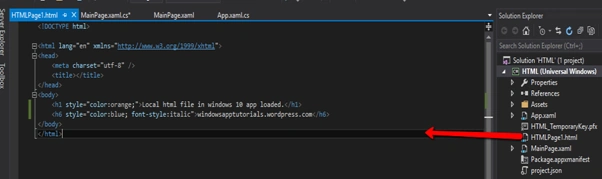
Then go to your code behind page and write the following code.
- public MainPage()
- {
- this.InitializeComponent();
- mywebview.Source = newUri("ms-appx-web:///HTMLPage1.html");
- }
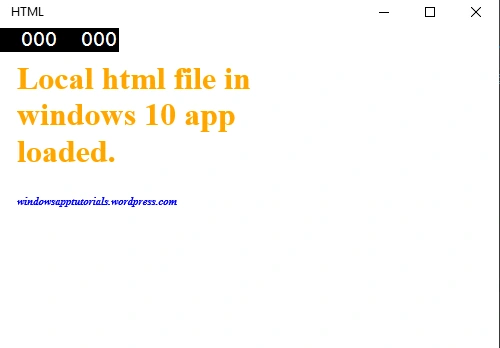
Load the html content using source properties.
- mywebview.Source=newUri("ms-appx-web:///HTMLPage1.html");
- mywebview.Navigate(newUri("ms-appx-web:///HTMLPage1.html"));
- mywebview.NavigateToString("<Html><Body><h1>Load html string.<h1><Body></Html>");
For more information on Windows 10 UWP, referto my e-book:
Read more articles on Universal Windows Platform:
deepak mandalPosted May 16, 2017, 3:38 AM
Thanks bro...but i also want to retrieve the specific data from Local HTML file (for example i take firstname textbox and write something inside box,also try to retrieve data which is written in box) using c# code. how to do this ..Any suggestion.. thanks in advance
Liêm NguyễnPosted May 28, 2016, 11:15 PM
Thank you man!
Rahul Kumar SaxenaPosted Apr 10, 2016, 11:05 AM
Good Show
Vignesh ManiPosted Apr 10, 2016, 8:23 AM
Good one
Gowtham RajamanickamPosted Apr 10, 2016, 8:03 AM
keep writ
Gowtham RajamanickamPosted Apr 10, 2016, 8:03 AM
good article