

In today’s article, I will guide you through your Azure DevOps setup to perform automated load tests using k6. Before we begin, I want to take a minute to explain what load tests are and why they are essential.
What is a load test?
There are many different types of testing in software development. For example, some tests check that different model of an application work together as expected (integration testing), some focus on the business requirements of an application by verifying the output of action without considering the intermediate state (functional testing), and others perform different types of testing. Load testing is a type of performance testing as well as a type of stress test and capacity test. It focuses on verifying the application’s stability and reliability under both normal and peak load conditions.
Important
While load testing tests your application under realistic average or peak loads, stress testing tests it under conditions that far exceed realistic estimates.
How does load testing work?
During load testing, the testing tool simulates the concurrent requests to your application through multiple virtual users (VUs) and measures insights like response times, throughput rates, resource utilization levels, and more.
Why is load testing important?
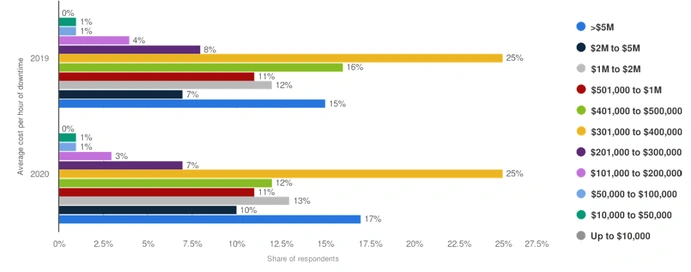
In today’s world, both enterprises and consumers rely on digital applications for crucial functions. For this reason, even a small failure can be costly both in terms of reputation and money. For example, imagine if Amazon did not know the amount of traffic that its servers could sustain; it would fail to supply requests from its customer during peak seasons like Black Friday. You might think that this event is unlikely. However, according to a survey taken by the global research and advisory firm Gartner, in 2020, 25% of respondents reported the average hourly downtime cost of their application was between $301,000 and $400,000. Furthermore, 17% said it cost them $5M per hour.
What is k6?
k6 is an open-source load testing tool written in Go that embeds a JavaScript runtime to allow developers to write performance tests in JavaScript. Each script must have at least one default function. This function represents the entry point of the virtual user. The structure of each script has two main areas,
Init Code
Code outside the default function that is run only once per VU
VU Code
Code inside the default function that runs continuously as long as the test is running
// init code
export default function() {
  // vu code
}
If you want to define characteristics like duration or DNS, or if you want to increase or decrease the number of VU during the test, you can use the options objects as follows,
export let options = {
   test_1: {
      executor: 'constant-arrival-rate',
      rate: 90,
      timeUnit: '1m',
      duration: '5m',
      preAllocatedVUs: 10,
      tags: { test_type: 'api' },
      env: { API_PROTOCOL: 'http' },
      exec: 'api',
    },
    test_2: {
      executor: 'ramping-arrival-rate',
      stages: [
        { duration: '30s', target: 600 },
        { duration: '6m30s', target: 200 },
        { duration: '90s', target: 15 },
      ],
      startTime: '90s',
      startRate: 15,
      timeUnit: '10s',
      preAllocatedVUs: 50,
      maxVUs: 1000,
      tags: { test_type: 'api' },
      env: { API_PROTOCOL: 'https' },
      exec: 'api',
    },
};
Azure DevOps and k6
Processes like continuous integration promote shift-left testing, giving you the advantage of discovering and addressing issues in the early stages of application development. However, you should run load tests designed to determine if your application can handle requests in an environment as close as possible to production. While the cost of maintaining an environment identical to that of production may be prohibitive, you should make it as similar as possible. If you have the resources, a solution might be to create a staging environment that is a copy of our production environment. Otherwise, you can consider carefully running tests on your production environment. In this demo, I will show you how to set up your DevOps to perform load testing of a .NET 5 API written in C# using k6. Now that you have a general understanding of this article’s leading players, let us dig into the demonstration.
Create the API
First, you need to create a new ASP.NET 5 API. You can do this easily by using the following code,
dotnet new sln
dotnet new webapi -o Training -f net5.0 --no-https
dotnet sln add Training/Training.csproj
To make this API more realistic, add the Entity Framework Core in-memory database provider and create a DbContext instance that represents a session with the database you will use to query and save instances of your entities.
public class ApplicationDbContext: DbContext {
    public ApplicationDbContext(DbContextOptions < ApplicationDbContext > options): base(options) {}
    public DbSet < Product > Products {
        get;
        set;
    }
}
Then, register the context as a service in the IService Collection by copying and pasting the following instruction in your Startup.cs file,
services.AddDbContext<ApplicationDbContext>(opt => opt.UseInMemoryDatabase("ApplicationDbContext"));
Create the Product class with its attributes and methods,
public class Product {
    public int Id {
        get;
        set;
    }
    public string Name {
        get;
        set;
    }
    public decimal Price {
        get;
        set;
    }
    public static void AddProduct(ApplicationDbContext context, Product product) {
        context.Products.Add(product);
        context.SaveChanges();
    }
    public static Product GetProductById(ApplicationDbContext context, int id) {
        return context.Products.FirstOrDefault((p) => p.Id == id);
    }
    public static List < Product > GetAllProduct(ApplicationDbContext context) {
        return context.Products.ToList();
    }
    public static void RemoveProductById(ApplicationDbContext context, int id) {
        var productToRemove = context.Products.FirstOrDefault((p) => p.Id == id);
        context.Products.Remove(productToRemove);
        context.SaveChanges();
    }
}
To complete your API, create a controller to define the methods of your API,
[ApiController]
[Route("[controller]")]
public class ProductController : ControllerBase
{
    private readonly ApplicationDbContext _context;
    public ProductController(ApplicationDbContext context)
    {
        _context = context;
    }
    [HttpPost]
    [Route("AddProduct")]
    public void AddProduct(Product product)
    {
        Product.AddProduct(_context, product);
    }
    [HttpPost]
    [Route("RemoveProduct")]
    public void RemoveProduct(int id)
    {
        Product.RemoveProductById(_context, id);
    }
    [HttpGet]
    [Route("GetAllProducts")]
    public IEnumerable<Product> GetAllProducts()
    {
        return Product.GetAllProduct(_context);
    }
    [HttpGet]
    [Route("GetProduct")]
    public Product GetProduct(int id)
    {
        return Product.GetProductById(_context, id);
    }
}
Create the load test
Now that your API is ready, you can move forward with the load tests. To do so, create a new folder and copy the following code into it in a script.js file,
import http from 'k6/http';
import { check } from 'k6';
import { jUnit, textSummary } from 'https://jslib.k6.io/k6-summary/0.0.1/index.js';
export const options = {
  stages: [
    { duration: '10s', target: 10 },
    { duration: '20s' },
    { duration: '10s', target: 5},
  ],
  thresholds: {
    http_req_duration: ['p(95)<250'],
  },
};
export default function () {
  let res = http.get(`${__ENV.API_PROTOCOL}://${__ENV.API_BASEURL}/Product/GetAllProducts`);
  check(res, {
    'is status 200': (r) => r.status === 200,
  });
}
export function handleSummary(data) {
  let filepath = `./${__ENV.TESTRESULT_FILENAME}-result.xml`;
    return {
        'stdout': textSummary(data, { indent: ' ', enableColors: true}),
        './loadtest-results.xml': jUnit(data),
    }
}
Let us take a moment to explain what this code does. First, it configures the test to ramp up the number of virtual users from 1 to 10 in 10 seconds in the options object. Then, this number will stay constant to 10 VU for 20 seconds. Finally, it will ramp down to 5 VU in the final 10 seconds of your test. The thresholds object defines that, to succeed, at least 95% of requests of this test should be below 250ms. Now, let us talk about functions. In this script, we have two functions. As I mentioned earlier in this article, the default function is the entry point of each virtual user (VUs). I used the k6/http module to perform an HTTP to the GetAllProducts method of my API. I also added two environment variables to change the protocol and base URL dynamically. The second function is the handle summary(). This function is invoked at the end of the test; it contains the results in their parameter. Then, I use a JS helper function to generate JUnit files from the summary data using the results.
Install the k6 extension
To use the k6 functionalities, you can either manually run the script to install the tool on the virtual machine where the agent is running or install the k6 extension in your organization. To install the extension, follow these steps:
- Sign in to your Azure DevOps organization.
- Go to Organization Settings.
- Select Extensions.
- Click on Browse Marketplace at the top right.
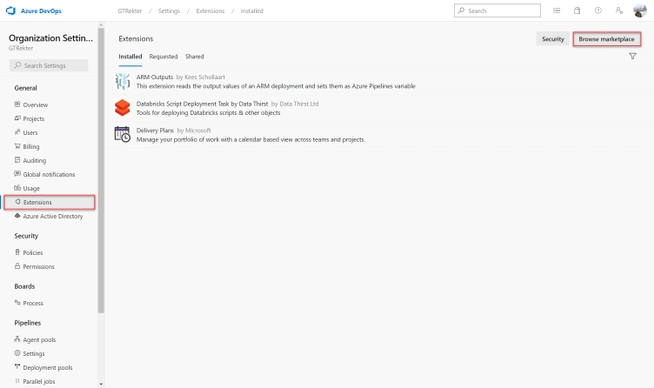
- As the Marketplace opens, search for k6. Click on the correct k6 result as shown below,
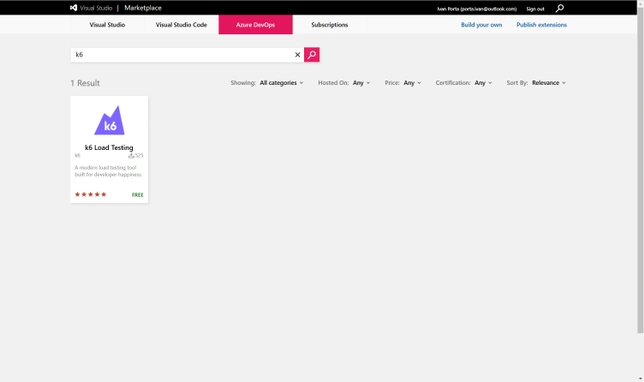
- Click on the Get it Free button.
- Select your target organization from the dropdown, then click Install to complete the procedure.
Where to execute the load test in the pipelines?
In Azure DevOps, you can develop both build and release pipelines. You might be tempted to perform your load test in your build pipeline to spot any degradation. However, this exempts it from the build pipeline duties. Also, to be reliable, load testing should be performed in an environment that better represents the production. From an economic perspective, the development environment typically uses far fewer resources than production for computing, storage, and networking. Therefore, I recommend executing the load test in the release pipeline.
Since the focus of this demo is load testing, I avoid explaining the steps necessary to create a service connection to your cloud provider and your build pipeline and I'm moving directly to the release pipeline.
- From the dashboard, select Pipelines and then Releases.
- Click the New Pipeline button.
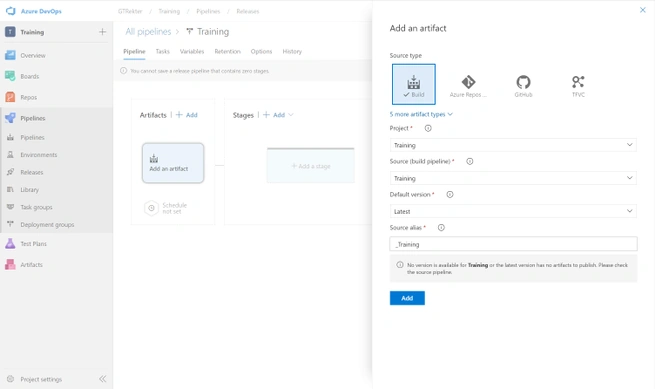
- Select Add an Artifact.
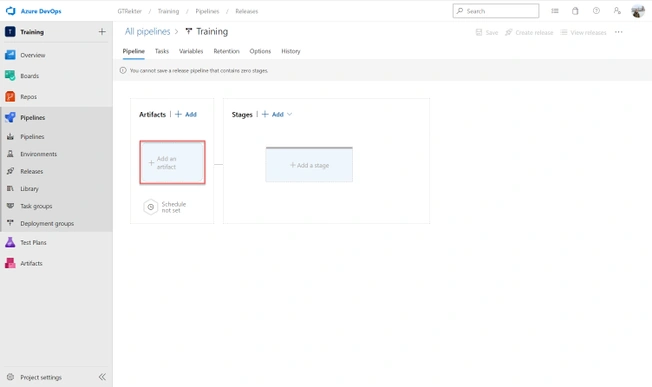
- Select Build as the source type, then select the building pipeline from within the Source (Build Pipeline) dropdown.
- Click on Add a Stage.
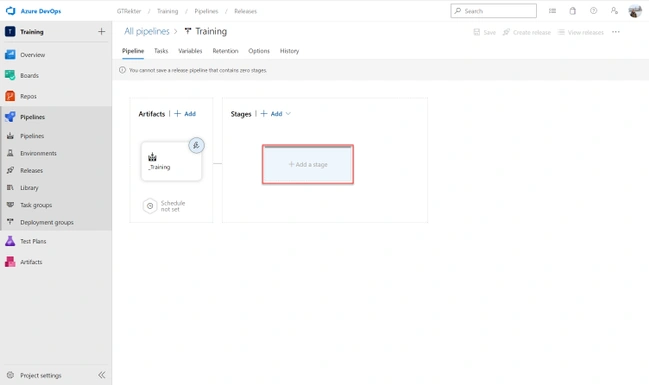
- Select Empty Job.
- Click the + icon then select the Azure App Service Deploy tasks.
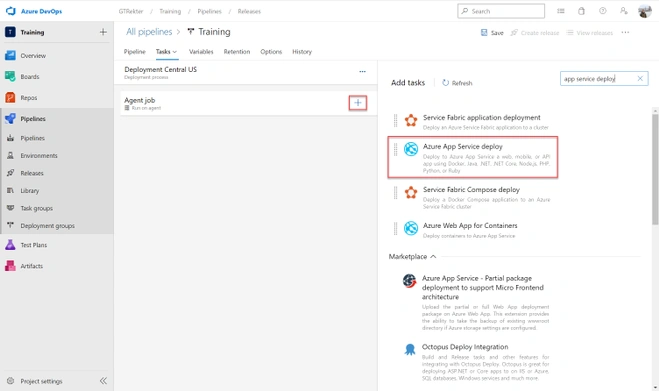
- Select the service connection to the Azure Resource Manager that you have previously created.
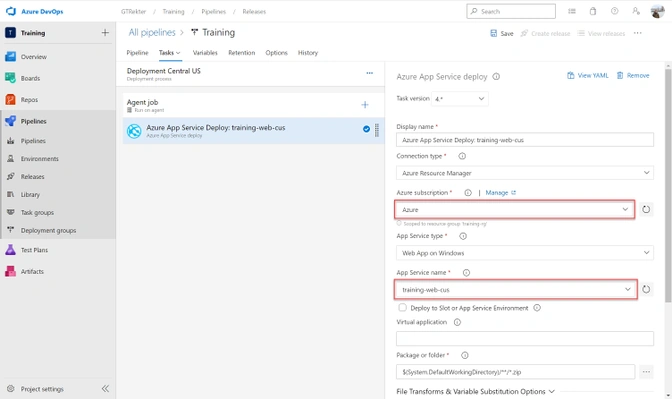
- Go back to the Pipeline tab.
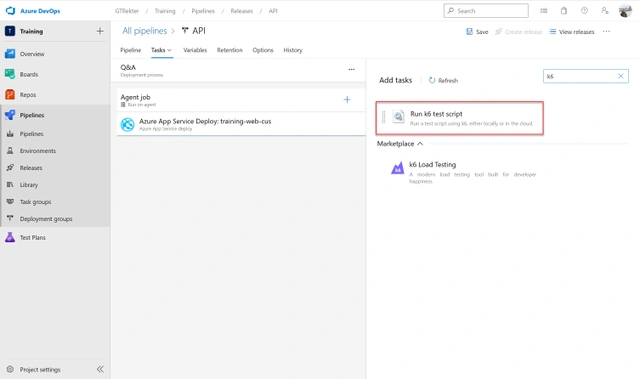
- Click the + icon again then select the k6 task.
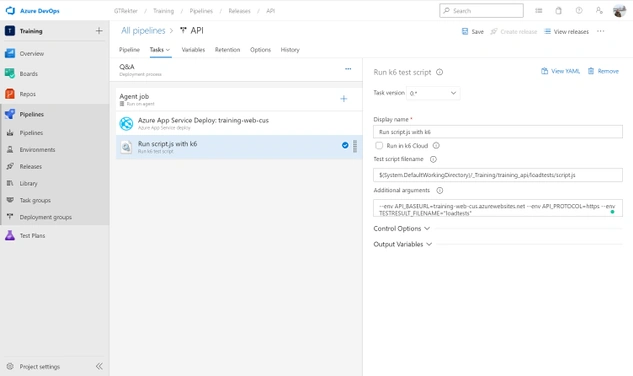
- Then, specify both the location of your load test and the values of your environment variables previously defined in your script.
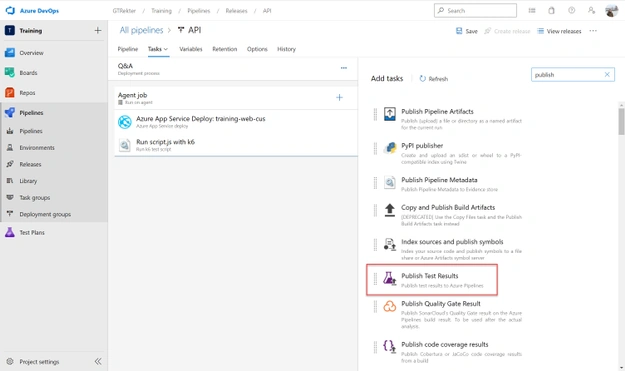
- To conclude your pipeline, click the + icon, and select the Publish Test Results task.
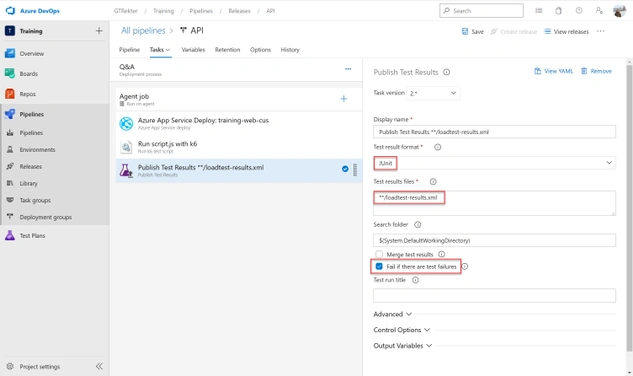
- Select the JUnit format, specify the path where your report is located, and enable the option to make the pipeline file if there are test failures.
Run the test
To run your pipeline, click on the Create New Release button on the top right side of the screen. If you enable the Continuous Deployment trigger, just perform a commit to your repository.
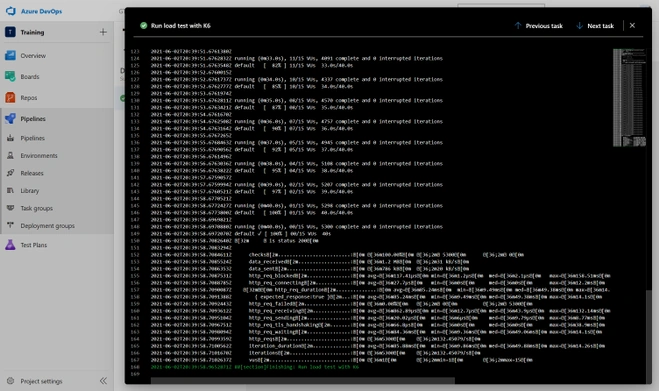
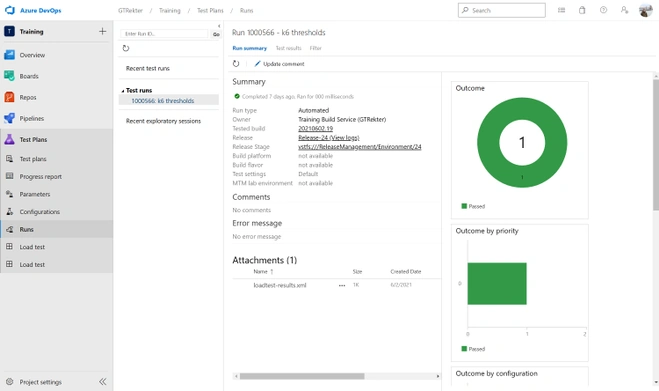
As you can see, we will be able to see the load test’s result in both the console and in Azure Test Plan. In this case, the test was successful and the release pipeline continued. If the application did not reach the criteria configured in the options file of the load test, the entire pipeline would have failed. From this failure, you would know that there was something wrong with it before it reached the production environment.
References
Shubham SawantPosted Jul 20, 2022, 9:07 AM
Hi @Ivan Porta can you please give information on how we can do load testing using k6 with the asp.net MVC web application