

One of the most convenient features of Microsoft Fabric Lakehouse is the ability to load data into an existing Delta table directly through the graphical user interface (GUI). This enhancement allows users to append or overwrite data without writing a single line of code, making data ingestion more accessible to both technical and non-technical users.
Whether you're a data engineer, data analyst, or business user, this feature simplifies the process of loading new datasets into your Lakehouse while maintaining the power and reliability of Delta tables.
Why This Feature Matters
In many organizations, new data arrives regularly in the form of CSV, Excel, Parquet, or other supported file formats. Traditionally, loading this data into an existing table often required:
Fabric Notebooks
Data Pipelines
Spark code
SQL commands
While these approaches remain valuable for automated ETL processes, they can be excessive for simple data loading tasks.
With the Fabric GUI, you can now perform these operations in just a few clicks.
Common Business Scenarios
This capability is particularly useful for scenarios such as:
Monthly sales files arriving from regional offices
Daily inventory updates
Customer records received from external partners
Finance reports exported from ERP systems
Historical data backfills
Manual data corrections
Instead of recreating the table each time, you simply load the new file into the existing Lakehouse table.
Supported File Formats
Fabric Lakehouse supports loading data from various file formats, including:
CSV
Excel
Parquet
JSON
Delta
Text files
This flexibility enables organizations to ingest data from multiple source systems with minimal effort.
Loading Data into an Existing Table
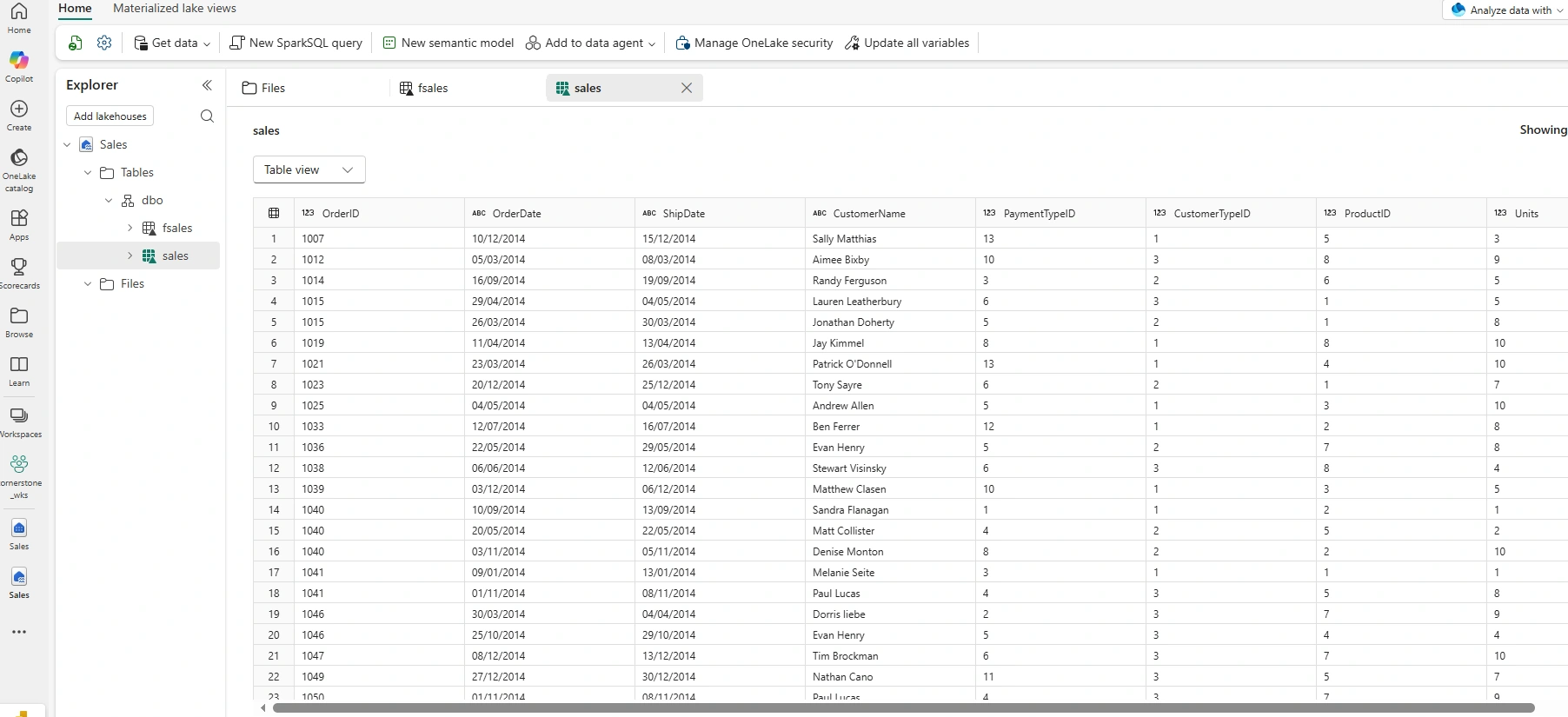
The process is straightforward. Based on the screenshot below, I already loaded sales for year 2014 from the Lakehouse Filestore to the Table using the GUI
Next, in the file store as seen below, I have sales_2015.csv containing similar columns with the sales_2014. The goal is to load the sales_2015 to the existing Sales table by append operation or overwrite as business requirement may be.
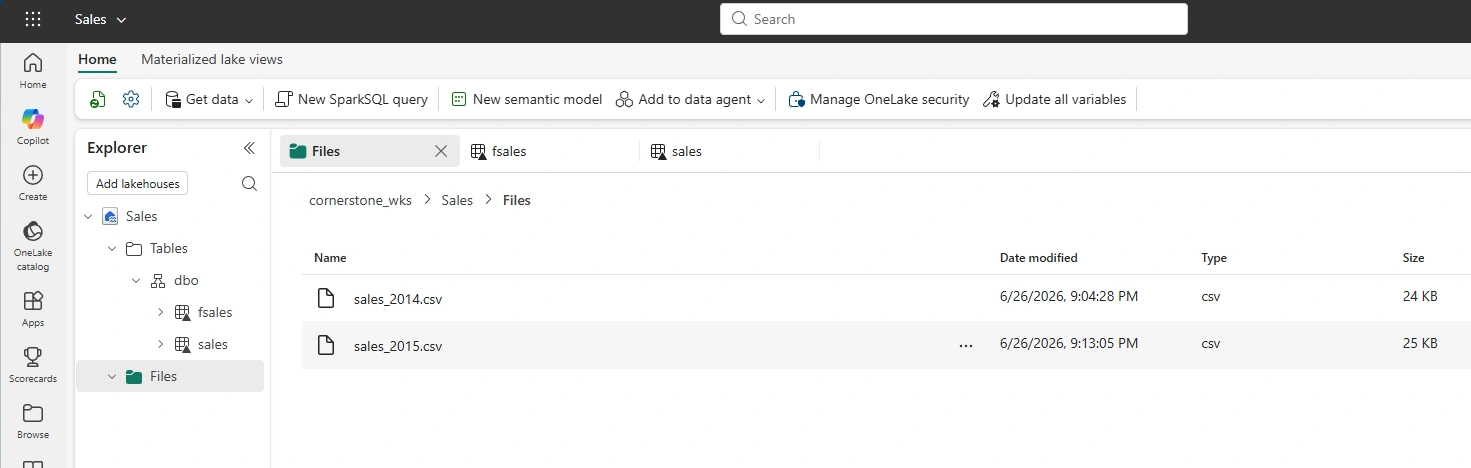
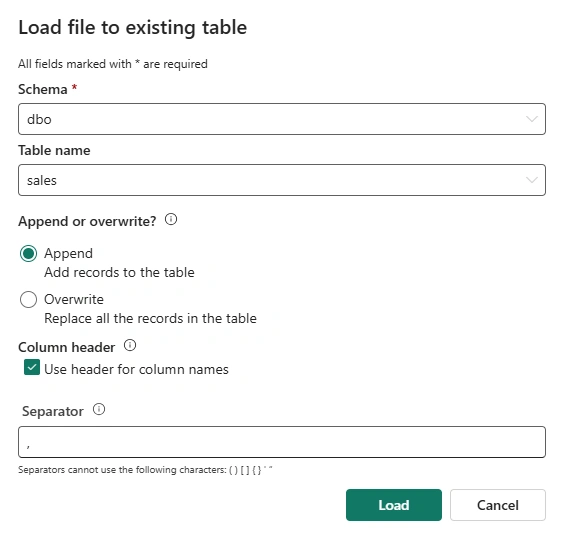
To load, right-click on the sales_2015.csv and select Load to Tables --> Existing table

In the Load file to existing table dialogue box, select the dbo schema and sales table name. Then, select append or overwrite behaviour. Click Load
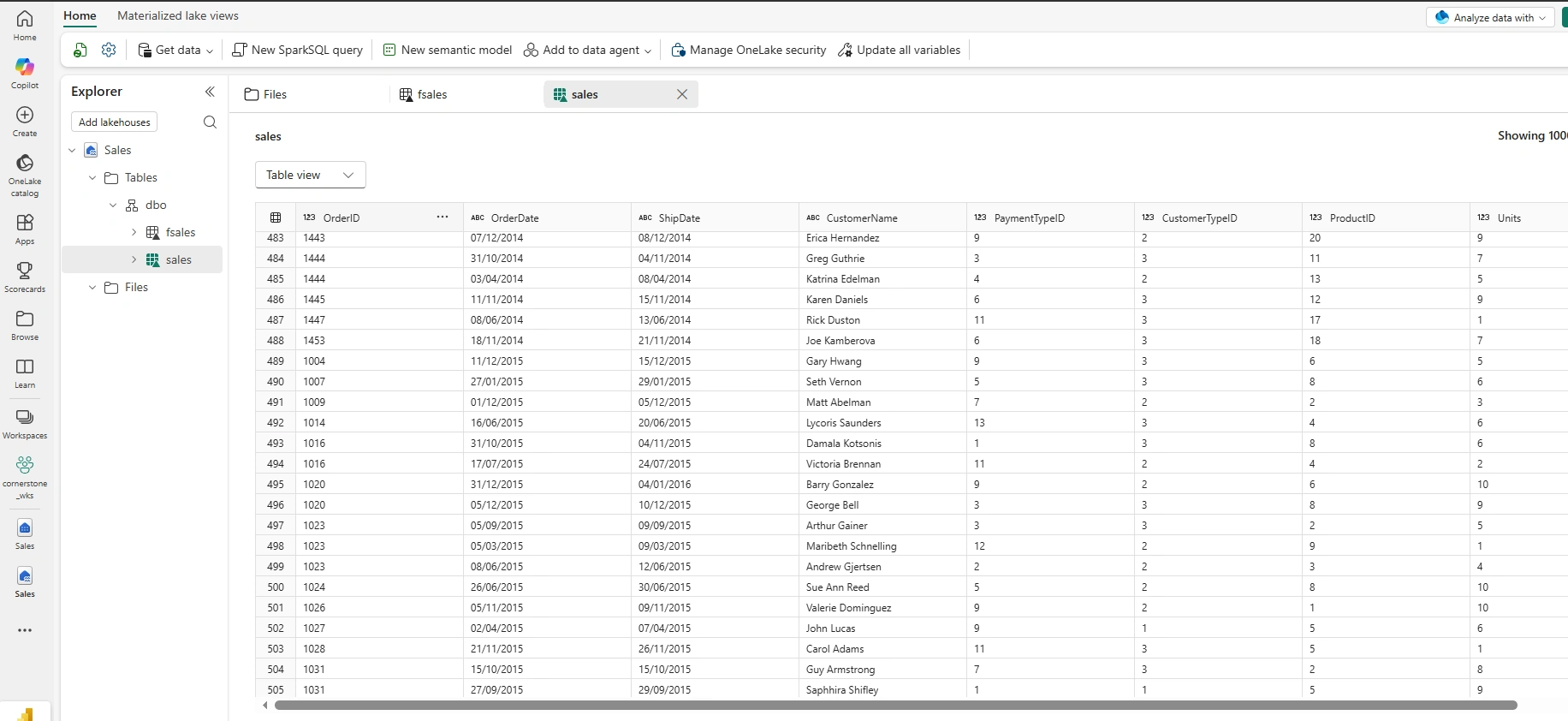
Depending on the number of rows in the file to append, the operation might take some time. After successful append, as seen in the screenshot below, we have sales record for 2015 in the sales delta table
Benefits of Using the GUI
Using the graphical interface offers several advantages:
No Coding Required
Business users and citizen developers can load data without needing SQL, Python, or Spark knowledge.
Faster Data Ingestion
Simple file uploads can be completed in minutes, reducing the time required to make new data available for analysis.
Reduced Development Overhead
For one-time imports or occasional updates, there is no need to create notebooks or pipelines.
Delta Lake Reliability
Even though the process is code-free, the data is still stored as a Delta table, providing benefits such as:
ACID transactions
Improved reliability
Better query performance
Schema enforcement
Support for scalable analytics
Best Practices
To ensure successful data loading, consider the following recommendations:
Keep the incoming file schema consistent with the destination table.
Validate data types before importing.
Remove unnecessary blank rows or columns from source files.
Use append mode for incremental datasets.
Use overwrite mode only when replacing the entire dataset.
Verify row counts after the import completes.
When Should You Use the GUI?
The graphical interface is ideal for:
Manual uploads
Small to medium-sized datasets
Data validation exercises
Proof of concepts
Demonstrations and training
Occasional business data imports
For large-scale, recurring, or enterprise-grade ingestion processes, automated solutions such as Fabric Data Pipelines, Dataflows Gen2, or Fabric Notebooks remain the recommended approach.
Final Thoughts
The ability to load files directly into an existing Lakehouse table using the Microsoft Fabric GUI is another example of how Fabric continues to simplify modern data engineering.
By removing the need for code in many common data ingestion scenarios, Microsoft Fabric enables organizations to onboard data more quickly while still leveraging the scalability, reliability, and performance of Delta Lake.
Whether you're performing a one-time data import or updating an existing dataset, this feature provides a fast, intuitive, and efficient way to keep your Lakehouse current. It's a welcome enhancement that empowers users of all skill levels to work with data more effectively.
Join the conversation! Your thoughts help the community grow.