

Introduction
Here's the step by step implementation.
Create New UWP project.
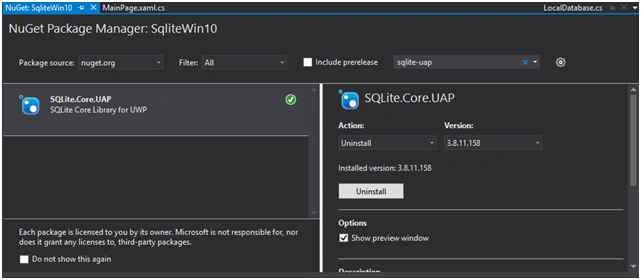
Install SQLite-UAP extensions form NuGet Package Manager as in the following screen.
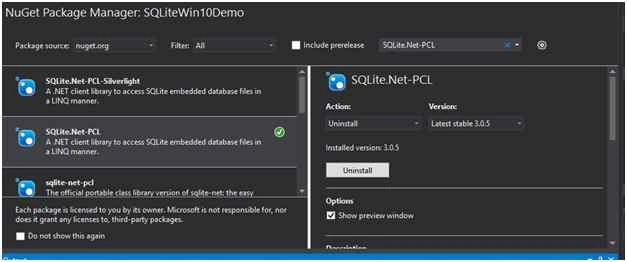
 Next Install SQLite.Net-PCL extension from NuGet Package
 Now, we are going to the following areas:
Setup SQLite environment.
- How to perform SQLite CRUD operations.
- How to bind SQLite data to a ListBox.
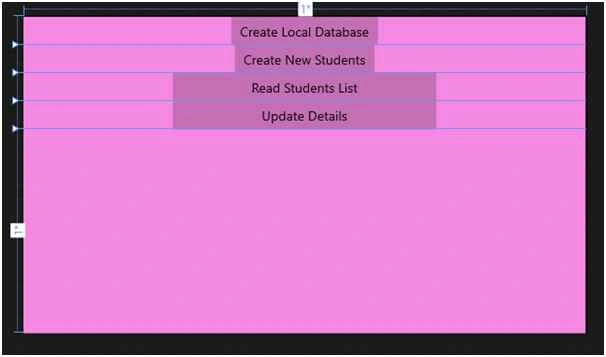
Design the UI as in the following screenshot:
 XAML Code
- <Grid Background="#FFF589E2">
- <Grid.ColumnDefinitions>
- <ColumnDefinition></ColumnDefinition>
- </Grid.ColumnDefinitions>
- <Grid.RowDefinitions>
- <RowDefinition Height="Auto"></RowDefinition>
- <RowDefinition Height="Auto"></RowDefinition>
- <RowDefinition Height="Auto"></RowDefinition>
- <RowDefinition Height="Auto"></RowDefinition>
- <RowDefinition Height="*"></RowDefinition>
- </Grid.RowDefinitions>
- <Button x:Name="CreateDBbutton" Grid.Row="0" Content="Create Local Database" HorizontalAlignment="Center" VerticalAlignment="Top" Click="button_Click" />
- <Button x:Name="create" Grid.Row="1" Content="Create New Students" HorizontalAlignment="Center" Click="create_Click"></Button>
- <Button x:Name="read" Grid.Row="2" Content="Read Students List" Width="300" Click="read_Click" HorizontalAlignment="Center"></Button>
- <Button x:Name="update" Grid.Row="3" Content="Update Details" Width="300" Click="update_Click" HorizontalAlignment="Stretch"></Button>
- <ListView x:Name="allstudents" HorizontalAlignment="Stretch" Grid.Row="4">
- <ListView.ItemTemplate>
- <DataTemplate>
- <TextBlock x:Name="ee" Text="{Binding Name}" FontSize="14"></TextBlock>
- </DataTemplate>
- </ListView.ItemTemplate>
- </ListView>
- </Grid>
Now write the following code in the corresponding button click events.
I am going to create one Student DB with Students Table with id, Name, Address, and Mobile. First design the table like the following:
- public class Students
- {
- [SQLite.Net.Attributes.PrimaryKey, SQLite.Net.Attributes.AutoIncrement]
- public int Id
- {
- get;
- set;
- }
- public string Name
- {
- get;
- set;
- }
- public string Address
- {
- get;
- set;
- }
- public string Mobile
- {
- get;
- set;
- }
- public Students()
- {}
- public Students(string name, string address, string mobile)
- {
- Name = name;
- Address = address;
- Mobile = mobile;
- }
- }
- public static void CreateDatabase()
- {
- var sqlpath = System.IO.Path.Combine(Windows.Storage.ApplicationData.Current.LocalFolder.Path, "Studentdb.sqlite");
- using(SQLite.Net.SQLiteConnection conn = new SQLite.Net.SQLiteConnection(new SQLite.Net.Platform.WinRT.SQLitePlatformWinRT(), sqlpath))
- {
- conn.CreateTable < Students > ();
- }
- }
Insert New Student details
- public void Insert(Students objContact)
- {
- var sqlpath = System.IO.Path.Combine(Windows.Storage.ApplicationData.Current.LocalFolder.Path, "Studentdb.sqlite");
- using(SQLite.Net.SQLiteConnection conn = new SQLite.Net.SQLiteConnection(new SQLite.Net.Platform.WinRT.SQLitePlatformWinRT(), sqlpath))
- {
- conn.RunInTransaction(() =>
- {
- conn.Insert(objContact);
- });
- }
- }
Retrieve the specific contact from the database
- // Retrieve the specific contact from the database.
- public Students ReadContact(int contactid)
- {
- var sqlpath = System.IO.Path.Combine(Windows.Storage.ApplicationData.Current.LocalFolder.Path, "Studentdb.sqlite");
- using(SQLite.Net.SQLiteConnection conn = new SQLite.Net.SQLiteConnection(new SQLite.Net.Platform.WinRT.SQLitePlatformWinRT(), sqlpath))
- {
- var existingconact = conn.Query < Students > ("select * from Students where Id =" + contactid).FirstOrDefault();
- return existingconact;
- }
- }
Read All Student details
- //Read All Student details
- public ObservableCollection < Students > ReadAllStudents()
- {
- var sqlpath = System.IO.Path.Combine(Windows.Storage.ApplicationData.Current.LocalFolder.Path, "Studentdb.sqlite");
- using(SQLite.Net.SQLiteConnection conn = new SQLite.Net.SQLiteConnection(new SQLite.Net.Platform.WinRT.SQLitePlatformWinRT(), sqlpath))
- {
- List < Students > myCollection = conn.Table < Students > ().ToList < Students > ();
- ObservableCollection < Students > StudentsList = new ObservableCollection < Students > (myCollection);
- return StudentsList;
- }
- }
Update student details
- //Update student detaisl
- public void UpdateDetails(string name)
- {
- var sqlpath = System.IO.Path.Combine(Windows.Storage.ApplicationData.Current.LocalFolder.Path, "Studentdb.sqlite");
- using(SQLite.Net.SQLiteConnection conn = new SQLite.Net.SQLiteConnection(new SQLite.Net.Platform.WinRT.SQLitePlatformWinRT(), sqlpath))
- {
- var existingconact = conn.Query < Students > ("select * from Students where Name =" + name).FirstOrDefault();
- if (existingconact != null)
- {
- existingconact.Name = name;
- existingconact.Address = "NewAddress";
- existingconact.Mobile = "962623233";
- conn.RunInTransaction(() =>
- {
- conn.Update(existingconact);
- });
- }
- }
- }
- //Delete all student or delete student table
- public void DeleteAllContact()
- {
- var sqlpath = System.IO.Path.Combine(Windows.Storage.ApplicationData.Current.LocalFolder.Path, "Studentdb.sqlite");
- using(SQLite.Net.SQLiteConnection conn = new SQLite.Net.SQLiteConnection(new SQLite.Net.Platform.WinRT.SQLitePlatformWinRT(), sqlpath))
- {
- conn.DropTable < Students > ();
- conn.CreateTable < Students > ();
- conn.Dispose();
- conn.Close();
- }
- }
- Delete specific student
- //Delete specific student
- public void DeleteContact(int Id)
- {
- var sqlpath = System.IO.Path.Combine(Windows.Storage.ApplicationData.Current.LocalFolder.Path, "Studentdb.sqlite");
- using(SQLite.Net.SQLiteConnection conn = new SQLite.Net.SQLiteConnection(new SQLite.Net.Platform.WinRT.SQLitePlatformWinRT(), sqlpath))
- {
- var existingconact = conn.Query < Students > ("select * from Studentdb where Id =" + Id).FirstOrDefault();
- if (existingconact != null)
- {
- conn.RunInTransaction(() =>
- {
- conn.Delete(existingconact);
- });
- }
- }
- }
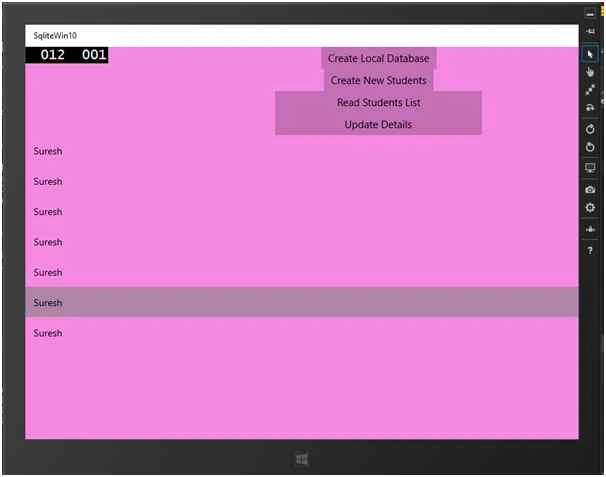
Source code.
Summary
In this article, we learned about local database SQLite For Windows 10.
Asfend YarPosted Mar 14, 2016, 3:23 PM
nice
Tim WoodsonPosted Feb 19, 2016, 11:43 PM
i get this error: Additional information: Unable to load DLL 'sqlite3': The specified module could not be found. (Exception from HRESULT: 0x8007007E)... do you know why and how? and how to fix it?
Kumaresh RajalingamPosted Feb 19, 2016, 7:59 PM
good one
Kumaresh RajalingamPosted Feb 19, 2016, 7:59 PM
Nice explanation
Sr KarthigaPosted Feb 16, 2016, 10:16 PM
good one
Sr KarthigaPosted Feb 16, 2016, 10:16 PM
Nice explanation
Kuppurasu NagarajPosted Feb 11, 2016, 12:39 PM
nice
Pavithra TRPosted Oct 29, 2015, 2:13 AM
Nice
Mohammed IbrahimPosted Oct 28, 2015, 9:21 AM
nice
Sibeesh VenuPosted Oct 28, 2015, 7:28 AM
Nice Share
Nilesh JadavPosted Oct 27, 2015, 9:50 PM
Nice one sir !!