Introduction
This article describes how to locate a mobile number in India in ASP.Net using JavaScript with state, service provider and service type.
Description
To create this application you need a JavaScript file that contains nearly all the mobile number data.
You can download it from the source code attached to this page.
DesignAdd a textbox, a button and three div tags.
Now design your screen as in the following screen.
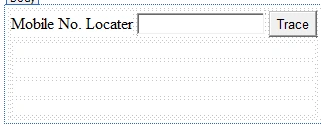
Or you can copy the following source code:
- <form id="form1" runat="server">
- <div>
- <table>
- <tr>
- <td>
- Mobile No. Locater
- </td>
- <td>
- <asp:TextBox ID="txtMobileNo" runat="server" MaxLength="10"></asp:TextBox>
- </td>
- <td>
- <asp:Button ID="Button1" runat="server" Text="Trace" OnClientClick="return GetPhnlocation();" />
- </td>
- </tr>
- <tr>
- <td colspan="3">
- <div align="center" id="name" style="font-weight: bold;">
- </div>
- <div align="center" id="company" style="font-weight: bold;">
- </div>
- <div align="center" id="idno" style="font-weight: bold;">
- </div>
- <div align="center" id="info" style="font-weight: bold;">
- </div>
- </td>
- </tr>
- </table>
- </div>
- </form>
Next add the MoLocater.js JavaScript file to your website and add the link to the head tag:
- <script src="MoLocater.js" type="text/javascript"></script>
In the MoLocater.js file is the fuction GetPhnlocation(); see it to get the details.
I catch the first 4 digits of the Mobile number and match it to the 4 digit mobile pattern. Sample code is given below.
- function GetPhnlocation() {
- var phone = document.getElementById('txtMobileNo');
- var number = document.getElementById('name');
- var state=document.getElementById('company');
- var provider=document.getElementById('idno');
- var service=document.getElementById('info');
- var code = phone.value.slice(0, 4);
- var re = /^[0-9]+$/;
- if (phone.value != '' && re.test(phone.value)&& (phone.value.length==10) ) {
- if (code == "9000") {
- number.firstChild.nodeValue = 'Mobile No: ' + phone.value;
- state.firstChild.nodeValue = 'State: Andhra Pradesh';
- provider.firstChild.nodeValue = 'Service Provider: Airtel';
- service.firstChild.nodeValue = 'Service Type: GSM';
- return false;
- }
-
- }
- }
According to this you can also add your new pattern to this code.
Now build your application and enter a mobile number then click on the trace button. It will show all details of that mobile number.
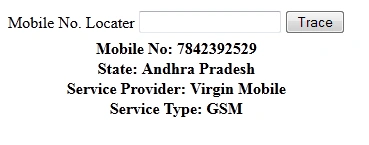
For any modifications or problems please comment.
Thanks.


Yash GandhiPosted Aug 26, 2019, 2:57 AM
Hey i lost my phone today morning can you help me find it
Mohamed Hedi BouaziziPosted May 30, 2018, 1:53 PM
This will work in other countries?
Saahisht PaulPosted Mar 22, 2017, 3:57 AM
Want to start your own TRACE MOBILE Site? Check out Trace Mobile Script, http://www.psmpl.com/trace-mobile-software.php
Syed Saad AbbasiPosted Dec 8, 2014, 3:56 AM
The 'code' that you used in MoLocater.js line 13 .why did you use that?{9000,9001,9002,9003 etc} . what is the purpose of these code can you please tell me ?
prem kumarPosted Nov 2, 2014, 11:56 AM
tnk u so much. I have a doubt. Is it possible to get the user details of a mobile number?
shambhoo prajapatiPosted Jun 25, 2014, 9:30 AM
super smart work
Nuthalapati ChowdaryPosted May 19, 2014, 2:03 AM
i have uploaded all files to hosting but its showing not found http://www.sivakumarn.com/mobile/default.aspx
Shivani SuranaPosted Apr 16, 2014, 3:46 AM
Very Good Job... Thank You For This.... But its Not Working for MNC Numbers
koti chitturiPosted Feb 3, 2014, 7:02 AM
Good One...Thank you
abdul khalilPosted Jan 2, 2014, 7:31 AM
good one..its working
sivaraj sPosted Dec 12, 2013, 7:16 AM
thank u
mukesh nandaPosted Oct 26, 2013, 2:40 AM
gud one
GurusharanPosted Oct 1, 2013, 9:05 AM
superb work
Preeti AgrawallaPosted Sep 7, 2013, 7:03 AM
Really its working. but its not working for MNP numbers
Ramchand RepallePosted Jul 8, 2013, 9:55 AM
I am also getting the error as "Microsoft JScript runtime error: Unable to set value of the property 'nodeValue': object is null or undefined""
venky gPosted Jun 25, 2013, 5:17 AM
JavaScript runtime error: Unable to get property 'value' of undefined or null reference