

Introduction:
Location based metadata defaults manages the default values of metadata
fields based on location and applies them so that they are available when the
user edits a document. SharePoint 2010 allows setting the default metadata
values to the document library, folders and sub folders, so that users do not
have to enter the metadata values when they upload the documents in the document
library. Please refer http://msdn.microsoft.com/en-us/library/ee557925.aspx for
location-based metadata defaults on columns that support setting defaults, in a
hierarchy of folders.
Description:
I have a document library "Shared Documents" which has folders and sub folders
as shown in the following figure.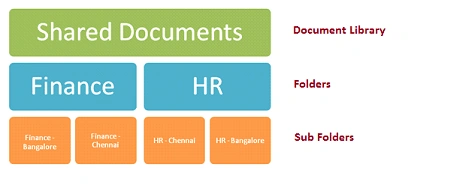
I have created one metadata column in Shared Documents which will be used for
setting metadata defaults for the folder and sub folders. Refer http://www.c-sharpcorner.com/UploadFile/anavijai/4349/
for creating Managed Metadata Column in SharePoint 2010. My Metadata column
contains the following terms.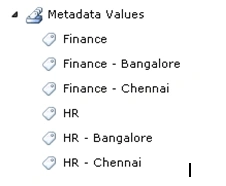
Shared Documents has the following columns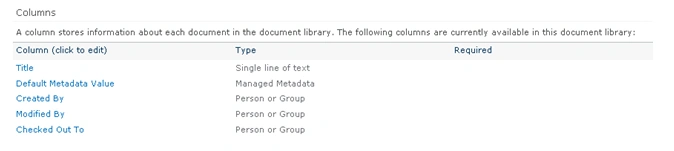
In this article we will be seeing how to set metadata defaults to the folders
and sub folders.
Configuring Metadata Defaults:
- Go to Shared Documents.
- In the ribbon interface, go to Library
Tools => Library => Click on Library Settings.
- Go to General Settings and then click on
Column default value settings.
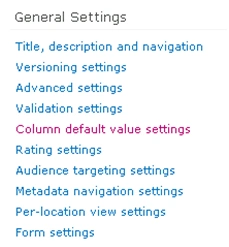
- Go to General Settings and then click on
Column default value settings.
- Click on Finance Folder.
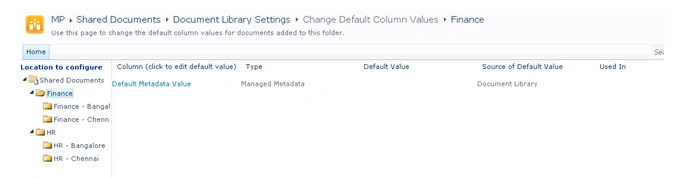
- On the right hand side you could see all
the columns that could be used for setting metadata defaults.
- Click on Default Metadata Value.
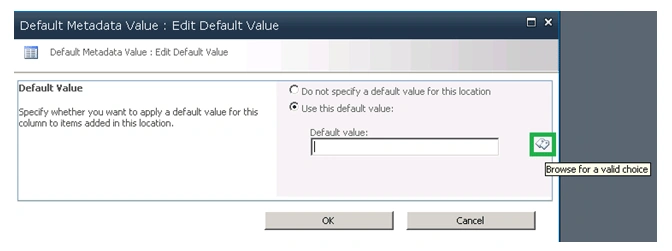
- Select Use this default value option and
then click on Browse for a valid choice option to select the default value.
- Select the value that you want to apply a
default value.
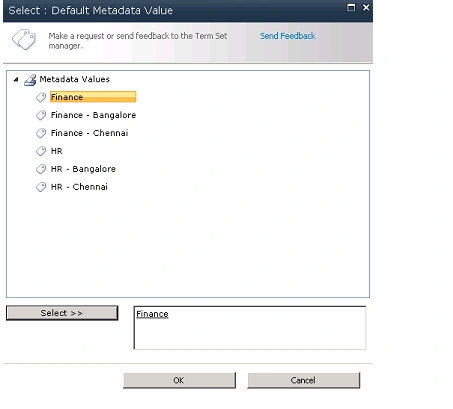
- I have selected Finance as a default value
for Finance folder.
- Click on Ok.
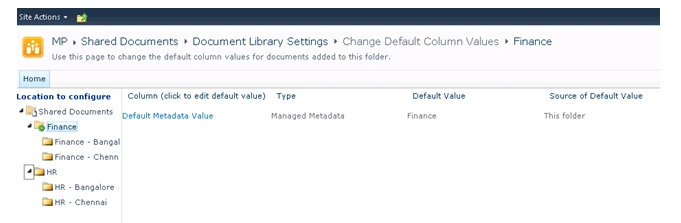
Testing:
- Go to Shared Documents.
- Click on Finance folder => click on
Finance - Bangalore folder.
- Add a new document to the document
library.
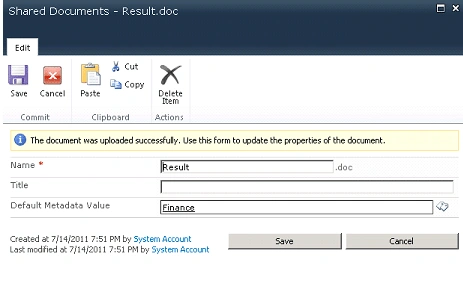
- It will take the default metadata value as
"Finance" even if the document is uploaded in the sub folder (Please refer
http://msdn.microsoft.com/en-us/library/ee557925.aspx for hierarchy of
folders for location-based metadata defaults on columns that support setting
defaults, in a hierarchy of folders).
- Similarly we can set the metadata defaults to the documents library, folders and sub folders.
Join the conversation! Your thoughts help the community grow.