

Firstly, we have to understand what is lock and where we put locks in SQL Server and then different types of locks.
What is Lock in SQL Server?
As we all know, multiple users need to access databases concurrently. So locks come into the picture to prevent data from being corrupted or invalidated when multiple users try to do operations such as read, write and update on database.
“Lock is defined as a mechanism to ensure data integrity, consistency while allowing concurrent access to data. It is used to implement concurrency control when multiple users access Database to manipulate its data at the same time”
Where locks are put in Database
Now, we have to understand where locks are actually present in our database, it means on which resource it locks or not.
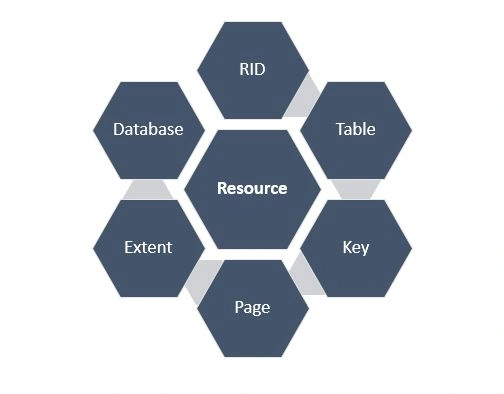
RID: (Row ID)
RID Used to lock a single row within a table.
Table: Complete table, including all data and indexes.
Key: Row lock within an index. It means primary key, Candidate Key, Secondary key etc.
Page: 8-kilobyte (KB) data page or index page. Lock can be placed on Page Level also, it means if a particular page is locked so another user cannot update data on it.
Extent: Contiguous group of eight data pages which can include index pages also.
Database: Entire Database can be locked for some type of users who have read permission on database.
Different Models of SQL Server locks
- Shared(S)
- Used for select operations
- Enable other sessions to perform select operations but prevent updates
- read-only operations
- Operation with SELECT statement generally use in Shared mode.
- Exclusive(X)
- Used for DML operations
- Prevents other users from accessing the resource.
- Operations, such as INSERT, UPDATE, or DELETE means DML query. Ensures that multiple updates cannot be made to the same resource at the same time.
- Update(U)
- Preliminary stage for exclusive lock. Used by the server when filtering the records to be modified
- Prevents other update locks
- A solution to the cycle deadlock problem
- Intent
- Intent Locks are used for establishing a lock Hierarchy.
- The types of intent locks are:
- intent shared (IS),
- intent exclusive (IX)
- shared with intent exclusive (SIX).
- Schema
- Schema locks are used when an operation dependent on the schema of a table is executing.
- The types of schema locks are:
- Schema modification (Sch-M) and
- Schema stability (Sch-S).
- Bulk Update (BU)
- Bulk Update used when bulk-copying data into a table and the TABLOCK hint is specified. Generally, use when user want to insert huge data in database/
Examples of Locks in SQL Server
Shared lock: select balance from tbl_account where acct_number = 25
--shared lock
We can perform multiple select statements on the same table.
We can perform multiple select statements on the same table.
Exclusive lock
insert tbl_account values(34, 500)
When we perform insert query in the table then page lock in Exclusive mode. Until recorded it's not inserted in table n other operation perform here. Similarly, delete, Update operation occurs.
delete tbl_account where balance < 0
update tbl_account set balance = 0 where acct_number = 25
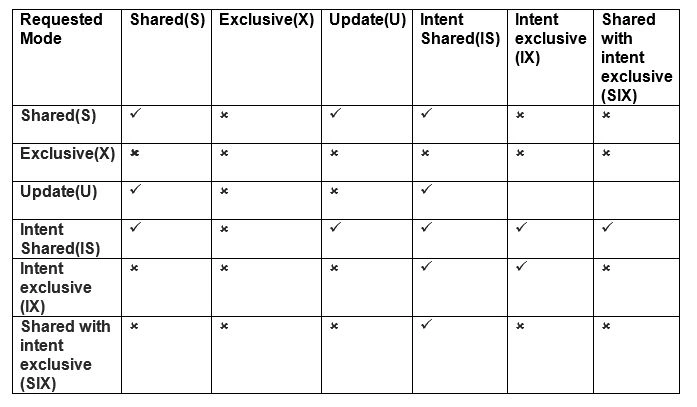
Lock Compatibility Matrix
Read more articles on SQL Server:
mohammad siddiquiPosted Nov 19, 2020, 3:40 AM
My Question: If A user is working and other B user want to work on same table, B user can get message that data is hold by A user.
harish kumarPosted Aug 19, 2020, 4:53 AM
Great Article...
Jaiprakash BarnwalPosted Aug 8, 2019, 11:40 AM
"Different Models of SQL Server locks", I think it should be "Different Modes of SQL Server locks"
yesubabu kPosted Jan 5, 2019, 2:23 AM
It is very helpfull
Yashwant VishwakarmaPosted Feb 22, 2017, 12:07 AM
Nice article :) Keep on writing !!
Delpin Susai RajPosted Aug 28, 2016, 5:02 AM
Nice
SubashPosted Jul 4, 2016, 1:05 AM
Thanks
Mithilesh KumarPosted Jun 7, 2016, 8:34 AM
Very Nice
Kapi ShivharePosted May 17, 2016, 12:23 AM
Nice...
Jessica JazzPosted May 17, 2016, 12:23 AM
Nice explanation..
Saravanakumar SekaranPosted May 14, 2016, 10:21 PM
wow really nice.
Prasanna MuraliPosted May 12, 2016, 10:02 PM
nice
Vishal PrajapatiPosted May 2, 2016, 7:00 AM
Good Job...
NitinPosted May 1, 2016, 12:20 PM
nice
Kuppurasu NagarajPosted Apr 30, 2016, 2:56 PM
Nice Sharing..
Pankaj Kumar ChoudharyPosted Apr 30, 2016, 1:14 PM
Nice Explain.......
Vivek KumarPosted Apr 28, 2016, 2:42 PM
Good one
RakeshPosted Apr 28, 2016, 1:58 PM
Good one
Humayun Kabir MamunPosted Apr 28, 2016, 1:51 PM
Nice...
Mohammed IbrahimPosted Apr 28, 2016, 12:21 PM
nice
Thiruppathi RPosted Apr 28, 2016, 9:07 AM
Great info
Hari ShankerPosted Apr 27, 2016, 11:34 PM
Nice information
sreenivasa kPosted Apr 27, 2016, 11:30 PM
good share
Bhavik PatelPosted Apr 27, 2016, 9:17 PM
good share. useful